


Patrick OReilly
Members
-
Joined
-
Last visited
Everything posted by Patrick OReilly
-
Hi all. So the "Load" figure on the graphs shows all the load that your Inverter is configured to support. When you set "Limit to Load" then "Load" only shows essential load - because that's what you asked for. When you set "Limit to Home" then "Load" includes non-essential load - again because that's what you asked for. But I understand your frustration - It would be great to be able to see the essential AND non-essential load shown separately, rather than just lumped together. Look at this post where I explained my solution using a custom graph inthe Sunsynk monitoring system. TLDR: look at the values for P-L1. That is the power flowing across the Inverter's "GRID" port. Positive means power from grid entering the inverter. Negative means the Inverter is pushing power out to the non-essential loads.
-
I have seen the inverter use both PV and Battery to feed non-essential. But it was not exceeding my inverter capacity (5.5kw), so I have not witnessed it limiting that. but I presume it would do - as you say. When @Lekud26 saw it exceed capacity, that may be because the CT was not correctly installed, and so the Inverter could not distinguish between essential and non-essential correctly.
-
Hi @Lekud26 I'm a Sunsynk user, so cannot say anything for certain re Deye. But they are the same hardware, so the software should really follow similar principles... My Sunsynk Inverters definitely do include non-essential load in the load figure when configured to "Zero Export". And they do not include it when configured to "Limit to Load". On the Sunsynk monitoring I can customize the graphs to show the flow through the "Grid" port - which is negative when the Inverter is feeding non-essential load. I don't know what the Deye monitoring allows though. I can also see that the "Load" figure = the CT when in zero export, and it follows the Grid figure when limited to load. From your experience I would hazard a guess that the installers don't really understand how the Deye/Sunsynk Inverters handle the non-essential loads. The CT is critically important - it must be correctly installed (correct location & correct direction). If they are getting that wrong, then I think they are guessing rather than knowing what they are doing. As for your question about the inverter overloading itself trying to support non-essential load - I can't speak from experience on that one. I would assume it would NOT do that, but simply feed as much power as it is able to. But I am not certain.
-
Perhaps this is an inverter issue, not a battery issue? Which Inverter? What are your settings? Did the Firmware update perhaps also result in a setting being affected?
-
Hi all. I'm not actually sure of this is an inverter function or a BMS function - but here's my problem: When the battery charges from PV and reaches 100%, it will then obviously stop charging, and PV production drops to match load for as long as the sun keeps shining. The "Good" system: On my daughter's setup (see signature below) this works perfectly, keeping the battery at 100% until the sun fades. After that the load will start consuming battery. Sometimes a short sharp load peak in the afternoon will knock the battery down to say 98%, but it will recharge to 100% from PV immediately afterward again. The "Bad" Systems: But on all three other systems it seems that the inverter (or the BMS?) decides that all charging is done for the day, and I will sometimes see the battery slowly begin discharging even while the sun is blazing away. So, I end the sunshine part of the day with the battery at, say, 97% instead of 100%. Have any of you noted the same issue? Is there a way to slap the inverter or BMS round the ear and get it to keep the battery at 100% till the Sun is gone? All 4 systems are 5KW Sunsynk Inverters, so it is perhaps worth noting that the "good" system has a Dyness Battery, while the "bad" ones have Shoto, Sunsynk and Volta Batteries.
-
OK, I logged on the service-desk, and it was actioned today - roughly 3 weeks later. And I got these versions on the Sunsynk 5KW... SW Ver. M 3.3.8.4 / S 1.5.1.5 / C E.4.3.0
-
My installer told me there's a special arrangement for installers to request this, but it's not open to the actual owners of the systems... This makes no sense to me ! I'll try my luck with the service-desk and see how it goes...
-
My installer got them to update mine within about 3 days. If you're still stuck, I'll ask him how he went about it.
-
That’s very doubtful! 😊 (best stay on topic before we are moderated out! 😉)
-
Thank you. It does mean that me experience is limited to Sunsynk - but I try to keep life simple where I can. 😊 I’ve also learned that the Dyness batteries’ BMS has a very obvious cell-balancing phase when they charge. When they hit 90% charge they throttle the rate of charge down to about 1KW. This is 0.2C of a single battery. When I later added a second battery in parallel, the limiting was still at 1KW in this phase. Only time will tell whether this makes a real difference to battery life. The other batteries also seem to do a bit of throttling, but only at >98%. That is hardly noticeable in the graphs.
-
Interesting feedback from @Kalahari Cruiser Up in Gauteng we’re having a cool clear winter (the norm for us) so we are benefiting from the solar generation throughout the day. My plant generated 22.2 KWh on 22 June - I kept the load up just to see what I could get from it on the shortest day of the year. But, my sister in the Cape shares your experience (her system is listed in my signature too since I monitor and advise her), so I feel your pain… 😔 Since the manufacturers seem to find it difficult to speak down to us mere mortals, it seems a well-written “Sunsynk/Deye Inverters for Dummies” would be a valuable reference. Should I try do that…? 🤔 With my schedule it may take a while…
-
My system updated on 19 June to this same version - so it seems to be the latest - at least as-at 19 June.
-
I think what it really means is "Zero export through CT". All the labeling on these options seems less than very clear... 😕 In my understanding you can do one of the following three things with your power (Very much as described in the video @PowerUser posted earlier in this thread. And I'm ignoring the battery and AUX ports for the purposes of this post): Use available power for the essential load only. Power to the LOAD port only. On the latest version of Sunsynk's App this is labelled "Zero-Export + Limit to Load Only". Use available power for both essential and non-essential. Power to the LOAD port, and to the GRID port, using the CT to prevent EXPORT. On the latest version of Sunsynk's App this is labelled "Limited to Home". Based on the chat above I think on the Deye App this is labelled "Zero Export to CT". Use available power for all loads and export any excess. Power to the LOAD port, and to the GRID port, even EXPORTING past the CT to the grid. On the latest version of Sunsynk's App this is labelled "Selling First". That's my understanding anyway, and I do find the wording less than obvious. I seldom do any settings on the Inverter itself, so I'm not sure what the labelling looks like on the inverter's onboard screens. That fact this it is different there at all is just another cause for confusion! I have always assumed (I know - very dangerous) that the Deye and Sunsynk inverters have identical capabilities, just with different labels. Perhaps a Deye user can (1) confirm/deny my assumption, and (2) provide the equivalent wording for those options on the Deye kit?
-
Perhaps we need to suggest to Sunsynk that the “limit to load only” checkbox should be available within the settings for each time slot in the timer. Then one could set times when it is ON (do not support non-essentials) and other times when it is OFF (do support non-essentials)
-
Hi @VinceG I’m no expert, just willing to poke my nose around. Looks like you are too… 😊 So - take this from whence it comes! I presume P-Load is clear to you - power out from the inverter to the essential load, entirely under the inverter’s control. I find P-L1 and P-External-CT-Total very useful. P-External-CT-Total Reports power through the CT, so import (+) from, and export (-) to, the grid. P-L1 seems to report power passing through the inverter’s GRID port. This is essentially the gateway between the inverter and the non-essential load. Positive is power into the inverter (import from non-ess), and negative is power out (export to non-ess). So when these two show a similar positive value, that’s AC from the grid right into your inverter. When they differ, the difference is what is being consumed by non-essential load circuits. A negative P-L1 means your inverter Is actually sending power out to the non-essential load. Long story, but I think there’s two answer your question. Oh - about inverter Max load at 5.5 kw. I think P-inv is your friend for that one. I’m not sure how to measure pass-through… that would be handy to know.
-
You are quite right - while the battery SoC is below your configured minimum. In this case PV goes first to battery, then essential load, then non-essential. The sequence I mentioned previously is when battery SoC is above the configured minimum. In my case my minimum SoC is usually at 40% (for load shedding protection), so most of the time the inverter is operating with the battery level above what is required, and so it will feed load before it charges battery.
-
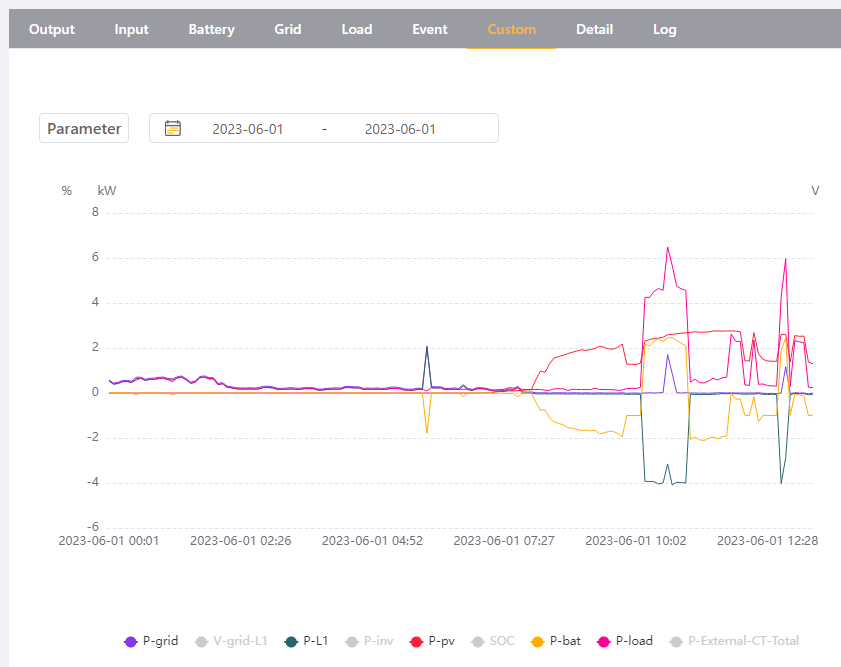
No. I found a way. First, when you are allowing the inverter to send power out to non-essential load, then the GRID reading is equal to what the CT reads. In other words it should match what your GRID meter is reading. Second, when you are allowing the inverter to send power out to non-essential load, then the LOAD reading INCLUDES all consumption (LOAD and export through the GRID port). Now, since all load is in one number, the frustrating part is to answer: "How much load is essential load, and how much is non-essential?". So I found after much experimentation that in the custom graph for the Inverter there is a value called "P-L1" which reveals the "Load" (kw) passing through the Inverter's grid port. This will show positive values when grid power is flowing INTO the inverter, and will show negative values when the inverter is exporting power to the non-essential load. Here's my graph for this morning - look carefully at the period 10-11am. My geyser kicked in (non-essential), and you can see that PV and Battery power were blended by the inverter to EXPORT to the geyser during that period (P-L1 goes negative). Apart from a short spike in load about 10:35am, the GRID (at the CT) stayed on zero while the inverter supplied the geyser. During that spike you can see that the export also reduced, indicating that the load spike was caused by something inside (essential load), maybe a kettle or something. Also note the small spike about 5am. Battery was on minimum SoC, so the load, grid and P-L1 were all tracking together. When the battery needed a little charge from grid, you can see battery goes negative, but this time P-L1 is positive (with grid), indicating IMPORT through the CT and through the inverter grid port. For those running "Limit to load", and you want to know how much the nomn-essentials are taking from the Grid - look at the "P-External-CT-Total" setting (disabled in my image above). this will show import from the grid through the CT, while the "P-grid" in that mode will only show what passes through the Inverter's grid port. I hope this helps...
-
Yup. I can do the same with timer settings on the Sunsynk. If you want to use battery for essential load only, you must set “zero export” and “limit to load”. if you want to use battery for non-essential too, then set “zero export”, but do NOT set “limit to load”. And all of the above are subject to the minimum SoC that is set in your timer. So even when you allow battery to be used for non essential load, it will stop doing so when your minimum SoC is reached. This allows you to preserve capacity for load shedding. Edit: these rules apply very similarly to the PV production when the Sun is shining. If the battery is above minimum SoC, PV production will be used first for essential load, then non-essential load, then to top up the battery. Often it is doing all three simultaneously.
-
Hi all. I run a 5kw Sunsynk. Essentially the same as the Deye, but slightly different software. With Sunsynk I use their software management via the SunsynkConnect App, or their web site, so I’m not familiar with solarman. Anyway, my reason for responding here is because my original installation was incorrect in that the CT was installed in the right place, but in the wrong direction. That messed with the behaviour when running “zero export”. By simply flipping the CT around the behaviour was corrected. Lesson: The correct installation of the CT is vital if you Intend to support any loads in the non-essential load part of the system. Definition: The non-essential load is all those appliances that are connected to the DB, between the CT and the inverter. Usually it would be your geyser(s), oven, and similar high-load items. This is why correct location of the CT matters - it defines the outer boundary of your system, and thus of the non-essential load portion of the system! There are two important details for the correct installation of the CT: 1) Location: the CT should be reading the flow of power from the Grid into your overall system. So it should be installed on the main grid feed, at your grid meter, OR at your DB where the feed from the meter enters the DB. At this point the CT is able to measure any movement of power between the grid and your system. This data is needed for the inverter to operate correctly. 2) Direction: the CT measurement is directional, and the direction of flow is important information. 1kw import from the grid is NOT the same thing as 1kw export to the grid - obviously. For the CT to read this correctly it must be installed facing the correct way. In the case of the Sunsynk, the CT has an Arrow visibly displayed on its exterior, and when installed this arrow must point TOWARD THE INVERTER. Notes about the settings: Again, the software on the Sunsynk uses slightly different labels compared to the Deye, but I’m sure you will follow: Limit to Load: this tells the inverter to support essential load ONLY. No power will be sent to the non-essential load. In this mode, the CT does not really serve any useful purpose. Zero Export: this tells the inverter to support both essential and non-essential load, but NOT to export anything to the grid. In this mode you can see why we need the CT - the inverter uses the CT to measure flow “at the meter”, and attempts to keep this equal to zero. Nothing in, nothing out. Selling First: this tells the inverter to export all excess power to the grid. Unless you have a selling agreement with your metro, you don’t want to do this, and you may land yourself in trouble if you do. So as far as I know: in South Africa, don’t use this setting. A final note about how the inverter supports the non-essential load: My installer tried to give me technical explanations about how the inverter “pushes back against the grid” to feed the non-essential load, manipulating frequency, or voltage, or whatever it does. That is beyond me, since I’m not an electrically trained person. But the way I picture it in my mind is like this: There are two sources of power into the non-essential load : 1) the grid (in through the CT), 2) the inverter. Let’s say your geyser kicks in to heat the water, and it pulls power - say 3kw. This will naturally come from the grid, because the inverter is not usually exporting power throughout its input connection. Now immediately the CT informs the inverter that there is 3kw being imported from the grid. The inverter assesses its situation, and since it is the middle of a sunny day it determines that it has excess power (PV production is greater than the load), so the inverter starts to export - let’s say 2kw of PV production to the non-essential load circuit. The CT now reports only 1kw import from grid. The inverter may then decided to also take stored power from the battery and use that. Since the CT is measuring a deficit of only 1kw, the inverter will draw from the battery at only 1kw, exporting that to non-essential load. So within milliseconds the geyser is actually being powered by some PV, some battery, and zero from the grid. Awesome! Of course, the inverter assesses the situation and adjusts according to your rules about priority, the actual PV production at the time, the battery SoC, the essential load in the rest of the house, etc. Any shortfall will then be filed by the Grid. I hope this helps!
-
Hey guys! Thanks to all of you for your feedback. I will dig in a little deeper still, and find out about the top Growatt model. The non-essential feed that Sunsynk (/Deye) has is really more than a feature in my mind - it should be a de-facto standard for any hybrid system because it is just so useful. so that may be a decider, once I've seen whether the proposed Growatt model (still waiting for the quote) is able to support that or not. I appreciate the time you all took to respond to my questions!
-
Hi all. I hope that some who have genuine experience with both Sunsynk and Growatt Inverters will be able to give some honest feeedback here. I have two properties running happily with 5kw Sunsynk systems. And I monitor a third site for my sister. I know the Sunsynks well, and I feel reasonably confident in tuning them and getting good performance. And they're all accessible and fully configurable in one place - on my phone. For my own home the installer I've spoken to is pushing hard for me to use Growatt instead. He's basically saying: "it's the same thing, but a whole lot cheaper!". I've never touched Growatt, so I honestly have no clue for comparison purposes. What are your thought fellow Solar System fans? Are they really "the same thing"? Will I be happy with the Growatt, or will there be features I might miss? Does the Growatt support the non-essential load option like the Sunsynks do? Will the Growatt actually be better than the Sunsynk? Please let's not start a flame-war here - but the way I know this forum I think that's unlikely... Thanks in advance...
-
Strange. I’ve deleted the App, reinstalled from the App Store (version 1.7 !?!), still says 1.6.1 inside the app. But now it’s working again… 😳
-
Hi all. I’m not sure when my Sunsynk Connect App updated to 1.6.1, but now I’m unable to get into inverter settings from the app. The error it returns says: “Parameter setting of this brand inverter is not supported yet“. Is it just me?
-
Thanks for your responses, guys. You have confirmed my suspicions - I'm not sending money into a black hole like that!
-
Hi all. I've come across this web site (greensolar-house.co.za) with excellent prices. "Too good to be true" in fact. Like a Sunsynk 10kwh battery for R45k ?!? But maybe they are legit...? Has anyone here bought anything from them?


