


Patrick OReilly
Members
-
Joined
-
Last visited
Everything posted by Patrick OReilly
-
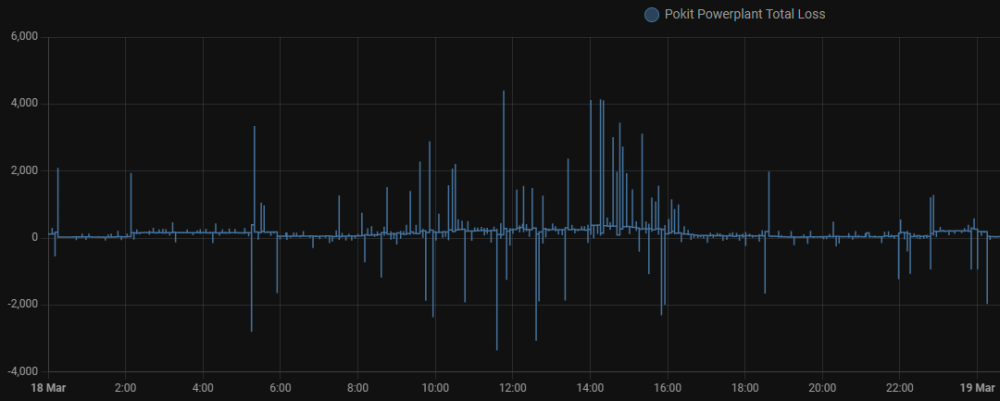
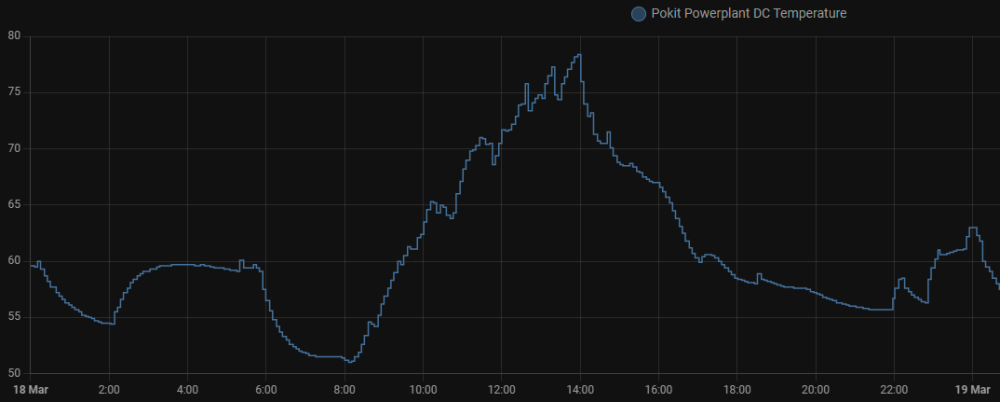
First, the trickle feed Mine behaves in line with the setting. I have it on 10w, and it will stay between 0-15 quite reliably. But this is as reported by the inverter - I have not used an independent CT to verify this. I have, however, noted that if you enable "solar export" then the grid import will hover around 50w while there is PV production. I don't understand why this happens. Anyway, I've stopped experimenting with export. Second, the internal consumption (or losses) As per some previous comments, the internal "losses" definitely vary depending on what's going on at the time. And those losses usually manifest as heat, which climbs notably when you're harvesting PV and/or using heavy load. Anyway, here's my graph of net losses from yesterday: This is from Home Assistant. I created my own sensor to calculate the net loss. It is basically the sum of inputs (PV, Grid import, Battery discharge) less the sum of outputs (Load, Battery charge, Grid export). I evidently have some timing issues which cause silly spikes in the graph (both positive and negative!) - so try to ignore those. But it is clear to see that in the "UPS mode" (running on batteries, low load) the internal losses are very low, less than 50w most of the time. But when the load increases, and when I'm generating PV power, the losses hover in the 150w-350w range. And, as I said, the increasing temperatures of the AC and DC circuits are evidence of these losses. Here's my DC temp graph over the same period - it gets worryingly hot, despite the fact that I'm running a fan pulling air over the radiator fins constantly. I do unfortunately have it installed in my garage, which I have now realized gets rather warm on summer days - ambient temp in the garage is in the 30C-35C range. I find it surprising that the unit does not even have any cooling fans of its own. Does anyone have any wisdom to share on improving the cooling on these 5.5KW SunSynk units?
-
Hi all. I must apologize for never coming back to update this topic. I did trace the problem. I think all the discussion in this thread about the balancing of the cells, and the strange behavior observed are probably valid, but determining the root cause was the issue. Eventually I found out somewhere obscure that the BMS was not correctly communicating with the Inverter. the installer had failed to set the battery's dip switches correctly for the Sunsynk/Dyness combination. So, we shut down everything, changed the dip switches, and restarted it all. Have not had a moment's trouble ever since. I'd have to go scrummage through my WhatsApp history to find the correct setting we used - so if anyone needs that, just shout.
-
Wow - you guys are awesome. These projects look like a lot of fun!
-
@hilt_ctn I finally got around to installing Tuya Local. Much happier!!!! Thank you for the pointer. The integration found a device config that seems to work well for the CBI switches, and this integration enables you to edit the device configs, so I'm working on those to see if I can fine-tune it any further. Two thumbs-up.
-
@hilt_ctn, Thanks for your reply. OK wait - there's "LocalTuya" and "Tuya Local" ?!? I think I used "LocalTuya", and it was tricky. I'll have a swing at the other one... I hope I'll still be able to figure out how to access the scheduling capabilities of those switches. But, the other option is to forget that and simply schedule on HA I guess... Thanks.
-
Hi all. I have scanned all the conversations I could find about the CBI Astute (ASC and ASI) switches, and how to integrate them to Home Assistant. I've managed to get to the point where I have 3 of them working. Somewhat. But I'm hoping someone here knows a bit more than I've been able to figure out so far. What I have done: Instead of using the "CBI Home" App, I used the "Tuya Smart" App to sync each device to my home Wifi. I have the Tuya accounts set up (both Dev and App accounts), and so I can control the devices via the Tuya Cloud and App. I have the standard Tuya Integration for HA, installed and working, able to control the switches, and see their power, current and voltage sensors. I have a couple of automations that are able to interact with these as I please. What I'd still like to do... First: The CBI switches seem to offer more entities than just the switch, power, current and voltage. But I can't see the other sensors. Does anyone know which is the best "Tuya Switch" to use to correspond with the hardware used by CBI in the Astute switches? I don't remember which Tuya Device I selected for the first one, but for the other two I used "Breaker (Wi-Fi)" under the device options when adding them. This shows 5 entities: switch, voltage, current, power, device restart status. Are there additional sensors? (Perhaps I'm expecting too much?) The App has scheduling capabilities, which must surely be local to the device. But I cannot see any entities that match that capability. Is the scheduling entirely dependent on the Tuya Cloud? The App shows history of consumption over time (per day, month, etc.) But I'm not sure if that data is aggregated in the Tuya Cloud, or on the local device... ? Second: Use the Local Tuya integration so that I'm not dependent on the Tuya Cloud (and hence my Fibre connection) 24/7. I did install Local Tuya, but I had endless trouble with the first switch. Just could not get HA and the switch to talk. I did not keep notes of the errors, so I'll have to retry this before expecting any more help here. I've parked it for now. I'd like to resolve the above item first. I figure I'll try again soon starting with a fresh install of Local Tuya. Thank you all for so much I've learned from this community already. One day I might be able to be the helper rather than the helpee. PS: The three switches I'm using are two of the ASI (Isolators for Geyser and Air Conditioning), and one ASC (Controller for Pool Pump).
-
I know this is a very late response, but anyway... Assuming you're using HA. Is your CBI switch on the non-essential side, and NOT on the generator? Which means it is exposed to the state of the grid? If so, that will tell you about the state of the grid. In my setup I have an automation to tell me when Grid state changes, based on the state change of the CBI switch. I get the alerts within seconds of the grid going ON or OFF. The logic is that if the switch state is 'unknown' or 'unavailable', that tells me the grid is gone. If the switch is 'ON' or 'OFF', that means the grid is present. #------------------------------------------------------------------------------# #--- Automation to Alert when the Grid goes ON or OFF. ---# #--- Triggered by the Geyser Switch's 'switch.geyser_switch' state. ---# #------------------------------------------------------------------------------# id : geyser_grid_state_alert alias : "Geyser Grid State Alert" description : "Geyser Grid State Alert" mode : single #--- Trigger on state changes on the Sunsynk Inverter's grid online sensor. ---# trigger: - platform: state entity_id: switch.geyser_switch from: to: #--- Filter out nonsense state changes ---# condition: - "{{ (trigger.from_state.state in ['unknown','unavailable']) != (trigger.to_state.state in ['unknown','unavailable']) }}" #--- Check the state, and send notifications if necessary. ---# action: - variables: var_grid_state: > {% if states('switch.geyser_switch') in ['on','off'] %} ON {% elif states('switch.geyser_switch') in ['unknown','unavailable'] %} OFF {% endif %} var_alert_sound: > {% if states('switch.geyser_switch') in ['on','off'] %} Alert_SpartanConnected_LowLatency_Haptic.caf {% elif states('switch.geyser_switch') in ['unknown','unavailable'] %} Alert_SpartanDisconnected_LowLatency_Haptic.caf {% endif %} - service: notify.mobile_app_##### data: title: "Grid is {{var_grid_state}}" message: | The Grid State has changed to {{var_grid_state}}. data: subtitle: "Geyser Switch Grid Power is {{var_grid_state}}" group: "HAss Geyser Switch Grid Alert" tag: "HAss Geyser Switch Grid Alert" push: sound: "{{ var_alert_sound }}" interruption-level: active
-
Thank you, Joe. Yes, I noted from the photos on this thread it gets rather "busy" in there. An option I might explore will be to install it in the roof above the DB where all the wiring exits the riser and goes on its merry way. But it can be rather hot up there... I found the devices available locally from GeeWiz online (Emporia Vue Gen 2 Energy Monitor - 200A 3-PHASE Sensors and 16x 50A Sensors - GeeWiz) That's the fully populated option, but it's a bit pricey compared to what you paid a year or two ago... Amazon lists this at $165, or R3,100, before shipping and duties...
-
Well - paint me impressed! The upgrades were done in the early hours of Saturday morning, which means less than 24 hours after the request, all 4 units done. One of the units went into a bit of a panic afterward (Error F62 - can't say if it was related or not), but after a full shutdown and restart all is well.
-
Hi all. I was looking at the Emporia Vue device, so decided I'd get some feedback here first... For those of you who have been using it - are you happy? it looks like the integration options to HA are good. Any comments - PRO or CON? Or perhaps you've found a better option? It looks like the biggest challenge will be fitting it all inside the DB enclosure!
-
Thank you @Ronnie1102 I’ll check this out.
-
Hi @Gary Waterworth First - thank you for your integration. I've been running it with great success for about 2 months now - very nice! It was really plug-n-play! I have two questions if I may: 1) I have not seen any way to set the frequency of the data updates from the inverter to the Sunsynk.net service. I have the Sunsynk dongle, not Solar Man. Is it possible, and could you point me at where I can make that setting? 2) If I understood and observed your node-red flows correctly, it fetches updates every 60 seconds? I'd most likely just want to set my data push to that same frequency. That way my automations that respond to load vs PV, etc. will be more responsive than they are now. PS: your work was the first example that I started browsing through after I got HA running, so I've learned a lot of what I know about HAss, and a few things about the Sunsynk Inverter, from your stuff. Thank you!
-
Mr @slipx - I'm loving this new feature - very nifty. And it adopted my personal colour selections automagically! I'm very new to HA, and the weirdness of YAML etc., and I've never worked with Python..., but I've been in software all my career (30+ years), and I admire the way you approach your work! Your methodical thinking shows in the results! Good work man! Here's my sunny yellow house running on solar power...

-
I've just requested the same for the 4 inverters I look after - let's see how quickly this gets done. 🙂
-
@kellerza - apologies, I wrote nonsense. My original installation is not yours - it is the work by @Gary Waterworth, which uses the Sunsynk cloud to read the status of the inverter every ~5 minutes. This is currently running with the Power Flow card from @slipx. I have enjoyed learning a lot about HA and node-red while mapping these two add-ons to work together. I have been looking at your work for so long that I conflated it with what I originally installed. My plan is to go with your add-on using the RS485-USB connection to my HA. I just have to get the bits of hardware and wiring organized, and then I'll be using your add-on to move to real-time data, and thus much more responsive control of my non-essential loads (i.e. geyser) based on PV vs. load, etc. And, of course, the ability to write to the inverter to adjust behavior around load shedding, poor weather, etc. Thanks to all you guys who share so much with those of us who are still learning. Perhaps one day I'll be in a position to share something too.
-
Hi all. Thank you @slipx for your awesome work on this flow card. And thanks for the constant updates!!! I've been snooping here a while and learning a lot from all you guys. I thought I'd share how my card is looking just to add to the "library" of images. As you can tell, I like brighter colors, and @slipx makes that dead easy to configure. Also, since I prefer the "lite" layout, but it lacks the non_essential load display, you'll notice I've done a 'jippo' and used two essential loads, but I mapped the non-essential and essential to the spots above and below the home, and made sure I have total load on that branch of output from the inverter. #worksforme. I know this layout is technically 'wrong', but I think it works just fine for a simple logical view of what's happening. Thank again for an awesome job @slipx . Right now, I'm only getting updates every 5 minutes using the integration from @Gary Waterworth. This is fine for monitoring and supporting some automations about when to run my geyser. But I'll be looking into the local direct integration from @kellerza using the RS485 as soon as I get a chance.

-
Perhaps it is already hot so the thermostat has switched off the element? You’ll only see current when the water cools down and needs to be heated.
-
Thanks for the info @BritishRacingGreen . When I get to this I’ll dig deeper to make sure I do it right. I might be reaching out to you… 😊👍
-
A Question re the RS485 option: My inverter in the garage is a fair distance away from my HA instance in my study. A cable would probably be a run of 20-25m. I seem to recall seeing a comment that the cable cannot be so long. I think that was in the context of an RS485 to USB converter, and hence a limitation on the length of the USB cable. I'm not sure. Does anyone here know what my limits would be?
-
Agreed. I'm only starting out with HA, and slow-going getting time between "life". For now, I have a few things running dependent on cloud access, but I definitely want to move toward HA being able to run without any internet. The only thing I'll want to support is for the HA app to talk to my instance when I'm out and about. I'm using Gary Waterworth's Integration to the Sunsynk Cloud service at the moment. It's been a great start for me, and I have visibility of what's going on now. I send myself alerts for high temperatures and battery state. I calculate how much time I can run my geyser in the early morning hours using excess remaining power in the battery. Ideally, I hit 20% SoC at about 7:30am, at which time the Sun starts charging me up again. I have PV forecasting (Meteorologisk Institutt) which is interesting, but I have not used it for any automations yet. What I have not yet tackled is an integration to fetch the loadshedding schedules and factor those into the planning. But I definitely want to "go local". When I have the necessary time (and when I see that @Dunc has enjoyed some success with the RS485), I'll be following suit. And I'll be able to keep the automations I have done, just adjusting them as necessary to use the local integration instead. Thanks to you guys here for doing the 'dirty work' for us!!! Kudos @kellerza and @Sc00bs .
-
I'm just taking a flyer here - have not done anything like this myself... But is it correct that you have "active: false" in customize at the bottom of that image?
-
Keep us posted on your project...
-
Thanks @kellerza and @Sc00bs for your work on this! Like @Dunc, I'd be interested in the Sunsynk Dongle option... Is there any work being done on this? Or is there a fundamental reason why it can't work?
-
Hmmmm - I was unaware of two different "blink rates" for the pairing. Interesting. I'll give that a whirl... Thank you.
-
Hi all. Excuse my inexperience - I'm now very new to Home Automation stuff.... I have the CBI ASI isolator in front of my geyser. It's working 100% with the CBI App. Cool, scheduling, etc, but all manual monitoring so far. Now I've installed Home Assistant. I have figured out from this thread that to get HA talking to the CBI Isolator, I need to pair it to the Tuya App, and then use the Tuya Integration on HA. Fine... I'm just having no joy getting the Tuya App to pair with the CBI switch. I get the switch into paring mode, open the App - and then wait till 2 minutes expire with no joy... I can re-pair the Switch to CBI App no problem. So, I know I am getting pairing to work. But it just won't play ball with the Tuya App. Any clues - please ?


