jgdt
Members
-
Joined
-
Last visited
Everything posted by jgdt
-
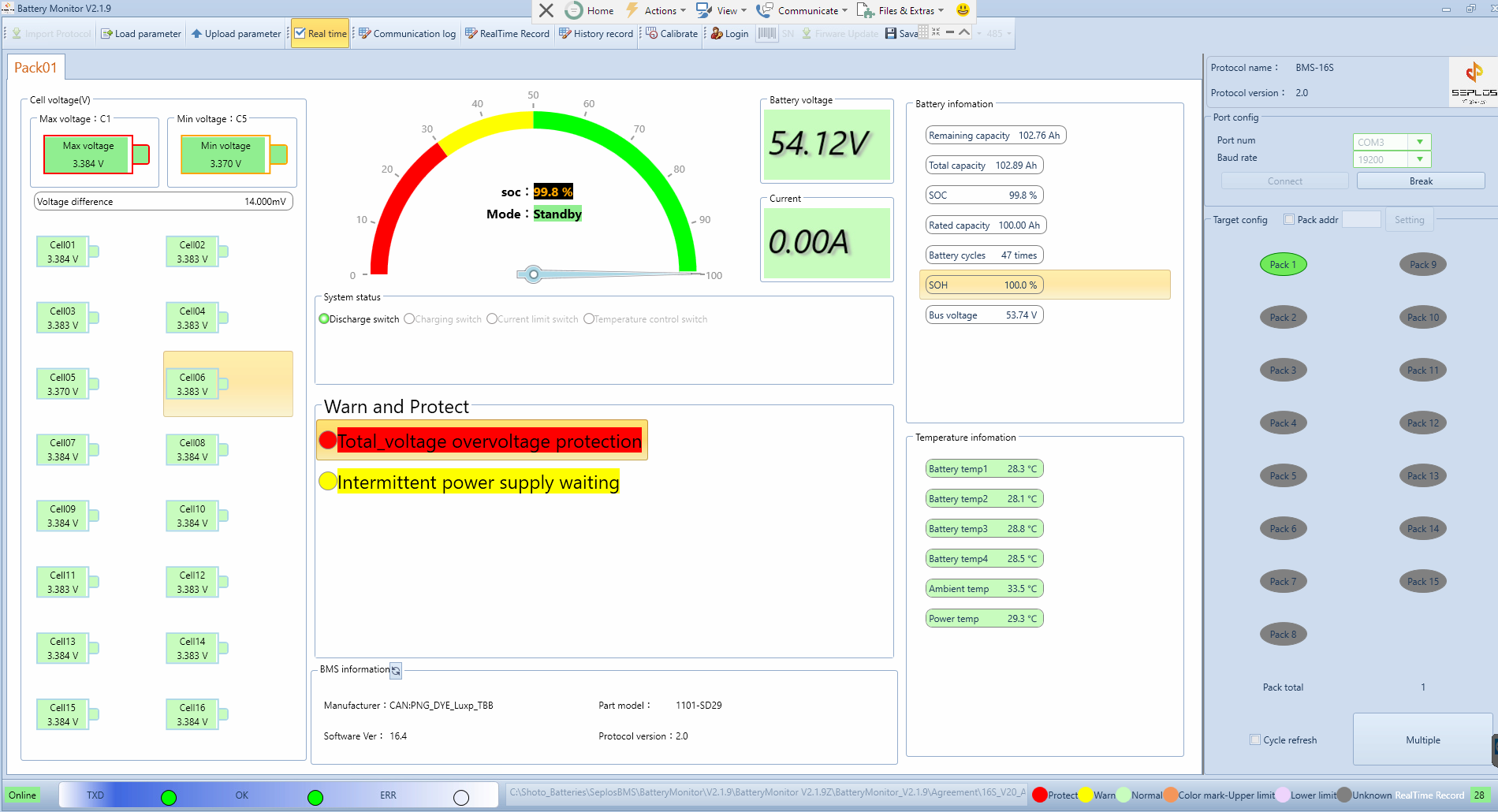
Almost hour later the cell voltages has settled down a bit after 100% SOC, as per screenshot. But the "Total_voltage overvoltage protection" error remains. Guess it will only be cleared after a while. Also what's the "Intermittent power supply waiting" warning about? edit: Regarding "Intermittent power supply waiting": quoting Jumper earlier in thread: "...already reached 100% SOC and the BMS won't allow charging again until it reaches 96%. That is what the "Intermittent Power Supply Waiting" message tells you, it is basically "Battery Waiting (to be discharged)"." before it will charge up again.

-
Yeah I noticed that and its concerning. My batteries just hit SOC 100% at the time of screenshot. Isn't all this safety guards and long life extension measures supposed to be handled automatically between Inverter/BMS via CAN? On my inverter (SunSynk) the max charge/discharge rates are set to lower than what the BMS advertises and when SOC hits 98% the BMS lowers the charge rate to 10A and the inverter does comply then it carries on slower charging until 100% at which point the BMS signals max charge rate as 0A.
-
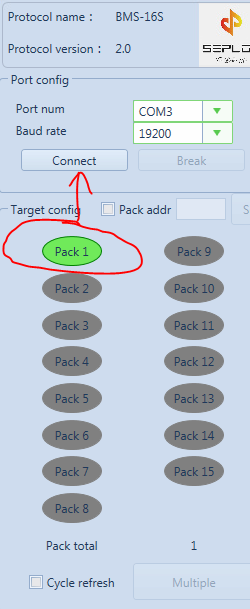
Drivers: I've cleaned up my drivers and can confirm that in my case the CH340 drivers should be used. Like jumper said, obviously because mine is a CH340 chip and not the better FTDI chip. The version itself does not matter. The version windows installs automatically is fine or the latest downloaded or even the one the google drive link (which I assume came from here https://www.seplos.com/en/download.html?group_id=6318). Progress: My problem, it seems, is that when just clicking connect (granted com port and baud rate is correctly set) the Battery Monitor software only tries to connect to Pack00. Which in my case is unsuccessful. If I additionally toggle 'Pack 1' in the Target config section, before hitting connect, it successfully connects. But,... only to Pack01. Pack00 is still missing. Cables and setup: - Slave battery: Dips 1 on, rest off. Cable from RS485A to master battery's RS485B port. - Master battery: Dips 5 on, rest off for CAN comms to inverter (cable between CAN port on battery and CAN port on inverter). Additionally it contains the new cable from RS485A to USB/PC. Pack assumptions: I think Pack01, as picked up by Battery Monitor, is the slave battery and presumably then my master battery is suppose to be Pack00. If I disconnect the inter battery comms cable between master and slave then Battery Monitor can't pick up anything. Which make sense because master battery isn't getting anything from slave battery anymore. If I then move my RS485A-USB/PC cable to the slave battery then Battery Monitor picks up Pack01 again, and the values seems to be the same than before. Going forward: So why isn't it picking up my master battery, presumably Pack00? Is it because master dips are set to 5 for CAN comms to inverter? I guess as a test I can toggle dips for RS485 alone setup and reset battery, but feels risky. I don't want to find myself in a place where I can't revert back (for whatever reason) to the CAN comms to inverter. So this brings me back to my original question can the master battery talk CAN to inverter and RS485 to USB/PC at the same time?

-
What software are you using here? Looks cool. Can you please provide details on your battery, comms cables and software being used?
-
Thanks, I'll take a deeper look into the drivers today, especially cleanup and try it on a cleaner machine as well. Can you please confirm the exact make/model of your batteries where you got this to work - is it Shoto SDC10-Box 5 or something else that also uses Seplos BMS? Thanks for all the assistance.
-
@jumper would you perhaps be so kind as to open your adaptor and inspect the chips for markings? Mine is printed in a grey color and very small so only noticed it ones I've used a flash light. Its marked as "WCH CH340C 411406C11". Hoping the CH340 driver should then be the one? I've tried both the FTDI and CH340 drivers (always making sure I do a clean install) as well as old and latest versions, no success. With CH340 drivers I at least can see data in serial com sniffer, but not with FTDI. Is there perhaps a newer version of Battery Monitor out there that I can try? I tried both 2.1.8 and 2.1.9. Perhaps if I use the latest Battery Monitor and latest CH340 driver I might have more success?
-
Guessing that there are 4 cell groups (with 4 cells each for 16S), so one temp reading per cell group?
-
Are you specifically referring to the FTDI driver install under https://drive.google.com/drive/folders/19uXOdmnqQoSb-akqRYanMFJ1uQha8XvM Or should I google around to find the latest FTDI driver or rather the specific one that applies to my adapter?
-
Thanks Jumper, this is exactly why I want to get Battery Monitor to work on my side as per the other thread you are helping me on. Do you perhaps know what "Battery temp1" through to "Battery temp4" actually refer to? For now I've decided to built a decent car port in front of my west facing garage, I think this will help a lot keep the ambient temp down in the middle of summer and then at least I have the extra benefit of a carport. If there's an AC in the garage we all might end up living in the garage in summer. Lol. But like you say its not worth the AC buy cost, installation and running costs.
-
Okay, so I made my cable according to the noted pin out in this thread (same as pin out in installation diagrams) and I confirmed there's continuity via multimeter, so I assume wiring is okay. I installed Battery Monitor 2.1.8 following the installation guide and imported the 'BMS-16S' protocol. It does pick up my COM3 port (its available in the port num drop down) and I changed baud rate to 19200, but after clicking connect it just sits with 'connecting...' dialogue spinner. Afterwards I tried V2.1.9 following same steps, but same undesired result. I did check the number format region settings as well. Are there any logs I can reference to troubleshoot? Are there other com port sniffers I can use just to verify that something is coming out of the RS485A port on my master battery?

-
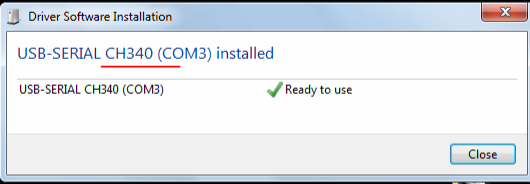
Just received my adapter. I plugged it into an old windows 7 laptop (previously there was mentions of win 10/11 uses, but there are resolution steps in this thread) just to have fewer technical hurdles to get it going first. The adaptor is "unconnected" at this point in time, will strip an old LAN cable later and connect it according to the pin outs already provided. I "allowed" windows to install a driver for me and it seems to have installed a USB-SERIAL CH340 driver. See attached photo. Just want to list this so long as I think Jumper did mention that in his case this driver was not the right one (even tough the CH340 is listed on his buying page : https://www.robotics.org.za/RS485-MINI?search=usb rs485 Hope I'm still on the right path, next I'll install Battery Monitor as per the documents on the google drive link in this thread. Do I need to have the cable connected to battery's RS458A when doing the installation or can installation be done with no connection and then just add it later?
-
In my case its just a single inverter. Was wondering whether its some kind of auto ground test? This might sound silly and give away my knowledge level, so apologies if this is wacked explanation. Hehe.
-
Brilliant. Boer maak 'n plan. My inverter is in garage but this is next to my home office and very eager to reduce the noise for productivity sake. Could you perhaps share more detail (with links) on the external 12v supply used as well as the sonoff switch? Would there be a reason to stick with 12V DC fans rather than 230V AC fans? Is it true that the DC fans runs quieter? Just wondering because I don't have a 12V power supply and going the 230V AC fan route might be easier for my case.
-
I also would like to know. Previously it remained a mystery.
-
@chrisc This manual I just uploaded might also help you in setting up 2nd battery once you've sourced on:
-
Scanned in product manual for Shoto SDC10-Box-5, 5.12kWh. But hard to find manuals for this specific model online. Could not find a searchable PDF doc. And can't find the original URL for this file anymore.
-
@chrisc My installer (Zeus Solutions) installed it. No idea who his supplier/distributor is. I would also like to know. Could be wrong but feels like this specific model is not as common, in South Africa, as the other shoto models? Not sure if the data cables came with the batteries or bought separately. Could be just normal LAN patch cables? I haven't pulled them out to inspect the pin outs. Where did you obtain yours? - DC wiring : Parallel with 150A fuse/breaker. - Data wiring : Master connected to Slave via RS485B to RS485A. Master connected to inverter via CAN. - Dip switches : 5 on master. 1 on slave. My understand is that this is inline with CAN addressing. A friend of mine has three of these in total, installed by same installer. If interested I can ask him for his wiring, dips, etc.
-
Thanks Jumper. I found something similar here (and ordered already): https://www.pishop.co.za/store/usb-to-rs485-485-converter-adapter . To my untrained eye they look to be the same. Hope it works.
-
Thanks Jumper. Where can I get the adapters for R30? My limited googling only got hits for couple of hundred bokke.
-
Ah great @jumper, thanks for the explanation. This sounds very positive. Has anybody used the Solar Assistant Shoto cable (https://solar-assistant.io/shop/products/shoto) successfully with PC based tools like Battery Monitor, PBMSTools, PModBusToos, etc. Or will this cable only work with the Solar Assistant Rasberry Pi? The said cable is a bit pricy. What's the total cost of rolling your own cable in line with the pint outs in page 1 of this thread if you need to buy all the components and tools (like a crimper, etc).
-
Sigh, this is stressing me out. Guess that's why one need to fork out the additional money in the beginning to get a good manufacturer/make/model. Even if the manufacturer is solid, in SA one is still subject to whatever gets imported when and the general availability
-
Perhaps stupid questions, but.... 1). Additionally, should the capacity of new battery also match the existing batteries? For instance if I have 2.x 5.12kWh 100Ah batteries can I add a 200Ah battery or 50Ah battery? Moreover, what about matching C ratings? 2). Can batteries with different state of health be matched? In which case, should the ones with lower SOH rather be slaves? 3). Is it better to make the newest battery the master? (guess question overlaps question 2 a bit).
-
Sorry perhaps silly question, but I need clarification on this: are CAN and RS485 comms an either or option or can both be utilized at same time for different purposes? Specifically for my case I already have my 2x Shoto batteries hooked up via CAN to SunSynk inverter for BMS control purposes. Master battery is on dip 5 with CAN cable to inverter and slave battery on dip 1 with cable between RS485B of master and RS485A on slave. If I were to hookup something via RS485(A), on master battery, to USB will I then loose existing CAN comms to inverter as its my understanding the dip switches etc also needs to be changed? What I'm trying to achieve is retain my existing Inverter<->CAN<->BMS comms/control and additionally read of more temp and cell voltage readings, etc of from RS485.
-
Stupid question, but how can one know for sure whether ones battery is 15 or 16 cells? The data sheets online for Shoto 5.12 SDC10-Box5 does not explicitly list the number of cells. Or can one derive it from the voltage specs? See photo.

-
Did anyone get something going for monitoring battery (Shoto)? I'm looking for something simple to setup and preferably something that leaves the CANBus communication from main battery to Inverter (SunSynk) intact and working at all times. From what I understand its often an either or decision? Perhaps I'm mistaken.