Revnge_SevnFold
Members
-
Joined
-
Last visited
Everything posted by Revnge_SevnFold
-
read the rest of the thread. Download link were shared.
-
Thank you very much! You guys helped me a lot. Was wondering wth was going on as I was constantly getting low voltage warning light on 80% SOC on my multiplus II.
-
I suggest stay away from nenergy batteries. Build quality is good but absolutely zero support for software and inverter compatibility/settings are a nightmare to figure out.
-
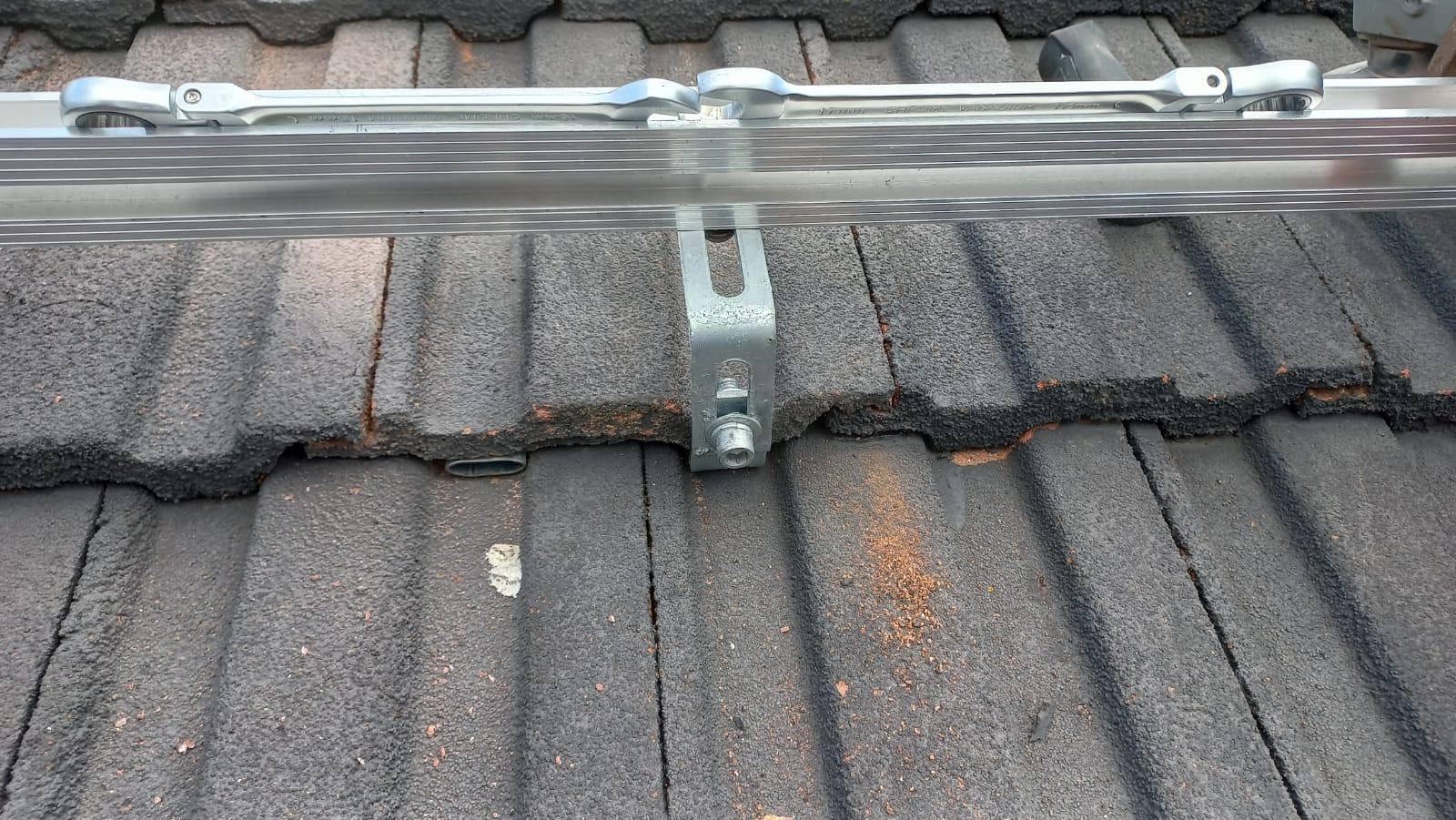
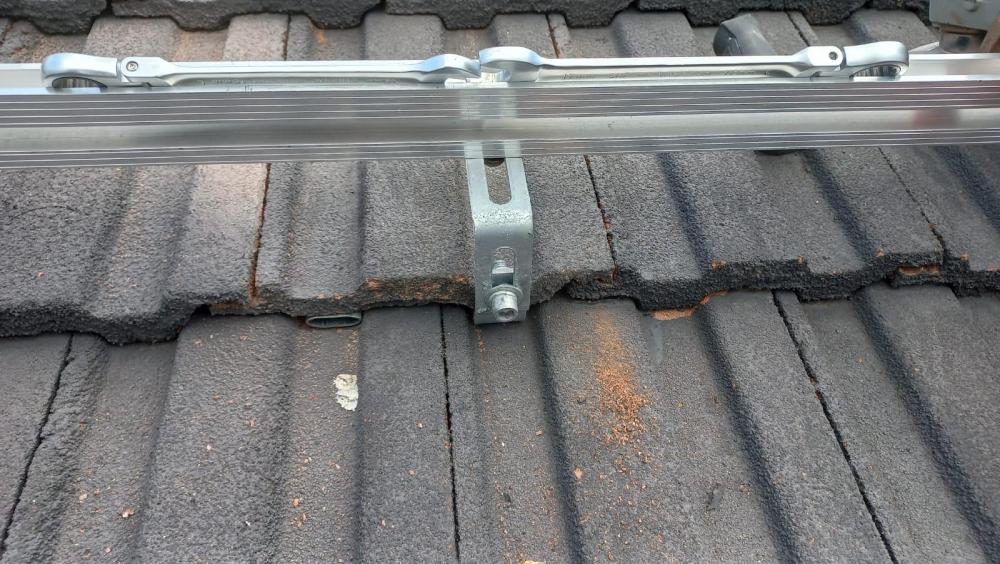
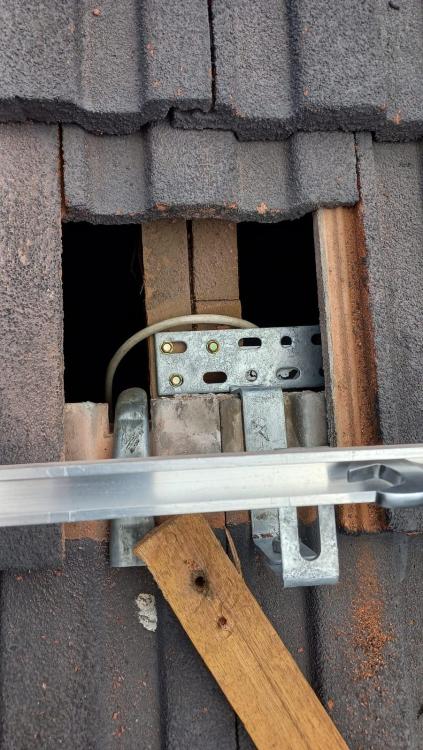
I understand, but I can fill it with sikaflex to stop any chaffing and cables are double insulated and fixed to the rails under the panels so no movement possible. 🤷♂️
-
This was my solution. We'll see if this is good enough for COC. Will be underneath the solar panel.
-
@RiaanC only way I could get software to detect the battery is with all the dip switch's down. I have two of these batteries and I'm trying to validate if the parallel communication is working, but the software will only show one battery at a time... That addressing does nothing, i have played with that it to no effect. I am not sure what the issue could be with the setting. I used pin 1,2,3 on my cable. I am thinking of just replacing these BMS's with JK BMS and adding a 16th Battey cell.
-
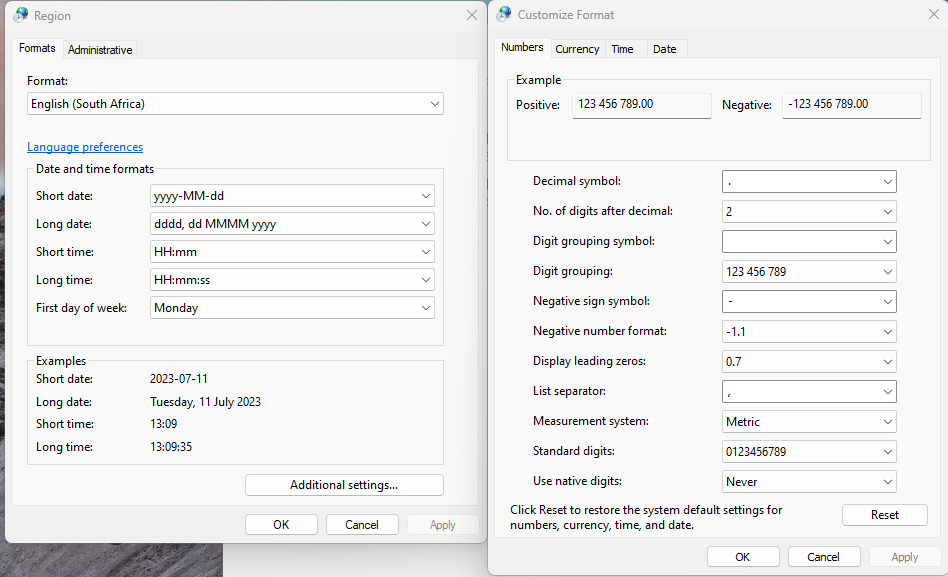
@MightyDee That is strange. I did not. It might be related to decimal formatting. I saw something related to that in the seplos software installation guide/manual. my settings below:
-
I also have a Victron MPPT. Do you have any more clarity on this subject that you could share? This was also a interesting discussion on the same topic:
-
@TaliaB Thank you very much for the feedback!
-
@WannabeSolarSparky thank you for the feedback! I found the instructions for my inverter. You don't know of any of the other devices like i mentioned earlier(power meter, Main DB, sub dbs, trunking)?
-
Hello guys, I am trying to see where I can mount my inverter to its permanent location. Are there any clearance regulations that I should be aware of when you have limited space? For example, clearance from power meter, Main DB, sub dbs, trunking or other installation related devices? Any assistance would be greatly appreciated.
-
This is so cool! I can see the balancing happening as well!!
-
@Neurik Where on earth did you find this software??? IT WORKED!!! I tried the battery monitor from Seplos but that did not work. I cant modify any of the parameters. Like you mentioned with regards to the communication protocals. I see there is a password field, do you know what it is?

-
@Zombie Do you have a link to the post?
-
@iiznh Thank you for sharing that project! Honestly appreciated. My next step was to just get a Victron smart shunt for SOC, but lets see if I can get the software working. I owe you beer! 🍻
-
@iiznh I hear what you are saying. But on the other hand I know they don't owe me anything. It just makes me sad reading the answer is right in front of me but I cant get it. haha
-
I have not gotten any feedback from the guys that got the communication working. Happens a lot on this forum unfortunately. People ask their questions get an answer or not then disappear, never to be heard from again I guess.
-
@Mileage Are you done with your installation? What was the end result? I am kind of in the same situation.
-
I don't see how you are going to do this easily depending on the space you have available on your main DB board to separate your loads between essential and non essential. This will require space for a second EL breaker, then move stove and geyser breakers to run through there from the mains, might need to move other items depending on the load the inverter can handle. Kettle is 2kw, microwave is 1.5kw, dishwasher is 2.5kw, hair dryer 2kw these are all running from plugs. Then you need a switch over box with breakers appropriately sized with AC in, AC out, switch over, and an AC SPD. I dont see an SPD in the db currently, that would be a good idea to get installed as well. My suggestion would be if this is going to be a long term permanent solution, save yourself a lot of headache and get an electrician to just install the hardware for you.
-
😅 ressurecting old thread! haha @Chris Hobson & @Ingo Look at this. NoArk breakers on Andy's Garage, Awesome channel. O yeah, @NigelL THANK YOU for that doc. Look at how he is connected switching off/on doing temp test in 40deg weather, nothing blowing up.
-
Anyone in this thread that got the software willing to share it with me plz?????😭
-
I just wanted to share this, but they changed the product description! Skelems! Haha but the product page from the online store still has it! Both pages: https://www.esquireshop.com/ProductDescription.aspx?id=8814554 https://www.securityandmore.co.za/products/copy-of-nenergy-3-8kw-48v-lithium-ion-80ah-lifepo4-battery-wall-mount-battery-cables-not-included FALSE MARKETING! I found out after purchase that Victron only supports CAN BMS communication and not RS485. And this is what I was trying to get out of them if this thing supports CAN or not.

-
I would not be surprised. The weird thing is, I thought these batteries would be some lazy rebrand, but its not. Seems like the have them custom made in China. The build quality is not bad I must say, of the one I have opened up.
-
@Coolbreeze All I can tell you is we will need the details of the people that actually manufacture these units in China as they are the ones what setup the BMS's and have the config software for them. I have even took one of my units apart to see if I can see anything on the BMS to identify what BMS they are using but there is NOTHING. Just a board version, but google did not bring anything up. My main issue is that these are really bad batteries and I have learned some expensive lessons here. Bad: 15s battery and not 16s. VERY low AMP output 30 amps??? WTF. and lastly ZERO software to connect to BMS and ZERO inverter support info. I bought two of the 48v 80AH units. REASON BEING because the 30amps is so little and would not be enough... anyways R32k lesson learned...
-
I cant remember the guys name. I just know its a female name, but for a guy. I remember asking for "her" and they still corrected me haha. Call the Durban office its where he is, if I remember correctly. I asked for someone who can assist me with your battery products.