
Blouwildebees
Members
-
Joined
-
Last visited
Reputation Activity
-
 Blouwildebees got a reaction from Energy-Jason in How to pronounce Deye?Deye feel lucky, punk? Well... Deye?
-
Blouwildebees got a reaction from MdF in How to pronounce Deye?Deye feel lucky, punk? Well... Deye?
-
 Blouwildebees reacted to kellerza in My Sunsynk 8Kw & data collection setupThanks, glad you find it useful!
Since you use sensor groups in your config (power_flow_card) https://kellerza.github.io/sunsynk/reference/definitions#power-flow-card-power-flow-card it includes several sensors. It seems like the names of the three-phase sensors do not match exactly, or these are not present in the three-phase inverter definition.
Single phase defs: https://github.com/kellerza/sunsynk/blob/main/src/sunsynk/definitions.py Three phase defs: https://github.com/kellerza/sunsynk/blob/main/src/sunsynk/definitions3ph.py
Apparently the solarman dongle is quite temperamental. There is some improvement (using native errors correction) in the edge addon. I've also asked the pysolman authors what they recommend to make this more reliable.
Probably best to open an issue, as its easier to track on Github than in a forum.
-
 Blouwildebees reacted to Sc00bs in KellerZa Integration Installation VideoHi Everyone,
I have done a video on the installation of the KellerZA integration from Johann. I think it is a better option than the Solarman integration as it allows for the writing of settings back to the inverter and gives you an upgrade path if you want a faster refresh. is very flexible and easy to setup.
Please let me know what you think of the video and if you have any questions please let me know.
Thanks for the great integration @kellerza 🙂
-
Blouwildebees reacted to iiznh in SmartDeyeDongle for 5kW/8kW/16kW single phase Deye/Sunsynk inverter available for order@Richyrich Yes both are available. It did put considerable effort towards getting all the available values on the inverter (reverse engineering what I could), wrote several workarounds for the bugs in the framework so it would work. There are something in the 140 entities (granted some are for the american split-phase setup and not useful to us in SA) I provided my workarounds to the opensource community to help them overcome some limitations.
My thinking was that I could save someone a couple of weeks of their time it must be worth something to them. Build the hardware, test it, polish the software so the whole experience is a smooth 10 minute setup.
But some people want to build their own dongle, that is cool too
Thank you @johanp for answering. I see you are enjoying the dongle you bought.
You can toggle grid charge and specify the Amps that the grid must charge. You could easily change these via automations if you need different profiles for different days
The time of use menu allows you to change the time (formatted as a time) power, SOC, and the charge settings you can get the exact same values than the time of use menu on the inverter. You could add an automation that changes your time of use for each day of the week, (eg my weekend usage is different than the week)
-
Blouwildebees reacted to kellerza in My Sunsynk 8Kw & data collection setupYes.
Tbh, there might still be changes needed in the frequency in which data is being read through the solarman dongle. Will see if I can throttle it down sometime this week.
-
Blouwildebees reacted to kellerza in My Sunsynk 8Kw & data collection setupHi @Blouwildebees
You can definitely update settings with the Sunsynk Addon, see some examples and automations here.
If you have a wired connection, you can be a lot more aggressive in reading settings. The addon typically reads important parameters (Watts) every second and can report immediately if there is a significant change (big load change). For less important parameters (config, kWh) it only reports every couple of minutes.
Your Home Assistant does not have to be close to the inverter. I run my mbusd gateway on a Pi 1B with wired Ethernet. See here for more options.
There is a PR waiting to add Solarman dongle support to the addon. Although that will limit you to 15second read intervals. But from the ode it does seem like you can write settings, even with the Solarman dongle.
-
Blouwildebees reacted to Sc00bs in My Sunsynk 8Kw & data collection setupThe ESP32 & KellerZa integration can update the inverter settings, the Solarman and Sunsynk integrations can't
-
Blouwildebees reacted to Sc00bs in My Sunsynk 8Kw & data collection setup@p_i It depends on which integration you are using, most of them rely on Home Assistant to query either the wifi dongle (Solarman), the Cloud server (Sunsynk) or the USB RS485 Interface (KellerZa https://github.com/kellerza/sunsynk)
The ESP32 integration uses ESPHome to setup the ESP32 with the RS485 board and the ESP32 queries the inverter and then sends the values to Home Assistant. If you want to change it to query different values from the Sunsynk/DEYE Modbus register you set those in the ESPhome integration and that gets uploaded to the ESP32.
I think the main advantage of the ESP32 over the Solarman and Sunsynk integrations is going to be that you can write settings to the inverter and that it is pretty much live. You can write settings back with @kellerza 's integration so the only difference is that you have to have your home assistant box near enough to your inverter for the USB cable/RS485 cable to reach. Maybe @kellerza can confirm for me about the writing data? Update times between the Kellerza & ESP32 is pretty much the same i.e. +- every 15 seconds.
I hope that makes more sense?
You can also check out the video I made at
-
Blouwildebees reacted to iiznh in SmartDeyeDongle for 5kW/8kW/16kW single phase Deye/Sunsynk inverter available for orderWhat you need to have already:
You need to be running a 5kW/8kW/16kW single phase Deye/Sunsynk inverter, Master & Slave configuration supported. 3 Phase Supported (3Phase inverters not currently supported) You need to run your own home assistant (https://www.home-assistant.io/installation/) on an old PC/VM/Laptop/Rasp Pi or similar must support 64bit. (I even managed to get it running on a netbook from 2010 that does not support UEFI boot, works great for home assistant). You need to have a 2.4GHz wifi network at the inverter with reasonable network coverage. Not included (must supply your own):
You need to have an old micro-USB (type B ) phone charger to supply power, even if it is a slo-o-o-ow charger, 500mA it is fine. These are still common even today for most electronic devices
SmartDeyeDongle Version 2
Price=R700 (EFT) + Courier(R100)/You collect(free)
Comes with RJ45 network cable (30cm) that has been plugged into an inverter and verified to be working without issues. Also protected with a heat-shrink cover.
Shipping R100 via The Courier Guy (3-4 business days economy, but most of the times they deliver the next day)
Plug and play device for home assistant that allows most settings on the inverter to be changed via UI/automations.
Please note that the firmware is not related to the opensource versions. Considerable effort has been put in to pull all the important data from the inverter and to provide the user with the ability to change most settings on the inverter.
I have 4 dongles for sale. DM me if you would like one and we can arrange the rest
-
Blouwildebees reacted to spotity in Toggle Sonoff Switches based on Sunsynk DataAbsolutely, I am running home assistant on a Pi4 - eWelink integration via SonoffLan and then I make use of @Gary Waterworth's integration to Sunsynk using Nodered. Another option is to use Solar Assistant and the native integration between solar assistant and home assistant, but this obviously requires more PI's and config.
From here you have endless possibilities including controlling your inverter. Home assistant gives you a dashboard which is very customizable. I use the Sunsynk card from @slipx on my dashboard, with a lot of automation to control what turns on and when (Geyserwise, Sonoffs, Appliances etc)
Home assistants has steep learning curve initially, but there is a massive community that are willing to help - also considering the above, you are not an average user - you'll be more than okay 😅
Shout if you want to find out any other info and I'll be happy to answer.
-
Blouwildebees reacted to paulcb in Toggle Sonoff Switches based on Sunsynk DataOk sure. Here goes. This assumes you know some basic linux. If not maybe this is not for you but perhaps I can help if needed:
1) Make sure your Sunsynk connect App is working and you know your username/password.
2) Make sure your Sonoff switches are working in the Ewelink app and you know your username/password.
3) Fire up an Ubuntu VM on AWS/Azure/GCP or even on a Pi or home PC. It can be really small like 512MB RAM and needs internet access
4) Install docker in the linux vm. Follow something like this: https://kinsta.com/blog/install-docker-ubuntu/
5) Someone wrote a nodejs gateway to mimic the calls done by the Ewelink App see: https://github.com/DoganM95/Ewelink-Rest-Api-Server I leverage this as a way to control the Sonoff Switches. To run this listening on port 8089 run this. It needs your Ewelink username/password you registered in the App so it can call into Ewelink servers:
docker run -d --restart=always -p 8089:3000 -e "EWELINK_USERNAME=yourusername" -e "EWELINK_PASSWORD=yourpassword" -e "EWELINK_REGION=eu" -e "PASSWORD_HASHING_ALGORITHM=sha512" -e "SERVER_MODE=prod" doganm95/ewelink-rest-api-server 6) Test you can turn a switch on like this (Replace "Your Switch Name" with the switch name as it appears in the Ewelink App):
curl -m20 -sX POST "http://localhost:8089" -H "content-type: application/json" -d"{\"devicenameincludes\":[\"Your Switch Name\"],\"params\":{\"switch\":\"on\"}}" 7) Install a json parser utility:
sudo apt install jq 8. In your home folder add the attached script.sh and make it executable with chmod +x ./script.sh
9) In the script set your Sunsynk connect username and password on rows 4 & 5 for SUNSYNK_USER and SUNSYNK_PASS. Then set SUNSYNK_PLANT on row 6 with the plant ID you see if you login to sunsynk connect in your browser. E.g. mine is 88663:
9) Create a cron schedule to run the script every 5 minutes: crontab -e -> then add a row like this: */5 * * * * /home/ubuntu/script.sh >> /home/ubuntu/solar.log
10) Edit the script to suit your needs and refer to your Sonoff switch names. I've got a simple example of a switch called "My Switch" that will turn on if we have excess power and Off if we don't. If you don't know what going on, ping me with your switch names and basic rules and I can help. You have a huge amount of control. I have some fairly complex rules around hour of day etc.
11) To see what the script is doing, run tail -f /home/ubuntu/solar.log
I'd love it if this is useful to anyone so let me know if you need help and add any things I might have missed to make the instructions foolproof. My script generates a basic HTML page of the current status but I deleted that part as it just makes the script more complex than necessary. Anyone with basic bash scripting can go wild. If you comfortable with python or something else then use that - its really just some HTTP GET and POST commands surrounded with JSON parsing.
script.sh
-
Blouwildebees reacted to paulcb in Toggle Sonoff Switches based on Sunsynk DataAfter some experimenting, I've come up with a reliable way to turn various Sonoff Switches on/off based on current Sunsynk stats such as SOV, Grid load, Solar generation, time of day etc. It even has a simple dashboard I'm displaying on an old phone stuck to the wall so that the family knows when is a good time to fire up the washing machine, dishwasher etc. I have various rules (in a bash script) that looks at the Sunsynk stats every 5 minutes and takes decisions on what to turn on/off based on current conditions. This is especially useful if like me you have the entire house on essential load and want fine-grained control of where excess power is used, while minimising Eskom usage.
Sonoff switches are like R150 so it does not break the bank to add this level of automation. For the geyser, I have a 20A Sonoff which is a bit more but not crazy price.
In my basic searching, I'm not sure if anyone has done this before as I have seen posts about waiting for the Sunsynk smart switch to do this kind of thing. If this is novel and people would like to know how to get this right, please let me know and I'll do a write up. I didn't want to do a long post, only to find that I've reinvented the wheel.
-
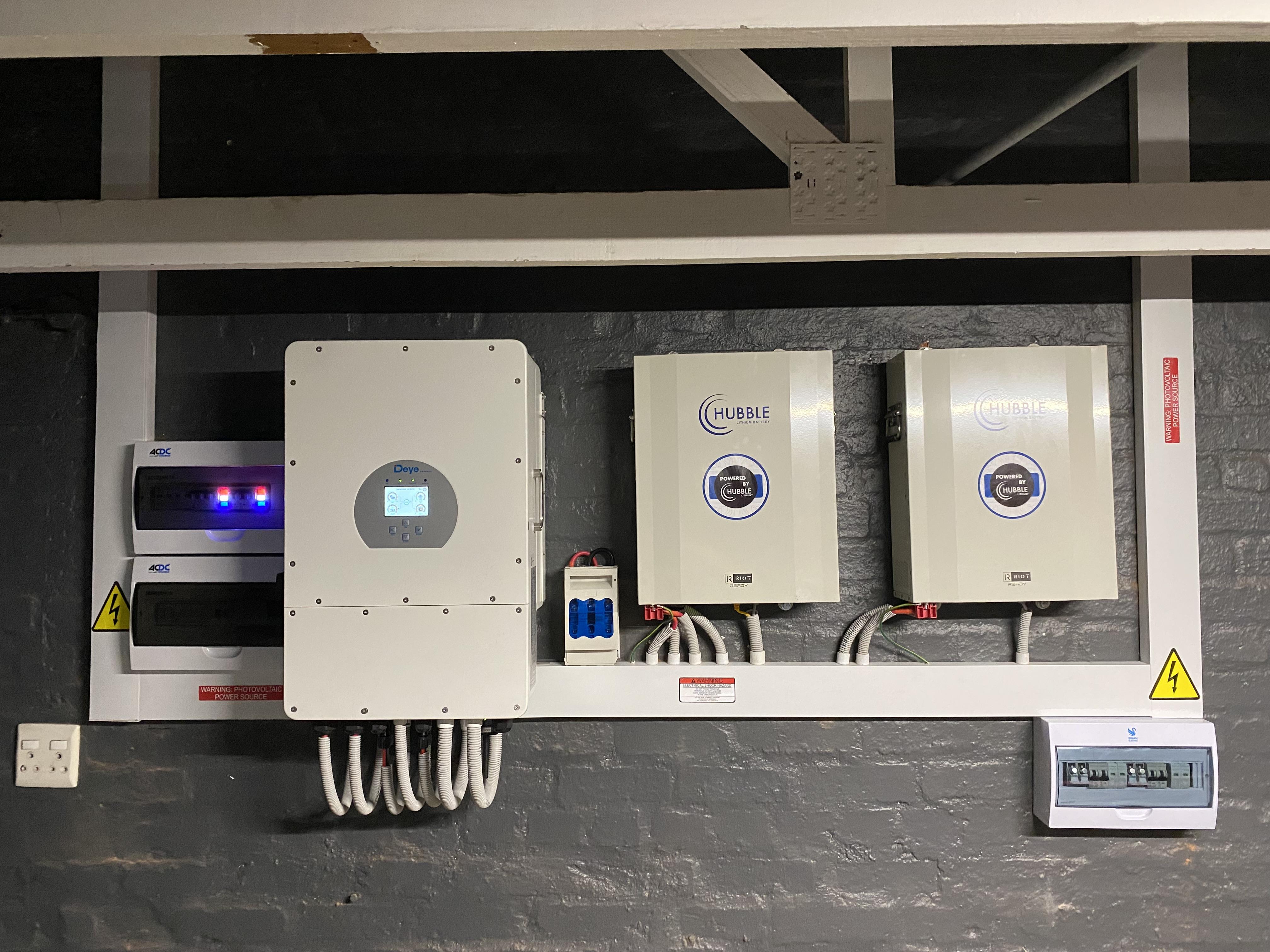
Very neat installation. I like the grey with the white contrast. Enjoy the freedom of no loadshedding!!!
-
Blouwildebees got a reaction from Steve87 in Deye 12kW 3P + 2x 5.76kWh Hubbles + 14x 455WpHallo almal!
New user here, Paarl resident.
My inverter and batteries were finally installed yesterday -- such freedom to simply forget about load shedding whilst watching Silo last night at 10pm! Solar panels have been delivered, but installer is awaiting A-frames for the roof slab installation, ETA about two weeks.
Once everything is up and running, I want to get into the automation aspects -- currently considering RPi + Solar Assistant + Home Assistant. Are there any other platforms I should think about?
Also, what's everyone using for their geyser management? I have 2 x geysers running on-grid only, along with the oven and HVAC, so looking to minimise Eishkom leakage.
Onwards and upwards!
BWB