cp69
Members
-
Joined
-
Last visited
Everything posted by cp69
-
Pity you've had a run around. Did you manage to pickup your cells?
-
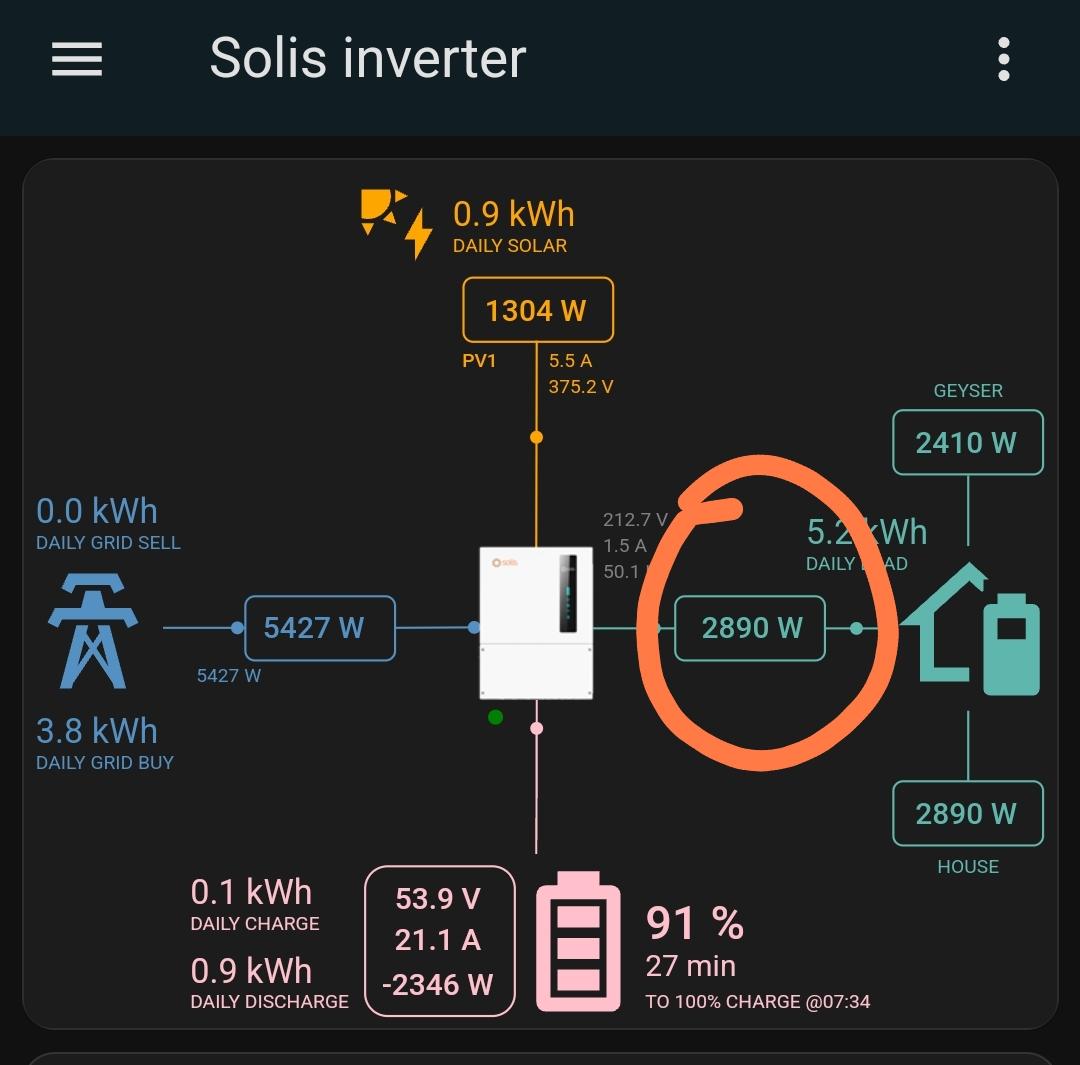
Thanks got it all working now. Last thing I need help with is the mapping of one of the entities. Which entity corresponds to the one I have circled in the image? It's showing the wrong sensor data but I can't figure out which entity it is?

-
Nice design idea. My only advice assemble it close to it's final resting home. That's going to weigh around 100kg complete. I actually tweaked my back moving my battery to it's final home!! Put me in bed for 24hrs!! Fan - I would design it to be around the BMS more than the cells. I have not seen my cells reach 40°c yet. The BMS runs much warmer than the cells
-
I'd be following this build
-
Aah, changed it but no image of my inverter shows? Mine looks like this type: custom:sunsynk-power-flow-card cardstyle: full show_solar: true inverter: model: solis modern: true battery: energy: 54 shutdown_soc: 20 show_daily: true solar: show_daily: true mppts: 2 load: show_daily: true grid: show_daily_buy: true show_daily_sell: false show_nonessential: false entities:
-
I don't see the modern:false line in the code? Am I missing something?
-
I have the adaptor, you're welcome to borrow it from me if you want. I have the same BMS and i've just been connecting over bluetooth
-
I'm keen to get mine on HA. I've been wanting to do this for a while as I have a bunch of smart lights and devices at home. Modbus via WiFi are you able to change inverter settings or is it read only? I have an old tablet I want to convert into a HA dashboard. If you could make a short guide that would be great
-
Aaah. That makes a lot more sense now. I installed my inverter before the lithium cells arrived and although you can use the inverter with no batteries when there is no batteries or PV the inverter shuts down. So I installed some lead acid batteries which were knowingly not usable anymore just to keep the inverter running in the evenings. With the lead acid batteries it was charging/discharging exactly as you describe. I then just resorted to switching the change over switch to eskom in the evenings and turn off the inverter. I think with lead acid batteries it still needs a bms. Once you have a lithium battery I think all your troubles will be sorted
-
I got cells from Apexium and BMS from seplos. This Apexium BMS looks identical to my seplos. CAN comms work perfectly fine with my Solis s6 which I think is what you have. The BMS is working better than expected and I'm getting much better balancing than the YouTuber - off grid garage. My cells have a 3-10mv voltage variation at all times. Quite impressive.
-
Another possibility. Check the other work modes are disabled. Only self use mode should be enabled
-
I would connect to the inverter over Bluetooth and make sure time of use is disabled. What grid code have you selected in the setup? There's still the unexplained battery reserve soc that's not working. I think this unit may be faulty or it needs a firmware update.
-
Ok so your setup is similar to mine. CT is installed in the same spot. With the timer thing it could be that you have time of use enabled. Check in your self use mode settings if time of use is enabled, that could be causing the 6pm discharge

-
If I'm understanding this your CT may be in the wrong place. Mine is installed on the cable that feeds in from our eskom meter.
-
You won't stop it exporting to the house while there is grid if you've allowed grid export. I wish you can disable battery exporting while allowing pv exporting. I have my entire house on the backup side. Only my geyser is on the grid side and the battery does feed the geyser if the grid is present. The second grid goes down the battery does not feed the geyser anymore as exporting is disabled once the grid goes down(NRS097 grid code requirements) On my system I have set the reserve soc to 100% so the battery holds at 100% until the grid goes down, then the battery powers the house. When the grid goes down the changeover is pretty quick, the lights flicker and on the odd occasion the tv will go off then back on. There's no noticable indication when the grid returns for me.
-
@Pho3niX90 wow you have some strange issues there. Are you saying the when the grid cuts the house is in darkness for 2-5s? Issue 4 is a weird one as well. On mine the backup is enabled, works fine and generator is disabled. Are you sure your CT is in the correct location and direction is correct??
-
I think the 9.6kw on the solis is the overall limit combined on both pv inputs. The limit per mppt is the current and/or the voc. I don't think it's limited to 4800w per mppt? I have 10 X jinko 550w panels on my solis 6kw and haven't had any issues. Interesting these hit 5500 - 6000w peak often. Haven't had any issues yet
-
I'm enjoying mine. Certainly does blend the power inputs(pv,grid,bat) to provide the load. App is live(or every 5s) if you're connected over Bluetooth. 5min refresh if you're viewing via the cloud. I do think the deye software is more refined and reliable but the solis has so much more potential once they get the app running perfectly. Solar assistant integration would also be amazing. It's coming I believe. The 6kw for me is the perfect size I have not yet overloaded it and I run my entire house except geyser on it. I've hit 5500w many times so I would've come up short or had to do some managing on a deye/sunsynk 5kw.
-
I've allowed it to export to grid. I have a spinning meter so it's perfect for the sunny days but not ideal when there's no sun and the battery feeds back to the grid
-
Yeah it's baffling me here. I would like the battery to supplement the grid in the evenings but it seems it's the other way round. If I don't set a low enough discharge current the battery will just drain at full power and backfeeds to the grid which makes no sense at all. Maybe it's my firmware I haven't updated it since I got it? I'll get in touch with solis support
-
And that's a battery with best of the best cells. Guaranteed Grade A brand new. Many of the better priced retail batteries are using unknown cells and some are 2nd life cells. You just need a little bit of basic electrical knowledge to build your DIY 15kw battery
-
Awesome. I'm very happy with my cells. I've run 3 full cycles and very happy. Paired with the v3 seplos BMS(update firmware) and it's great. 6mv deviation at 100% soc. Seplos default voltages seem rather conservative tho, what voltages are you going to settle with? I mean high voltage alarm, high voltage protection etc
-
Question I have. Why is my battery feeding the geyser which is the only thing on the grid side? Rest of the house on back up side. I only want batteries to power the backup side? What setting am I missing here?

-
Any idea what the G100 setting is for?
-
Oh that's great news. I see the current grid code in the settings is NRS097. No clue what that means!! I haven't been able to test this myself as I don't have a battery so when the grid goes down the inverter shuts down