Youda
Members
-
Joined
-
Last visited
Everything posted by Youda
-
Not really @warick_wrx Scenario 2 is possible even without any comm cable between the Pylontech BMS and Inverter. It works purely based on the analog voltage and current measurement. It's basically the same logic that was used for lead-acid batteries in the old times when there were no BMS. If you have a comm cable and working communication between the BMS and the inverter, the possibilities are even richer.
-
Yes, it is possible, but: 1) You don't have to stop the charger once the Pylontech is charged to 100% SoC, as once the voltage of battery reaches the voltage set on the charger then the charging current will quickly drop to zero. You just have to watch for the situations where the voltage of charger suddenly jumps up. This might happen when large AC load is switched off, while the sun is fully shining. This might cause overvoltage alarm, if the resting voltage of the battery is already too high. Therefore, if you don't have a way how to disable the charger, it's better to set the charger to 52,5V (15x 3,5V). Such a voltage is still able to charge Pylontech to 100% SoC, while leaving sufficient "voltage margin" for these unexpected jumps. Got it? 2) Even some basic chargers have 2 settings that you can combine, in order to protect the battery from overvoltage and/or overcharging: CC voltage = 53V CV voltage = 52,5V. When both settings above are used together, the battery is charged to 53V first, then the charger lowers it's voltage to the resting 52,5V. 3) This is how the charging current looks in the last stage of charging, when the voltage of the Pylontech starts to reach the voltage set on the charger: From 10:00 the charging currents starts to drop quickly, reaching zero amps at 10:25. Note a small current spike at 10:46 - it's caused by a sudden voltage jump mentioned above.

-
@tomvi for the BatteryView HV 3.8.2: User = user Administrator = Pylon2019001! Warning: Do not play with the stuff you are not trained on. Youda
-
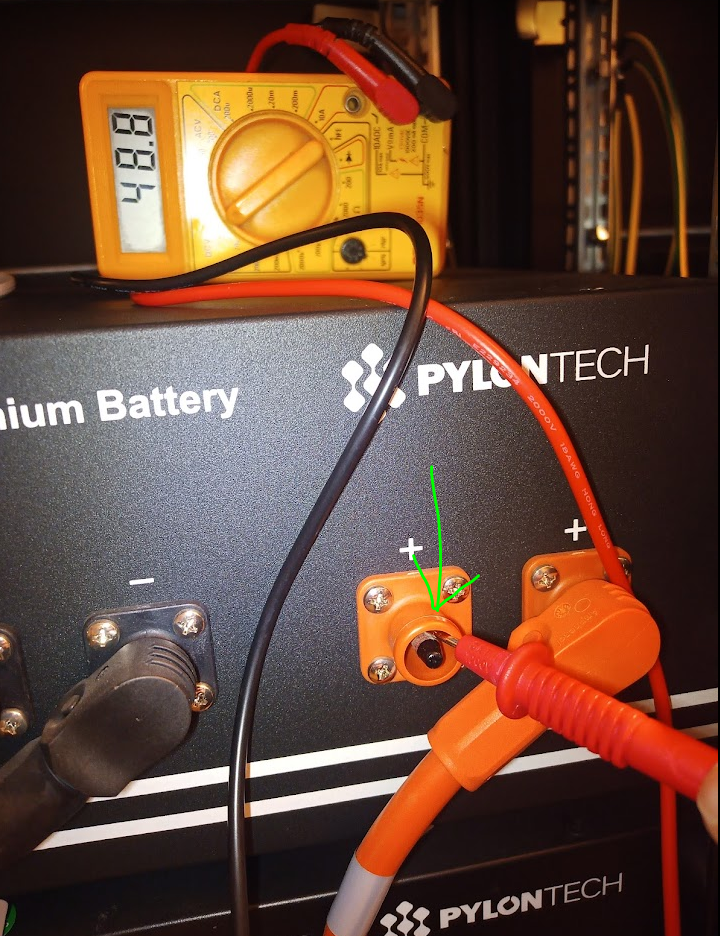
Hi @BritishRacingGreen 1) First of all - if the US3000C is running and the RUN led is slowly blinking, then the battery should be supplying 48V to the output terminals. There's no need to connect the communication cables etc. 2) Just grab a voltmeter and check the terminals. Beware that the SurLok terminals have plastic-insulated pins. Therefore you have to touch the side of the pin, not the tip. Like this: 3) Test each battery, one by one. 4) The screenshots that you've provided in the first post show that all the usual suspects are okay: - BMS OK - Cells OK - Temperature OK So, if there's no voltage on the terminals then the internal fuse (or precharge circuit) has blown. Even the manual is clear on this: BTW: Reliable Pylontech distributors have some spare BMS boards on stock and are experienced with flashing firmware or swapping the boards as these batteries are being sold in thousands. So the repair should not take ages. And in this particular case it really might be just the fuse.


-
How about to add ZIEHL UFR and couple of contactors, so once the grid parameters starts to go out of the norm the installation will be automatically disconnected? https://www.victronenergy.com/accessories/ziehl-voltage-frequency-sensitive-relay-ufr1001e Or, maybe just a simple automatic transfer switch will do the job too.
-
BatteryView HV 3.8.2 BatteryView 3.8.2 for HV Product.zip
-
BatteryView HV 3.5 BatteryView 3.5 for HV Product.zip
-
BatteryView HV 3.5 and 3.8 Pylontech's "BatteryView HV" is a diagnostic tool used for the high-voltage batteries like: H48050 + external BMS Force H1 Force H2 If you are adding a new brick to the existing high-voltage stack, this tool might be useful for checking the voltage levels of the individual cells and ensuring that the stack is properly balanced. You'll need a Windows laptop with a serial port (or with USB2Serial converter) and a serial cable. Bear in mind that you will need real RS232 interface, NOT the 5V/3.3V UART. Common pinout of the RJ-45 CONSOLE port on the most of the Pylontech HV batteries: If your battery uses a different pinout, then consult the wiring with the product manual.

-
 READ THE INSTRUCTIONS FIRST: https://powerforum.co.za/topic/2322-youdas-off-grid-lab/?do=findComment&comment=151032 Firmware for Pylontech low-voltage batteries: US2000B Plus US2000C (original chip) US2000C (new chip) US3000 US3000C (original chip) US3000C (new chip) US5000 (original chip) US5000 (new chip)
 -
Driver of this Peugeot left me a message and attached the photo. Nice one!

-
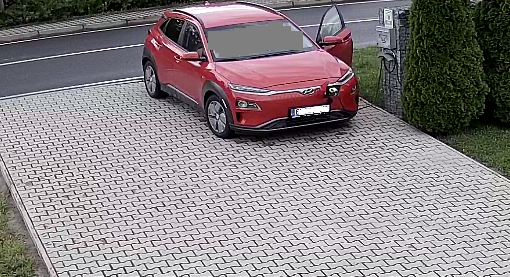
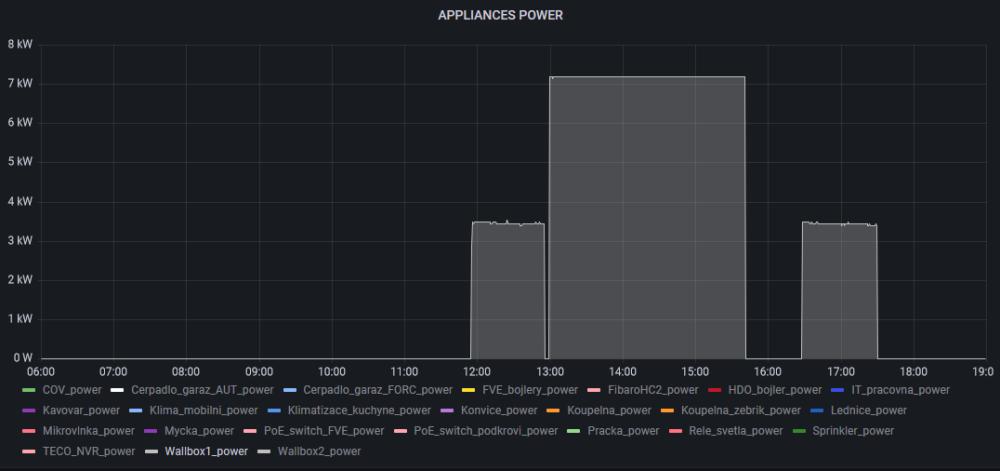
Since the original post above, dozens of hybrids and EV's stopped by my solar charger for a few kWh's. Here's a couple of them: The last one was funny: Renault was charging for an hour or so, then the Merc arrived and queued-up...on a slow solar charger The Renault let him to and the Merc was charging for 2,5hrs. Later that day, Renault arrived once again - as seen on the chart bellow:




-
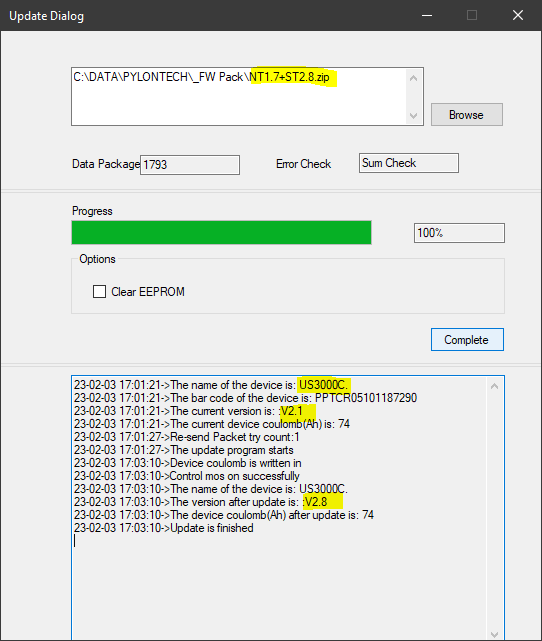
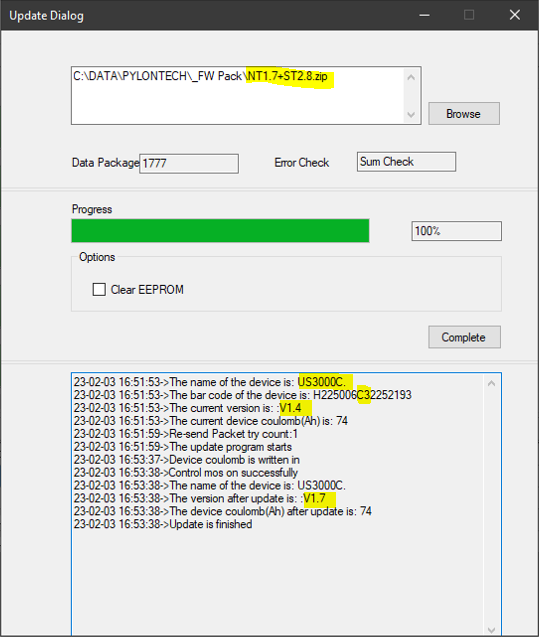
Oh man! Looks like you do know what the fear is Yeah, exactly. Funny is, that no matter what, the BatteryView is always asking user for entering the coulomb value at the end of the FW update, even if it cannot use it. For the models like US2000 or US3000 it logs error then, but for the C models it actually writes that value in the NVRAM as seen on the attached screenshots. It says coulomb, but it's actually expecting amp-hours, like 50 or 74: US3000: US3000C:


-
Hi @PurePower Just double-checked that and I can confirm that at the end of 2022 the latest FW versions for US2000 variants were: US2000plus = us2000b_v2.9_Crc.bin US2000plus95 = us2000B_Plus_V3.4_Crc.bin For a shame, I do not have the first file, just the second one. Sorry Also, there's no easy way of identify which variant you have, as both of the above are reporting device model = 2KBPL in the BatteryView. On top of that, beware that: - US3000 firmware is NOT compatible with US2000, so don't try to flash us3000a_V3.4_Crc.bin in the US2000. - US2000C and US3000C firmware IS unified. You can flash it into both, US2000C and US3000C. - US5000 has a special firmware. Like I wrote in the beginning - if it works, then don't repair it. However, if you have some problems and will be able to get us2000b_v2.9_Crc.bin from your seller or Pylontech support, then share it with the others afterwards, please.
-
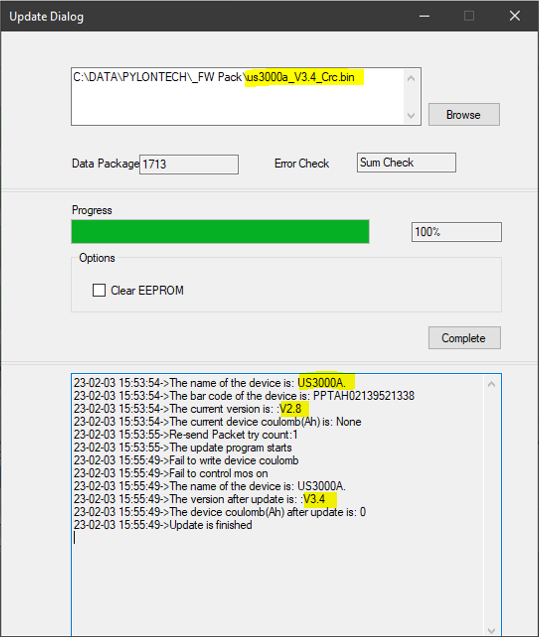
Just updated another batch of batteries. There were 3 different types: Original US3000 US3000C with the older chip US3000C with the new chip Everything went okay, here's the final update window for each type: Original US3000, named s US3000A in the software: US3000C with the older chip: US3000C with the new chip (as identified by E2 or C3 in the serial number):
-
-
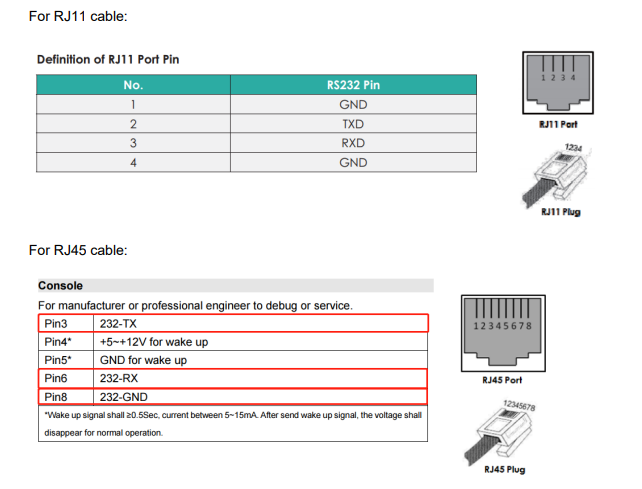
***DISCLAIMER: Use at you own risk. You may brick and/or damage your batteries How to upgrade firmware of the Pylontech batteries If it works okay, do not touch it! If it does not work okay, contact your dealer. If your dealer is not helpful, contact Pylontech support. If Pylontech support is not answering, then you can try to upgrade the firmware. Connect laptop PC to the Pylontech battery: 1) First, you'll need to make (or purchase) a serial cable in order to connect a laptop to CONSOLE port of the battery. Older models of Pylontech batteries are using RJ-11, while newer models are equipped with RJ-45. Wiring on the right is suitable for all the new models, including US3000C, US5000C, Force H1 and Force H2: 2) A lot of people are struggling with making a working cable, because in some versions of Pylontech user-manual there's a missing information on the GND pin for the RJ-45 console port. Other people are unable to connect since they swapped TX and RX. So, here's the actual pinout of console port for RJ-11 and RJ-45: 3) Grab a Windows laptop PC equipped with a physical DB9 serial port and connect it to the battery stack via the cable above. As an alternative, you can use cheap USB-to-SERIAL converter, for example FTDI-based. WARNING: Console port is RS232, with positive and negative voltage levels. Therefore, you have to use true RS232 serial-port interface, NOT UART 3.3 or 5V! 4) Download and unpack Pylontech_Tools.zip from the link bellow. The password for the ZIP file is: Youda 5) Start the BatteryView software: For batteries with a very old firmware, BatteryView 2 works the best. For new batteries, use BatteryView 3.0.28 or newer. Select the respective COM port and use 115200 baud-rate 6) Now you can perform diagnostic tasks, or update battery's firmware. Updating Pylontech firmware: 1) When updating firmware, the best is to power-down whole stack, remove all the LINK cables between the batteries and then turning-on just one battery at a time and perform the FW upgrade on it. Then repeat the process for the next battery. Updating batteries while online in a stack works too, but you will get alarms and red lights. 2) There are several models of Pylontech batteries and the firmware is INCOMPATIBLE between most of them: If you flash a wrong FW in the battery you will brick it. FW numbering is INCONSISTENT between the models. Fox example: For an old battery with certain PCB the FW2.4 might be the most-recent, while for a new battery with a different PCB and chipset the most-recent version would be FW1.9. In other words - higher number does not automatically mean that the firmware is newer, nor better! 3) If possible, it's preferred to update FW via BatteryView 3.0.28 while using following rules: For updating US2000C, US3000C and US5000 select the whole ZIP file that includes two BIN packages inside and perform update. The BW3.0.28 will be able to pick right BIN file inside the ZIP package automatically. DO NOT select BIN package manually. When updating US2000 and US3000 then you must select the correct BIN file manually, for a shame. 4) Due to the silicon chip shortage Pylontech changed the BMS chip for some of the produced batteries. Therefore, for some models there are two different firmware branches. One for the original chip and the other for the new chip. Luckily, when upgrading FW via the ZIP method desribed above, the BW3.0.28 will choose the correct branch (BIN file) automatically. 5) This list indicates firmware version suitable for the each model and what file to flash: Model: US2000plus FW: V2.9 FLASH: us2000b_v2.9_Crc.bin Model: US2000plus95 FW: V3.4 FLASH: us2000B_Plus_V3.4_Crc.bin Model: US3000 FW: V3.4 FLASH: us3000a_V3.4_Crc.bin Model: US2000C (original chip) FW: V2.8 FLASH: NT1.7+2.8.zip Model: US3000C (original chip) FW: V2.8 FLASH: NT1.7+2.8.zip Model: US2000C (new chip) FW: V1.7 FLASH: NT1.7+2.8.zip Model: US3000C (new chip) FW: V1.7 FLASH: NT1.7+2.8.zip Model: US5000 (original chip) FW: V1.3 FLASH: US5000 ST+NT 1.3.zip Model: US5000 (new chip) FW: V1.3 FLASH: US5000 ST+NT 1.3.zip 6) If you have a bricked battery, you can use Pylontech Upgrade Tool V1.0.9 from the Pylontech_Tools.zip to recover it via flashing a correct firmware. The process is as follows: Connect the debug cable to this software and the battery (attention: at this time please do not switch the battery on), then 1. open the software, click Immediate Update. 2. Click Connect. 3. Click Browse to select the correct firmware. 4. Then click Program and switch on the battery by hard switch and the red soft start button immediately. This will bring the battery back to normal. 7) When updating firmware, it's the best to turn-off all the batteries in the stack and remove all the LINK cables. Then power-on a single battery and perform FW update on it. Repeat for the remaining batteries in the stack. Reconnect all the LINK cables and start the stack as normal. Although it is possible to perform FW update while the battery is running in the stack, you will get alarms and red lights when you'll do it that way. 8 ) Firmware packages mentioned above are packed in this archive: Download and unpack the ZIP budle from the link bellow. The password for the ZIP file is: Youda Youda


-
 READ THE INSTRUCTIONS FIRST: https://powerforum.co.za/topic/2322-youdas-off-grid-lab/?do=findComment&comment=151032 UpgradeTool 1.0.9 BatteryView 2 BatteryView 3.0.28 BatteryView 3.0.29
 -
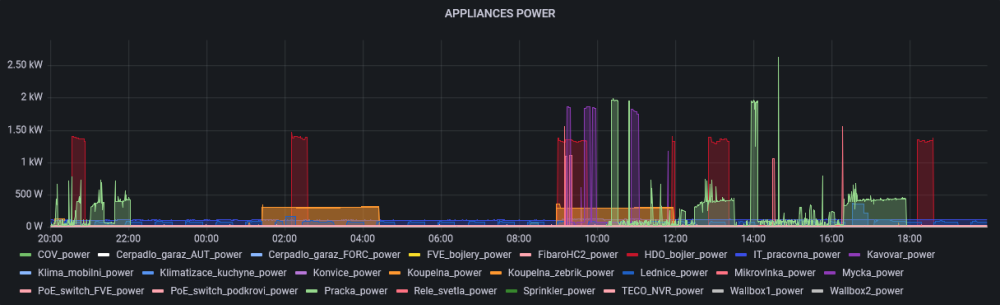
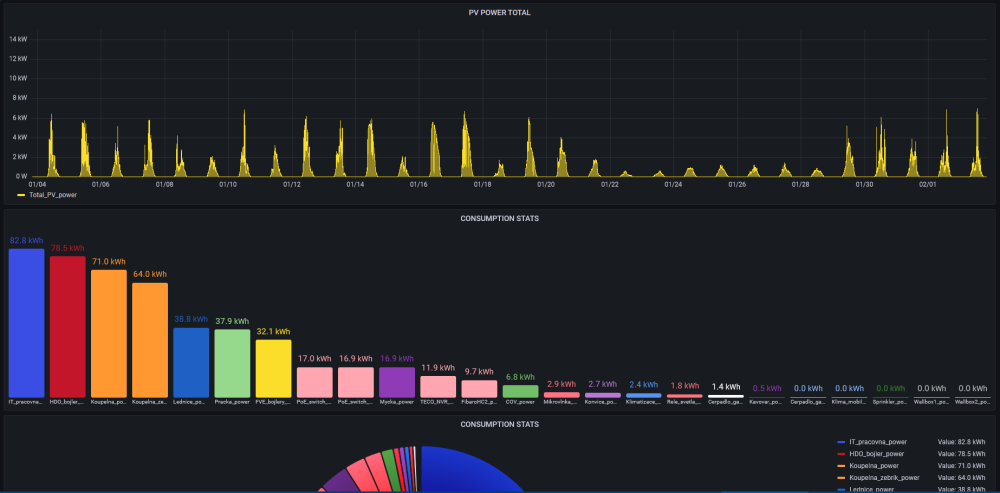
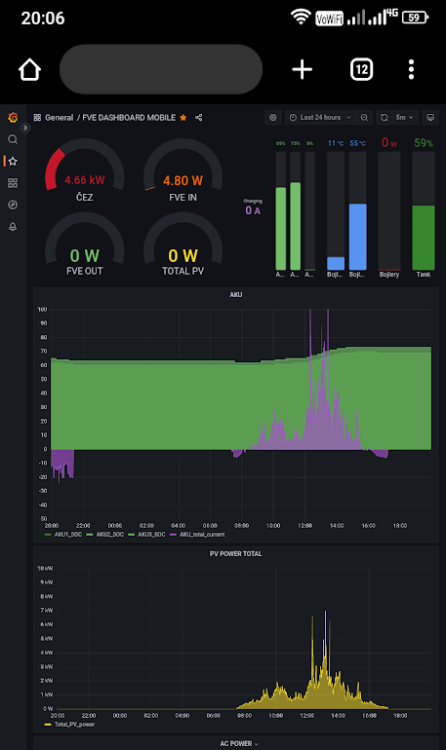
3) Moved from EmonCMS (cloud-based) to Grafana running on-premises. While EmonCMS was great for start, Grafana has way more capabilities and on-prem solution is a nice way to get rid of that monthly OPEX that was associated with the cloud-based solution. By the way, I went for 64bit OS and 64bit InfluxDB2, in order to be able to run integration jobs (stats) on larger datasets. A few examples from the GUI: Works on internet-enabled mobile phone too:
-
Hi guys, did a couple of updates to my lab in the meantime: 1) There was a sale on batteries, so I've added some more Pylontech US3000C bricks to my setup. It's 56kWh now. Note that the rack on the left is still empty: 2) I was not satisfied with the plastic distribution board that I originally used. Main reason was that I needed to add some new components in and there was no free space left. Therefore, I ditched the plastic box and rewired everything in the new Eaton distribution board that is made of metal. This board has a space for 196 modules, if I recall correctly, so I hope that it will last.


-
@riogrande75 personally, I am not using direct comm link between the Pylontech and my Infinisolar inverters, as the implementation on the Infini side is really poor. Can't perform even basic tasks. I had the required card in the past, tried it, but then gave it to somebody else, who had just one inverter (where it works a bit better than in my setup of 3 inverters) As a replacement, I've built my own automation, that talks to Pylontech and to Infini too and performs various tasks based on SOC, actual PV power and the system load. Complicated, expensive but it works much better. Anyway, if you are still interested, Infini is talking to Pylontech BMB via RS485 interface. I've put PDF with Pylontech protocol description in this older post: https://powerforum.co.za/topic/2322-youdas-off-grid-lab/?do=findComment&comment=75314
-
@P1000 I don't see that it broke as a result of tweaking the settings. @G-Man wrote that he discovered the charging issue during a long-term power outage. And the question is, whether charging of the batteries in an off-grid situation ever worked here:
-
GW ET series from 2018 still might be under warranty, see the attached T&C. Don't get me wrong, GoodWe is a well-known brand, has a broad product portfolio and is active on the PV market for years. There are ten-thousands of various GW inverters installed in the field. On the other hand, there is an evidence of strange minor issues that GW support was not able to solve. I mean discharging batteries to the grid during the night, overheating on sunny days, unstable wifi, etc. Also (and this applies to many other vendors too) there are groups of serial numbers within a product lines, where if your product has serial number from such unfortunate group, then it requires a special branch of firmware and sometimes even has a couple of features missing. Model number and the product name is the same, but the guts of the unit are slightly different. Therefore, I am a bit afraid that this might be a similar case. Let's see whether the GW support will be able to crack this mystery. But what will you do if they won't be able to solve it? Does it make sense to keep the inverter than cannot deliver what you need? GOODWELimitedWarrantyforInverterSystem-GLOBAL-144-fuben.pdf
-
Hi @G-Man thanks for sharing the update. IMHO, there must be something broken with your GW5048D ES as this behavior is really strange and not normal. Personally, I would return the inverter to the dealer (if it's still under warranty), or simply dump it and go for another make/model. Luckily, Pylontech US3000 batteries are compatible with many other brands, so these can be reused.
-
In the Advanced Settings, ensure that the Backup Supply is ON, and Off-Grid Output is ON. By the way, the correct startup sequence is to start the batteries first, then start the inverter. It's not a good to start/stop batteries while the inverter is already running. Also, check whether the inverter is not powering the loads, but charging the batteries meanwhile.
-
For this you need to connect to the console port of the battery stack with a laptop and serial cable. Then open the diagnostic console command-line interface, where the easiest way to do so is via BatteryView.exe Once in the command-line interface, there's a bunch of commands you can execute against the battery stack. For example: pwrsys config stat info etc. Some more info about the pylontech batteries is scattered here: https://powerforum.co.za/topic/2322-youdas-off-grid-lab