Youda
Members
-
Joined
-
Last visited
Everything posted by Youda
-
@Shortcut Periodic keepalive frame (CAN 0x305) is normally NOT needed by Pylontech US baterries. Some other, mainly high-voltage models, are using this technique. If the CAN 0x305 message will not be sent from the inverter every couple of minutes then these batteries will auto-shutdown. If the support is saying that your brand new US5000 have this feature too, then this is really strange...or they are simply wrong, since their product portfolio is very broad as of today. BTW: next time on the forum, I would suggest you to start a separate thread where you describe exactly what's the issue, what's the setup and how it behaves under various conditions. Because when "hijacking" some other's thread then your info ends up being mixed-up with the previous info, which makes things really messy. Anyway, to some of your questions: 1) Yes, you can just bridge the internal fuses and rely on the external fuses or the DC breaker. But is it recommeded? Definitelly not. Those internal 4-pole fuses are being used for a reason. 2) If you start the battery and everything is green but there's no voltage on the terminals then the fuses are blown. If you start the battery, everything is green and there IS voltage on the terminals but the battery is unable to power the loads and it's voltage is fluctuating then some other part of BMS board is fried. Mostly DFETs. 3) If you want to check what support is telling you about the keepalive, just setup Cerbo and connect it to the baterry via CAN cable. Cerbo is sending 0x305 regardless of battery needing it or not. I'm really curious how this will end-up.
-
Well @Tinbum that's true, they have built-in softstart (that feature came with the C-models, older ones do not have it at all). For a shame, this built-in feature is not 100% reliable and from time to time the BMS blows it's fuses, or DMOS get's fried. Most of the time it happens with 8000VA+ Victron inverters. 5000VA MPII looks like not having this "startup hunger". Anyway, I saw two such batteries last year, personally. And now we have @Shortcut here, with the same issue. BTW: In those 2 cases that I saw personally, the Pylontech refused the warranty repair. The local shop then swapped the whole BMS boards for the new ones, not just the SMD fuses. I assume that they fix the boards later and then use them as a spare parts for another cases like this.
-
AFAIK, for US5000 the latest is 1.3.
-
1) These two BMS boards are fried, that's for sure. There's no point in trying to do a software reset. Hope it's just the 4-pin fuses array that blown, not the FETs. There's still a chance that the FETs survived the Victron's Power-On surge as their demise is normally signalized by the red alarm LED and beep, together with a red banner "DMOS fail" or "CMOS fail" shown in the BatteryView. IMHO, warranty repair will be declined....if they will ever reply to you at all. 2) By the way, why are you contacting Pylontech directly? Just ask the shop or distributor that sold you the batteries to get the support for you. If you're lucky, the shop will offer out-of-warranty repair at least. 3) Next time, once your batteries will be back in the shape, use pre-charging circuit (aka soft-start) when connecting the batteries to the Victron every time. Why: The cells themselves ARE able to survive the surge caused by the empty capacitors in the Victron, but the BMS board is NOT. AFAIK, with at least 5x Pylontech (of any capacity) connected in parallel, the BMS boards will survive. Anything bellow that count will throw an error or be fried. Good luck
-
Hi @Graniet, Technically, Pylontech Pelio has all the necessary interfaces to be monitored via BatteryView. But, as fas as I know, the compatible version of the BW is not available for download yet. Even the version 3.0.29 is not designed to work with Pelio. Anyway, the correct way to monitor and fiddle with the Pylontech Pelio is to use the WIFI module that has been packed in the wall-mount kit (or ground-standing kit). Just plug the WIFI module to the master battery of the stack, then turn the battery on and follow this manual. https://powerforum.co.za/applications/core/interface/file/attachment.php?id=47487&key=1237ec54d25eb41c15f29481409317b0 At the end, you will be able to see the detailed info about the cells directly on your mobile phone. WI-FI Set-up Guidance Pelio.pdf
-
I remember an old lady, who's son visited her on the weekend and asked if he could charge his EV (car)...
-
Well, I'd prefer to see the real amps as the self-consumption of the inverter is not constant, but is higher for the bigger loads. Also, one might think that the battery is being charged by 1A, but in reality it's being discharged by 0,5A Personally, I log the amps that I get from BMS via CAN bus, same with the SoC. Still not 100% perfect, but as close as possible, I would say.
-
Exactly. At these small currents, DC clamp meters are lying all day long. And the inverters themselves are not better either (I saw a couple of inverters that were calibrated to report 0A when the draw from the battery was 1,5A). The best is to check the current reported by the BMS. If that's possible, of course.
-
20m3 of water plus your own borehole? Amazing!
-
First of all, try to run the inverter with it's output totally disconnected from the house circuits. Just the inverter running from the batteries. Then check if it is still reporting those 300W or not. Most of the times these strange numbers are being caused by the small electronics that's plugged into the house's circuits. Even if the devices like TV, audio, phone chargers, etc. are switched-off their power supplies are being energized and may cause reactive power draw. Well, only if the inverter will be reporting those 300W even with it's output leads disconnected from the house, then it's a case for a repair/calibration.
-
The problem is complex, but yes, we are making it worse too. First of all, there's too much of us. No other species on the planet are able to trick the diseases and death as we are. Therefore, natural population regulation mechanisms are not working on us anymore. And since all the people are trying to improve their personal lives as much as possible, we are consuming more and more resources. Being it water, food, land, oil&gas, coil, metals and rare minerals. The energy of the Sun, stored for millions of the years under the Earth's crust, is being extracted in a very short time, used and the resulting heat & pollution is released into the environment. For a shame, corporations needs more and more customers, governments need more and more sheeple. Therefore, nobody is going to address the root cause of the issue and propose effective mitigation steps. Since that would hurt a lot, corporations would go bankrupt and governments would start to fall. Instead, the focus is being steered towards simple-to-explain and easy-to-understand initiatives that in fact are just green-washing. In short, we should stop plundering the resources, stop "burning stuff", stop producing waste and pollution. Everything else is just a band-aid. But this approach is impossible for 90% of the world's population. In the end, some sort of SHTF will definitely happen. Sooner or later we as people, plus the most of the animal species, will extinct. But the planet will go on and the nature will take everything back. Even some of the animals will survive, be it bugs, worms or just bacteria and the whole cycle of life will start again.
-
Looks great! How about to ditch te 1100L constant and use derivate over last X days instead?
-
Hi @Vin I would not go into the fight with the city without having proper ammo first. These household electricity meters are certified and well-calibrated, so while it's possible that the meter is faulty the chance is pretty low. Speaking of ammo, just call your sparky and let him install a usage meter in the DB box as @GMAC said. Preferably the one with WIFI and mobile app, so you would be able to get long-term stats and compare them with what the HEX 130 is reporting. Should there be large discrepancy, then you'll get involved with the city. There's a plenty of suitable devices, your sparky would know for sure what's the best choice. For example, something like these cheap ones:


-
Let me share some numbers, as this might help with the solar setup planning: This is 24 000 BTU/h minisplit unit Cooling cca 50m2 livingroom+kitchen Target temperature 22°C Outside temperature is 35°C during day and 23°C over night Power draw chart, 24hrs duration: Energy consumption over 30 days: So it's roughly 6kWh of energy per day for cooling. Normal power draw is 200 to 1000W, with occasional spikes up to 2000W. Looking at the chart, it would be better to stop the aircon during the night, as it's not really needed and there are too many starts/stops of the compressor which is not good for the longevity of the unit. Hope this helps Youda PS: As monthly average might be tricky and misleading, here's the daily consumption chart for the last 30 days:


-
Since I have no EV myself, I tested the wallbox with my home-made EV emulator: Now I am waiting for some real EV to come and try it. Anyway, to me it looks like the thermal design of OpenEVSE is not the best one. The enclosure is small and water-tight sealed, location of thermal sensor in the LCD bring some issues too. I cannot speak for the relay, but to me it's strange that relay's armature is hotter than the actual contacts. BTW, I have two such wallboxes and they behave identically. There's a new version of OpenEVSE already available, with large display (touchscreen?) where the temperature sensor is not on the LCD board, but has it's own separate board connected via I2C cable. Therefore, one can place the sensor near to the relay, far from the power supply.

-
Then I checked the power supply that's integrated into OpenEVSE's main board. And surprise #2 occurred, as the power supply had more than 80°C. OpenEVSE's main board with the power supply (MINMAX) on the bench: Thermal image of the OpenEVSE's power supply during operation: For a shame, the thermal measurement sensor in the OpenEVSE is a part of LCD display board, that sits just in front of the aforementioned MINMAX ABF-04D125 power supply. Given there's high ambient air temperature, plus heat from the relay, plus heat from the power supply, it's no surprise that the wallbox feels too hot sometimes. Since I cannot do much with the relay, I searched info on the MINMAX ABF-04D125 and found that it's has efficiency of just 75% and it's output power is quite low too (0,25A@12V and 0,12A@5V). That would explain why it gets so hot when under a load. So I removed the supply from the board and bolted on two separate power supplies, one for 12V and one for 5V. With their power rating (0,45A@12V and 0,7A@5V) I believe that they will run much coller. Original dual-voltage PSU vs two new PSUs (before the actual lobotomy): OpenEVSE's main board with the new power supplies bolted on: Luckily my lobotomy skills were good enough for the wallbox to survive and it works again


-
So, I tested charging with the friend's Tesla and made some thermal images during the session. Initially, I was suspecting that the relay contacts are overheating, but to my surprise the contacts stayed relatively cool. power wires were pretty hot, of course relay contacts were cool relay's armature and coil were much hotter than contacts Thermal image of the relay:

-
OpenEVSE: Over Temperature Hi guys, like I wrote in the past, I am offering free EV charging from my solar. Couple of days ago, I arrived home a realized that the OpenEVSE wallbox is reporting OverTemperature error. OpenEVSE Over Temperature Error: Checked the monitoring data and I found that there was an EV charging in the afternoon and the temperature inside the OpenEVSE enclosure went over 70°C, which caused thermal shutdown, of course: Power/Temperature during the charging session that cause overheat (BMW i3): I checked the history and found that normally there's around 20 degrees jump when EV is charging, but this time it was 30 degrees jump. I was able to find some more 30 degrees jumps deeper in the history and realized that it happens exclusively with BMW i3. Not everytime, but when it does, it's i3. 1-Year history: To be continued...


-
Whether to use a number of smaller air conditioners or one larger multi-zone system is a matter of a personal preference. Multi-zone system will be cheaper and a bit more energy efficient, but there would be no redundancy. Once the outdoor unit fails you're done. On the other hand, shared outdoor unit will take much less space. A number of discrete air conditioners will bring redundancy but I can't imagine a house with let's say 4 outdoor units mounted on. In my country, most of the home aircons are single-phase, which is ideal for a small solar. Commercial units are 3-phase, which might be a problem sometimes. Just double-check before placing an order. To the picture of a proposed setup: This will not work good. Cold air from the unit travels really slow and is unable to pass thru the walls and doors. Even if the doors would be open 24x7, the first kids bedroom will be cold, while the 2nd and 3rd will be much hotter. For the efficient cooling you need to install a dedicated indoor unit in the every room (or take down all the inside walls). I know about houses where the indoor unit is mounted in the hallway that runs across the whole house, with the bedroom to the right and left from it. It works somehow, but in order to have a decent temperature in the bedrooms the hallway has to be kept freezing....which is not comfortable at all.
-
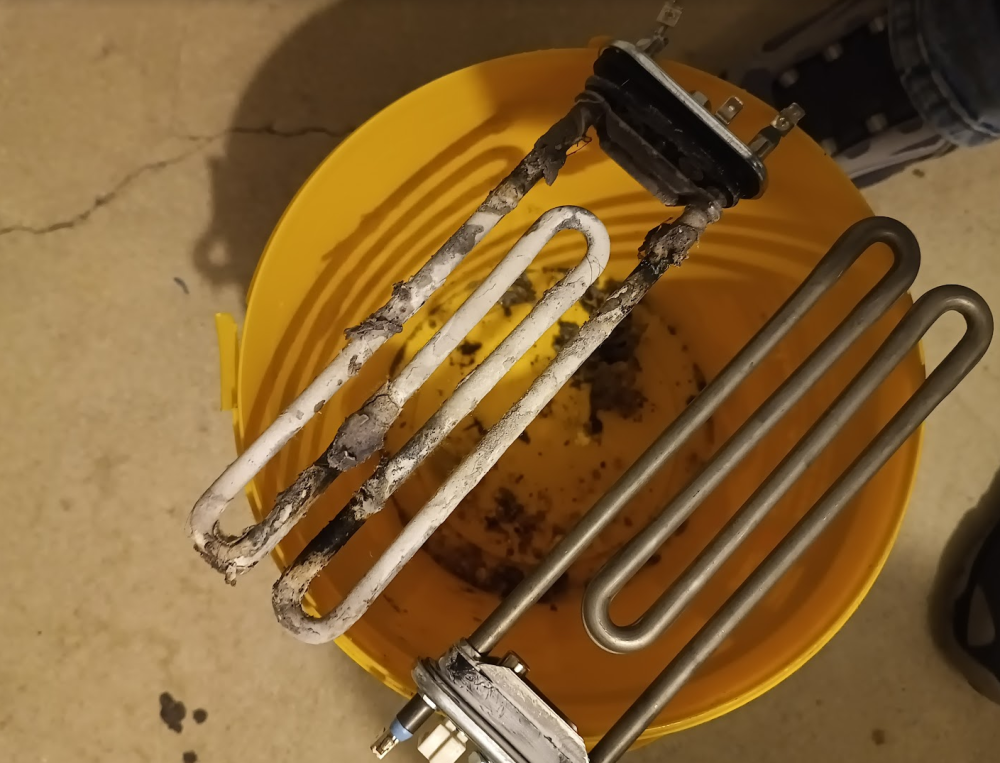
Broken washer-dryer story: I am using washer-dryer combo with an integrated heat-pump from AEG happily for number of years. Bought first one roughly 15 years ago, and when it died from overworking, I bought a new model. Recently, I was doing laundry and realized that towels are not as fluffy as they used to be. At first, I was thinking that there's a problem with the dryer part of the machine, as it's a pretty complicated device. Double-checked that, but the dryer and it's heat-pump was running okay. Since I am monitoring most of my appliances power consumption, I launched Grafana (https://powerforum.co.za/topic/2322-youdas-off-grid-lab/page/9/#comment-151001) in order to check for anomaly. You guess - it was there: In the past, the machine was having a huge power draw at the start of each cycle, in order to heat the water: Starting roughly 3 months ago, this part of power draw stopped showing: Okay, the issue was obvious - the machine was not heating the water, which usually means that the heating element is "kaput" and has to be changed. So I bought a spare-part and changed it to make the machine great again Autopsy identified that the old heating element was electrically interrupted, since it's resistance measurement was equal to infinity. Not only that the element was covered in limescale (which is pretty common) but this time there was a lot of fibre chunks too. It's clearly visible that the element burnout happened exactly in the spots that were covered(heat-isolated) the most: Following the successfull repair, I was thinking about two topics: 1) Why it took me so long to realize that there's something bad with the machine. 2) How to spot the issue ASAP in the future. As of 1) the answer is, that during summer and fall, the temperature of tap water was not that cold, so the detergent was still doing it's job partially. But when the winter arrived, the temperature of tap water has fallen rapidly and reached unsuitable level, which led to my late discovery of the issue. Well, completely other thing is that any machine should be able to identify such a basic failure by itself. But it did not. What a shame. Speaking of 2) I did a minor change to my existing automation script that is sending me PUSH notification every time the machine finishes the cycle: now the script is logging the highest power draw achieved during the cycle and this value is being attached to the aforementioned notification. With this information, I'll be able to see immediately that there was something wrong during the last cycle. Notification: Of course, I can add a rule that checks highest power draw achieved during the cycle and send me an alert if the value will be less than 2kW, for example. But you know - I am too lazy to do it, despite it's just one line of code, technically Youda



-
Hi @Lionel RUN In short: For that simple scenario, that you've described above, all you need is a wallbox that has "enable contact", "enable input contact" or "enable charge contact" input terminal. You will hook the dry contact from the BMS to this input terminal and program the BMS to close the dry contact once the SOC is above 75%, open once it's below 50%. AFAIK even the Victron BMV700 can do something like this. An example of a suitable wallbox is KEBA C-series: https://www.keba.com/file/downloads/e-mobility/KeContact_KCP20_30_ih_en.pdf Some other wallbox vendors are offering the same functionality for sure, just search for the key words above and then double-check with the seller. Information add on: Just like @JustinSchoeman mentioned, some wallboxes have JSON API, so you can control them programmatically over the LAN or WIFI. Common API functions are "set maximum charging current", "pause/resume charging", "report power" and "report energy". Of course, in order to use such API, you have to implement some kind of automation based on a Raspberry PI or PLC. Personally, I am using this solution, as you can check in Youdas LAB-thread, but for your use-case it would be an unnecessary overkill.

-
Another update from Youda's LAB: Like I mentioned a long-time ago, I'm offering free EV charging from my LAB's solar: https://powerforum.co.za/topic/2322-youdas-off-grid-lab/page/8/#comment-81049 https://powerforum.co.za/topic/2322-youdas-off-grid-lab/page/2/#comment-58507 Recently, I paved a small spot next to the driveway and moved the wallbox from it's original location to this new one. Charging is much more convenient now: Also, the wallbox is tied to Fibaro automation via JSON API, so it's power output can be controlled automatically, based on the state of the PV production. For the sake of simplicity the rule is that when it's sunny (and the battery has a decent charge) it offers 32 Amps while during the night it falls down to 10 Amps only. If needed, the main parameters can be set (or checked) via smartphone: Found out that each car model has a different charging-power curve. One interesting example here: Right now it's winter here, with tons of snow, so the PV is producing almost zero kWh/day. Luckily, EV drivers are aware of that Within few months the decent PV production will be back, so I assume that EV's will start to appear again. Youda


-
Hi @PierreJ I remember a lot of these issues with the batteries that were sold last year and with the batteries sold around January of this year too. Based on that I would say that your batteries might fall into the affected range too. For US3000C with the old chip, the fix is in the firmware 2.8 and newer. For US3000C with the new chip(check my previous posts on how to recognize them based on SN), the fix is in the firmware 1.7 and newer. Should you find older FW in your (or your client's) batteries, I would advise to email Pylontech support with the SN and they will send you back the newest ZIP firmware package together with BatteryView or FlashTool. Contrary to previous BIN packages the ZIP packages are pretty safe to flash, when combined with the new BV of FlashTool. PS: Funny thing is, that very old Pylontech batteries don't exhibit the issue, as they do not have enhanced CAN bus protocol implemented in their (ancient) firmware. Therefore, even if there is a bad voltage sample on the cell, there's no way to relay this information to the Victron GX.
-
SOLVED: Pylontech + Victron = High Cell Voltage Alarm Hi guys, the problem shown above is a specific issue that is affecting only the combination of Victron + Pylontech, when using CAN communication between the Victron GX device and the Pylontech's BMS. Root cause is something like this: Most of the inverter manufacturers are using original Pylontech BMS CANbus protocol implementation, that is quite limited on the information it can provide about the cells. It focuses on SOC, current control and alarms mainly. Victron was the first one (AFAIK) to implement enhanced version of the BMS CANbus protocol. The enhanced protocol is able to report information about the state of individual cells, which is great for diagnostics. For a shame, from time to time there's a voltage sampling error. Normally, this error is being eliminated by the BMS verification algorithm, so the battery as a whole is aware that it's just an error and stays calm. But when the enhanced protocol is used then the Victron GX device receives actual value (bad sample), will log it in the VRM, and might start to panic. That's the reason, why this issue is affecting Victron installations only (AFAIK). The issue is solved via Pylontech firmware update, where bad samples are automatically eliminated from being forwarded to Victron GX. Hope this helps, Youda
-
Yeah, in reality, both of these have a very similar effect. Let me just repeat that 53V is too much. Set your charger to 52,5V and that's it. No communication with the BMS necessary. In order to be precise: Normally, Pylontech BMS does NOT limit charging current. Yes, there is FET in the BMS input, but it's used as ON/OFF protective device only. The reason why you see that the charging current is going down is based purely on the fact that the battery is full and it's not accepting charge anymore. Lead-acid battery, without any BMS, has a very similar curve too. The only difference is that with the lead-acid the last stage of charging takes much longer, the amps curve is not so steep....and voltage levels per cell are different, of course: Example of practical implementation in a Mean Well charger: https://www.meanwell.com/newsInfo.aspx?c=5&i=946