Youda
Members
-
Joined
-
Last visited
Everything posted by Youda
-
The first lithium batteries for my solar were two built-to-order packs of Winston cells + BMS. With 20 kWh of the total capacity, they were able to power the whole house, including the oven and induction cooktop. I enjoyed to watch the flashing balancers in operation and liked the massive charging current that they have been able to accept. But, there was a couple of downsides too. One of them is that a single inox box with 10 kWh of LFP cells weights around 100 Kg. So it's impossible to move these boxes around by a single person. Also, how to efficiently store 3 or 4 of these, while keeping the cables as short as possible? So I made a list of nice-to-have features and started looking for a replacement: LFP, 48V 19" rack-mountable Better price per kWh - as Winstons LiFeYPo4 are one of the most expensive cells on the market Price per brick around 1000 USD - so I can buy a single brick whenever I need to, without saving money a year in advance With a standard LAN, RS232, RS485 or CAN BUS interface - not 3V UART Weight per brick around 30 Kg - in order to handle all the install/removal operations by myself Supplies must be widely in-stock all over the year - as I don't want to invest in a niche product that won't be available in the future I did my market research and found that Pylontech US3000, while not 100% perfect, is the best fit for me. There were couple of features that I really did not like, so I poked around for some time, trying to fit something better. But I had no luck. All the alternatives had some issues. For example, SinLion batteries were cheaper per kWh, but had a very poor suply chain. So far, US3000 works nicely and I feel that for me it was a good choice. Of course, there are some downsides that one has to take into account: 15 cells in series architecture makes Pylontech incompatible with most of the other LFP batts that are 16S. So you can't paralel them together. It's a vendor lock-in. Specsheet is a bit misleading when comes to "recommended" amps and charging voltages. Either you must have a compatible inverter with a BMS communication or be able to play with the settings a bit. Supplied 25mm2 cables are bit thin. While specs allow to stack 8 bricks together, it's a lot of cable joints and resistance. In practice, it's better to split the stack in two, especially if you want to push/pull more than 120A per 592Ah stack. Based on my experience, I would say that it's not just about the price per kWh, but there are other factors that come into play. For example, I would use a very different form-factor and a plastic sealed case for a yacht. Similarly, if I had to paralel the batteries with some older LFPs, I would stick to 16S.


-
Oh, 16 years would be so nice! 🤣 But I think that if they will survive for 10 years, it would be still okay.
-
Hmm, why not to fit 7 + 1/2 cell into a 24V LFP pack? There must be a way to do this....hold my beer....
-
Majority of the LFP batteries are built as 16S cells for a 48V pack or 4S for a 12V pack. Therefore 56.2V or 14.2V setting. And this setup works great, since it fits into a range of most solar chargers. For a shame, Pylontech opted for a non-standard 15S architecture of the pack and now we have to deal with it: It's a bit harder to finetune the charger for 15S. By removing that 1 cell from the 16S pack, manufacturer also removed a bit of voltage margin between fullycharged and overcharged states. You can't paralel 15S pack with a standard 16S pack. So, you are locked forever to buy from that same manufacturer. But that's the life
-
Do you have SolarPower app installed and connected already? If yes, post the actual screenshots, please.
-
100 days, cycled to 50% each day = 50 cycles on the meter.

-
Exactly!
-
Exactly. I think that most of the people at Pylontech don't even know how their products really operate. Which might be the reason why the documentation they provide to partnering vendors is so poor. The best charger for Pylontech would be the one that would pull all the states from the BMS and dynamically adjust charging current based on the info from the individual cells, like voltages, currents, temperatures. (Such detail is not available over CAN, only via RS485). But the complicated algorithms are prone to error and hard to finetune in the field. So, at the end of the day, just setting a nice flat C.C. voltage and checking the SOC from time to time is the best approach
-
@plonkster the easiest way to verify this is to charge the stack of US3000 bricks to 99% SOC, while looking at the BatteryView.exe stats. You'll notice that US3000 brick is declared as 99% charged when almost all the cells are at 3.480V (+- few mV) and the rest of the cells at 3.450V at least. When you check each brick in a stack, one by one, you will notice the exact same state: almost all the cells have 3.480V, while one or two have 3.450V or 3.470V. These lower voltage cells have a bigger capacity than the others, I assume. So, the voltage that balancers are targeting is 3.480V and the 3.450V is the second condition that must be met in order to report full charge. See the screenshots. Details of 1st brick when 99% charged: Summary for stack of 7 bricks: Some more info: Phantom BMS in the Pylontech US3000 is using one Texas Instruments BQ34Z100 along with a set of BQ779XX balancers. These chips are pretty clever and power-efficient. For example, the max balancing current is only 50mA per cell. You can set not only a static balancing voltage value, but a whole voltage range where the cells will be balanced. Once all the cells are within this range, these 50mA balancers will try to make them equal. The 50mA is a very tiny balancing current, so the BQ779XX directly controls the chargeFET and dischargeFET in order to protect the battery from over/under charge, since the balancers alone are not powerfull enough to stop the charger from killing the cells. BTW, you can test these FETs directly from US3000 CLI, they are named cFET and dFET there. Also, you can see in the CLI that the above Texas Instruments chipset is set to ChemID = 435 in case of US3000. Based on the above, I would say that in each installation of US3000, there might be a different "balancing voltage" observed. However, 3.450V is clearly the minimum voltage that each cell have to reach in order to declare a fullcharge. And since there's a lot of cells in the brick and even more in the stack, one has to set C.C. a bit higher in order to ensure that ALL the cells in the stack sucessfully passed the 3.450V and are equalized at some other, a bit higher voltage. Makes sense? In short, this BMS has awesome design, that ensures high energy efficiency and longevity at the same time. It's a way better gear then I expected, to be honest. Regs, Youda


-
Yes, this is a well-know behavior of Axpert when set to 05 PYL. Don't worry, the balancers will produce a bit more heat, but AFAIK nobody with Axpert set to 05 PYL experienced overvoltage alarm yet. On the other hand, I've seen cases where Axpert (with enabled RS485 communication to the Pylontech BMS) switched back to the grid too early during a discharge - once the battery was at 48V. So, just test your setup, how deep it will allow you to discharge the batteries. It should work till 45V or 10% SOC, whatever will come first. Then the Axpert should switch to grid. BTW: If you will force the Axpert to continue discharging the batteries, they will go into "sleep mode" once they will get down to 8% SOC and will be kept there for at least 10mins.
-
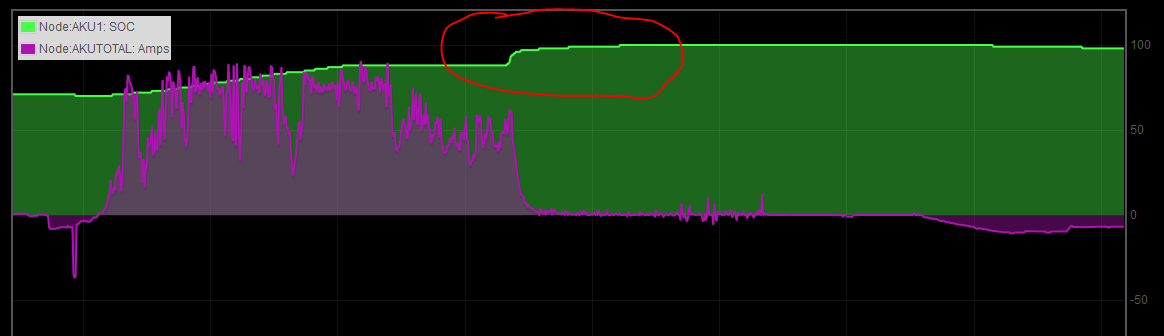
Once you connect to the battery via CLI, you can get a LOT of information on how it works internally. For example, a portion of this BMS is built around Texas Instruments bq34z100 chip, which is a nice piece of HW, I would say: https://www.ti.com/lit/ds/symlink/bq34z100.pdf https://www.ti.com/lit/ug/sluu904a/sluu904a.pdf One have to ensure that all the cells reached the balancing voltage, in order to be equalized. Once the voltage of the Pylontech battery reaches 52.5V all the balancers should be working already. So you don't need to keep that voltage up for longer than couple of minutes normally. And that is what inverters usually do. AFAIK, no inverter stops supplying current immediatelly when he reaches to the C.V. voltage, but he wants to see steady C.V. voltage for a minute or two, at least. Some smart inverters with BMS communication, might stop charging as soon as BMS would report 100% SOC. But since SOC is being calculated (estimated) by amphours, it's never 100% accurate. Therefore Pylontech BMS stops reporting SOC increments at roughly 88% despite the fact that bq34z100 is still counting amphours. Once all the cells reach balancing voltage, the Pylontech BMS starts to simulate a gradual increase of SOC from 88 to 100%. With some other, not-so-smart batteries and their BMS'es you will experience a similar step at the end of the charging, but it will be just one big clear jump, no smooth increments. Basically all of this is just a reset of BMS AmpHours counter. In short, when the cells reach their balancing voltage too quickly, most BMS'es will wait for 2 minutes and then reset their AmpHour counter and update the battery SOC value directly to 100% even if AmpHours counter did not reached the nominal capacity yet. For most of the LFP batteries, it jumps from 90 to 100% and it's okay. But if the above jump is huge, like from 50% to 100%, it actually means that the battery capacity is much lower (degraded) than what BMS was programmed for. Or, that AmpHours meter is seriously uncalibrated. So, charge Pylontech to 52.5V, maybe to 52.6V or so, watch for jumps and you will be okay

-
Hi @Muhammad Ahmed any of these can do what you are looking for: InfiniSolar Plus 5KW InfiniSolar E 5.5 InfiniSolar Super 4KW Stay away from InfiniSolar V. It won't work as you need. All of the above machines are being sold under the originial Voltronic's InfiniSolar brand name and also rebranded as MPP Solar MPI, Voltacon, Giant etc. Technically, they are all the same, the difference is only in price and level of support. The best support has MPP Solar, so I would advice to buy from them, if you don't have a local preffered supplier already. Personally, I'm using InfiniSolar Plus 5KW. It works really great, but it is an older design and has quite a big self-consumption of power. Therfore, I would suggest you to pick InfiniSolar E 5.5 which is newest model and should be a bit more efficient. It's also cheaper. Only drawback is that InfiniSolar E 5.5 can't work with multiple units in paralel - so the installation will be limited to a single inverter. Got it? Apart of the Inverter, you will also need a MODBUS card and SMART MODBUS METER. It has to be purchased separately. Please, read the manual first, in order to understand how blending works and how to wire it correctly. Especially the chapter 11 and the description of Grid-Tie with Backup II mode http://www.mppsolar.com/manual/MPI 5.5K HYBRID/5.5K hybrid inverter manual-20160817.pdf Regs, Youda

-
Hi @Muhammad Ahmed I've just replied to your personal message. BTW, this forum works pretty well, there's no need to post the same question under three different topics... Regs, Youda
-
How to charge your Pylontech US3000 and why From time to time, there's a discussion on Pylontech US2000/US3000 batteries and what is the best charging voltage for them. So, here's the answer based on my personal experience: C.C. = 52.5V C.V. = 52.0V Why: First of all, it's important to clarify what the term "charging voltage", sometimes referred as C.C. aka constant current, means. It's NOT the voltage that's being created by the charger and then applied to the battery terminals. In reality, the charger just pushes current into the battery, while constinuously measuring the voltage on the terminals. Once the voltage reading on the terminals is equal to the value that's set as charging voltage, the charger stops pushing current. Then, based on the selected charging profile, the charger goes in the next stage, like C.V. aka constant voltage, for example. If the C.C. voltage is set too high, the charger will continue to push the current in the batteries for too long. The voltage will rise above the safe level for that given battery chemistry and the cells will overcharge, swell and take damage. In order to protect the cells, US3000 has a balancer for each individual cell and a MOSFET for each brick. Once the voltage of the individual cell goes above 3.480V, the balancer will kick-in and start to burn the excessive current, turning the electric energy into heat. That's the way how US3000 ensures that at the end of charging all the cells have equal voltage, in other words "are balanced". Of course, cell balancers are not powerfull enough to burn all the energy that might be potentially pushed by the charger. That's the reason why there's a MOSFET in the battery pack. If all the balancers are already burning energy and the charger is still pushing energy, then the MOSFET will limit the current in order to protect the pack. In the specsheet, Pylontech recommend to set the charging voltage somewhere between the 52.5V to 53.5V: There's 15 LFP cells in each US3000 pack and balancers are starting at voltage 3.480V per cell: 15 x 3.480V = 52.2V So, the setting C.C. to 52.5V (52.2V + 0.3V) ensures that all the balancers will operate correctly and at the same time, they won't be overloaded. If your solar charger is actively communicating with the US3000 via CAN bus or RS485, then he can read the battery voltage via this digital communication. Therefore, it does not matter how long the battery-to-charger cables are and whether the charger itself is measuring accurate or not. The voltage is measured by the BMS and communicated digitally. In that case, the best is to set C.C. to 52.5V. If your solar charger does NOT utilize BMS comunication, then he has to rely on his own voltage measurements. In that case, one has to take into account the length of the battery-to-charger cables, all the joints resistance and the associated voltage drop. Therefore, it might be necessary to adjust C.C. to a higher value, like 52.6V or 52.7V for example. There's nothing you can break if you will experiment and raise the C.C. slowly in order to find the best value for your setup. Just be sure to stay away from the maximum allowed voltage as described in the specsheet. While the specsheet allows charging voltage up to 53.5V, it's not a good idea: The higher voltage puts a higher load the balancers, mosfet and on the cells too. All the excessive energy is wasted and turned into heat. And the heat is generally not good for the cells, of course. Second reason, why setting the C.C. to the maximum is not a good choice is the fact, that during the charging there might be occasional spikes of power that will go to the battery. Sometimes these spikes are caused by the charger algorithm itself, sometimes they are caused by a changing light conditions or by turning ON/OFF bigger loads. Once this happens during the charging, and the battery is already at it's 53.5V maximum, the BMS will sense the overvoltage and throws an error. If not corrected immediatelly, it will shutdown the battery. How to set C.V. voltage: The LFP cells used in US3000 have a resting voltage 3.2V per cell. Technically, there's no "float" voltage that you need to apply to LFP, like is common in the Lead-Acid world. LFP cells are best to be charged and then disconnected. This is based on the fact that you can overcharge and damage a LFP cell even with 100mA of current, if applied for a long time. On the other hand, in solar applications it's impossible to disconnect the batteries from inverter once fully charged, since the batteries are acting as an energy buffer 24x7. Therefore, it's good to set C.V. to a value that will supply just a tiny amount of current into the batteries in order to keep them topped, and live with the fact that balancers will kick-in from time to time and will waste some energy by turning it into heat. With some other types of batteries, where balancers are visible, you can see this state - LED on each balancer blinks randomly, once per second or two. It's like a heartbeat. For a shame, Pylons don't have this direct visibility and you have to go into CLI, if you want to see what's going on inside the battery. Based on that, I'm personally using C.V. = 52V, so the balancers are not wasting excessive amounts of energy, and operate only when really needed. US3000 battery: Phantom BMS sitting inside a Pylontech battery: CLI info for a stack of 8xUS3000: pylon_debug>pwrsys Power System Information --------------------------------- System is discharging Total Num : 8 Present Num : 8 Sleep Num : 0 System Volt : 49756 mV System Curr : -17724 mA System RC : 558692 mAH System FCC : 588892 mAH System SOC : 94 % System SOH : 100 % Highest voltage : 3319 mV Average voltage : 3317 mV Lowest voltage : 3315 mV Highest temperature : 22000 mC Average temperature : 21500 mC Lowest temperature : 20000 mC Recommend chg voltage : 53250 mV Recommend dsg voltage : 47000 mV Recommend chg current : 118400 mA Recommend dsg current : -296000 mA Command completed successfully Note one interesting information: The stack has 592Ah of nominal capacity, but the recommended charging current, advertised by the BMS, is 118A = C/5. Recommended discharging current, advertised by the BMS, is 296A = C/2. No matter what values (much bigger) are being promoted in the specsheet, I would say that the battery designer had a very good reason why he hardcoded C/5 and C/2 into the BMS as recommended Amps. CLI info on the 1st brick: pylon_debug>info Device address : 1 Manufacturer : Pylon Device name : US3000A Board version : PHANTOMSAV10R03 Main Soft version : B65.6 Soft version : V1.3 Boot version : V1.4 Comm version : V2.0 Release Date : 18-09-12 Barcode : PPTAH02 Specification : 48V/74AH Cell Number : 15 Max Dischg Curr : -100000mA Max Charge Curr : 102000mA EPONPort rate : 1200 Console Port rate : 115200 Command completed successfully State of Health for 15 cells in the 1st brick: pylon_debug>soh Power 1 Battery Voltage SOHCount SOHStatus 0 3317 0 Normal 1 3317 0 Normal 2 3318 0 Normal 3 3317 0 Normal 4 3317 0 Normal 5 3318 0 Normal 6 3318 0 Normal 7 3319 0 Normal 8 3316 0 Normal 9 3316 0 Normal 10 3317 0 Normal 11 3318 0 Normal 12 3319 0 Normal 13 3317 0 Normal 14 3318 0 Normal Command completed successfully Statistics for the oldest brick in a stack of 8: pylon_debug>stat 8 Device address 8 Data Items : 0 HisData Items : 2048 MiscData Items : 122 Charge Cnt. : 0 Discharge Cnt. : 3180 Charge Times : 31004 Status Cnt. : 3179 Idle Times : 41151 COC Times : 0 DOC Times : 0 COCA Times : 0 DOCA Times : 0 SC Times : 0 Bat OV Times : 0 Bat HV Times : 0 Bat LV Times : 0 Bat UV Times : 0 Bat SLP Times : 0 Pwr OV Times : 0 Pwr HV Times : 0 Pwr LV Times : 0 Pwr UV Times : 0 Pwr SLP Times : 0 COT Times : 0 CUT Times : 0 DOT Times : 0 DUT Times : 0 CHT Times : 0 CLT Times : 0 DHT Times : 0 DLT Times : 0 Shut Times : 1 Reset Times : 14 RV Times : 0 Input OV Times : 0 SOH Times : 0 BMICERR Times : 0 CYCLE Times : 62 Pwr Percent : 95 Pwr Coulomb : 254001600 Dsg Cap : 4614627 [email protected] Cnt : 0 [email protected] Cnt : 0 HT Cnt : 0 LT Cnt : 0 LV Cnt : 0 LifeWarn Times : 0 LifeAlarm Times : 0 Command completed successfully Note the Cycle Times, this brick has 62 full cycles on it's meter. One full cycle is accounted whenever you discharge a full nominal capacity from the pack. Hope the above info will help someone to understand how to treat these batteries. Youda


-
Not really: - You can set your CC voltage anywhere between 52.5V and 53.5V The lower value is better, as I explained above. This gives you nice window to calibrate the C.C. according to the accuracy of your charger, resistance of the cables etc. - The BMS measures the voltages directly on the internal side of the battery terminals of each brick and then directly on each cell. Therefore a voltage drop on the battery cable, caused by a huge load, does not mess with the measurements.
-
1) Install SolarPower application on your laptop and connect it to the InfiniSolar via RS232 or USB: 2) If you have "SNMP WebPro Card" in the "intelligent slot" of the Infini then you can connect to the inverter directly, via LAN and a Web browser.

-
Just set 52.5V and you're okay. I wanted to explain what's behind all these numbers therefore it looks a bit complicated. BTW, speaking of "." vs "," I have "." on my numeric keypad, therefore I stick to it.
-
Don't do it. The internal MOSFET in the Pylontech will start to throttle the charging current once the voltage will be too high in order to protect the battery.Balencers will burn all the excessive energy and produce heat. But since microcare won't stop charging, the battery will disconnect. 53.5V
-
Hi guys, @Jaco de Jongh is right: Pylontech US3000 should be charged to 52.5 at least. Details: Why 52.5V? Because the internal balancers kick-in at 3.480V per cell which translates to 52.2V. The 0.3V difference is the space that allows balancers to operate safely. If you charge to 52V only (3.466V per cell) then the balancers won't start and the pack will become ubalanced over a long period of time. If you will charge to 53.5V, then the balancers will have to burn much more energy and the temperature of the pack will rise. But still okay. If you will charge to 53.6V, then the internal overvoltage protection will throw an error and the battery will disconnect itself. Beware, that even if you set your charger to 53.5V, there still will be a short spikes of power that will push the voltage over, based on the changing light conditions. Therefore, using the upper voltage limit is not a good idea. By the way, these spikes of power are the reason why in the past you've experienced 100% SOC even when charging to 52V only. Looks like the light conditions has changed since, and now there's not enough power spikes to push the voltage over and start the balancers. @Ironman if you want to know more about Pylontechs, just check my LAB, the link is in my signature.
-
Hi @Wilfred the above is a known bug (https://powerforum.co.za/topic/3784-axpert-king-cant-stop-it-charging-from-utility/?tab=comments#comment-58281) I met @vit couple of weeks ago and he's still waiting for a new firmware that should fix it (possibly). I will ask him to post an update once the FW will be applied.
-
A friend of mine is using this setup to power his workshop, including all the 3-phase machines and tools. The setup produces nice and clean 3-phase power with the correct phase-shift between the phases. The grid is not needed for the start, you can use this even when you're completely offgrid. Works with a 1-phase loads too, it's capable of supporting assymetrical phase load. BTW: In my own setup, I'm using a different gear, three InfiniSolar inverters working in parallel in a 1-phase 15KW system.
-
Okay, then the cheapest solution is the Axpert King operated in the SUB mode. Roughly 5kWh of lithium batteries is a good choice, since in the SUB mode the batteries are not being discharged but are serving just as a buffer and UPS. With addition of ICC, one can set the system to allow discharge of the batteries to a certain SOC and then activate the "grid support". One Axpert King delivers up to 5kW of AC power (solar only or solar+grid). If you need more power, then combine two or more of these units into a parallel system.
-
Hi @Jaco de Jongh "True Hybrid Axpert" is a hoax. There's nothing like that. While some Axperts are capable of feeding energy spikes back to the grid when in Line Mode, it's much more a design flaw than a desired functionality. It's not meant for energy export and it can't be controlled, limited or calibrated in the GUI. Aerox Inverex 5.2 is the only OEM variant that's capable of a controlled energy export. The only "True Hybrid" from Voltronic Power is InfiniSolar product line. Controllable export/import from the grid. Certified by the grid authorities across the globe as a hybrid machine. So, the valid question would be - what is your friend trying to accomplish? For a lot of users, Axpert King is the best choice for an affordable price. It's not hybrid, but thanks to it's AC-DC-AC architecture, it can solve a lot of tasks where you would have to use a true hybrid in the past. If your friend is looking for a cheapest machine that can export energy to the grid then InfiniSolar might be the choice. From other affordable brands, GoodWe and SolaX are popular too. Both are true hybrids. Voltronic Power Inverters Specs enclosed:


-
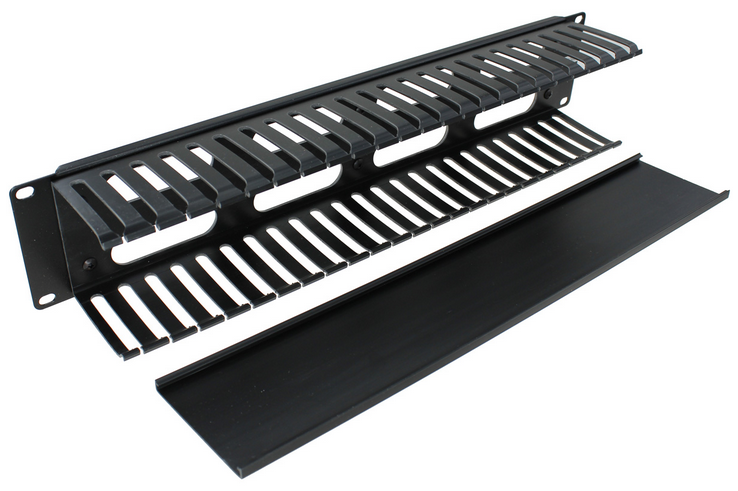
Nice one! The most common issue is thermals. These glass-door cabinets should be used mainly for the networking equipment. Yes, some guys like to put their servers behind a glass, but for a proper cold-aisle cooling the correct doors are those made of perforated sheet metal. For a couple of solar chargers and inverter a glass doors are still okay. Just be sure to allow hot/cold air to freely escape/enter the cabinet. Do not mount anything directly on the walls, rear or front doors. Do not slide front vertical rails too deep in the rack. If you do, then a standard 19" equipment won't fit in. Most of the rack cabinets have 4 vertical rails only. If you want to combine standard 19" equipment together with some non-standard gear, it's a good idea to get additional two "42U vertical rails" and mount them in middle of the cabinet's depth in order to support inverters, for example. Do not put anything directly on the cabinet's floor. Use a shelf and leave some free space for airflow, cables and easy maintenance access. For holding some super-heavy stuff, like the batteries, a metal box sitting on top of APC UPS rails is much stronger than a standard 19" shelf. Fuses, breakers and other stuff can be mounted on DIN rails, attached to the cheap 2U/3U blanking panels. Cables stored in the finger ducts. Keep in mind that all the wirelles stuff might experience a reduced range when locked in this nice and grounded Faraday's cage. Not aplicable in your case, but I have to say it: The 19" rack-mount batteries is the best option here. Like Pylontech, Sinlion, BYD. For a shame, there's not much rack-mount inverters available on the market. And on top of it, they require a loud forced cooling. I'm looking forward to see the new "mechanical room" Good luck!


-
Not really. Pylontech UP2500 bricks are meant to be connected in parallel, in order to serve in a 24V DC systems. If you are looking for a high-voltage battery, then the correct product is H48050. Has 48V per brick and can be connected in series. Just keep in mind that H48050 stack needs the external controller SC0500 in order to operate.