


artful_dodger
Members
-
Joined
-
-
-
Any chance you have a picture of your setup?
-
I had a quick look at what Ant and JBD are. Looks quite complicated from an installation/setup point of view?
-
Hi everyone. A short while back, after a typical JHB afternoon thunderstorm, 3 of my 4 Narada batteries stopped reporting SOC to solar assistant (and one of my two Axperts died as well). After some digging I found the supposedly official Narada BMS software and checked each battery to confirm what was going on. I get a "no communication" message on each of the three suspected broken units. The 4th reports data as per solar assistant. So I assume the BMS got fried in the storm? Is such a thing repairable and if so, by whom? Thanks
-
This morning I turned the battery back on to show how with just the smallest charge input (solar input at 7.05am) and the battery will in a very short space of time report 100% SOC.
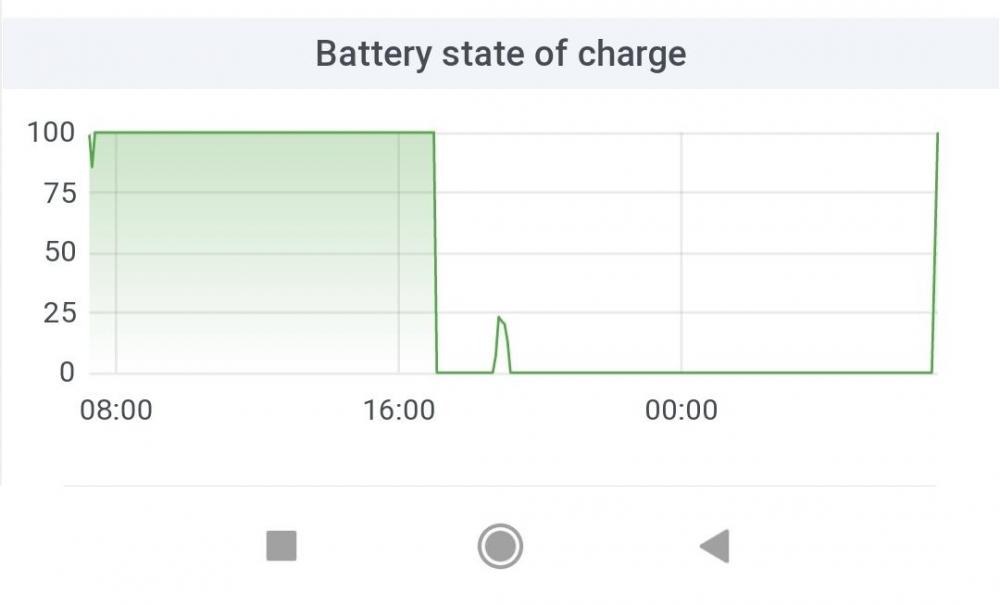 Hi all. I'm running two Axpert King inverters in parallel with a single 100ah Narada lithium battery. Have been using Solar Assistant to monitor the setup, including SOC from the Narada. I have recently experienced my battery being fully charged and instantly dropping to 0% SOC. This is confirmed by the indicator lights on the front of the Narada so it's not a reporting issue in Solar Assistant, I don't think. Is my battery dead? Any thoughts would be appreciated.
 Are you using sonoff devices alongside ICC power management? And if so, what sort of circuits do you intend controlling with those?Any movement on the Narada BMS support?Who was your supplier?Exactly right. Sorry I should have been clear on that in my previous post.I put the firmware on a USB drive, plugged the OTG cable into the port on the inverter, then plugged in the USB drive into the other end of the OTG. Then went into the menu item specified in the inverter manual for updating firmware by USB (can't remember now exactly where that is). Once I confirmed my selection the rest just happened. Was quite painless.You can do it via the USB port you just need an OTG cable. Worked a treat with mine after a lot of frustration with the other ports and cablesCool. So it sounds like you got ICC before the days of the cloud app existing. You will need to contact someone about that. All I can say is that I dealt with Johan and had very good support...but all of that ICC stuff doesn't seem to be something I'd like to get involved in. On the battery side ideally you want some external battery monitor that ICC can piggy back on rather than using the inverters inbuilt battery monitor which, especially for lithium batteries, is completely useless. I have a Narada lithium battery and use the ICC cable to plug straight into the Pi. You're unlikely to get data going from both inverters to your Pi, or at least I can't manage that. Don't feel alone re your homework. I spent years researching on and off on this forum before pulling the trigger, then basically had to forget everything and learn again on the fly while the system was running. I'm no expert on the settings, so I won't comment on that part of your post. One of the far more knowledgeable people will do that, no doubt.Might I ask who did your install? What batteries are you using? Emoncms is the cloud hosting that gives you a view into the data provided by ICC. If you bought ICC you should have received Emoncms login details along with some API settings to send the data?If you have the feed working to EmonCMS is it not possible to feed same into the ICC database? Anyway, if you could share how you went about that it would be great? Only getting data from one inverter is a bit frustrating.


