


RhysMcW
Members
-
Joined
-
Last visited
Everything posted by RhysMcW
-
it's from 2021.9 that they introduced the new total_increasing for the state_class
-
@Sc00bs did you come right with this? I notice you have state_class, with an underscore, mine does not have the underscore, but that is because on the Inverter_Monitor_Publish flow in the "Assemble Config" node there is the following line to set the state_class payload for MQTT - it references "stateclass", with no underscore, in msg "state_class": msg.stateclass, so check your "Assemble Config" node to see if your's is like that and if so remove the underscore in your Energy change node(s).

-
I tried the one you mention from Micro Robotics but I had intermittent results I'm using this one with no issues, running cat5e about 18m to adapter in my NUC https://www.robotics.org.za/RS485-3P?search=485
-
Hi @Eksteen Welcome to the forum, there's plenty great information around... I'm not entirely sure how the inverter will/won't work with no batteries and no essential load but I guess it should still be able to feed back to the non-essential loads with the PV produced, if setup correctly... what firmware is your inverter running? post pics of the flow chart and the 6 block displays post a pic of your system mode settings (timers, zero export etc display) or if you're on v419 then the Workmode 2 screen
-
it's not so much the method of writing 2-byte registers, that I can see, it's the format the inverter will accept the new date/time that I think is the issue. I have tried so many variations now I've lost track of what I've tried so given up for now, hoping someone else has a look and finds a solution.
-
In the new "Energy" settings in HA there is the Grid consumption bit where you can add entities, I saw my BNETA power monitor plugs were there so I had a look in InfluxDB at those and see they send last_reset, in what looks like a number that is just the date and time. It looks like HA then adds a column called "last_reset_str" last_reset last_reset_str 202011251456369984.00 -> 2020-11-25T14:56:37+00:00 I've tried using the "J: expression" in the change node to set the value. I've tried the following expressions (with - > being the resulting value from the expression) $now('[Y0001][M01][D01]000000000.00') -> "20210805000000000.00" $string($now('[Y0001][M01][D01]000000000.00')) -> "20210805000000000.00" $number($now('[Y0001][M01][D01]000000000.00')) -> 20210805000000000 (can't seem to get the .00 decimal using the expression unless it is a string) If I use the debug node to see the data going to MQTT I can see the relevant values but HA seems to be ignoring/disregarding them.


-
I think you're correct, not sure how to do so yet...
-
I am successfully writing register 243 via the NR modbus and the RS485-USB adapter connected to my SunSynk. I have a Node Red flow that changes the setting based on conditions during the day and it's all working, so the register is R/W.
-
Has anyone tried setting the time on the inverter using the modbus connection? I've done a NR flow to get the current date/time from the inverter and compare it to the current date/time, on my HA box, and if there is more than 10 seconds difference then I want to set the date/time on the inverter. The registers are 22,23 & 24 which are 2-byte registers. I can get the date/time fine in NR but I can't seem to get the inverter time set. Does anyone know how you're supposed to setup the payload for sending to the inverter? Here's my current function code for setting up the house/minute for register 24 which the inverter seems to be ignoring as the hour/minute is not getting set. (msg.minutes & msg.seconds are setup in a function prior to this one) function byteArrayToLong(byteArray) { var b_value = 0; for ( var i = 0; i <= byteArray.length - 1; i++) { b_value = (b_value * 256) + byteArray[i]; } return b_value; } msg.payload = { 'value': [byteArrayToLong([msg.minutes,msg.seconds])], 'fc': 16, 'unitid': 1, 'address': 24, 'quantity': 1 }; return msg; which results in the following payload being sent to the ModBusWrite flow, via a link-in/out "payload": { "value": [ 11318 ], "fc": 16, "unitid": 1, "address": 24, "quantity": 1 }
-
that looks like the CT is not in the correct location. Your flow diagram, showing the locations of grid, switch over etc, shows the switch over before both the non-essential and essential load DBs, thereby implying that either the grid or the inverter would supply to both DBs, thereby making both DBs essential load if change over is on inverter feed or both DBs non-essential if change over is on grid feed. My setup has the grid in to the non-essential DB then on to a change over switch at the essential load DB so I can switch the essential load DB to get power from either the inverter or the grid. The CT needs to be on the live wire between the grid and the non-essential load DB, thereby measuring all current drawn from the grid.

-
yep, looks like you are correct. I got the new 419 and if I change the time value in the top left field, start time for 1, then the bottom right field, end time for 6, updates with the same value.
-
the pre-paid meter would only charge for pushing back if the inverter is pushing back and the interter would only push back it was configured to do so, or possibly outdated firmware... what firmware is your inverter running? is the CT coil installed and working correctly? - post pics of the flow chart and the 6 block displays post a pic of your system mode settings (timers, zero export etc display)
-
I see the new inverter firmware version 419 has start and end times for the system mode times. Does anyone know the new modbus registers? Is there an updated document available perhaps?
-
those are correct, the NR flows from this topic have all that except the generator load and essential load, but those registers and calculations are correct (I've added the essential load calc to my NR flow)
-
Note if you're planning on getting some of these and flashing with Tasmota. I bought some wanting to flash Tasmota onto them, not wanting them to connect via cloud, to integrate with my Home Assistant setup but discovered they have the WB2S chip in them which is not compatible with Tasmota.
-
@Gareth_ZA - please also post a photo of your Flow Chart screen and also the screen with the 6 blocks showing the various values
-
@Gareth_ZA then you're still pushing back to the grid based on settings... please post a photo of your System Mode setup screen, where the times, power, Zero Export etc are.
-
correct, as long as you have the CT coil installed correctly and working as that's what the Sunsynk uses to detect whether it's pushing past the CT to the grid and if so then throttle back the push.
-
I don't think a 24v 3k Axpert and a 48v 3k Plus Infinisolar are in the same class, new Infinisolar 3k Plus are around R15k... My price is negotiable, but obviously not wanting to just about give it away...
-
I believe most current pre-paid meters will "charge" you if you export, but that's because they're just seeing current flow and not direction of flow... As long as you have the CT installed correctly then the inverter will not push current past the CT to the grid but will, settings dependant, push power to the non-essential loads like geyser, stove etc. Keep zero export set but 20w may be a little low, you'll likely still end up with some push back to the grid as the inverter readjusts the current pushing to non-essential loads. I have mine at 60w and it seems to be working, with only the occasional very brief negative reading of a few watts so probably not really noticeable amount of pre-paid "charging" extra...
-
Thanks @Bloubul7, got it writing and reading now, see the context/global/global.json file now with the values
-
I must just be missing something but having spent a good few hours looking at it, it's time to ask... Part of the NR flows @Bloubul7 put together is the dashboards, which have buttons to save, and read, default and loadshedding settings to/from files, to then potentially use to write to the inverter. I've found reference to file names like "DS_SoC_Zone1" but I can't seem to get the files saved to disk, and therefore cannot read from them. When I click the buttons on the dashboard to save nothing seems to happen, certainly don't get any files saved on the NUC. I'm not sure where the files would write to but have searched the entire disk within a SSH shell and don't find any files but those names. I have all the flows enabled except the ModBusWrite flow as I don't want anything written back to the inverter yet. An anyone point me to something I need to do/change?
-
@Achmat between this topic started by @Bloubul7 and the one started by @Sc00bs, I managed to get my inverter data into my Home Assistant. For Home Assistant you can use a Pi but I'd recommend an Intel NUC as it has significantly more power than the Pi. With HA you will need Node Red and the MQTT integration, among others as you need - https://www.home-assistant.io/. To get the data from your Sunsynk you'll need a RS485-USB adapter, I'm using the following one https://www.robotics.org.za/RS485-3P?search=rs485 Don't go for the R30 one they have, while I did get data it was a little flaky, as others have commented too... You can get the Node Red flows that deal with getting the data from the inverter, via the RS485 adapter, and publish them to InfluxDB and MQTT (so you can use the data in HA) from the GitHub @jacauc setup - https://github.com/jacauc/SunSynk-NodeRed As for getting the data from Solarman into InfluxDB, there probably is a way but I don't know how off-hand...
-
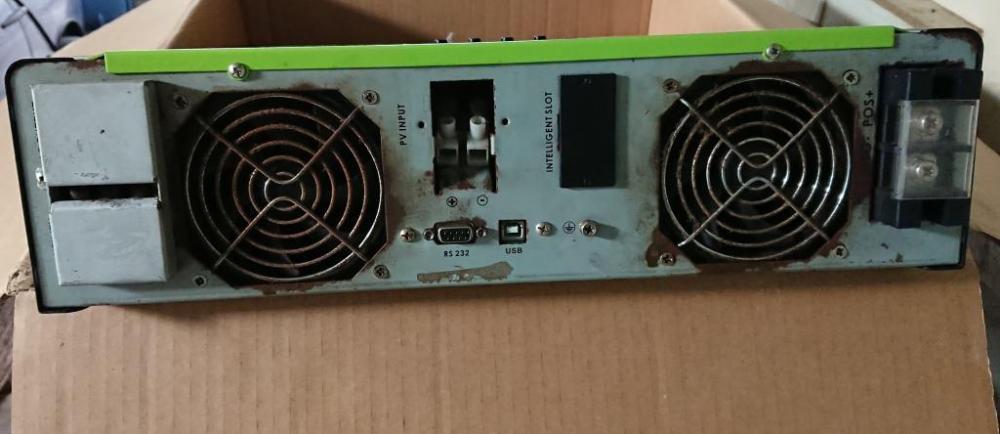
I've just upgraded my inverter so now have the Infinisolar 3kW Plus (Mecer branded) available for sale. It was originally purchased in in December 2015 and has the main board replaced my Mustek about 16 months ago. Unfortunately they also replaced the cooling fans at the bottom with lower spec models that do not push the same volume of air as the originals, so the inverter does tend to get hot in summer. They refused to correct it... I had rigged up a fan on a timer to run 20 minutes every hour which seemed to help. I'm asking R6000 (or nearest offer) I'm in Strand, Western Cape.


-
I've really been enjoying being able to get live data from the inverter... I finally got to look at the NodeRed dashboards that @Bloubul7 put together. I noticed that on the System Settings dashboard that all seemed to pull correctly from the inverter except for the Grid Charge and Use Timer buttons, which remained off even though there should've been some on. Digging into it a little and adding some debugs I noticed that, for the Grid charge settings, I was getting a return value of 5 for those on my actual inverter settings were on and a value of 4 for those that were off. I've changed the function nodes "For_GC_Z(1-6)" line 3 from "if (a == 1 ) {" to now be "if (a == 1 || a == 5) {" and now the System Settings dashboard buttons for the Grid Charge all show as per my inverter settings. I left in the check for value of 1 just in case things change and also useful if this gets into the flow code on @jacauc GitHub and value 1 is still valid for some/most. For the use timer I was getting a value of 255, which corresponds to the "sunsynk_modbus - no chinese.docx" (thanks @Sc00bs) for address 248 which shows "0 Disable" and "0xFF enable", so I've changed the function to check for a value of 255 instead of 1. Now the Use Timer button on the dashboard also shows as on...


