


CarlT
Members
-
Joined
-
Last visited
Everything posted by CarlT
-
The Jean Muller fuses are nice, but it seems the local agents don't import them. Everyone uses the AC fuses! I am cautious by nature, so in my list of priorities, first is the safety of my family, followed by the protection of the equipment.
-
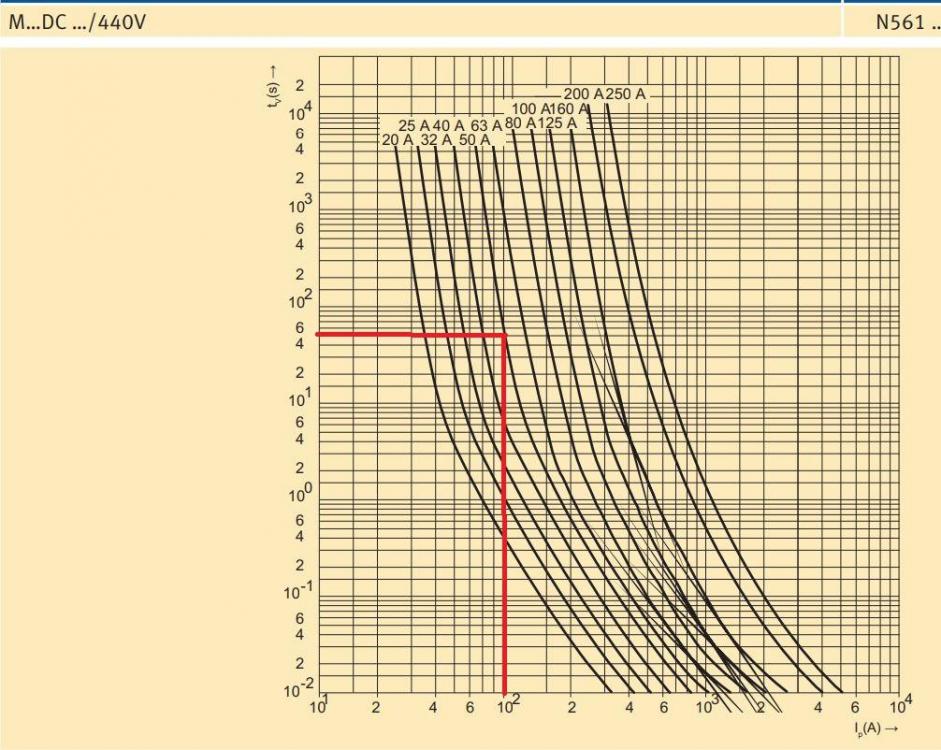
The problem is slightly more complex than most people realise. Unfortunately it isn't as easy as saying "pick a fuse that will blow at X amps". Here is a picture of the current-time characteristics from one of the Jean Muller DC fuses: So if we agree that 100A for 15s is the limit that we don't want to exceed, then we need to choose from the fuse values that fit inside the box I drew (time on the Y-axis, current on the X-axis, graph is logarithmic). But we need to be careful that the fuse we choose don't blow too quickly. For example, if we operate at the recommended currents of 37A (for the US3000), we can't use the 20A fuse, since it will blow at around 11s. The 100A fuse might last indefinitely at 37A, and even last 10 000s at 100A, so that might not work. The 40A or 50A fuse might be a good compromise.
-
The short-time current rating of cables are probably orders of magnitude higher than for the electronics. Yes, the Pylontech is designed to switch itself off on high current (100A for 15s if I'm not mistaken), but why take the chance? The Pylontech is significantly more expensive than most anything else in the setup. Therefore I want to protect it. From Pylontech's datasheets, the US2000 has a recommended charge/discharge current of 25A and a max charge/discharge current of 50A, while the US3000 has 37A and 74A respectively. Ideally your fuse will blow before you reach these maximums.
-
The transmitters only have 3 settings, namely 6s, 12s and 18s. As far as I can see, there is nowhere else to adjust the sampling frequency.
-
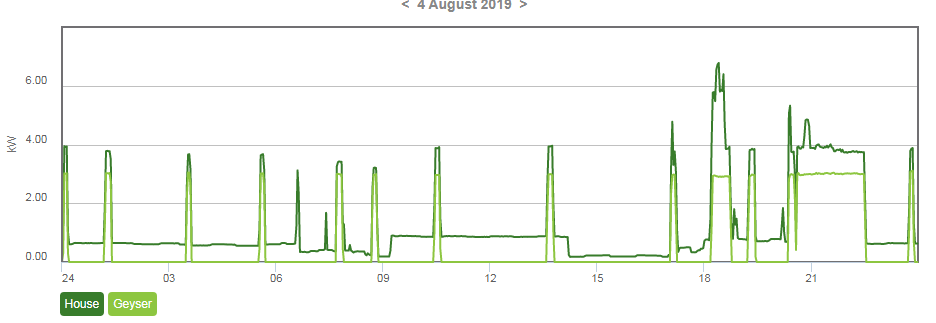
I use an Efergy meter to monitor my house energy usage, as well as my geyser energy usage. Here is what the usage was for a certain day (4 August): The geyser (in light green), switches on periodically to maintain temperature. It essentially goes from 0W to 3kW when doing this, as is expected. On 6 August we had a power failure due to stolen copper, and I stayed at home that day to put the lights on my inverter (no solar, just battery backup). During this process, I did some new wiring in the main DB, but didn't touch the geysers wiring at all. Yet since then, this is what I'm seeing: As you can see, the geyser is now going to some intermediate value between 0W and 3kW. What can be the cause of this?

-
250A is way too much for use with a Pylontech. The idea of a fuse is to blow long before any electronics get damaged.
-
My one concern is that most of the Mersen and Jean Muller fuses available seem to be AC fuses without any proper DC rating to them. This is a big no-no for me.
-
Something to be aware of. If you are using a 25A breaker and expecting it to break at 25A, you might be in for a surprise. There is some variation, but basically, it comes down to the following: Curve B CB's will break at 3-5 times the rated current, while curve C CB's will break at 5-10 times the rated current. There are CB's with other curves (D, K, Z), but B and C are the most common. Regarding the cable size, SANS 10142 defines a de-rating is required, depending on the installation method. If your GP wire runs in conduit in a roof, you need to de-rate by 80% or so. If there are additional wires running in the same conduit, you have to de-rate some more. If it was me, I wouldn't mess around. The cost is negligible for such a short distance. Just put in 6mm or even 10mm wire. In fact, I'm busy with my install now, and will have GP wire running in conduit in the roof feeding my Multiplus II (32A input rating). To this end I will use 10mm, just to be safe.
-
Something else to consider is the current vs time curves of the fuse. Do not expect a 100A fuse to blow at 100A, especially not immediately. For my Pylontech, coupled with my MP II, I will probably use 50A DC fuses. The ones I'm looking at have the correct curves and should blow before the BMS needs to switch off the battery due to high current.
-
Here is the Jean Muller DC rated NH-link fuses: https://www.jeanmueller.de/produkte/jean/en_GB/N_DC/Fuse-links for DC applications/index.xhtml Apparently Segen Solar do have them (or can order them). Just ask your local solar shop to order the correct fuses from Segen.
-
I don't have the link now, but there are definitely DC fuses on the Jean Muller website. I also contacted Segen Solar, which is (one of ?) the importer of Jean Muller. They said you can ask your local shop to order the DC fuses from them. Not sure about the price or lead time. I also agree that if no DC data exist, do not use the fuse for DC. Littlefuse has an excellent whitepaper on fuses.
-
I've had my 3000VA MP II and US3000 Pylontech since March. Thus far I have managed to hang the inverter and the new DB. I'm installing as a UPS at the moment, so no solar. But what is taking time is the fact that the DB where the inverter and essential loads will be wired into are physically separated from the main DB. Therefore I need to do some re-wiring of the house to get everything working.
-
Nice. I hope your install goes quicker than mine!
-
-
Thanks for all the replies. Unfortunately, a cold took hold of me, so I wasn't able to do any of the work I wanted to do. Since I couldn't do any physical work, I spent time reading. I came across the following on page 9 of the Multiplus II manual (old manual): "The AC input must be protected by a fuse or magnetic circuit breaker rated at 32A or less". The commonly used CB's are usually thermal or thermal-magnetic. Why do they explicitly state that it needs to be a magnetic CB?
-
Thanks. From the 3D pdf, I measured around M5, but this helps a lot.
-
What size are the battery cable studs on the Multiplus II? And are the nuts included in the packaging? I'm sitting at work, so can't confirm. Also can't find specifics on the web. I want to buy battery cables this afternoon (together with lugs), and won't be able to go home first to check.
-
There is space for 2 of those busbar holders. But if you can find the correct busbar (with screw terminals), they can be added to that holder. There is space for four clip in screw terminals for N and PE. Joburg water damaged my fibre line, so I am a bit limited in my internet at home. I'll see if I can upload some more pictures tomorrow from work.
-
Here are some photos: Busbar close-up (note the N and PE indicators): I can't upload more photos. It can be removed and moved to the top of the DB as well.


-
I bought it. Very nice. Now I would like to get some additional busbars that fit in it. EM doesn't seem to have all of the accessories. Don't really know where to look for them.
-
Thanks! I just want to build on it. For the record, there are ongoing discussions on the Victron Community about Victron possibly releasing their Visio stencils. Their big concern is that they do not want community drawings being taken for official drawings.
-
Would you mind sharing your diagram?
-
I see ElectroMechanica also does the Hager DB and CB's : http://www.em.co.za/Home/Distribution-Boards/VS318TJ.html Does anyone have experience with them? I want to get this one. It is completely oversized for my application, but I have a lot of wall to work with, and would rather have too much space instead of too little...
-
That looks like QElectrotech.
-
Will we be seeing the setup this coming weekend?


