SYC
Members
-
Joined
-
Last visited
Everything posted by SYC
-
Hi, Sent PM
-
Item: Synapse 5.0K+ Offgrid inverter, 48VDC, 5000W, 80A MPPT Age: Brand new in box (will be tested for buy on collection) Price: R4950 Payment Method Accepted: Cash, EFT or Geo Payment Warranty: 1yr Packaging: in original box Condition: new Location: JHB South, Robertsham Reason: Not needed anymore, was intended to be used as backup power for office bought and using Ecoflow instead Shipping: None Collection: Yes Link:
-
Item: Victron BMV712 with shunt (complete, incl ve direct to usb) Age: not sure Price: R1500 Payment Method Accepted: Cash, EFT or Geo Payment Warranty: none Packaging: none Condition: Used, few scratches due to storage Location: JHB South, Robertsham Reason: Not using anymore Shipping: None Collection: Yes Link:
-
Sent PM with some firmware for LV Hub I know, same thing was happening to me and i remember getting extremely frustrated/annoyed coz it was working before I re-arranged setup
-
Dip switch on hub 000001 Try leaving cable to cerbo unplugged and connecting it last once the hub does not give an alarm Is your cable config between batteries the same as pic above? (straight cable with all 8 pin should be used)
-
For both from master battery to hub and from hub to cerbo It's been a while, remember having the same issue and it took a few tries to get it right
-
Hi Make sure the cable that is going from LV HUB to the cerbo pin 1,2 and 3 are disconnect / NULL And follow the steps below:

-
Slmz, Where are you based? I have
-
Hi, Switch off entire system. Check if dip switches on all US2000 (slaves) are off and that only dip switch 1 on master batter US5000 is on (one is on the right, if i'm not mistaken switch is upside down). Switch back on and check values If the above is correct, could very well be that solarassistant is not querying that value
-
Longer IMO
-
As long as you dont exceed 500VDC per string to be safe you should be good. On the 9+4 the 325w will work at 320w only meaning you will loss 45w which is minimal.
-
it can be set to cut after set usage like a prepaid meter
-
https://www.major-tech.com/product/smart-energy-meter-and-timer/ This might do the trick
-
MOST IMPORTANT RULE for firmware upgrade/update: IF IT AIN'T BROKE DON'T FIX (if you have to get professional to do) Dead Pylontech- How to bring pylontech back to life after corrupt or failed firmware update setp-by-step 1.Confirm the dip switches are 1-0-0-0 with battery off 2.Plug in debug cable/firmware upgrade cable 3.Run Upgrade Tool 4.On Upgrade Tool make a tick by immediate update and then click connect (should say connected) 5.Click on browse to .bin file and choose (HAS TO BE .BIN NOT .ZIP FILE) for me *_nt_*.bin one worked 6.Press “program” on Upgrade Tool 7.Quick switch on battery (hold the red button in and then switch on the main switch, you can release the red button after switch on) Upgrade Tool should say Get in bootloader mode Upgrade should load and battery should switch back on (if not start again from step 4) My mistake I unzipped firmware when using BatteryView to upgrade DO NOT unzip firmware file for BatteryView Upgrade. Region settings on computer needs to be Uinted States Hope this helps/makes someones life easier coz it took me a while to figure out
-
Change region settings on computer to United States
-
Short answer: Yes it can
-
It can definately be done. With Victron Smart MPPT controller you can set absorption,float and equalization voltages via (bluetooth on victron connect) all to 51.8V for pylontech batteries so it will never over or under charge. The amps does not matter cause it will clip/regulate as needed. So no communication really need with batteries as long as you are using a common "busbar". ***DO NOT exceed the voltage on MPPT controller when connecting panel*** So if you get 150/70 it means no more than +- 140v of panels in series. If you need any further explaination PM me will call you and explain
-
Sent PM
-
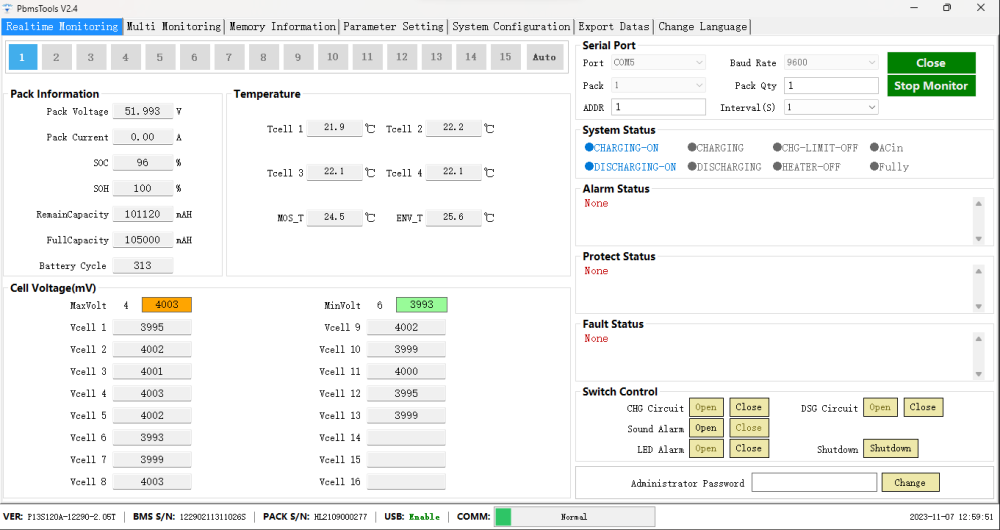
On hold awaiting payment from prospective buyerItem: Hubble AM-2 Price: Sold Cycles: 313 - SOC 96% as @ 7/11/23 not in use Payment Method Accepted: EFT or FNB Geo Warranty: Can be checked I think balance is 8yrs Packaging: Box Condition: excellent condition Location: JHB South Reason: Changed to Pylontech Shipping: None Collection: YesPrice reduced from R7K to R5KMy observation: From the pic i noticed that you put US2000C as first and last. They should be first and second (1.us2000c,2.us2000c,3.us2000,4.us2000,5.us2000) IMO Setting for User bulk, absorption, float 51.8v and charge current should not exceed 125amps for entire battery bank (25amps/batt) FYI You can also try upgrading the firmware on all the batteriesHas been done with what you suggested provided wifi is available at the motor and for added security a camera facing the gate with remote access (to make sure gate does not stay open or any unlawfull entry). That's how I have it