SYC
Members
-
Joined
-
Last visited
Everything posted by SYC
-
Yes, Grid meter ET112 is also used for exactly what you want to do "I would like to keep my net usage as close to zero as possible" It tries to keep your usage from the grid as close to zero as possible without exporting Also allows for exporting if wanted
-
Hi, Location please
-
Hubble Inverter Settings V1.5.pdf Welcome see attached from hubble
-
@Kobus680718 panels should be connected in 2S6P per inverter not 3 in series
-
@Bloubul7 No you answered the first and I answered the second...
-
The Axpert king goes upto 140A on PV charging current Correct
-
Each 3.5 pylontech recommended charge current 37A x 10 = 370A/2 inverters = 185 per/inverter (depending on which Axpert you have to will set charge cuurent accordingly)
-
Welcome, On ICC under settings,inverter mqtt check if inverter selection matches your inverter? Under settings,battery is use pylotech values on?
-
Correction NO Relay needed. Just installed Sonoff 10A without relay pump and chlorinator running +-800W
-
Check 👆 just an idea, been working for me for a few months now on geysers and just bought relay for Pool pump haven't installed yet, 🤔 Maybe tomorrow
-
Do you have Pi with ICC? If yes you could buy ICC APM and activate. Use a sonoff switch with a relay to turn on pool pump via APM software when excess pv is available,set timer,etc,etc

-
Pic of PhilFM is the correct way it should be connected. Pylontech say it should be connected that way. If you add another battery later,the new battery becomes the master and goes on top.
-
Welcome, Victron you won't go wrong
-
1a. domain : greenskyenergy.co.za 1b. action : 1c. Registrar : 1API GmbH 2a. registrant : REDACTED 2b. registrantpostaladdress: REDACTED 2c. registrantstreetaddress: REDACTED 2d. amount : REDACTED 2e. paymenttype : REDACTED 2f. billingaccount : REDACTED 2g. billingemail : REDACTED 2i. invoiceaddress : REDACTED 2j. registrantphone : REDACTED 2k. registrantfax : REDACTED 2l. registrantemail : REDACTED 2n. vat : REDACTED 3b. cname : 3c. cnamesub1 : 3d. cnamesub2 : 3e. creationdate : 2020/08/12 20:58:28 There about us. Founded in 2013, Green Sky Energy, was launched as an E-Commerce website specializing in Solar Power and Uninterruptible Power Supply (UPS) products. We are based in South Africa. Our access to a huge amount of stock coupled with our 30+ years of experience and expert knowledge means that we are able to provide reliable, comprehensive advice and complete solutions. If you have any questions about any of our products or would like to discuss reliable power solutions for your home or workplace, please contact us. Ja right!!!
-
Does your inverters have parallel cards in them? https://powerforum.co.za/topic/7125-for-sale-axpert-parallel-cards/?tab=comments#comment-84388 If you go parallel than one battery bank is needed meaning batteries get connected in parallel and shared by both inverters Parallel installation.pdf
-
Amps, post pic of label on battery and how have you connect inverters in parallel to single phase or seperate?
-
Whats the size of your bank AMPS and breaker size?
-
Do you have a fuse between Batteries and inverter? YES to inputs & outputs on inverter if they are being connected to same phase,NO if they are on seperate phases but NOOOOO!!! 🙈 to EL/Main DB connection. You need AC in from main db to seperate db for inverter to EL to CB wired to changeover switch and inverter. AC out from inverter to same db for inverter to CB and than to main DB on all seperated essential loads Maybe get an electrician to assist with this part coz as explained with drawing you will be pushing 230v from grid and 230v from inverter into one phase essentailly making 460v on that phase (you will blow everything inverters,who knows what else) IMO YES coz if something goes wrong with inverter/solar setup,flip the switch and carryon as before you installed the inverter/solar. Essentially giving you time to repair/maintenance without any downtime.
-
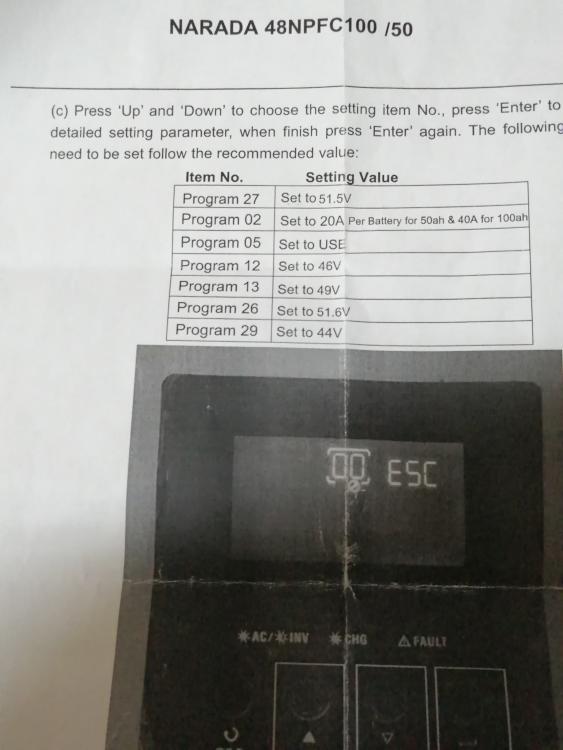
The correct settings for that batteries are (supplied by supplier): so 40amp per battery so 80amps on both Inverters You have the Axpert MKII 450V inverter just for future reference. Latest firmware version is 71.82 I think
-
IMO you should be fine with just one cable (but I would choose 2.5mm to be safe)
-
IMO 1.5mm surfix for lights and 2.5mm surfix for pump (if you only running small pump and nothing else in future 1.5mm should be fine) all in conduit piping as you mentioned 20mm should be fine
-
IMO No best to use 8 x 380=3040 on each inverter (2s4p)
-
No the amps are added together (watts are added both in S & P)
-
You could use a Y connector to join the extra string or change for 6 way (6 way safer option)
-
If connecting it the way i think you want to,you will be feeding 460V (230v from grid and 230v from inverter) into your house on a single phase. Firstly decide which way are you connecting parrallel or one on each phase.From mains to ac in and ac out to house (critical load or what you want backed up) neutrals cannot mix (grid neutral and inverter neutral needs to be seperate). One bank if you running parallel and 2 seperate banks if you running on 2 seperate phases If this does not make sense than unfortunately you need to get someone that understands or has electrical knowledge Will work but 2S6P is better search and read in forum Coulomb has explained many times why 2S for 70cell is better than 3S 60cell