


Deon Zeelie
Members
-
Joined
-
Last visited
-
Thank you for the chat
-
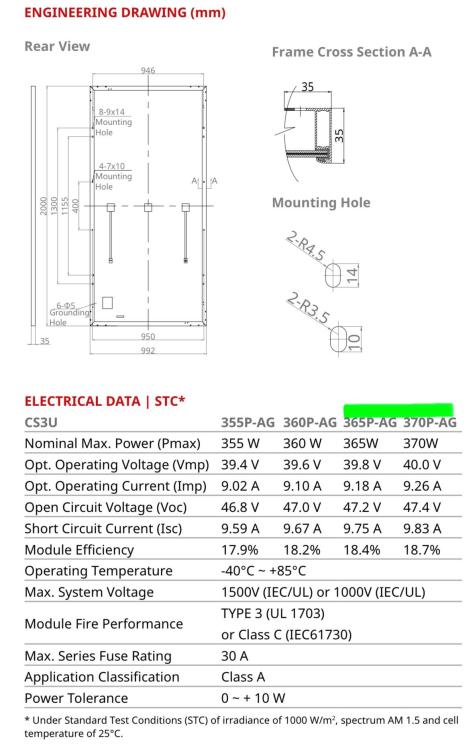
Item Wanted: Either of these two models , my constraint is the 2000 mm height 365P-AG 370P-AG Packaging Essential: Desired Age:4-6 years, will do a performance test Location:Pretoria or East Rand Willing to accept a shipped item: Ballpark/Budget Amount:R2000 for 4
-
Hello. the update is done by connecting your battery to a laptop with a 232 cable. They then log into your battery and run the update or take the batteto them to update it. why do you want do you want to ipdate it. Are your batteries on different firmware? Northriding Commercial Park, 251 Aintree Ave, Northriding, Randburg, 2169 EMAIL [email protected]
-
-
Hi Deven. No I don't, but BSL did my upgrades over the internet after locking into my batteries remotely
-
Got the message from my network about a attack coming from my Axpert Mac adres. Removed it from the network and had a massive increase in network performance. Do go and read up on "Ping of Death". I am using Solar Assistant, watchpower was just an backup

-
Thank you for the voltage reminder Coulomb, I was looking at the Solar Assistant power management graph % but my voltage was below the back to battery setting.
-
Sitting with same problem today for some reason. Battery is as 48%, but inverter stays on line, disabled the solar assistant power function, set inverter to sbu but it stays on bypass. If I trip the line it does switch over to battery. Any idea what can be wrong
-
-
-
Here is mine on 2x7.2 kwh batteries. Enough to run the house for 14 hours 18h00-07h00 including one geyser cycle. Reason I dont discharge to 20% is to cover the occasional 4-8 morning loadshedding, using AC to top up a bit. Also using a loadshedding relay to switch of geyser in the early mornings to save on batteries. My settings are a bit conservative at this stage

-
-
-
BSL updated battery firmware to 2.14, will monitor it for a couple of weeks
-
Contacted BSL, got helped immediately, four batteries bought Nov, Dec 2022 had firmware 2.05. BSL updated it over the network to 2.14 and also checked the health status of all the cells.
-
spoken to Solar Assistant team, awaiting feedback
-
Can anyone conform what's the latest version software on the BSL 7.2 Kwh batteries? I am currently sitting with ver 2.05.
-
Thank you
-
The one in Gauteng looks like its fine now, left the Pi off for a couple of hours. One in NC report 109%, but inverter and battery shows still chargingging


-
Mine is orange Pi though, would the ran the same ver software


