


Zodiac69
Members
-
Joined
-
Last visited
Everything posted by Zodiac69
-
Hi Sidewinder I would like to do the Influx method as well, but i am not sure how to, unless i try and do my own Pull request and do an Influx of my own. I could not see where the files are stored under HA to modify then to use Influx instead of MQTT
-
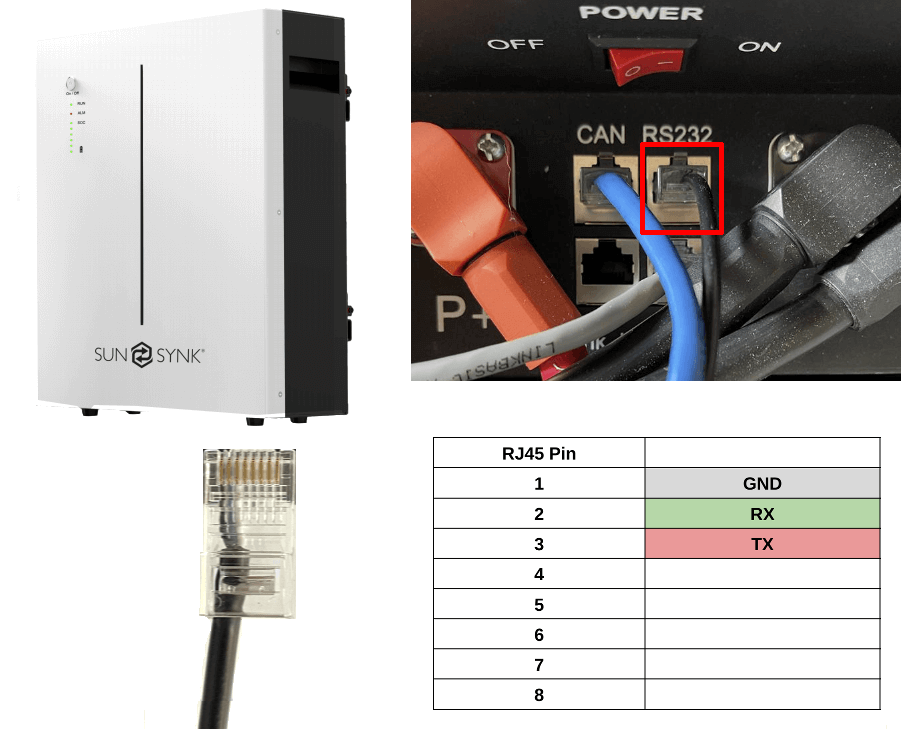
Here is the code for the ESP. I used an ESP32 This is after you have configured your ESP the way you want it to be. external_components: - source: github://oxan/esphome-stream-server # ############################################################## # Battery RS232 UART Setup # ############################################################# uart: id: bat_uart baud_rate: 9600 tx_pin: GPIO17 rx_pin: GPIO16 stream_server: uart_id: bat_uart port: 5000 buffer_size: 512 binary_sensor: - platform: stream_server connected: name: Connected On the Sunsynk 10.65kWh battery the RS232 port is an RJ45 Fron Solar assistant web, i found the pinout for Sunsynk.
-
So i managed to get my 10.65kWh SS battery data into ESPHome... Sort of... I setup my ESPHome as a Stream Server I then installed BMSPase (Tertiush) Use the "dev" and set it for LAN I now have all my battery data in HA. One or two readings are not the same: 1. Battery Voltage is lower that what my SS Inverter show. 2. SoC does not make sense - 140% ??? I defentley have a PaceBMS as my BMS is read as - P16S200A-A21084-1.05 I am going to move to this one - PaceBMS direct to influx instead of mqtt
-
So i went down the wrong rabbit hole, assuming that the Sunsynk Battery data was accessible via the RS485 Modbus as this would have been the preferred way. After some interaction with Sunsynk, i was informed that they do not support communicating with the battery via the RS485 Modbus port, Looking at Solar Assistant, they use RS232 to communicate with the battery, i then started looking for info on the protocol. I tested many BMS software programmes and finally found one that worked instantly - PBms Tools V2.4 So my Sunsynk 10.65kW battery has a Pace BMS. Now that i know what to look for i found the Protocol document. I also reached out to Sunsynk support, and they confirmed that it is Pace BMS by sending me the same protocol document. Here is a post by Tertiush where he posts about a Python script he made to communicated with the Pace BMS. Here is the link to his Github repository. If there is some clever ESPHome gurus that can implement this on ESPHome, then we can use the same ESP32 for RS485 to the inverter and RS232 to the batteries. I captured some data between the software and my battery. What i found was that he software just repeat these four (4) calls, over and over. I have attached some data but not my Serial No. ~250146C10000FD9A # Software Version ~25014600602850313653323030412D4132313038342D312E3035F57F ~250146C20000FD99 #SerialNumber ###### ~25014642E00201FD30 #PackAnalogData ~25014600D07C0001100D230D220D230D220D240D230D1F0D260D220D210D240D160D230D220D230D22060B960B950B940B940BA20BC70000D21D4C640436B100604E2061E332 ~25014644E00201FD2E #2WarnInfo ~25014600E04E000110000000000000000000000000000000000600000000000000000000802410000000000001EEC8 PACE-BMS-RS232-communication-protocol-20180705.pdf
-
From what i can see, the SS Inverter does not pull all the battery data from the BMS. Looking at Solar Assistant, it uses the battery RS232 port to retrieve the battery data. I don't have SA, just looking at the info - SA Battery Config SA connect to the inverter via RS485 and a separate RS232 it communicates to the battery. I found some battery comms in the SS protocol that i want to try and use to extract battery cell data.
-
The Full load must go via the ASC. With the way the ASC is wired, you only drive the coil of the contactor, will not even show as the contactor coil power consumption is very low. (N) to N on ASC (N) to A1 on Contactor (L) From breaker to input of ASC Output of ASC to Contactor to A2 and to the "Input" of your contactor. Do you have 3phase or is it 3x geysers? Your total load can not be more than 30A if it is single phase. If you have 3Phase, then you need 3x ASC units, one per Phase. I do something similar.. I have two ASC's, one per Geyser as i stagger my load, and two contactors, one contactor per geyser. In my case i have wired the geysers to that i break Live and Neutral via each contactor.
-
Hi JayMardern I use an RPI for HA, but i am in the process of moving to an old Thin Client - HP520t with an external SSD.
-
Hi JayMarden Set a counter on your geysers kWh. Set a timer to reset at midnight. Set rule / and gate that the on signal can only pass if the kWh is less than the value you want. Set rule to switch off units when you reach your preset kWh
-
Hi WillHza I Agree with your statement of "Under sizing". I think that the SS guide is also too conservative in the contactor size rating. If you look at the SS 8.8kW unit, it is rated for 16kW for 10sec. Normally things go wrong is when high current is drawn, that is when you require the protection, and from what i read here and from installers i have spoken they are not applying this correct in the field.
-
With reference to MartinB on the size of the Earthing conductor. Your earth wire size must be adequate to be able to conduct the "FULL" Peak Output Power of your inverter. Most decent inverters are rated at around 200% (10 seconds), this is not fixed, and you have to verify the value from your inverter technical data. If you have a fault, you can draw up to 7200W on a Sunsynk 5.5kW inverter. Your N-E return path must be able to handle this current, about 32A at 230Vac, as a fault can cause the full current to flow in your Earth wire. To me that imply that the relay used for N-E link must also be able to handle the "FULL" current. If this is not done, you may create a scenario where the "touch" voltage of the faulty equipment is high enough to be fatal. The term "Bonding" might be misleading. The term bonding or electrical bonding, connecting and jointing two conductors (wires, pumps, machines, pipes etc) and metallic bodies (non-current carrying during the normal operation) permanently to equalize the potential difference on both machines or systems connected by bond wire. Bonding wires tend to be a lot "thinner" as they do not carry any current.
-
Hi Muttley I presume you set it up as a switch 1st... If you set it up as a switch 1st, then the sensor values become "Attributes" to your switch. See bottom of your image. I selected sensor, then the DP (21,22,23) for Current, Voltage and power. Then i selected switch as the last entity.

-
Hi Muttley I used the Tuya App as well 1st and i get all the values in HA. Install LocalTuya via HACS, i prefer to not be dependent on internet connectivity, so local LAN control is preferred. The LocalTuya site explain how to get your "key's" to integrate them into HA The DPS that you need to use for the CBI units are: 21 - Current, Unit - Current, Factor of 0.001 22 - Voltage, Unit - Voltage, Factor of 0.1 23 - Consumption, Unit - Power, Factor of 0.1 and the last one is a switch for manual operation, 20.
-
On the topic of geysers. As i don't have solar yet, do anyone know of a "time-shift" automation i can look at? I have my geysers on a fixed time schedule at the moment, but i would like to dynamic shift the time either forwards or back depending on the load shedding schedule. Either in Node-RED or Home Assistant.
-
I monitor my Inverter (Sunsynk) and the moment the "Grid" is lost, i switch off all the "BIG" loads that is connected to my inverter. As my house is very old and it is not easy to install additional wiring to separate some of the big loads from my normal circuits, for now, that is the only way i can do that. I use Home Assistant, communicate with the inverter via RS485 to get all the values and status. I use the CBI Astute (30A) to switch off my well point pump and i also have 3x CBI wall sockets that switch off the Dish washer and some other loads while we are on loadshedding. This way you can control individual circuits.
-
Hi kellerza Not sure why, but if i used the registers as shown here Sunsynk Mimic, my Non Essential was showing negative values, see message to slipx Wrong Values. I looked at all the inverter "Grid" registers in node red, gauge for each one, and looked at the value during "Normal" operation and Load shedding and register 167 was not matching my system during loadshedding. Using register 169 and now i am no longer getting negative values when the battery charge. Register 169 gave me values that were correct. Battery Charging: Battery Charged:


-
Very old houses did not have earth leakage. They had "fuses" only, there were later replaced by circuit breakers. There is still some old houses i know of that only has a "Fuse Box" in the kitchen. with fuse wire in paper envelopes to repair the blown fuse. By it might be that the Earth connection has corroded away, common occurrence here where i live as the salt in the soil destroy any conductor. They had to install 10.5m earth rod to get a proper earth value when i bought the property.
-
The Earth conductor has to be able to dissipate all the energy in case of a fault. So the earth conductor should be at least the same size or larger in mm sqr. as your current carrying conductors. The earth cable must be able to handle a short circuit to earth without the potential of the earthed (metal) parts exceeding "touch" voltage as per SANS 10142-1
-
Look again, it shows "C63". That is a 63Amp breaker. Below it show 10000A, so 10kA short circuit rating.
-
Hi slipx It seems that register 169 is working for my setup. So: Essential Load = (175+169) - 166 Non-Essential = 172-169
-
Hi slipx On the "DOT" to indicate the Inverter status - 👍 I have been struggling to get my values for "Essential" and "Non-Essential" to match what i know i am consuming. After looking at the real-time data in MQTT Explorer and looking at other registers, i think i might have found the solution. Essential Load = (175+167) - 166, I also saw that kellerza has this in his HA integration. Non-Essential = 172-167, BUT... i had to change "inverter_load_grid_167" to register 178 for my loads to work. So: Essential Load = (175+178) - 166 Non-Essential = 172-178 I tested this with switching my geyser on/off. I have two CBI Astute Smart Controllers connected to each of my geysers that is on the non-essential side. i might be a few watts off, but it seems to be working. Does this seem correct??? What i found is that during loadshedding, this does not work anymore... Register 178, is then the same value as 175 instead of going to zero.
-
Can i suggest a "HALO" for the inverter image based on it's status from register 059 - Run State? 0x0000 - Standby - Blue 0x0001 - Self Test - Yellow 0x0002 - Normal - Green 0x0003 - Alarm - Orange 0x0004 - Fault - Red
-
Thank you Manage to get it working.
-
Hi slipx Would you please share your Inverter config? I am unable to communicate with my 8kW Sunsynk. I have set my Sunsynk unit to ID 01. I have tried setting the inverter to both Master and Slave without any success. I am using this RS485 unit, - https://www.robotics.org.za/W17286?search=485&page=2 - that is used by other, without any success. I presume i am doing something simple wrong.
-
So i just integrated the DBI Astute Smart Plug (ASP) into Home Assistant without any firmware flashing or Hardware hack. CBI Astute use standard Tuya wifi chip. I am using Tuya local, so no cloud required and it works like a charm. I used the Tuya app to setup the ASP on my WiFi - Make sure you are on 2.4Ghz wifi, the CBI ASP only work on 2.4Ghz wifi. Once connected to my network, i followed these instructions to get the ASP into HA - HOW TO - Setup Local Tuya in Home Assistant Be patient and go slow as it is a pain, but it does work. Make sure you have something plugged into the ASP that draw power, as you need to look at the field values while integrating into HA to select the correct entry for Voltage, current and Wattage. So now i can switch off (from HA) my stove or Geyser, any CBI Astute device, when there is load shedding to prevent the Inverter battery from getting drained.
-
Hi seant Do you still have this unit, or has it been sold?

