


Plaashaas
Members
-
Joined
-
Last visited
Everything posted by Plaashaas
-
When I left this morning it was still dark but later could confirm PV is coming in and charging the battery. "PV issue", I presume there was/is a issue with Firmware? What should I look for? "Over-charging" too soon to say. Will check it tonight after a day in "PYL". Care to share USE settings? My setup at this stage is like this. But only Inverter 1, Master is connected to the Pylontech BMS. Not sure how the slave will handle this?

-
I finally managed to get the firmware updated on both units, dsp and mcu. All I had to do is to reflash 2:49 AGAIN and then the mcu worked fine. Not sure what went wrong with the first reflash. The FTDI cable worked fine. (Bought from Matrix warehouse, UGREEN, USB > Serial) Both Units are now on 2:49 (U2) and 71.92 (U1) and working in parallel. But I now have 3 new challenges: 1. The Slave Inverter gives the 61 (Communication with battery lost) error. This is because only the Master is connected to the Pylontech bank. Do I just ignore it? 2. I could not get Watchpower on laptop to connect to Master. I tried the USB > USB Micro like before with no success. Also tried the USB to RJ232 with no luck. Is this something to with the new firmware? (I can get comms on the android app via bluetooth) 3. The Master gave a 04 warning this morning. Battery bank at 10%. Previously Utility would kick in at 20% and utility charging max set to 2A worked perfect for me. Setting is SLB UCB an 05 set to "PYL". Is this firmware, parallel or settings issue?
-
Yes this exactly the problem Yes the display is off/dead but I am sure it took the 2:49 update. Will try everything in that order. Thx
-
@Blowdart18 Not yet. I have used 3 different laptops and an old desktop, all with 2 different USB>Serial cables. Managed to get another cable I will be trying this weekend. If that fails I will take the unit to supplier. Mine is also parallel setup although at this stage I am just running of one.
-
@Youda You sir are a gentleman! Maybe a gofundme page? I am sure others share your sentiments.
-
The PV array size for both are the same, i.e. 4000W. The King does have a smaller voltage range but that only influences your string setups. Trust me the blending option will become very relevant very quickly. With my previous inverter, if the panels are producing 3kW but the load is 3.1kW the whole load will be switched to Utility. With the King it will only supplement the 100W from battery or Utility pending settings.
-
Thank you all for you patience and help. I will go try EVERYTHING suggested and if that fails, take the inverter off and back to supplier.
-
I have long since given up looking stupid.... I am desperate now so..... Terminal program???? Meaning "Device Manager" >>>> com ports ???
-
Yes. Problem is the FTDI one worked fine for the display update. The prolific did not work for dsp.
-
That I have done for sure.
-
Does FTDI232 and prolific driver make any sense?
-
Based on my other one.... it takes about a second and then starts counting down from 6
-
Yes set to COM1.... Also tried 2, 3, 4... no luck. (Also tried restarting laptop after changing COM designation)
-
It is still this issue....
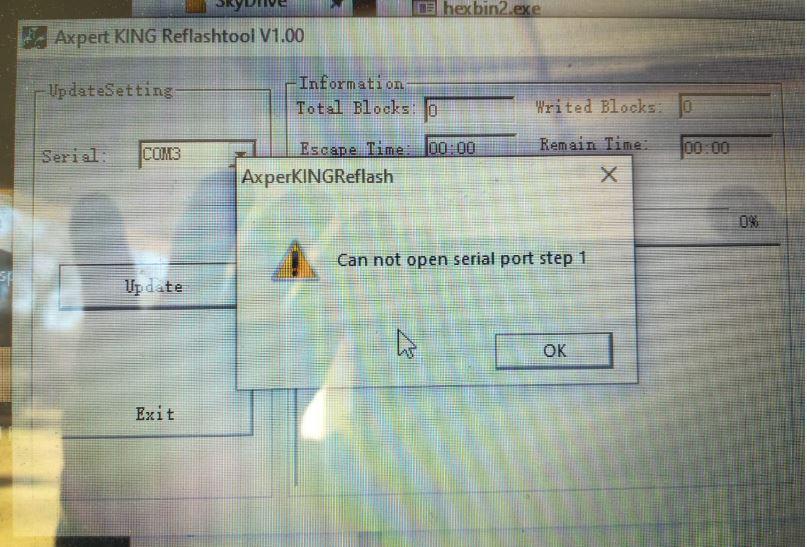
-
The Kodak King OG5.48 will blend. Also 0 seconds switch to utility if need be
-
Ok I have now tried 2 laptops, Windows 7 and Windows 10, also 2 different USB>Serial cables with no success. My last resort this weekend is getting an actual old desktop from a museum and trying again. Can't believe that in 2020 we are resorting to 1980's technology! My worry is that the one inverter when switched on only has a blank (off) screen. I can hear it switching on and relays clicking. I also know that it took the 2.49 update. How long should I wait after starting inverter before I click in the Update firmware button. My procedure is: Utility and PV supply off. Close fuses from battery. Press ON button on Inverter. Wait 10 seconds (Counting Mississippily) Press Update. Please advise guys I am seriously frustrated with this issue have been excited for weeks to get the parallel going..... whaaap whaaap whaaaaap. If I have bricked it, how will I know? What needs to be replaced and what is the cost of that in SA?
-
Not even in a few years. (Most probably never) @Coulomb First time ever I know something you didn't, and probably the last. 😄
-
-
Should you not upgrade U2 to 2.40 or 2.49? I think the 71.92 specifically mentions to be used with 2.40 or later. (Not sure if this part of the issue)
-
Yes it is an USB serial adapter. Ok so I have an old laptop with a serial port but would need a serial (Male) to RS232 cable? The cable that comes with the inverter is female and so is the serial port on the laptop. Imagine developers were building cars! I would just buy a bicycle. Cool tip thanks
-
Good morning guys. I need help please. I installed a 2nd Kodak King Inverter but cant parallel yet because the firmware versions differ, 71.80 and 71.90. I managed to get the Remote display updated op both machines to 2.40 But encountered issues with the firmware 71.92 upgrade. Also tried 71.86. I changed the COM3 to COM1 and restarted my computer with no success. Using Windows 10 I tried the USB method as per page 23 but got the 03 error, "wrong format". The USB stick was formatted to FAT32. Please help.


-
Thank you for the Calvin. I will eloborate more tomorrow about the issues I encountered. I managed to upgrade both inverter display units using the "computer serial cable" method. But the firmware did not want to work. Litterly spend the whole day struggling with it. Will post some screenshots tomorrow.
-
If I try this method I get a 03 error. Did you have all the downloaded files on the USB? (DDL included or just mcu.hex?
-
Do they both have to be on the same firmware?
-
Thank you sir

