


Henry2501
Members
-
Joined
-
Last visited
Everything posted by Henry2501
-
I had Pylontech and i was very happy with them. They really are good batteries. I just had FOMO and wanted to get 16cell batteries and all 100Ah batteries. I had a mix of UP5000 and US3000 batteries. They lasted many years and only did 300cycles 2 of them so they still in fresh baby stages. The one US3000A battery did 745cycles and was still healthy This was my first one. I Updated all the Battery BMS firmware's about 3 years ago. I was going to upgrade to the UF5000 but then the must batteries at half the price stole my short concentration span. But so far its been a bit of a struggle. But i had the same issues with the pylotecs in the beginning not communicating with the Inverter. But after the Battery firmware update they all worked via Coms. So same same. Just different brand.
-
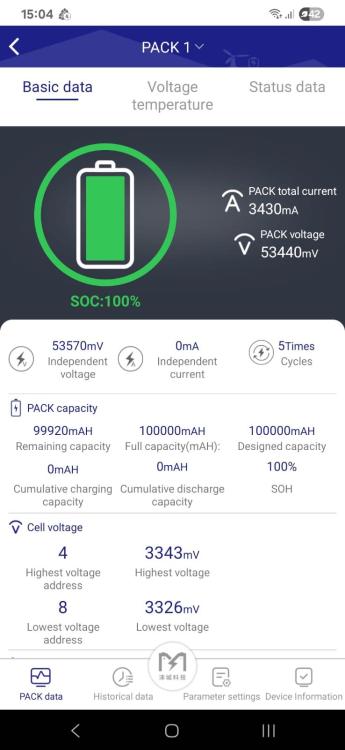
Thanks @MrBeauvedere you a bloody legend. Downloaded the PaceEx app from playstore and it works. Bloody hell The Must techs could not even help me here. Ok now i will Do some research on how to adjust charge voltages and stuff. Thank again. I tried almost 30 different apps from play store this one never came up. Now i have to learn what i can change and what not.
-
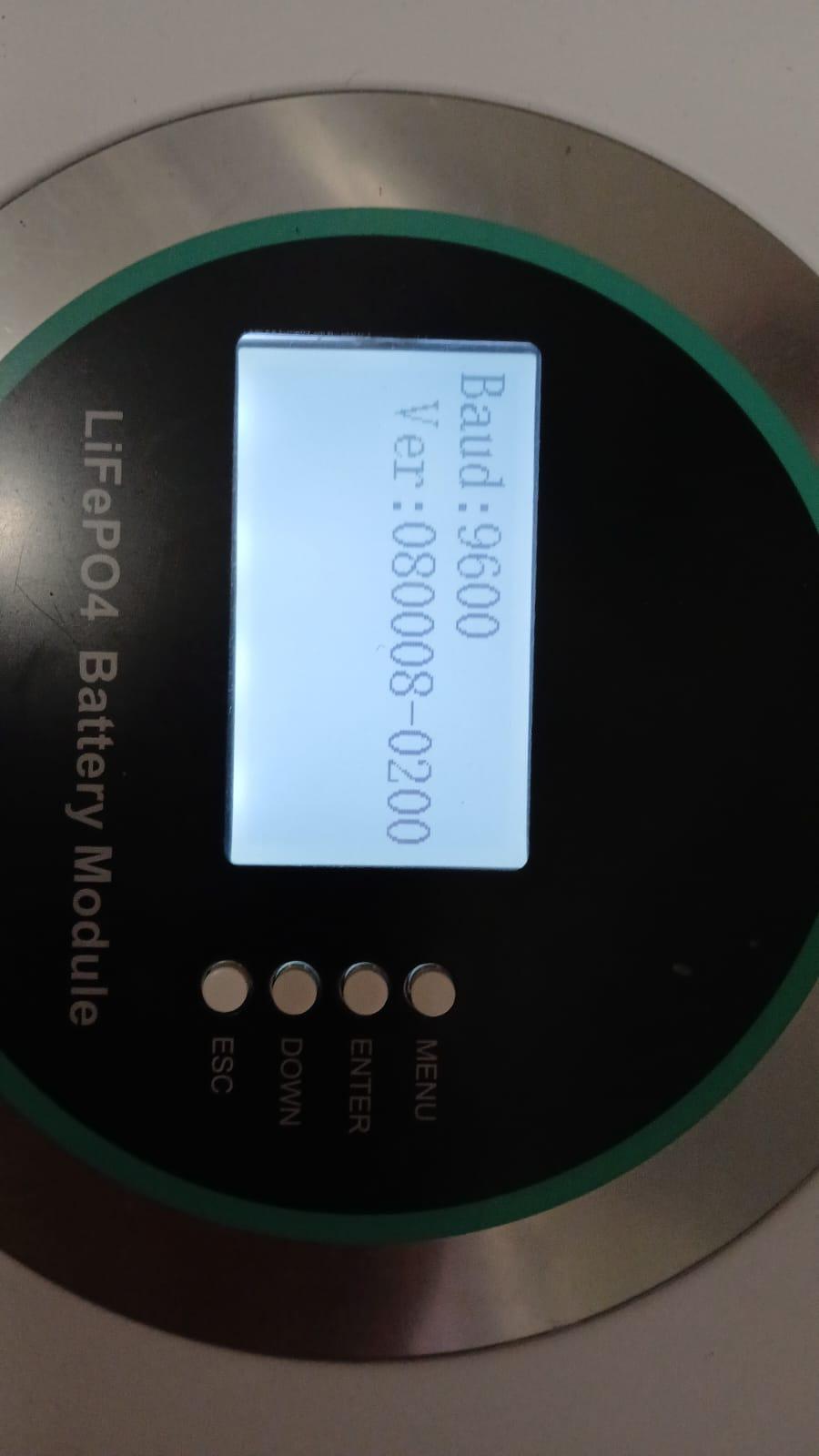
Good Day sir. I have no idea. I have been trying to find out what bms it has but not getting there at all. All i can see is the following on the System Screen. Tried the JK BMS monitor Software but it does not read the BMS. Will see if i can get the PaceBMS software will google around. Maybe that will work.

-
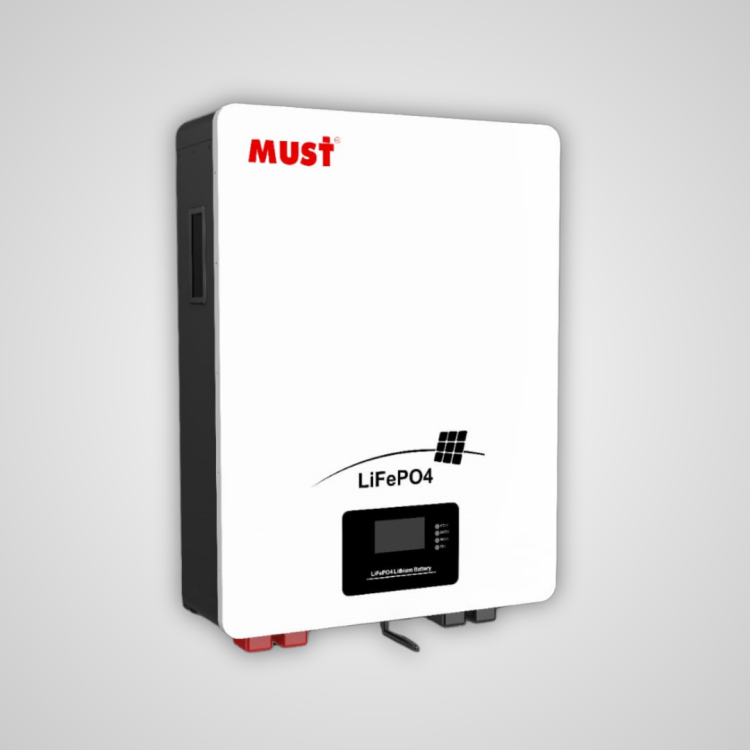
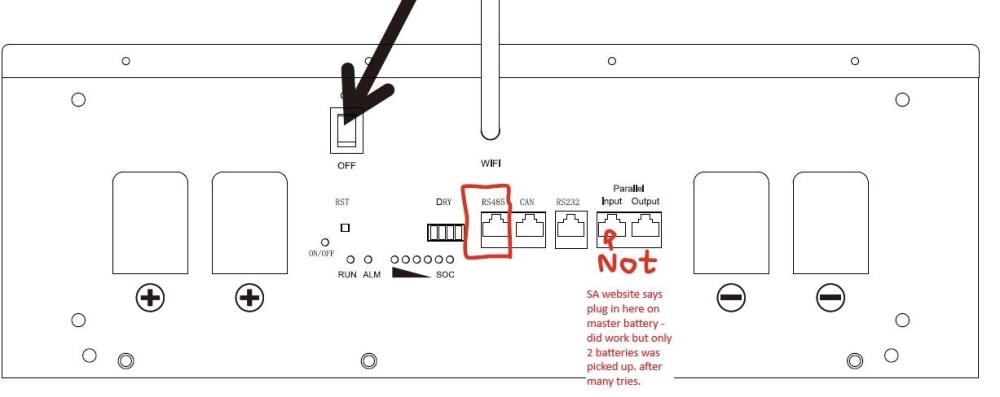
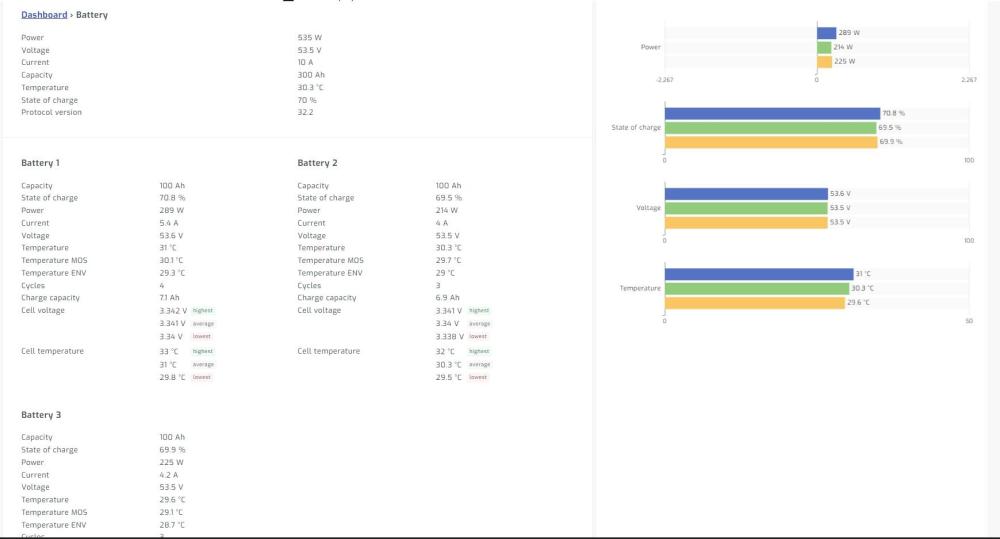
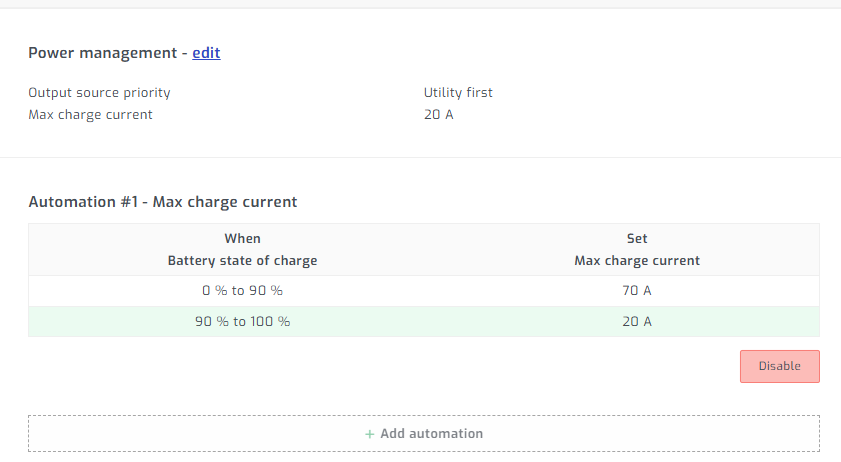
I took a leap of faith and upgraded from Pylontech to three of these Must batteries. At first i was very disappointed- could be my inverter who knows but getting support from Must or the Distributer of these must batteries is a dead end. my experience is all i can work on. So eventually i got them to work. They did work on the pylontech protocol on my Axpert 8kw inverter but showed wrong values as in the capacity and state of charge. Was all over the show. Good thing was the Values required by the inverter like voltage and so on was working. So the communication was working as in the voltages for charging and Amperage request from the batteries was all going through and charging at correct voltages and bms was talking correctly. Just the state of charge was all screwed up. Contacted Solar assistant as there was no clear indication that the Must batteries are supported on their website and they suggested using a rs485 adapter and reading the values through solar assistant. I bought the Shoto RS485 cable as recommended by them and then she worked after a view failed tries. So if you bought these batteries and struggle with a axpert inverter then just get Solar assistant. I did have it before as the Pylontec batteries was connected to it so i just had to get the correct cable. I tried various RS485 to usb adapters but none of them worked. Have no idea why. Spend way to much money on other adapters that just was a failure. I was worried the cable from Solar assistant wont work but to my surprise it did. :) I had to Put my Axpert inverter on "User" settings. Fine with me as the coms was all over the place. and its also connected to Solar Assistant. I used Battery Float and Charge Voltages at (NOW 56.8V) 57.6 V that is what the BMS requests so i left it at that for now might adjust it down to 56 V we will see. I will keep an eye on the SOC and see. I use to run my pylontec batteries at 3.5volt per cell. so at 52.5 Volts Max Charge current at 90 i have 3 Batteries so thats 30amp each. More than fast enough. I only charge of solar as im 99% offgrid. Except those long and cold winter days with almost zero solar. then i have to start the genny or switch eksdom on for a couple of hours to charge battery. I prefer the genny. Lets hope not anymore as i have more batteries now. I could not get more Pylontec UP5000 batteries at a decent price. i see they moving to the UF5000 now that is 16cells. So sold mine and tried the Must. In the end the way i see it 100amps is hopefully 100amps. As long as the cells are Lifepo4 who cares. I was almost going to rip out the Must BMS and replace it with a JK or something just to get them to work. I guess thats why we pay that extra for well known branded battery for better compatibility. But then again it could just be my axpert inverter. For all you axpert haters out there these are in my opinion good inverters. They hell of a noisy but that's ok they work. Compared to the other ones still worth the money. I run this inverter with compressor , well pumps, Sprinkler systems and all and they have never really given me problems. It just works. Updating the Firmware is a hit and a miss sometimes but I have stopped on that worry in anycase. Sorry im ranting long story short. Axpert settings on User mode. Plug RS485 cable from SA in to the RS485 coms port. Not the Parallel in port as per their SA website see images attached. Make sure Battery is set to Pylontech protocal on the battery bms. Cycle bms by switching of the battery. Connect Solar assistant via the cable and now all readings good. So it was a bit of a struggle but all working now. Some useless info if someone is struggling with these batteries. Capacity test was good so im happy with these, but dont expect help from Must at all. They cant even tell you what app to use on them as i tried almost every app from the app store and none of them work. They could have just left the So called areal off. waist of time. Looks nice and smart but useless. *****Updated Changes 15/12/2025****** Findings - The Must BMS really push the batteries to their max voltage of 3.65 per cell. I dont like that at all so i adjusted the voltage to 3.55 per cell. setting to 56.8 Charge voltage. I also noticed that the bms waits right to the end of voltage charge range before it adjusts the requested amperage down- So i added a Rule Under power management in Solar assistant to Charge batteries at 70amps from 0-90 SOC and from 90-100% 20Amps max. So that settle the last bit of charge at 7amps per battery. I have 3. Find the batteries respond better to this. They dont get a over voltages allarm as often. I will see how this works for me. I am in the process and communicating with must for a firmware updates but this is very slow and all i get out of them is functioning as normal. They really seem to not care. One word answers and thats it. Apperantly CAN coms work but so far i could not get CAN coms to work on my Inverter with Weco or Soltara Option under battery Coms. Made a custom RJ45 cable from inverter pins 6,7 to battery pin 4,5 but that was a fail. If anyone has better results on these batteries please share. Like newer firmware or even an app that actually does work on the BMS coms that will be fun to see. I wish i knew more so i can get in to the BMS and adjust the setting and charge voltages on the BMS. But my brain to much of a rockspider to get that right. Fun times. Thanks to @MrBeauvedere the App from playstore that works is the Paceex BMS app. Atleast that picks the batteries up. So progress there is. Thank you Sir.
-
100% you need another panels. We always recommend a minimum of 4 panels in series on all axpert models. The only one that is slightly better is the Axpert max 1, 7.2kva , for some reason they have a mppt controller that starts up at 90volts. up to 450volts. I love these units but most people dont go for them they want the 5kw units.
-
One Pylontech UP5000 should be set to 1000 then the next one should be 0000, simple. Then the MAstyer (1000) should have a network cable the short black one that came with the battery connected to the (LinkPort1) to the slave battery (LinkPort0), switch the slave battery on first, Then the MAster battery, Press the little red button for 3 seconds and all the batteries will sync. Thats it. Also leave the battery terminals connected together for an hour or two without being plugged in on the inverter to equalize. Leave both batteries on and linked.
-
it should have come with your inverter in the box.
-
Like its been said here. 10 years down the line and now the installer is blamed. Thats like saying i bought my car 5 years ago never serviced or checked it. now the engine is broken. What now. Is the dealer responsible. please man. I have seen installations done by people that have all the new green cards and so called qualified but people will always take a shortcut to make more money. Some installations look beautiful till you take the covers off, Open all the DB boards then look at it. My 5 year old son can make better connection than that. Dont be fooled by the outside but look on the inside you will find a different outcome. What cables are used. Quality and thickens of cables that is used. How the connections are terminated. Just twisted and shoved half assed in to the socket or is it nicely crimped and inserted without extras hanging out and looking need. have they what i call tighten and tug on the cable to make sure its nice and tight in there. Here a simple example. Most household inverters aka Sunsynk, axpert, Dye, Solis etc have an mppt controller that can handle a dc voltage of between 90-500volts, yes sunsynk start at 120 ok!! but 99percent of all the installation i come across has a SPD of 600Volts or 1000volts on dc side. Its fits the code of having a SPD well done you pass. Great now what its all in code. NO NO NO You need to install a SPD of 500volts preferably 450volts max to protect the Inverter of a surge of electricity. By the time the 600volts spd has grounded the connection the intverter mppt is already blown. See how clever that was. But the SPD will protect me from lightning. ALSO WRONG, NOTHING can protect you from a direct lightning strike. NOTHING !!!!!! Lets hear the clever comments on how it can. Please reply. Do i have my greencard- no - have i been doing installation on solar for many many years - yes - Do i do it the right way. I surely stick with code and make sure the quality of my work is in such a way i can pitch up years later and be proud of my work. My clients are protected and so am i. Quality cable and correct thickness is used to make sure no losses can occur or minimal losses for the clever comments. but i dont go use 4mm2 cable on a roof that is running 6000watts in solar running just over 300volts at 16-19amps. But the cable specs say it can handle 40 amps in an open environment maybe for a short time. Go stick you hand on that 4mm2 cable and feel how hot that cable gets. On a nice and sunny day pushing full load the cable heat up become very hot to the touch. Over years the cable will start degrading causing more heat and causing fires. I can go on forever about the bad workmanship i come across but that's just two simple examples. Any person can do a installation its pissy but doing it correctly is another story. Go get your so called green card guy with a flashy certificates , 50 workers and bullshit overcharging you by a 50-80%, nice flashy bakkie and so on, hes must do good work. Look how well he is doing YES YEEEEEES MUST BE. Bullshit baffles brains. I guess thats the secret in South Africa. But good workmanship is a sin. All the code is most of the time dumb. If you as an electrician walk in and just stick your hand in the db board without checking if there is power you are a loose head. All the stickers are there for when another electrician comes there so they can see the inverter is connected to the db board. Well if you cant recognize that there is an inverter in the same area as the db then you don't deserve to be called an electrician. These things are all common sense. like the one person said here always check if there is power and double check and check again. Then continue with work. As an appy that is what you are taught. especially when it gets to 3 phase. that shit burns....... and kills
-
VOC 47 ( NOCT) Vmp 39 ( NOCT) so four panels are = 156 we get this constant voltage out on the screen but wattage is all over. On a full sunny day yesterday- sun all day no clouds we got a measly 1.1kw out the solar panels. That should have given the client atleast 5-6 units. not 1.1. Thats unexceptable. I know where you going as the inverter mppt controller only kicks in at 125Volts but we also used a 5kw VMiii on the same panels and we get full Solar capacity it also runs at 120-450Volts DC mppt. ( I did all the tests just to make sure its nothing on the installation) Its basicly the same mppt controller just a bigger unit. Everything points to the Inverter. GC solar said its not their responsibility to update the firmware on all the units they import. Another bull excuse. Then we said please give us the firmware, then they said no if we update it then the warranty is null and voided. I then contacted the CEO but hes just avoiding my calls now. So basically i have a unusable Inverter and i am taking it further with GC Solar. They are a useless company. Now they want me to wait 14 working days for one of their useless technicians to come out and try and update the firmware. where they should have a service desk to quickly update it. Seriously. its 10minutes. sorry i am ranting just a bit frustrated.
-
Just remember please clean the inverter out often depends on how much dust you have. I wipe my side vents at least 2 or 3 times a month. When i walk in to the garage and see dust on them i clean it. Then also open the inverter once a year and blow off any extra dust inside out.
-
yes we have experienced this with modified inverter that we come across. Especially the axpert inverters. If you look at the bottom where the fans is you can see a lot of small parts components. I came across 2 inverters already where people turned the fans around and those small components eroded from the forced air on them. That also one of the reason i did not do the fan mod. Did not want to go in to this as some smart people here will probably say i am talking nonsense as electronics have a coating on to prevent erosion but thanks for bringing it up.
-
I run my 3kw element on the Inverter 8kw, I upgraded it from a 2kw element found it worked quicker and better. 2kw took way to long. IF solar is available i manually control it to run during the day. Sun = free energy so why not take advantage of it. That is if the inverter and solar you have installed can handle the load. On average my geyser takes about 30-45 minutes to heat up to 60. So why not. Every cent you can save on eksdom side why not. Even if she uses 2000watts of the batteries for 30-40 minutes im not faced as there is normally enough time and sun to charge it up again after the geyser gets to temps. Also add a blanket around your geyser. I went cheap and got some underfelt(the stuff you put under carpets grey looking stuff) and wrapped the geyser in that 3or 4 layers cant remember. Works better than these stupid geyser blankets hold heat much better now. Just remember to switch it off on very overcast days as it will drain the batteries very quickly. I am 95% offgrid so my eksdom is off most of the time. But sometimes i have to tuck my tail between my legs and ask for some power from the big man 🤣 then i will switch my incoming eksdom on.
-
I also have a Axpert max 1. I removed the filters long time ago and manually open the inverter once a year and blow it out with a blower. Temps stays nice and low even in summer. Those filters slow the airflow down so much. I get they there for dust, but if the unit constantly over heats whats the point not going to last long in any case. Inverter also runs much quieter as it does not need so much fans constantly running. My fans are still the original fans still facing down. I was contemplating turning them around but just the filter delete made the inverter better. My 2 cents. see image for temps the last 3 months.

-
So far we did one installation of these VMiV 3600 inverter a growcol branded unit from GC Solar. Client upgraded from a Must inverter to this unit. Nothing but problems so far. The MPPT controller is so unstable and never reaches the peak performance of the Solar panels. Wattage jumps around like a mad rabbit. From 600 instantly drops to 0 then jumps back to 300watts. its very unstable. The Panels 4x415Watt panels get on average only 350-600watts out of them. Connected a different inverter and full peak is there so its inverter related issues here. Also had the inverter at my own place to try and test it same symptoms, cant get it stable on my old panels thats been running for almost 8 years. Contacted GC Solar. They have no clue. Asked for a firmware file also cant assist. Asked for a refund not interested, their technical staff is so uneducated they don't even know how to load the firmware. Asked them to please get me the firmware they just answer with all sort of excuses and delay tactics. My client insisted on this inverter so now they blame me for being useless. Growcol does not answer their emails either. I am sure its firmware related as i have seen this before but nothing from the GC Solar or growcol. logged in via Solar assist software it shows firmware version 61. Sidenote. I agree with one user here why do we need RGB on an inverter. I myself run a Axper 7.2kv and disabled the Stupid and anoying RGB light. So dum and not adding any function to the inverter. This is only my second time i delt with GC Solar and i would not recommend these people. Sorry to say but they have no clue what they doing. I should have known when you walk in by their Warehouse and they in the dark during load-shedding. Could not even print a basic invoice. They were the only people with this inverter so had no choice. Il rather stick with my other suppliers thank you. Forgot to add its a VMiV 3.6kva Growcoll inverter so not sure if the firmware on this page will work but might be not worth testing as GC Solar might not swap the unit out if its the wrong firmware.

-
Hello @Coulomb no this is a brand new inverter ( exact same model) with the original 72.01 firmware, but now the battery doesn't charge again. Thats why i upgraded the previous inverter firmware with the new firmware of 90.06 but then it failed after 60 days F90 error. ( Should i upgrade again DO you think) So This Inverter is brand new - Original Firmware as from Mustek (Mecer) does not charge the battery unless you put it in grid only mode. then solar will charge the battery but then it wont feed the extra solar in to the house. Then you have to set it to SUB mode then it will feed power to the house but battery wont get charged. Also does the lose solar for no reason what i now call a bug. Yesterday on the new inverter i had to restart 5 times before the solar started working again. The exact same issue as the old inverter did in the beginning. Battery is also set to only charge of the Solar.
-
So i got on the roof today and removed the Earthing cable from the Solar panels because the book implies no earthing of the solar panels. I have MONO panels so does not apply to that maybe there is a grounding earth leak somewhere. But i will monitor it.
-
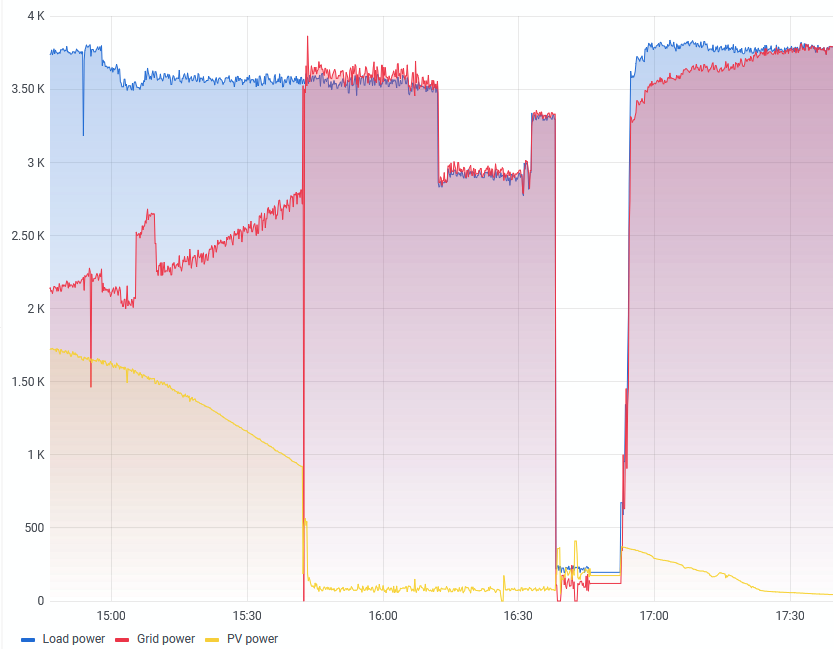
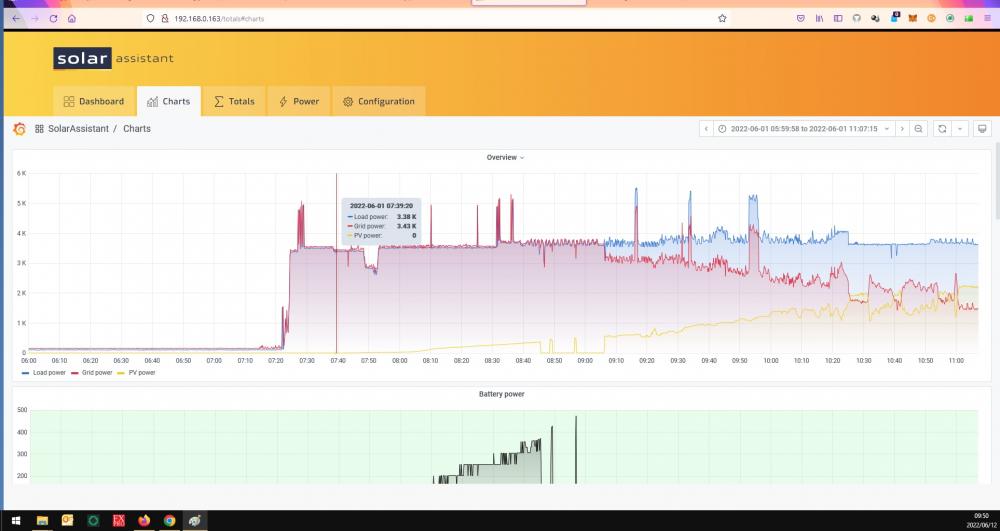
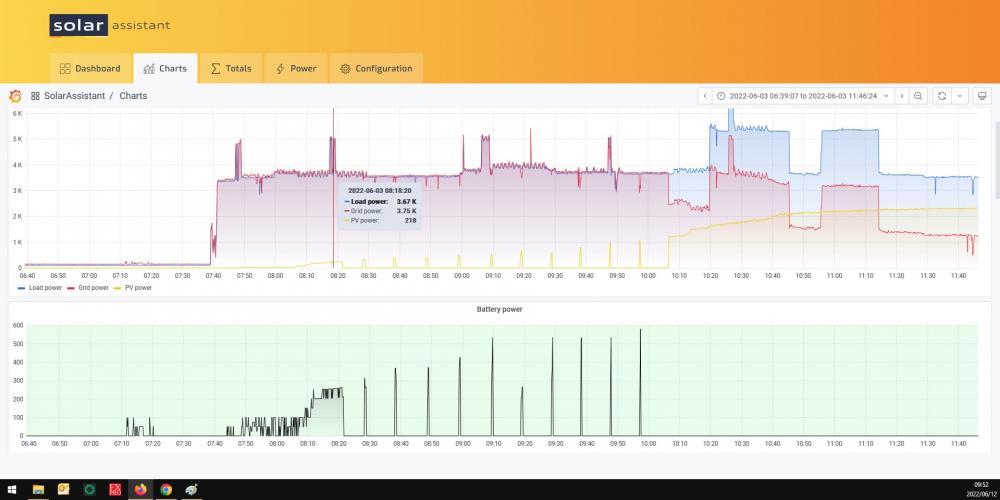
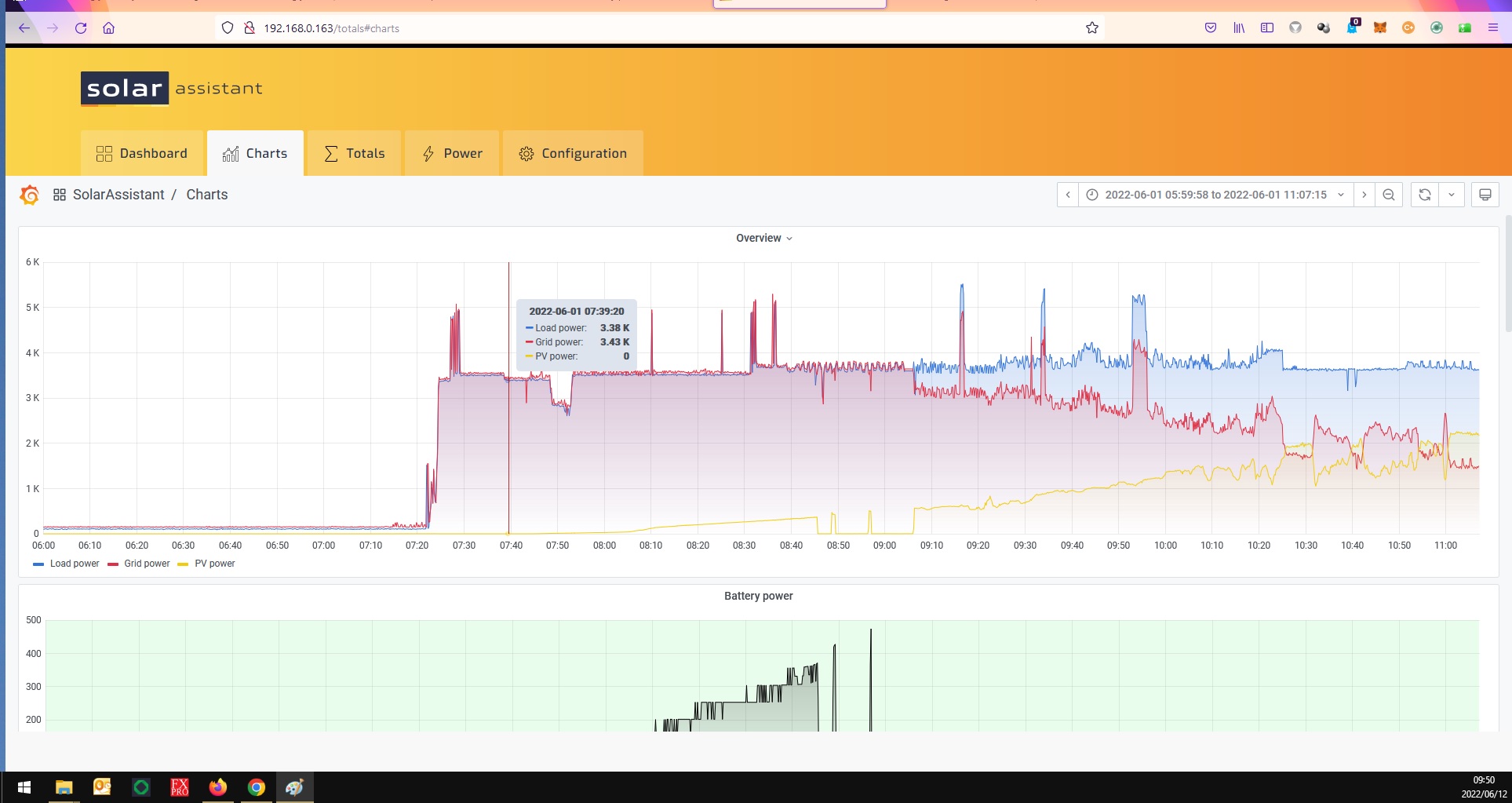
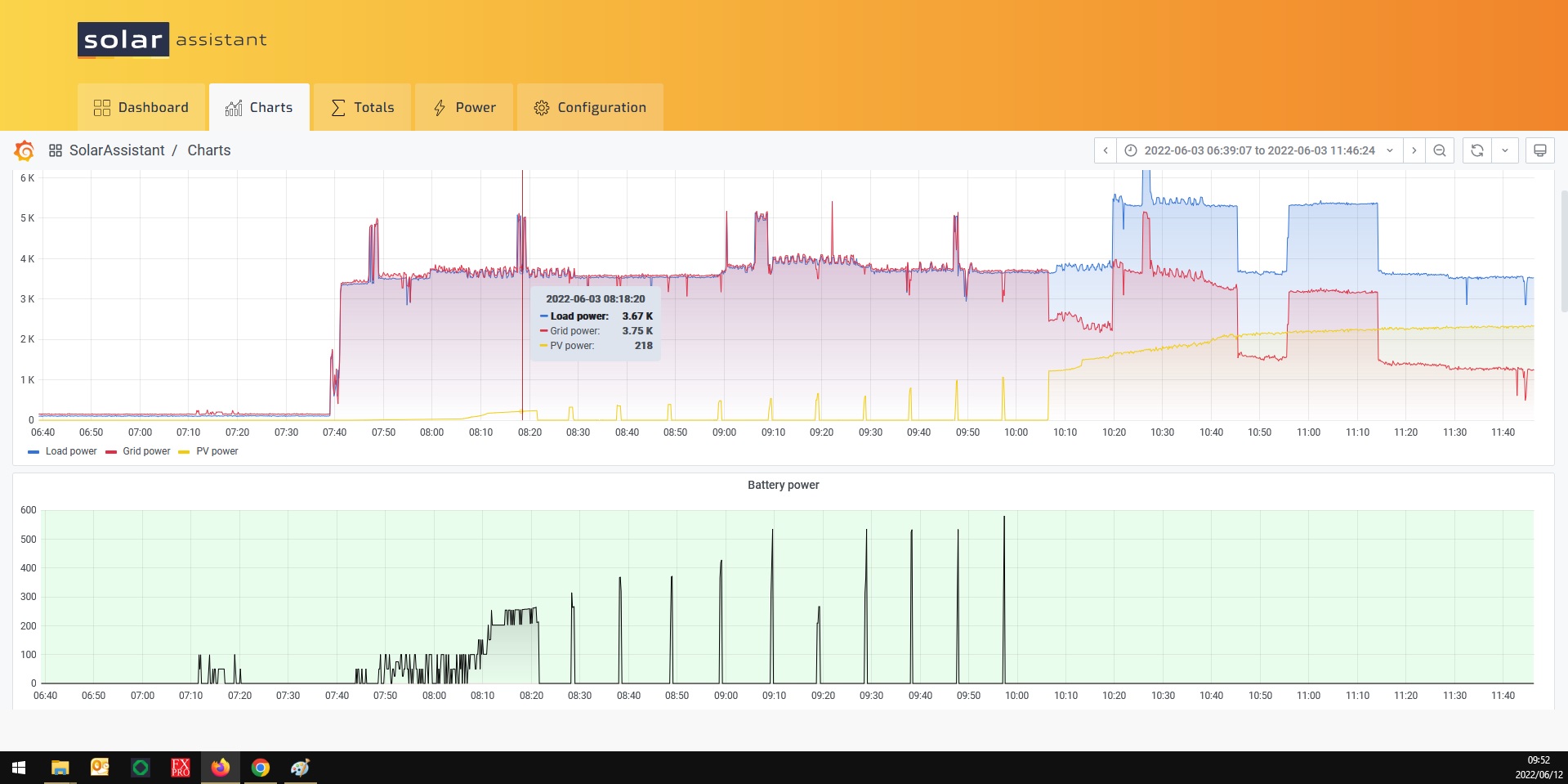
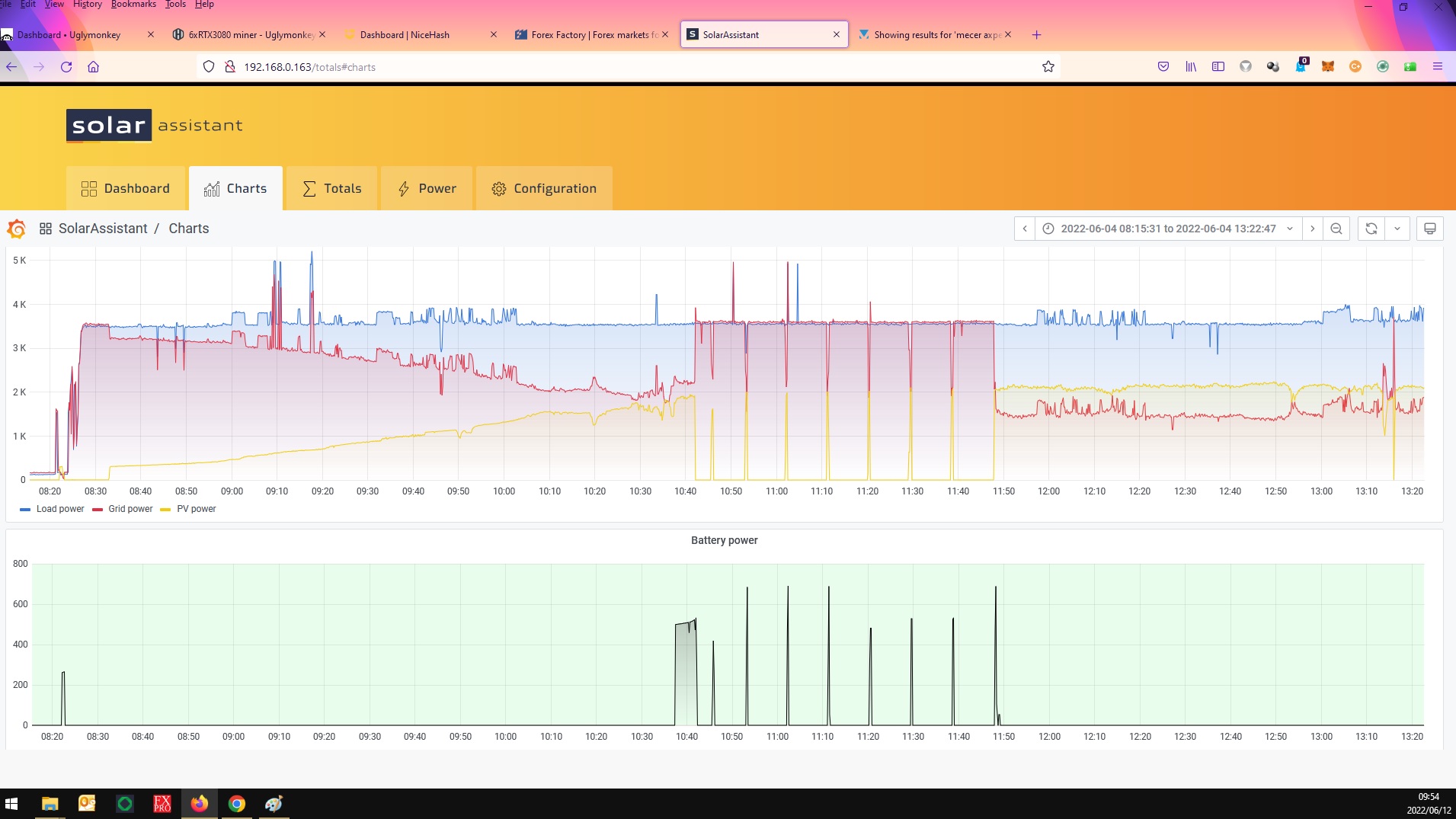
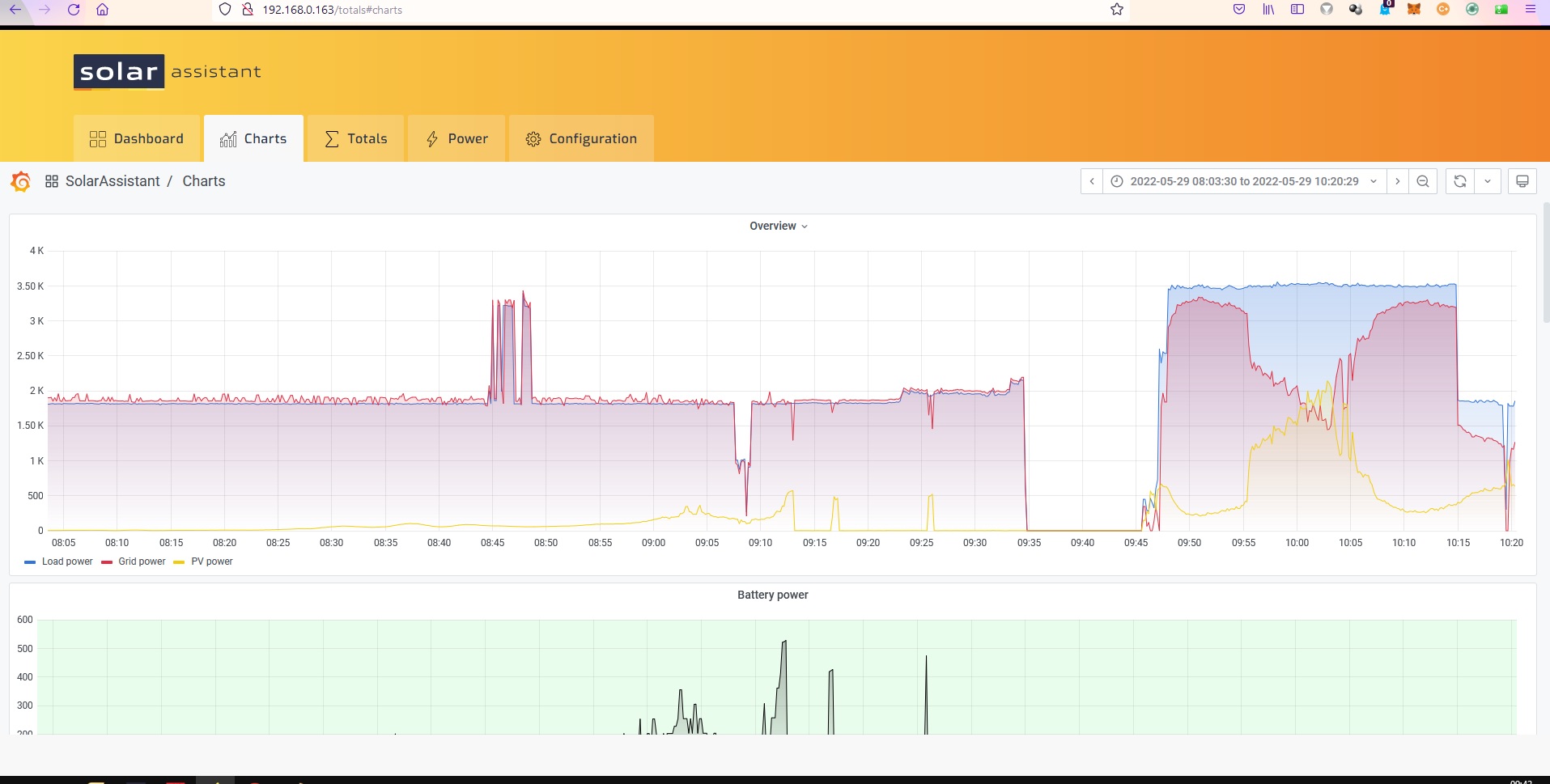
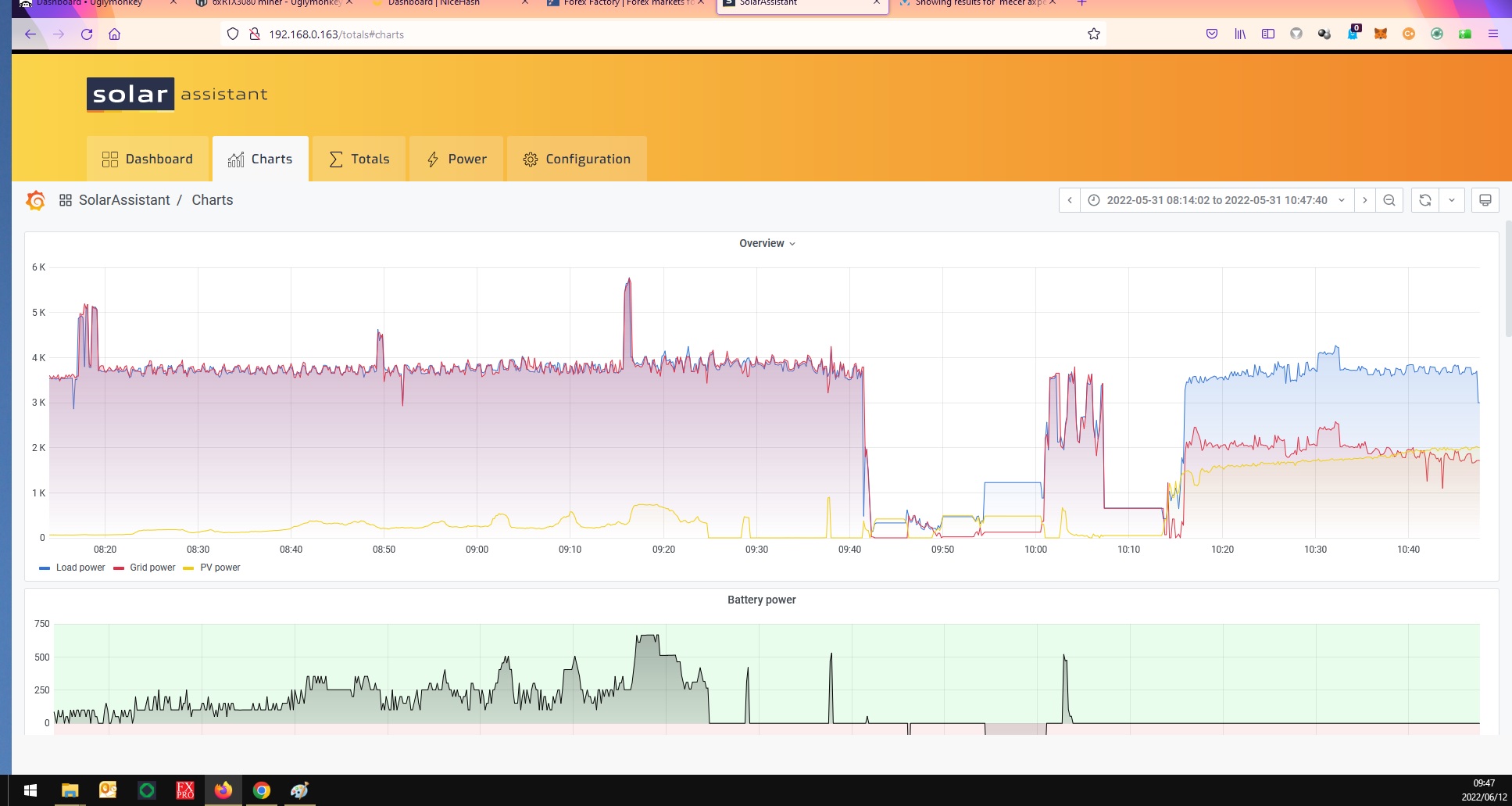
Hello @Coulomb I loaded the firmware from the forum the 90.06 under the download link and exactly 60 days later F90 error. Already the New inverter stopped feeding Solar in to the house, had to restart 5 times then all of a sudden its feeding solar in to the house again. These Mecer units are nothing but problems as far as a i can see. This is is doing the exact same as the previous unit with the 72.01 firmware. Stop charging the battery and stops feeding power in to the house. When i loaded the 90.06 she was a bit more stable but still did it, but now i am scared. Here you can see the inverter drops the solar for no reason then i have to restart constantly till she works again. I ran my old inverter my 5kv one for the last week and it never did any of this stuff just worked out the box. I got it back from the person i sold it to as he did not pay me. This happens at random and Mustek keeps telling me its not the inverter. I dont know what to do anymore. as i paid R22000 for this thing. Please see the images attached. you can see the solar just drops the 04/06/2022 is a perfect example of how the solar drops then pumps then drops then its like in perfect frequency. The guy at mustek sayd but than can just be clouds. Perfectly timed clouds must be.
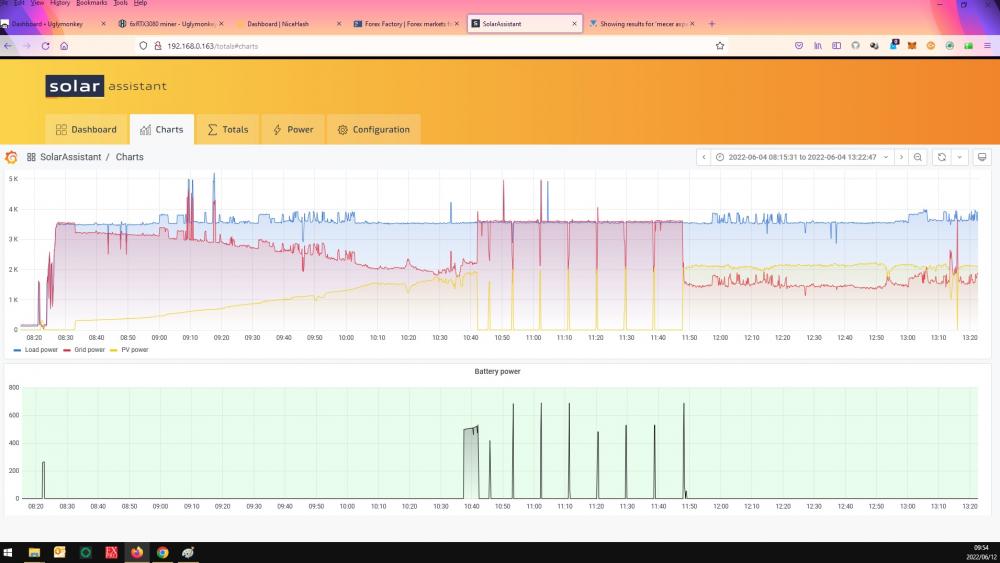
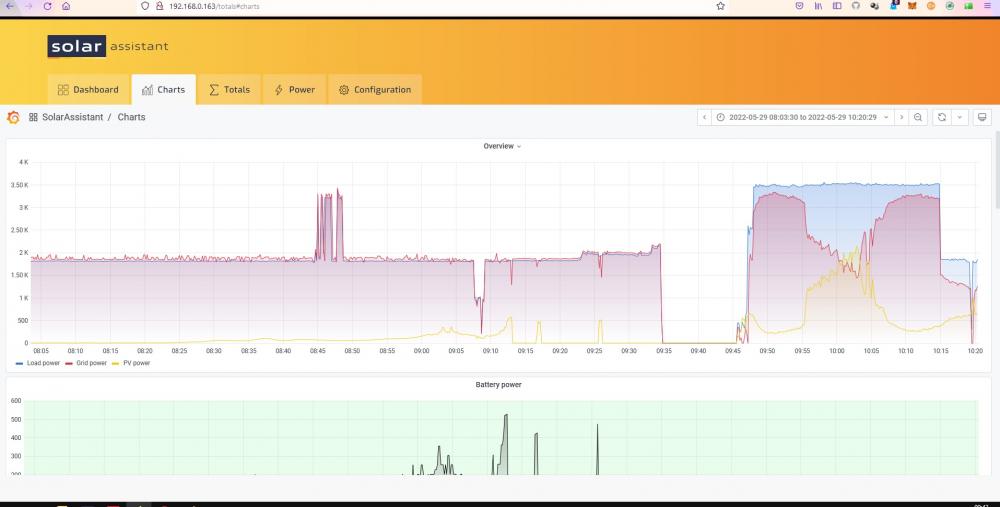
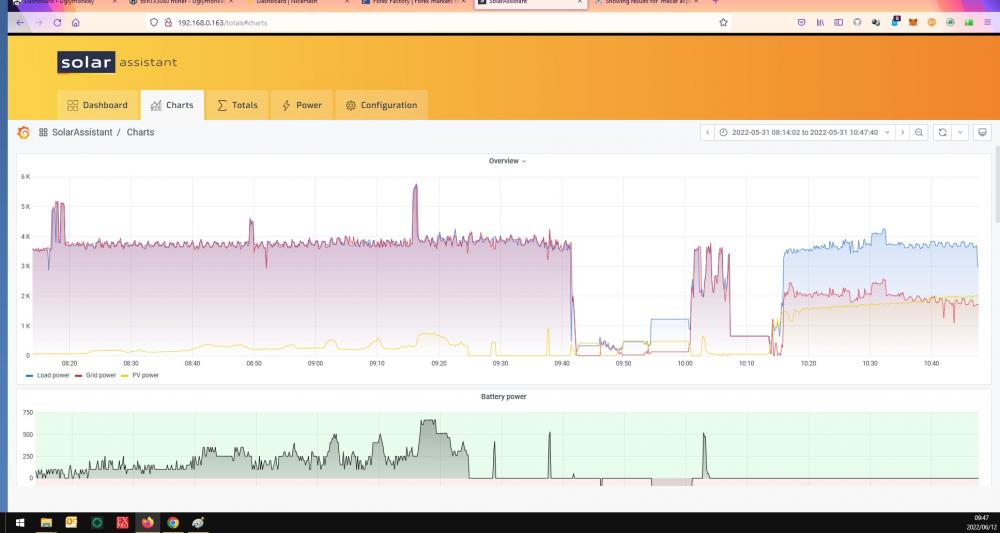
-
word of Warning to people with a Mustek Max 8kw inverter the one with the rgb led in front the straight RGB light not the round one. I have one of these Mustek inverters and it has been in twice to replace the Main controller. Eventually i asked for a new inverter and they did give me a new one as the old one is now only 5 months old. WORD OF WARNING IF YOU HAVE A M3C3R MAX INVERTER Dont load the new firmware on it as after exactly 60days mine said F90 error. MIGHT HAVE BEEN JUST MY BAD LUCK I DONT KNOW. The firmware was loaded on the 12/4/2022 and on Sunday the 12/06/2022 F90 message appeared and nothing wanted to respond or work and no power to the house. I now have a new inverter but to scared to change the firmware to the new firmware as this one came with the same as my previous inverter fans are always on and very noisy. I just installed the new inverter again and will see if this firmware works correctly as the previous one did not charge the battery correctly. So time will tel. @Coulomb if i am wrong please correct me but now i feel like must3k might be importing Voltronic ripoff units or am i just being paranoid now. I remember reading somewhere on the forum about the F90 error. THIS inverter has been nothing but a nightmare. Driver Axpert Max Firmware version 72.01 Model number 44 Machine type Off Grid Topology Transformerless Max parallel units 9 units Nominal battery voltage 48.0 V Expected AC input voltage 230.0 V Max AC input current 34.7 A Max AC output current 34.7 A Max AC output power 8000 W Max AC output apparent power 8000 VA
-
GoodDay. I am also from CapeTown South africa. And yes you can definitely see less production this year. To my small brain its definitely more pollution in the air. In 2020 when we were in lock down the air quality was a lot cleaner so no smog in the air the production on my solar panels were off the charts. I was getting over 2200 watts from my 1600 watts string panels. 4x405 Mono Panels halve cell. now 1000watts on average, My 4x545watts string is only producing 1600watts on average so all down facing north . Yes we always have smog especially now the last couple of weeks with very little wind. You can see even the sun looks a bit yellow/brown some days. That why the day after rain production ramps up again. Drive up to durbanville and look back towards capetown. From strand all the way to westcoast all you can see is a thick smog layer. Horrible. Cape town is know for its bad quality air especially now when the wind is not howling. if you fly you can see the smog all over the lower cape town area basically all the way from somerset west to almost as far a Yzerfontein the whole of bottom corner of the western cape is covered in smog. So sad, i hope we get lots off rain soon to clean the air. This is all just based on my opinion and offcoarse i can be wrong 😉
-
Hello Coulomb Thank you for your great assistance like always. I tried everything in the end and nothing worked. Took the unit in to my local mustek dealer and they replaced the main controller board as no firmware wanted to load on to it.T^hey even tried many times. new board now running 46.05 It seems to be behaving normally now but i only installed it today so will see. Thank you again i just wanted to respond to you.
-
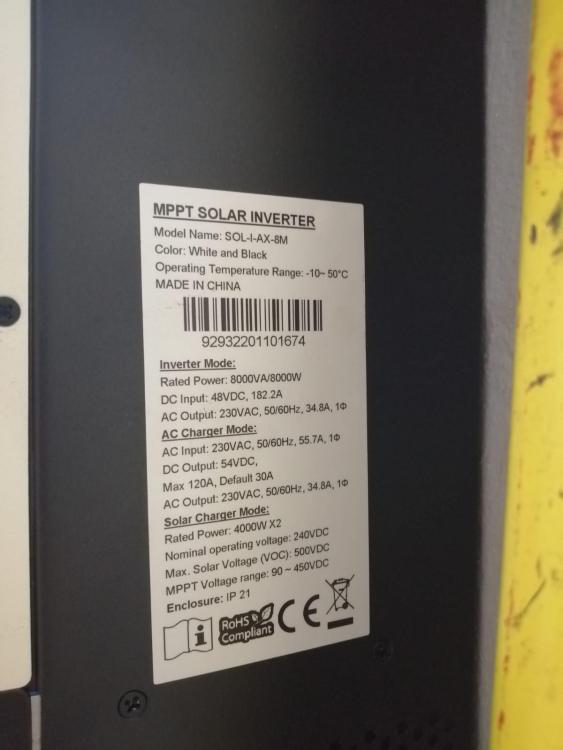
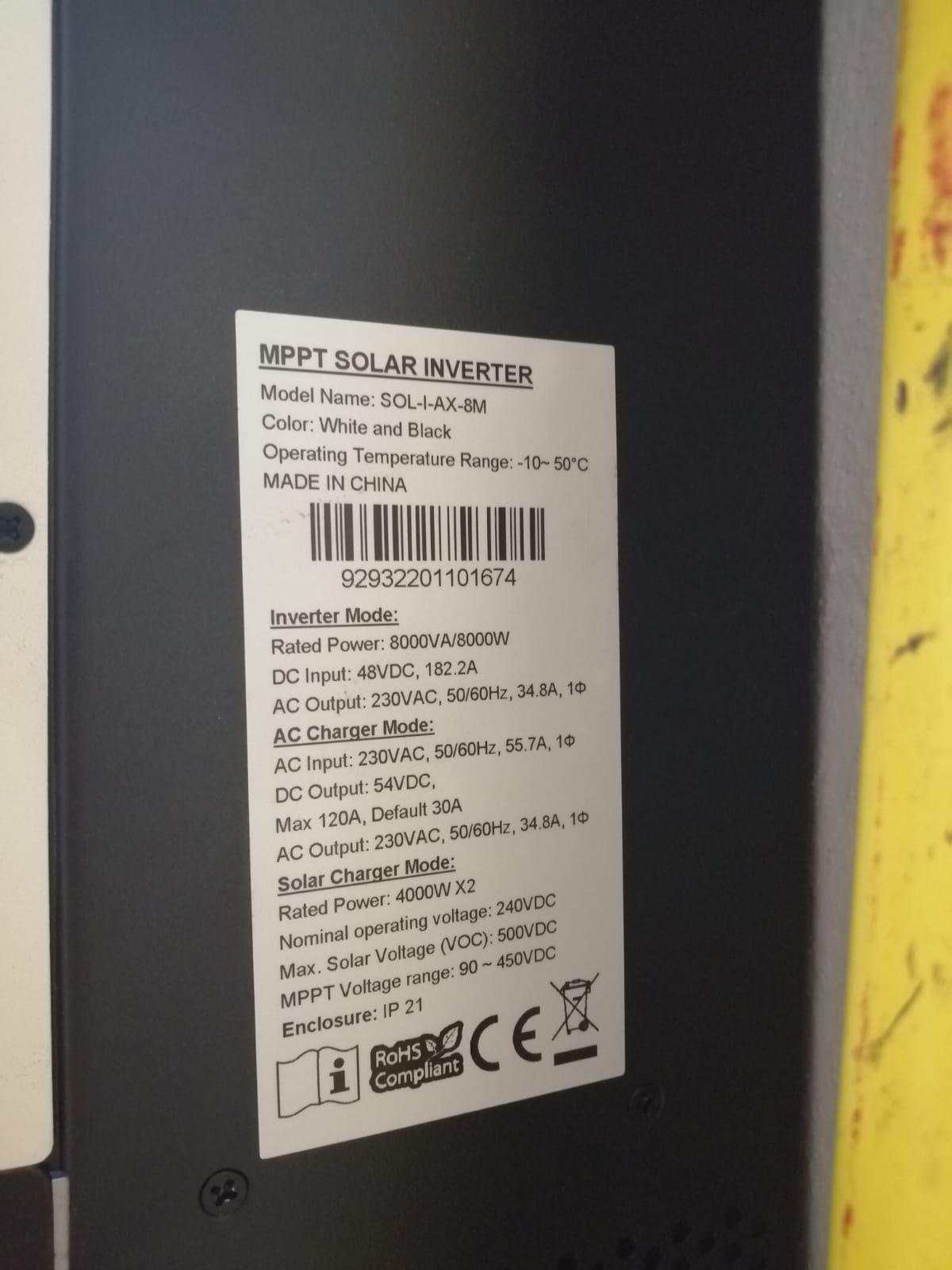
@Coulomb thank for the updates on the firmware. I just upgraded to a Mecer Sol-I-AX-8M inverter and its running Main CPU 72.01 and Remote ppanel 12.13, i emailed supplier and mustek for firmware updates as this inverter is doing funny thing like never charging the battery they send me Main firmware 46.05 and Remote firmware 12.13. My question is watt do i use. The Mustek firmware 46.05 or the firmware on the net 90.06 and why is my inverter running 72.01??? Im very confused and dont want to brick my inverter. Already sold my older inverter that i also had to upgrade the firmware to work correctly. But now i am scared to use the wrong one. I read through most of the forum and found most people have the 46firmware and havent found anyone with 72.01 firmware. The box was opened when i got it but i thought maybe they just updated the firmware thats why it was opened but now i am worried someone send the unit back after they loaded the wrong firmware. Any advise would be greatly appreciated.
.thumb.jpeg.5cdbe4c1e8fbb228f2e1a9f5e2a39cc5.jpeg)
-
Dont know if you got yours fixed @Blessing @Coulomb but here is new firmware for my Inverter i believe its the same as the Kodak VMiii inverter. Fixed a lot of issues.
-
For anyone interested. I am not sure if i am allowed to do this but i finally got firmware from the actual factory in Taiwan that manufactures my specific unit. Its the VMiii 5kv unit with 48volt battery (I also have a Pylontech 3000 battery connected to it with no communication issues. ) I had constant issues with unit resetting stored settings and fan always on issues. I got the latest firmware from the factory for the Display unit and the Main CPU firmware. They were very professional and quick to assist me after the local Company did not do much to assist, they did eventually respond but still did not give me the correct info. After updating both the Main Firmware and the Display firmware my unit is way more stable and quieter. No fans running 24/7. I upgraded from 41.03 to 41.16 main cpu and 2.00 to 2.61 on the remote Display CPU and it is way more stable. This might not be the latest i don't know but it seems stable. Was super easy to do. Hope this can help someone that is struggling. Please note this firmware is for the VMiii 5kv Offgrid inverter with the Screen on the bottom left side of the Inverter box see image attached i believe the same as the kodak inverters. I accept no responsibility for you bricking your inverter, this is used at your own risk. If i can do it i am sure you can. Remote Panel Firmware Upgrade SOP20190819.pdf Remote Panel_Reflash_MCU(02.61).rar VMIII reflash_ver41.16.7z

-
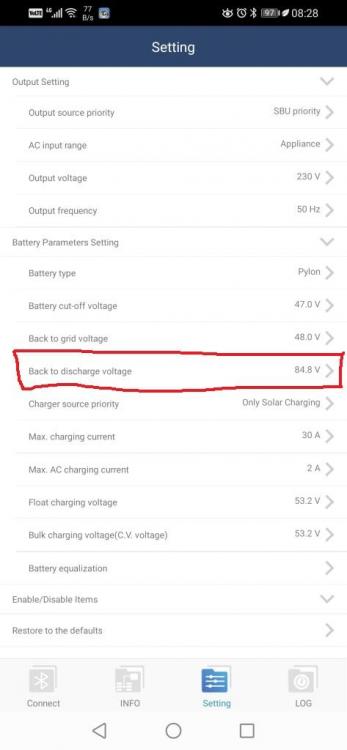
Ok so after i reset the inverter last week and disconnected all the Power sources it was stable for nearly a week only to get this again today. Here you can see the "Back to "Discharge mode is set to 84.8Volts (Normally its 87Volts) so i give up on this makes no sense. It will now stay like this until i reprogram the inverter. before i left it for 3 days and it just stays like this. Reprogram required. Any new ideas for me Thank you.
-
Hello StephenB This is not a solution just a question. I also have strange behaviour issues with my 5kva inverter its a VMIII and idea what yours is. I think its firmware related but i havent been able to solve it. Hope you come right






.jpeg.acc5d6089d4a3f536d1a46c93437da2a.jpeg)

