


Deondti
Members
-
Joined
-
Last visited
Everything posted by Deondti
-
Issue is deye has a calculated battery capacity which changes , when battery capacity is set to near that value it works correctly. In my opinion this should be ignored if lithium battery is used. Still sounds like a deye firmware issue in the deye to me
-
I just discovered that "battery capacity " has a effect , perhaps some kind of offset
-
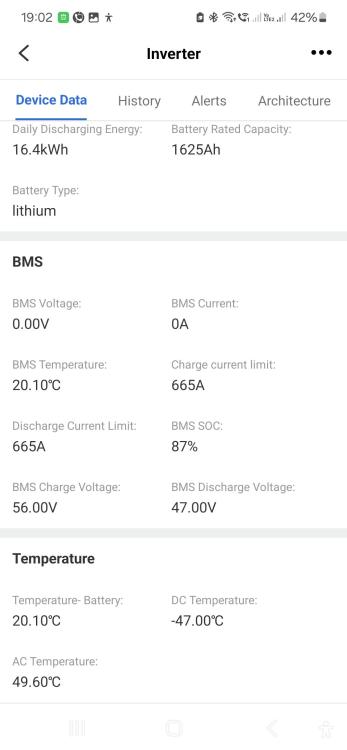
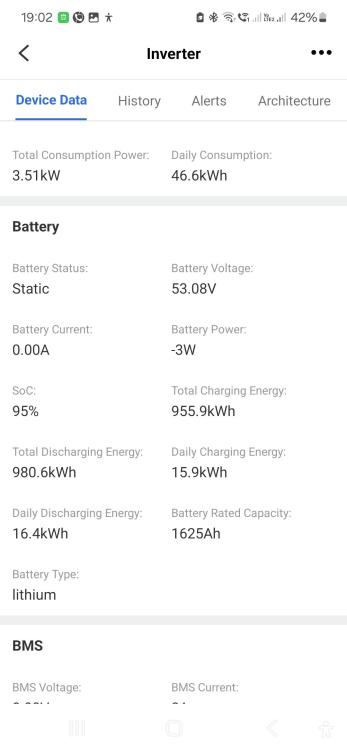
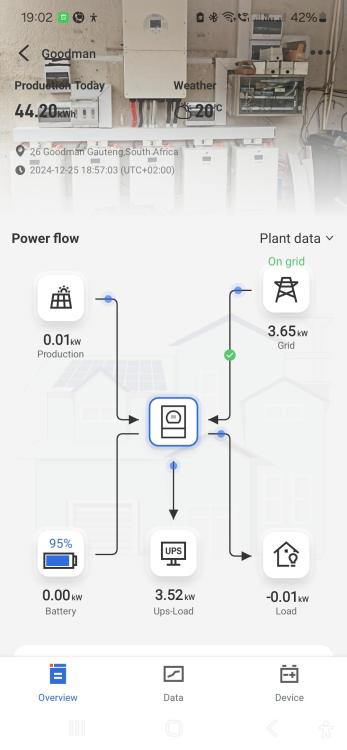
That's is the correct model, yes. I had a look and while charging the "battery soc" on inverter does not match soc any of the battery's. Battery SOC on the inverter is always at 100% long before any of the battery's are at 100% While discharging it also does not match any of the battery's. It's also not a average value of the 7 battery's, charging or discharging. The li bms value reported by the bms is infact the average of all the battery's It's as if the inverter is determining SOC based on voltage solely. Infact I can change the setting to based on voltage and the inverter value stays the same as when i select Lithium. Remember I stated that the li bms values read by the inverter is correct and 100% of what it should be. See my photos. The inverter is simply using its own calculated soc.
-
Maybe someone else has experienced this and have found a solution. 16Kw single phase inverter 7 x svolt batterys that use PACE bms all connected and communicating with inverter using "00" pylon configuration. The li ion info on the inverter displays the bms data perfectly BUT the main screen on the inverter is using a different value ( i can only assume a value calculated if you had no comms) It's also using this same SOC for my time settings. I have been in contact with DEYE who has upgraded the firmware which hasn't solved anything. Deye now suggests it's a battery firmware issue which I cannot believe. Any ideas or perhaps pace bms available?
-
Yes Sadly Manie has passed I have 3 ICM systems that stopped working, i'm not sure if it needs server authentication but it seems lost in the water. The website is still active and they are still taking funds never to be seen to date again. no refunds, no correspondence and no delivery of items. I now connect my battery's and inverter directly to my Home assistant without SA or ICM
-
Default pasword for ICM MQTT is ICM123456
-
did you ever solve your problem? I'm having a 8Kw doing exactly that occasionally, it displays no consumption when utility is up, on load shedding the load displays. It's like its bypassing the inverter without reading even grid load yet there is... I suspect the relays internally might be sticking
-
UPDATE I have reported this to DEYE , gave them my dongle Serial and 30minutes later they updated the dongle firmware over the air, WORKING 100% now
-
Interesting thing.... today the grid is off due to "Eskom Maintenance" My essential load is now pushing the correct values that match the inverter screen exactly. Pondering if there is a trick with the ct ( I cannot think of a scenario that would make sense of the display reading to differ to pushed data) I will play around when grid returns. I have a ICM unit that I still need to connect, I will have to make my own rs485 cable since my regular supplier seems to be Mia and his associate is also not responding.
-
I Just purchased and installed a DEYE 16Kw single phase inverter. I discovered that on the inverter the grid/ct watts and load watts would be eg. 6000W but on the DEYE app and Solarman app it only reports 600W I'm also running the DEYE home asssitant integration and it reports the same , out by one digit using the wifi dongle with local connection on LAN. Would this be a firmware issue on the inverter/dongle?? Unfortunately I cannot try the rs485 port at this stage Has anyone else experienced this?
-
my comms issue was solved with this firmware, over 2 months without the error
-
-
The inverter displays" UPG YES" Nothing happens on the software , stays 0% , times out to " can not open serial port step 1" update, I tried a different serial cable and it's upgrading
-
Yes the PV is now in HV config Thank you for the FW. let me try
-
BUMP Has anyone found a cause? I have the same issue Ver 50.07, all 3 inverters same FW IT happens randomly , sometimes after a day, sometimes after weeks NOTE: I ran KING 1 units in that same spot for YEARS, ALL parallel cables are perfect. I'm starting to think these KING2 units are duds. After having these units for 3 days , 2 of them blew up, I had to pay premium to have them repaired. DIY Geek and Full circle solar warrants no warrantee..... everything with them is "POWER SURGE" there is no way I'm sending them back


