


NigelL
Members
-
Joined
-
Last visited
Everything posted by NigelL
-
Hi VisN, have you verified that the correct Voltage settings have been programmed using VEConfigure? What is the "DC input low shut-down" voltage setting? This can also be affected by the ESS "Dynamic Cut-off" feature if you have enabled this option.
-
Thanks everyone for the feedback! This confirms that I probably don't need to change anything after all 😉
-
Thanks! I have not seen any recommendation, either way, in the Victron manual. The solar panel negative appears to be directly connected to battery negative on the MPPT150/70 - so it may be best to earth the battery negative to give improved protection to the MPPT. I was wondering if there are any "regulatory" requirements in this regard - e.g. for Engineering signoff?
-
I have seen differing opinions on whether one should earth the negative terminal of one's Inverter battery. My inverter's AC connections, AC Surge protection and Chassis are well earthed (Victron Multigrid-II 48V, 3KVA). My solar panel frames are earthed as is my DC Surge protection on the input to my Solar Charger (Victron MPPT 150-70). The "AC-Side" and "DC-Side" earths connect together at a single point very close to where the mains power enters my property (i.e. close to the Neutral-Earth connection and Earth-rod/electrode). Should I also be connecting my battery negative terminal to the "DC-Side" earth?
-
This was still probably a good buy. Most small Ink-Jet printers are really just a way to lock you into buying small, expensive ink cartridges. They heavily discount the printer hardware and then make all their profit from selling the cartridges... Some manufacturers even put encrypted chips into the ink cartridge so that you cannot use generic replacements and cannot refill them.
-
I printed this onto an A4 self-adhesive label sheet, so one just peels off the backing and it's ready to stick ! The lamination bonds to both the printed-side of the label and the peel-off backing. So one discards the back half of the label-lamination "sandwich" which exposes the sticky backing of the self-adhesive label.
-
I have found a fairly simple and effective way of making custom labels - e.g. for marking/labelling Distribution Board. See example below I designed the labels in Visio and then had it colour-printed onto an A4 self-adhesive paper label (glossy type). I then laminated the whole printed label, including the peel-off label-backing. The lamination protects the label and gives it a hard-wearing finish. The printing cost about R11/page and the laminating about R13/page at my local "Wizards" print/copy shop.

-
I am offering the UPS, including the external battery box, for R2950. This is a bargain price considering the cost of a new unit with similar specs 😉 https://www.apc.com/shop/my/en/products/APC-Smart-UPS-XL-750VA-USB-Serial-230V/P-SUA750XLI?isCurrentSite=true
-
Hi Jason The internal batteries are connected directly to the batteries in the external battery box - so they all charge/discharge at the same rate. The UPS operates as 24V system, so 3 parallel sets of two 12V batteries in series (when one includes the 4 batteries in the external battery box). The UPS does not have any direct support for an external Solar charger, but one could theoretically connect a 24V Solar Charger to the battery bank. I have never done this so cannot give any assurance how well this may work in practice.
-
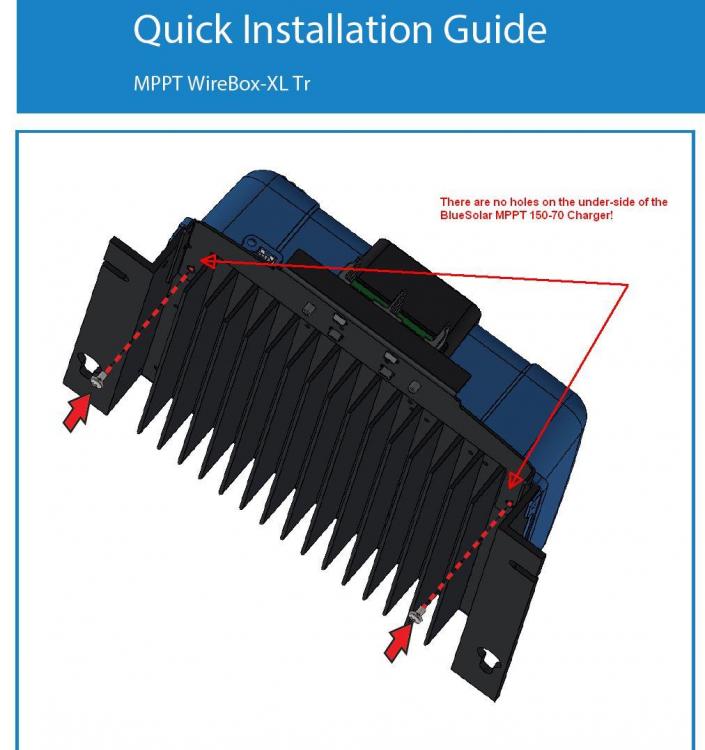
The Wirebox steel plate is quite easy to roughen up with sandpaper. The underside of the heatsink is quite narrow so it's difficult to get sandpaper in there, so I ended up using an old pen-knife to lightly scratch away some of the black anodising. It is worth masking off the area with some tape so that you do not scratch areas that will be visible after gluing. The final result was actually quite neat, despite this sounding like a McGyver job 😉
-
Sure - I used "Pratley Quickset Clear" glue. I also slightly roughened up both surfaces where the glue would touch. This glue thickens and sets fairly quickly (it will stop flowing/running after about 10 minutes) so keep this in mind when applying. One also does not want to use too much of it otherwise it can make a bit of a mess. I usually apply it with an earbud with the cotton-end cut off at an angle.
-
One could drill and thread you own holes - but one would have to remove the cover to make sure that any aluminium shavings don't end up somewhere important. I could not find an easy way to do this. I opted for the glue approach since the steel plate fits quite snugly to the bottom of the heatsink. However I'm not sure what I will do if it ever needs to go in for repairs under warranty 😉
-
I bought one of these for my MPPT and they look good and provide good strain-relief! The only issue I picked up is that my MPPT does not have threaded holes on the underside of the heatsink for fitting it. I am not 100% sure, but it looks like these holes may only be on the "SmartSolar" version of the MPPT and not the "BlueSolar" version. I tried getting an answer from Victron on this, but was not successful. I eventually solved this by gluing the plate to the heatsink with a small amount of strong 2-part epoxy. I would be interested in whether your unit is also missing these holes.
-
The costs jump up a bit more when you have a 3-phase supply 😬! Unfortunately I did not get everything at the same time otherwise I could have arranged a bulk-discount...
-
Yes this is possible. The only point to keep in mind is that you need space for a separate Neutral Bar for all the circuits fed from the second RCD.
-
I have not had any earth-leakage trips so far, although my installation was only completed just over a month ago. I don't think we have had many Eskom outages in this time, but I have done quite a few tests where I have disconnected Eskom. I have two RCDs on the AC-OUT1. The "Chint NL1-63" RCD connects to all lights in the house (LED), Fridge, TV, Extractor fan, WiFi Router etc. The "Hager CD264J" RCD connects to a second sub-DB in my office that supplies a number of PCs, printer, aircon and security camera and server etc. I also had my APC-UPS connected to this circuit, but disconnected it about 2 weeks ago (I am selling it). I'm holding thumbs that there will not be any issues going forward!
-
I don't have the Carlo, so I'm n ot familiar with how it is normally configured. I read the Mains voltage on my CCGX on the Multiplus menu. Mine normally seems to vary from about 200VAC to about 220VAC.


-
When the Eskom feed is turned off, the Multigrid will supply AC-OUT1 at pre-programmed voltage level - typically 230VAC. When the Eskom feed is restored, the Mutligrid has to synchronise its AC-OUT1 voltage and phase to match the incoming Eskom feed. I suspect that this sudden change in voltage/phase is playing a part in this problem. Maybe you can re-program the Multi to be at a closer output voltage to the "normal" Eskom feed?
-
I wonder if the surge-protection circuit in the APC UPS may be causing/contributing to this problem? I would try connecting the UPS loads directly to AC-OUT1 and see if this changes anything. Then repeat this test with APC UPS completely disconnected from AC-OUT1.
-
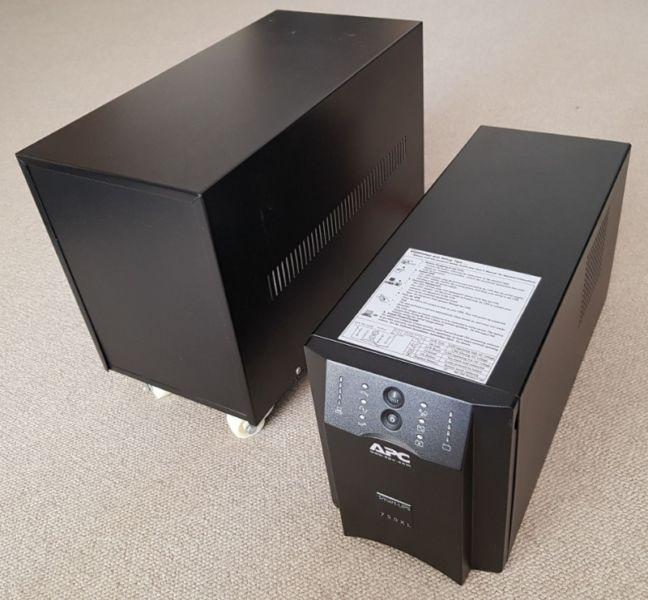
APC 750XL Smart UPS with extended battery box for sale. The main UPS has 2 x 17Ah batteries and the extended box has 4 x 17Ah batteries. The batteries are now 4 years old but still hold a fair amount of charge. When fitted with new batteries, the UPS ran for just over 4 and a half hours with load of approximately 250W. The built-in battery charger is designed for external battery packs, so the recharge time is under 2 hours. I am in Vredehoek, Cape Town.


-
A strong, earth-directed, CME would be catastrophic to major infrastructure (power lines, transformers etc.). However small electronic items, that are not connected to long wires, would be largely unaffected by even the strongest CME. I remember reading somewhere that a lightning strike generates a much higher intensity magnetic field than a CME, even at some distance. The key issue is that the relatively "low-level" magnetic field from a CME is so widespread - affecting the whole sun-facing side of the earth. This allows a massive amount of energy to be coupled into long power lines, telephone lines, fences etc. Time to upgrade the surge protection on my Mains input....!
-
I came across the following link for photos of Cape Town from Feb 2018. They also have photos from 2017, so we may get another update in a month or two? http://www.arcgis.com/home/webmap/viewer.html?url=https%3A%2F%2Fcitymaps.capetown.gov.za%2Fagsext1%2Frest%2Fservices%2FAerial_Photography_Cached%2FAP_2018_Feb%2FMapServer&source=sd
-
Eskom-se-push 😛 seems to get the most recommendations... https://eskom.sepush.co.za/
-
I guess that I have just re-discovered one of the immutable laws of the universe, that applies to many different fields. Actual_DB_Space_Required = Planned_DB_Space + n (where n >= 1). 😃
-
I was also hoping to avoid that 🤔. I guess I will have to do it, but it just seems a rather inelegant solution given that the LED Indicator is a device with an inherently low-value fusible current. But still better than having to install an additional circuit breaker just for the LED Indicator!


