


MdF
Members
-
Joined
-
Last visited
Everything posted by MdF
-
Hi Serg, Do a search on the forum for Deye and Work Mode Settings and you will find quite a bit of info on that topic. However, have a look at this topic for some help in the meantime to get your system set up optimally:
-
Yes, SA does allow you to do this. There is actually quite a lot that you can manage via the app. Not an investment you will regret purchasing. MdF
-
I was in a rush typing and didn't read my message properly. Meant to say The easy fix is a dedicated network cable. MdF
-
I had a similar issue when I started with SA a couple of years back. But I would get connectivity drops 3 or 4 times a day. So kind of lived with it. The easy fix is with a dedicated network cable. A few months ago I had to upgrade my wifi router at home and the SA Pi has been solid ever since. MdF
-
I have seen the Automation functionality but am too "scared" to try it out 🙂 I would like to see feedback from others first as to how they try to use this feature. MdF
-
Hi GF, thanks for the suggestions. I will certainly look in to trying out your suggestions. MdF
-
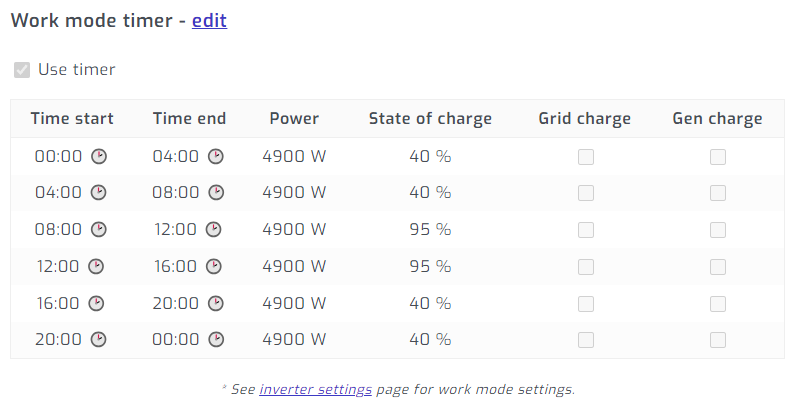
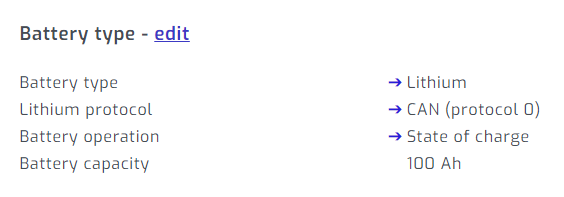
Jaco, try changing your settings on the inverter (or through SA) to the following. Note Work Mode Time uses State of Charge. Once you have done that, then you can play around with the % charge you want for your batteries. At the moment, you have it set to Voltage. However, do note, that in some circumstances, you will end up using some grid during the day when loads are high and solar is poor. But when you have loadshedding, the grid usage will not happen and power will come from solar and batteries in varying amounts. On my system (see details in signature below), I am using on average 300-400 watts of Grid per day, which for me is acceptable for what I have installed. Hope this helps. MdF
-
Apparently the latest versions of SA have an option to resample data etc once an update is done or you see something that doesntly look right. Go to Configuration tab > System > Storage > click on view Detail > then System > Usage and click on Resample totals. It can take up to about 5 min to complete. Give that a try and see what happens and if you data corrects? MdF
-
I take it you are referring to Solar Assistant? Not shoiwng up on my system yet either. MdF
-
Got this reply from SA just now: I have just done this and it seems to have worked. Took a while but correct data showing now. MdF
-
Yip, the first update gave me negative numbers. But I thought that intuitively that is not a problem as the negative number denotes that the battery has used power hence it has lost power to power up stuff (negative value) ??? But after the second update, I am now also seeing zero numbers for this column. Something not quite right now. Have reported this just now to SA. MdF

-
Yip, I'm seeing that too and I am now on version 26-11-2023. Since I don't use HA, I didn't really notice it until you pointed it out now. MdF
-
Ja, that is probably the best way to go. MdF
-
I also found that my router was rather outdated and old (10 years actually), never thinking that could be the source of the problem. So, replaced it a while back and SA has been rock solid too in terms of connectivity. I have noticed that it will drop connection now and then, but connects back within 10 seconds. Gone are the days of each day the system not connecting for as much as 3 to 4 hours. MdF
-
Yes I did.
-
Hi Vic, This is the correct cable to purchase and yes, the software is available from them too. If you do go this route of "semi-remote" updating, let us know how it goes here. MdF
-
Hi Vic, So, I ordered the correct USB cable from LBSA which was needed to connect to the battery itself. Then using my internet connected laptop connected to the battery via the USB cable, LBSA used Teamviewer to connect to my laptop, installed a software programme and then did their fancy electricity magic that way. Yes, it is defo a bit of a mission to do this as you need to setup a time with LBSA for when both of you can bet at the system. But I had no issues whatsoever with working this way as I could actually follow onscreen with what LBSA were doing to the battery. I learnt quite a bit during that process as well. If you have more than one battery, LBSA will ask you in the chat to connect between each battery so that is why you need time to be online and at your system. Hope this helps. MdF PS, the battery monitoring software they used is still on my laptop and I am quite good at using it now. Just only for information about each cell, battery performamnce etc. There is a wealth of info available but you have to be physically "tied" to the battery with your laptop and cable.
-
I have been using 2 of these batteries (previous version design is more square) and have been very happy with them since install. Just over 820 ccyles on both of them. However, they do not give detailed battery information in Solar Assistant but rather only the standard battery information. But apart from this "nice to have" they have been absoluetely rock solid. And their price I see now is good too. Support has been great too (email and remote). When I had an issue with the second battery being added, the cycle count was not correct. They did a remote connect to the batteries and upgraded firmware on the first one to match the second newer one. Since then, no issues. MdF
-
Strange that. I see there is another software update package this morning. Try that first. Otherwise report to SA and I am sure they will fix it.
-
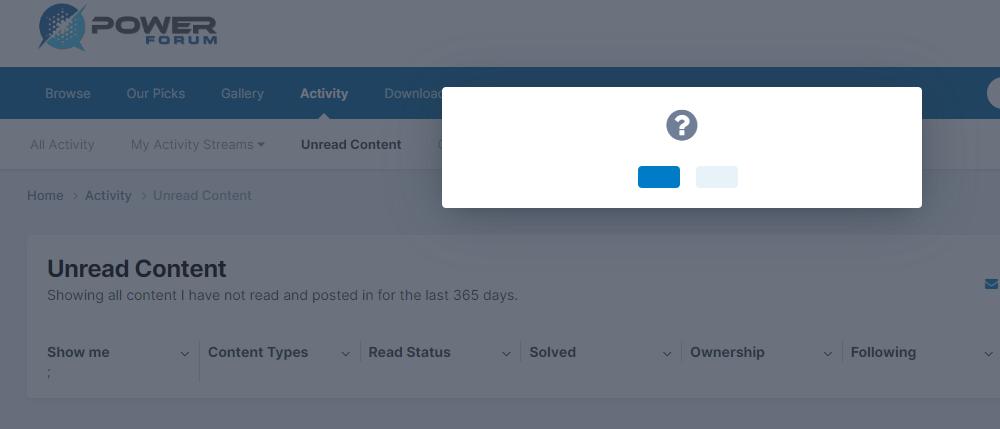
For me, the text is showing again in the Mark All Read option so seems to be fixed.

-
Here is the screenshot when you click Mark All Read. You then need to click on the dark blue button in the popup.
-
The CT is installed and wired correctly, it is just where it is inside the inverter as there was no more space inside the DB when the system was installed. It had to be located there. MdF
-
Hi Zweli, Have a look at the following thread as it should be able to assist you: https://powerforum.co.za/topic/11682-deye-time-of-use-settings/#comment-117611
-
So its pronounced "Dooi-Ya". Cool, we learn something new every day 🙂
-
Morning All, So a bit of fun for today. What is the correct pronunciation for the word Deye? Is it simply "Day" without anything at the end? Or is it something like "Day-ya" with a "yaaaa" at the end? Or even "Day-ye" with a "yeeee" at the end? Contributions welcome. Have a lekker Thursday. MdF


