


Muttley
Members
-
Joined
-
Last visited
Everything posted by Muttley
-
I have 5 x 5 kWh batteries 🤪
-
Hi @slipx Not sure if I've missed something but since the last update, if I click on the total PV from my 2 x arrays, it doesn't show the history like it use to. Each individual bank does but not the combined one. It seems like the hyperlink is no longer available. TIA
-
Thanks! Been busy testing that actually
-
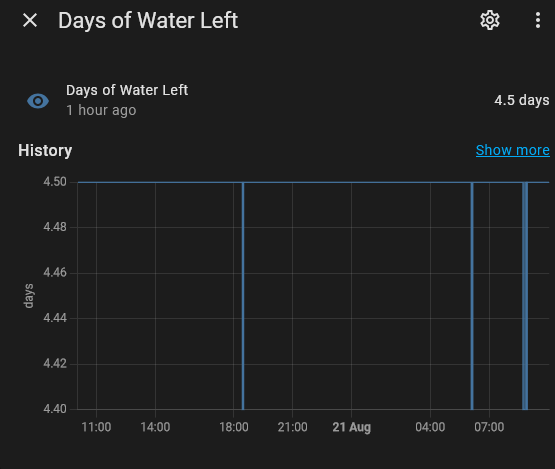
Added this to the code above which gives a number of days left of water left based on a daily usage of 1100l per day: - platform: template name: "Days of Water Left" id: days_of_water_left unit_of_measurement: "days" accuracy_decimals: 1 update_interval: 60s lambda: |- float total_volume = id(tank_volume).state; float daily_usage = 1100.0; // 1100 liters per day float days_left = total_volume / daily_usage; // Cap the maximum days to 5 when tanks are full if (days_left > 5.0) { return 5.0; } return std::max(0.0f, days_left); New sensor: sensor.days_of_water_left
-
Bit of an update on our system... Almost went the route of getting a heat pump (+- 40K) to help reduce the morning geyser load but then I got a brainwave 🤓 Decided to try do a bit of energy blending in the morning to reduce the grid usage for the 1 Geyser which runs from 08:00. With the help of Claude.ai, I managed to implement a *free* and fairly simple Home Assistant automation to achieve this. I'm currently using about 1kW from Eksdom during the day in total (we drink lots of coffee here in the AM) but could probably reduce this if I increased the battery discharge rate in the automation... Automation runs from 05:00 to 10:00 (this can be changed if need be) Sets the battery SOC rate to 60% Adjusts the battery discharge rate to 50A After the automation runs, it sets back our current system profile (scene) to the current winter profile so charging etc can happen as per normal. Anyway, here's the automation if anyone is interested in trying something similar: alias: Morning Load Supplementation for Winter description: >- Manages battery settings from 05:00 to 10:00 and enables winter profile at 10:00 trigger: - platform: time at: "05:00:00" - platform: time at: "10:00:00" action: - choose: - conditions: - condition: time after: "05:00:00" before: "10:00:00" sequence: - service: number.set_value target: entity_id: number.set_soc_timezone1 data: value: 60 - service: number.set_value target: entity_id: number.battery_max_discharge_current data: value: 50 - conditions: - condition: time after: "09:59:59" before: "10:00:01" sequence: - service: scene.turn_on target: entity_id: scene.winter_default_power_profile data: {} mode: single I'm no expert but happy to elaborate if I can...
.thumb.jpg.3fd8afe4f92ee1e00de9d7791e67987e.jpg)
-
Thanks for the input - still struggling but will give it a shot again with fresh eyes over the weekend!
-
Hey @slipx I've been trying to get this card to work but no matter what I try, I cannot get the Prog Capacity to visualise correctly: I've checked that all the entities exist so I suspect it's a template sensor or something that I'm missing... Any input or an explain to me like I'm 5 would be awesome!

-
See here:
-
binary_sensor.grid_connected_status
-
Thanks for this info, really appreciate it! Currently looking at the 6.3 Super from ITS...
-
2 more batteries added to the mix: (Thanks to @Steve87) Next job is a heat pump for 2 of our geysers - the poor 8kW Sunsynk is not handling the daily load. This plus the lower PV generation during winter means that with the 2 x extra batteries and producing +- 40-45kWh per day, we're way short!
.thumb.jpg.d20d13492a632d4da5f89055bd7e20d3.jpg)
-
Awesome, thanks for the clarity
-
Hey @slipx Wondering if you could let me know which option/s I should chose for solar forecast with open-meteo? Current settings are giving an output W/m2....

-
Yup - the dev of that plugin got irritated by all the stupid requests made by some. Anyway, someone else forked (https://github.com/BJReplay/ha-solcast-solar) it so you can remove the plugin and then follow the steps below. (All API settings and entities should still be there and no other changes required from you side) Manually in HACS Follow the link here Use the custom repo link https://github.com/BJReplay/ha-solcast-solar Select the category type integration Then once it's there (still in HACS) click the INSTALL button Then go to the HA Devices and Services and add a new Solcast Integration
-
If you want to change those, you'll need to update the the card: Change the kWh to W and remove the transform - entity: sensor.ss_total_solar name: Solar Power float_precision: 3 color: '#ff9800' yaxis_id: kWh unit: kW transform: return x/1000; extend_to: now show: legend_value: true in_header: false group_by: func: avg duration: 5m - entity: sensor.solcast_pv_forecast_forecast_today name: Solar Forecast (D1) extend_to: false color: grey opacity: 0.3 stroke_width: 0 yaxis_id: kWh
-
For once I can help solar: mppts: 2 display_mode: 2 show_daily: true colour: '#F4C430' animation_speed: 9 max_power: 9200 pv1_name: Steel pv1_max_power: 4600 pv2_name: Tile pv2_max_power: 4600 pv3_name: null pv4_name: null efficiency: 3 auto_scale: false Change the auto_scale to true
-
Awesome stuff.. Gonna copy pasta this in Thanks as always!
-
Hey, Nice chatting here and not on MyBB Thanks so much... I can't find the code... @slipx would you mind sharing?
-
Hey @slipx So with the Sunsynk server shenanigans today, I basically lost some of my daily stats data. It does seem to appear in HA but not in all the right places. Is there any way that this can be re-imported per se? EG's below: Still available here: But nothing here: Nor here:


-
Hi all, I'm not using the Sunsynk App at all as I'm using an ESP32 with Home Assistant to control/monitor my inverter. With the server issues experienced by Sunsynk (again), I was wondering what impact there will be if I turn off the Time Sync on my Sunsynk Inverter. I keep losing data (I know 1st world problem) at least once a month so really trying to avoid this issue. Any input would be greatly appreciated 🙃

-
Array is: 20 x 460W JA Solar panels (2x 10s) - Highest I've seen it peak at is around +- 10kWp if I understand correctly... Inverter was set to drink a max of 8000W until I set it to 10400W in April - thanks @Steve87 Yesterday was a really bad day as I ran out of solar hours so had to charge up batteries from the grid hence the 61.7kWh load. We usually average around 48kWh per day - this consists on an average of 13kWh to charge batteries. We are high consumers - 3 Geysers, 2 dishwashers, 2 washing machines and the list goes on.

-
May in Gauteng has been epic for me with an average of 46kWh/day. Today was not great- ran out of sun in the afternoon Solcast is forecasting another bad day tomorrow but then things seem to go back to normal 🤖

-
Thanks PV is 20 x 460W JA Mono Solar Panels (5s2p Mppt 1 and 5s2p Mppt 2 total 9200 watts 21.84A/Mppt) all facing north. Here's what they look like
-
Couldn't agree more - the clear Joburg skies have been great from a consistency point of view: Had a few days where I've been able to soak up every bit of PV! Sitting on 233 kWh for May so far (Ave of 47 kWh per day)... hopefully it carry's on like this 🙃

-
Nicely done @Steve87 😍 What car is it charging? Don't suppose it or the car support feeding the house with power from the car's battery...

.jpg.59e468441ae8da56b947d16d94b90331.jpg)
.jpg.a04ebaa831da82fe4ad4f7f6e740f0c5.jpg)


