Lee2
Members
-
Joined
-
Last visited
Everything posted by Lee2
-
How do you know it just wasn't tightened properly when installed though? I asked an electrical engineer friend about this now and he said this situation [vibrating loose] is very unlikely
-
Fair point. Also due to expansion and contraction due to resistance when energised and de-energised.
-
I don't buy that they need tightening every 6 months, how would they come loose, it is not like they vibrating etc. Also doesn't your EL need overload protection? Though i wonder if one actually does if the supply is less than 63a.
-
Preferably still sealed in the box
-
What are all those plugs and lightswitches for next to the inverter? What powers them and what in turn do they power?
-
Why not buy a 5kva inverter that can be paralleled and skip the wind for now
-
What sonoff model did you use? I am assume the powr3 given the basic is only rated at 10a?
-
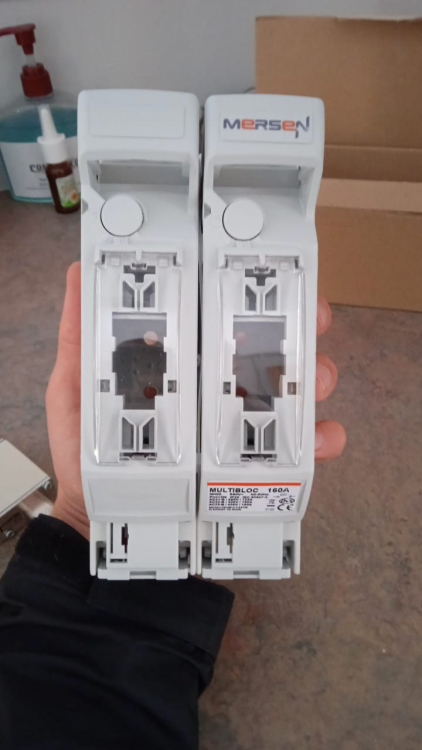
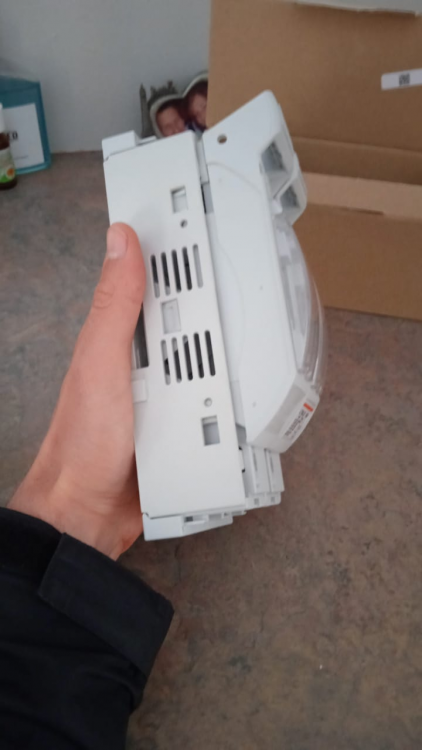
Currently I just have a 100a Victron mega fuse for my 2000w 24v Axpert inverter. I decided to upgrade to a fuse and disconnect system but I am shocked by how large it is. It seems like complete overkill. I thought it would not be much larger than an MCB. I am looking for something much smaller than this, what is the best product that for fusing and disconnecting? Or is this the best product for the job?
-
The problem is the installers prefer working for a super rich person installing a system worth hundreds of k where they walking away with super profits and they just not interested in working for you. When the global energy crisis calms down and the SA ultra rich all have systems, then prices will decrease. Until then it is bad timing
-
Can a geyser run off a plug socket? Perhaps a dedicated one for the geyser only, assuming it is suitably rated [one can get industrial sockets rated at 32a etc]. My reasoning for this is my geyser is only 2kw, why hardwire it in as they fail every few years, it would be way less effort to just plug it in with the added advantage that one could run it off a generator or inverter in an emergency. Can one do something like this and still be compliant?
-
Amazing thank you! Where does one get those auto-changeovers that are din-mounted from? Also what is Local Switch? Is that just overload protection for the EL? I also didn't know one could run a CBI Astute for the geyser without overload protection?
-
Is there any chance you have any photos of such a setup [inverters connected to the changeover via these blue plugs you see used with generators] that you could share as a reference?
-
@steve87 I have been wondering a while if you just want a UPS plug and play solution is it compliant to get a sparky to add a changeover with one of those blue plug socket sets used for generators that you can plug in any axpert or generator etc. Perfect for rental properties etc, the tenant can bring their own trolley inverter and plug in , and for new house builds etc
-
Put the inverter on the wall yourself and just get a general sparky with an. hourly rate and ask him to add a changeover switch and get a few circuits onto it. Make sure earth leakage works under all scenarios. Assuming no complications that is a 2-3 hr job Phase 1 done. Phase 2 brings DC and more complexity but that is another days problem.
-
Does anyone have some photos of their installation [including the db], or a circuit/wiring diagram? I am aware it is a small inverter but it would power only a few key lights and plugs circuits. Edit: must have gotten a COC and be fully compliant
-
But the Eskom side could in theory draw a lot of power if the changeover is on Eskom This is how the essential side is envisaged to look on the db | Mains 63a | Change over 63a | E/L 63a | Lights 10a | Lights 10a | Lights 10a |Lights 10a | Plugs 20a |Plugs 20a | The inverter would feed into the changeover with a 1.5mm2 wire and need to be protected by a 10a or 6a breaker on the inverter AC out. These circuits in practice only draw very little power, but the eskom side of the CO is going to need to handle 60a ?
-
On one end would you have a beefy 16mm2 wire from Eskom and the other a puny 1.5mm2 wire from the inverter? I am looking to power about 4-5 lights circuits with LEDs (not all on at once) and 2 bedroom plug circuits (max load would be maybe 700w and that is maxed, average load probably 150-350w) and I just find this size difference hard to grasp. My own changeover uses 2.5mm2 wire on both ends but only has 2 10a circuits after it so load cannot exceed 20amps. In this case load theoretically could as there are 7 circuits
-
What does this look like? Do you. have some photos? How do you hide the wires away?
-
Do the 1000w and 2000w Axperts bond neutral to earth when they running in battery mode? In line mode the neutral is already bonded. This is necessary from what I understand to make sure any earth leakage units I place before a changeover switch will trip correctly. Does this happen automatically?
-
My lightswitches don't have a neutral. To add them I am guessing the following: Turn off mains Take off switch cover and light fixture etc Insert fish tape into conduit until it pops up at the light fixture Attach black 1.5mm wire to fish tape and pull it down Twist the new black wire together with the existing neutral at the light and reattach i haven't used a fish tape before but i assume i just buy one at the local hardware.