


Acheron
Members
-
Joined
-
Last visited
Everything posted by Acheron
-
EDIT: Ignore
-
Did some more digging for what I saw above: Comms clearly established from inverter to batteries indicated a charge of 53.2V Checking Solar Assistant (connected directly to batteries via separate comms cable) indicates recommended is 53.3V So is the inverter at fault here for pushing this higher than it should OR should the BMS stop this from happening anyway? Somewhere somehow there is a breakdown in comms and the installer/myself cannot be blamed here is a its all controlled automatically via BMS to inverter comms. Nowhere I have set a charge voltage to be followed.


-
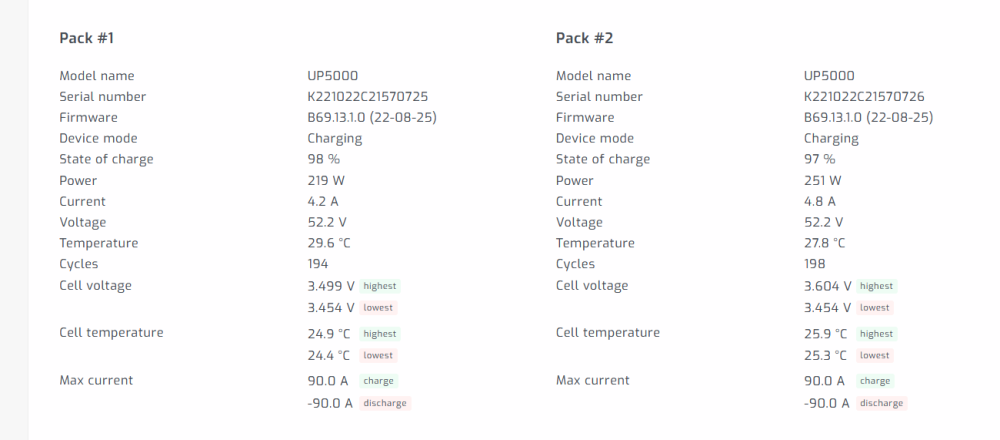
Caught mine doing the same now on pack 2 3.604v (spotted it as high as 3.65) Sunsynk + 2x UP5000 Got no reason to believe my BMS comms between inverter and battery is wrong.

-
Post your inverter settings
-
I assume all of the above is related to the timer functionality? Lowering the wattage is probably not the best solution as I'd still run say the dishwasher quick cycle (>2200watts and consumes 1kwh) at night occasionally Ideally I'd like for it not to be able to draw anything out of the battery from non-essentials. Not sure how this could be achieved via SOC.
-
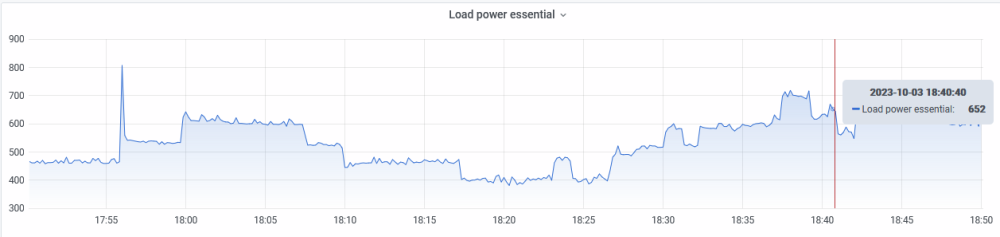
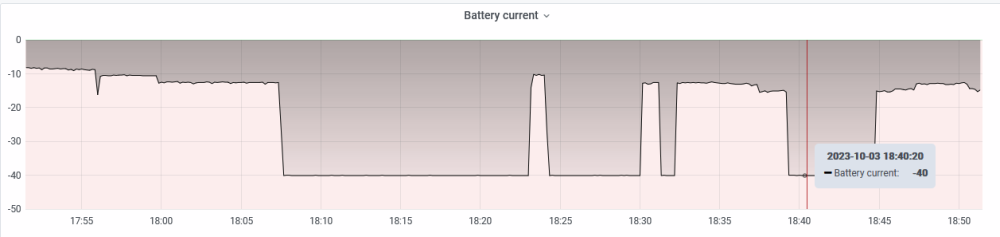
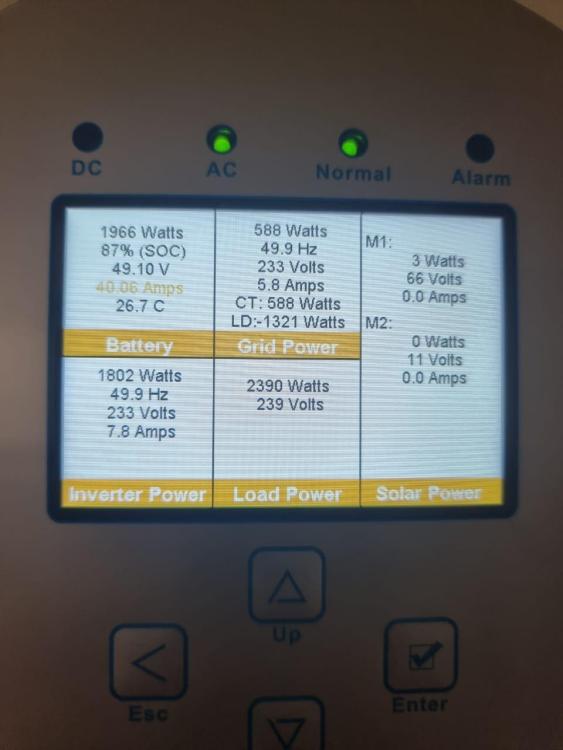
I have a 5kw Sunsynk paired with 2x Pylontech UP5000. I have both my geyser and stove connected to Non-Essentials and everything else in the house connected to essential loads. Today I noticed that in Solar Assistant despite indicating correctly that my oven draw is on Non-Essentials that its using battery to power it? How and why would it do that? My understanding was that Non-Essentials will never be powered by battery? Loads: Battery: From the Sunsynk Display:



-
So in essence the safest thing to do would be to immediately, before connecting the battery, set up the User values to what the Pylontech is specced for and switch on BMS_Err_stop. Then connect batteries (with correct cable) and monitor charge behavior closely. Should it fall back to user settings then at least they wont be out spec. If it continues to charge to much higher voltages then the issue is elsewhere.
-
Have seen this mentioned as part of the setup, but do we know for a fact that is the root cause of this? i.e. is this a symptom of lost comms (in which case inverter decides to pick voltages) or misinterpreted/ignored comms.
-
So I'm looking at replacing my Kodak Off-Grid inverter with a hybrid from either Sunsynk or Deye. From what I understand there is a particularly chronic bug with both brands where they overcharge Pylontech batteries, essentially ignoring the BMS set points for voltage. My questions: Is this true for all Sunsynk/Deye variants or just some? Has a software based workaround been found yet? I realise one could simply disconnect the battery comms and manually set these charge values, but I'd prefer to be able to work with/use SOC values.
-
Why do you have the same advert posted under two different usernames?
-
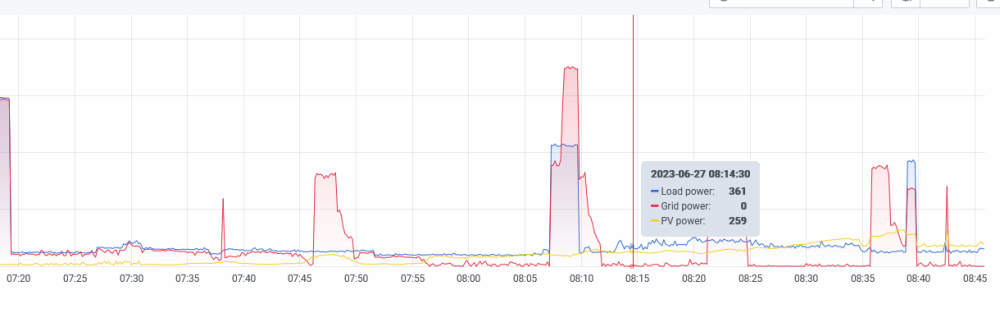
Unfortunately it does seem to keep discharging (at differing amounts) throughout the day until the next charge cycle occurs. I had this behaviour before I added solar, but it was limited to a semi constant 20-40w discharge. Now that I've added solar this seems to fluctuate wildly, almost as if the battery needs to compensate? Last hour: (PV is low due to rainy weather+time) Yesterday (also rainy, but just showing the trend with valleys of discharge power over the day). Inverter is running on SUB and there was no loss of grid so cannot fathom why it needs to use any battery here. Night time hours with no PV (note the constant, but lower battery discharge)


-
Yep.


-
Inverter (Kodak OG6.2) displays some odd behaviour: 2 examples: 1) Boiling a kettle (top is load and bottom is battery draw in watts at same time) Why would it be pulling 419w out of the battery when there should be sufficient PV and grid? 2) Idle household usage (top is load and bottom is battery draw in watts at same time) Almost no grid being used, enough PV to cover load, but battery being discharged by 250-ish watts


-
Any chance you can assist me with my queries with the same inverter sourced from yourselves: I can confirm that the fans run constantly and never turn off. I would not consider them loud until you're pushing around >2k watts through it and perhaps charging the batteries simultaneously. You would definitely want it far from a lounge/bedroom area. I have mine in the garage which separated from my lounge by the firewall. I barely hear it. You do indeed get the electrical buzz, but next to the fan noise it is the lesser of the noise concerns. If you like I can record it.
-
SoC or time of discharge based, yes, but as a side note mine does not switch based on either. When I lose grid the second output simply turns off regardless of what I have set there. Was trying to see if the OP had a similar experience See below:
-
Are you using your second AC output? Does it function correctly in switching on/off based on SOC or time of discharge?
-
Did you ever get this resolved?
-
I have the inverter and it does not appear to be limited per "output". I will however say that switching of the 2nd output (non-essential) does not work (switching according to time/SOC) as advertised. Busy trying to get some help from @SEGEN SOLAR at the moment
-
It's a catch 22 situation. During the lower stages of loadshedding (2 and below), it might be possible to defer charging from the grid to a later time most days. However during something like Stage 6 you are out several times a day, sometimes with sessions spaced out giving only 1 or 2 hours break between sessions. How do you expect someone, especially those without solar or those without significantly overspecced battery banks to not charge up before hand or in between? The real solution here is for government/Eskom to offer proper rebates on off-grid equipment to encourage people to add solar/oversize their storage.
-
Inverter is connected to the batteries via the provided comms cable and is set to the Pylontech specific "PYL" program. Utility is set as primary charger. As for the SOC question, when I kick over from grid to battery the reported SOC does not instantly drop below 95%, yet the switching off of the second output still occurs instantly. I have tried setting this lower, however the same behavior persists. I was hoping @SEGEN SOLAR would have had some success stories from people using this inverter (perhaps there is a firmware update) and perhaps shed some light on the other questions.
-
Any takers? Really puzzled about some of this stuff 🤐
-
@SEGEN SOLAR Perhaps you could assist here? My installer sourced the hardware from yourselves.
-
So I have the following installed: Kodak OG-PLUS 6.2. This is the off-grid model with the two AC outputs. https://thepowerstore.co.za/products/kodak-solar-off-grid-inverter-6-2kw-48v 2x Pylontech UP5000's (Inverter is set to the PYL program so it managed by the Pylontech BMS) A Raspberry Pi running Solar Assistant and connected to the inverter AND batteries The only thing on the non-essential side is the geyser, but I have this bypassed and operating fully on Eskom supply until my panels (8x JA Solar 550w) arrive I have a few questions based on what I've seen so far with this system. Hoping some of you more experienced folks could help: 1) Inverter noise I had a Mecer 3kva system paired with some AGM batteries that was dead quiet while working from the grid and only made a noise from fans when charging batteries/while working from battery supply This new inverter's fans are always on. No matter the load, no matter whether I'm on grid power or battery. The fans do ramp up and down based on load/charging. The unit also emits a slight electrical buzz noise. Thankfully the unit is in the garage so it doesn't really disturb me too much, but it seems odd that it would be constantly loud. 2) Odd charging/floating cycle Over the course of every 60 to 90min the battery voltage drops from 53.2v down to 50.3v while on grid power. Inverter then throws some current at the battery to get it back up to 53.2v. Possibly related to point 4? 3) Possible mismatched voltage/SOC Reported SOC @ 100%, but voltage @ 50.5v? Checked this on the Watchpower app too just to make sure SolarAssistant was not misreporting and it was indeed the same 4) Constant drain of batteries while on Eskom supply Before I connected the Pi to the batteries SolarAssistant would report, while on grid power, that 0w was being used from the batteries When I connected the Pi to the batteries I now see a 20w-40w constant draw reported in the graphs AND the battery info page while on grid power (the latter is only available in SolarAssistant if you are connected directly to the batteries) 5) SOC control of non-essential load sort of works I have the inverter set to turn off the non-essential load at the highest SOC possible (95%): Menu 60 = 95, Menu 61 = disable, Menu 62: 00-23 (default) When grid power is lost the non-essential load turns OFF regardless of SOC. When grid power returns non-essential load turns ON regardless of SOC


-
Changed my setup this weekend. Got 2x Pylontech UP5000's and a Kodak OG6.2 Twin inverter. Comms set up for the Pylontech on the inverter and no sign of comms errors. What puzzles me is the following charging cycle that goes on throughout the day without using any of the battery since the early hours of this morning. Does this look like a normal floating cycle?


-
Missed that, thanks





