


Youda
Members
-
Joined
-
Last visited
Everything posted by Youda
-
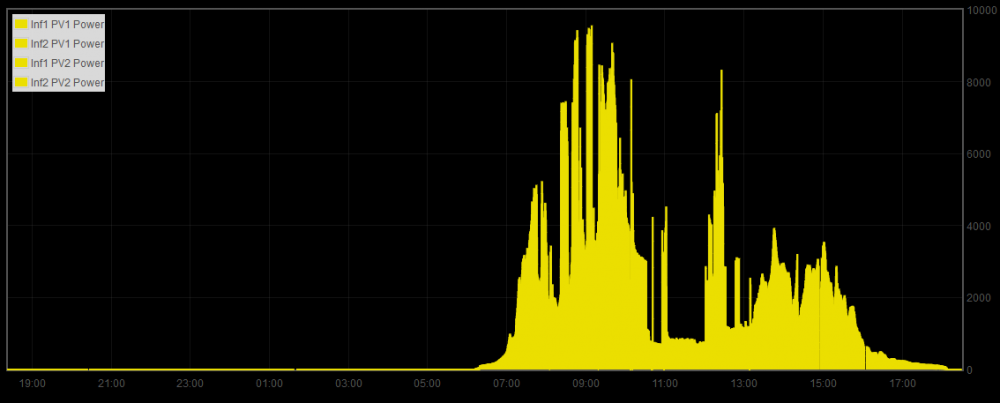
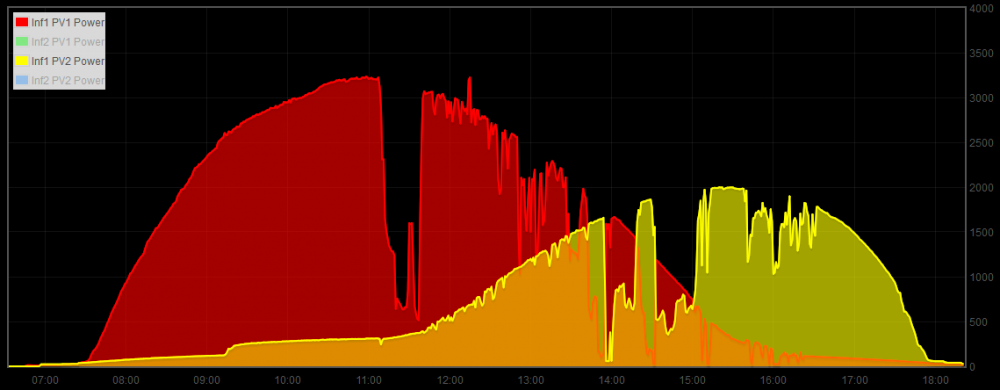
Well, most of the popular "solar stats" that you can see online are comming from ongrid inverters. For ongrid inverter the grid itself is a huge load. Whatever these ongrid inverters will push into the grid, someone on the other side of the wires will consume. For offgrid PV systems, you need some kind of "ideal load", for example an empty battery. If the batteries are near full and there are no other loads then the generated PV power will drop: This is my system as of today, where you can see large drops in generated power, since I had no use for that power: Same here: Batteries were charged in the morning, but then I had no use for the excess power. So the generation went down during the day: This is an older sample, where I was able to use all the electricity. Drops in the power generation were caused by the clouds only:

-
It's normal. In order to power the loads on demand, an inverter has to run and generate 230V continuously, even if there are no loads at the moment. Once you switch-on a fridge, light, etc. the power starts to flow and the inverter will rev-up. Some brands have a "load search" mode, where the inverter is running in low-consumption mode and just probing for loads. If closed circuit is detected, the inverter will switch from "load search" mode to a standard mode. But the Axpert, AFAIK, has no such option.
-
Hmm... how about to put some AC load on it? I mean, if the batteries are full and there is no load on the AC side of the inverter, then no power can be generated.
-
Shakama, IMHO, 5kW Axpert is a good choice for an off-grid installation. This box is used all over the world and there's a lot of Axpert users on this forum too. So if you are going to build your system by yourself, you will have a rich source of information available to you. Personally, I would pick one of these models: Axpert MKS 48V 5000W - MPPT Voc 145V / 3000Wp Axpert King 48V 5000W - MPPT Voc 145V / 4000Wp Axpert VMII 48V 5000W - MPPT Voc 500V / 4000Wp For example, if you pick an Axpert model with 145V max Voc and CanadianSolar CS6P-250P, then you can connect 3 such panels into a series (3 x 37.2V = 111.6V) Next, you will combine four of these series in parallel for a total PV power 4 x 3 x 250Wp = 3000Wp. Be careful and never connect more panels into a series than is a maximum allowed Voc for an inverter. To be precise, you need to keep a small reserve because the cold panels have a bit higher voltage than what is noted in the specsheet.

-
Just one thing to add - Pylontech's alarm LED has just two meanings: 1 - charging protection 2 - discharging protection So, if the LED is ON and you are charging, it basically tells you that you are pushing too much

-
Hi Elbow, if I get it correctly, the original problem is: 1) When fully charged and kept in float, one of your Pylons will throw and error and will disconnect itself. 2) You see that as the battery is being charged to the top, there's a visible difference in the voltage between the lowest and highest cell. Am I Right? Question: Did the Pylon throw an error and disconnect itself during a discharging phase too? I assume that the answer is NO. Well, I experienced a similar issue with other brand's intelligent battery in the past and the root cause was that I was basically overcharging it. When applied to Pylon US2000B Plus: - Pylon is 15x LFP in series. - When you charge over 3.48V per cell, then the balancers will start to act. - These balancers are meant to level the voltage of all the cells when fully charged. They are doing this, but cannot keep-up for a long time, especially if the charger is still pushing the current into the battery. Given we can use 2 charging states, CC + CV, it makes sense to set charging like this: CC = 15x 3.55V = 53.2V CV = 15x 3.48V= 52.2V For the CC phase, it's pretty safe to set even higher voltage, up to 54V for Pylon (3.6V per cell). But the CV phase is critical and you shouldn't hold the batteries on the higher voltage for too long. With the above settings, you should be able to get to 100% SoC, where you will start to notice a difference in voltage of the individual cells. Then, the balancers will kick-in and once the charger will go into the CV stage, you should see that all the cells are on the same voltage of 3.48V. Also, there should not be an error, nor battery self-disconnect issue. My 2cents. Just a note, for my 16S LFP packs I'm using CC=56V (3.5V per cell), CV = 55.6V (3.475V per cell). But I had the luxury of seeing the LED on each balancer, so I knew whether balancers were fully engaged for a long time, or whether they were just acting here and there (as designed).
-
TTT, you are exactly right! If there is even a slightest possibility that this off-grid system will be tied to a grid somewhere in the future, it definitelly makes a sense to go for the components "certified" by the local authorities.
-
Hi guys a short update... A couple of weeks ago, I've added a second LiFePo4 battery pack to my Solar LAB. So, it's 20kWh of lithium now. Before: After: Also, I was not really satisfied with the reliability of my wireless monitoring. Originally, I used Z-Uno boards to read-out the RS-232 serial data from the inverters and send them over the wireless Z-Wave protocol. It worked, but sometimes half of the monitored values got stuck, while the other half was okay, etc. Therefore, this time I went for a small DIN-rail mounted PLC (Tecomat Foxtrot). Did a bit of coding and now I'm transferring the data over the ethernet, with the help of RestAPI and JSON. It's much faster and rock-solid Since this PLC has a built-in display with UP/DOWN buttons underneath it, I used it for debuging and for displaying the operational state of both InfiniSolars too. Current layout of the distribution board: Detail of the PLC display, Screen 1 of 6: Since I had to code anyway, I did a small improvement in my home-automation logic and now I'm able to switch ON/OFF each inverter directly from the phone. Detail of the first inverter in the mobile app, note the ON/OFF buttons that I've added: Now, I'm thinking of adding some more logic, that will enable me to automatically cascade both inverters: - For the AC loads under 3kW, only one 5kW inverter will be active, while the other will be in the low-consumption charger-mode. - Once the AC loads will go above 3kW, the logic will turn-on the second inverter too. - Once the load will drop under 2kW for ten minutes, the second inverter will be switched back to the charger-mode Shame is, that I'm feeling toooo lazyyyy now.....


-
Hi Shakama, while I personally use other brands, the Freedom Won LFP battey is a good choice. Since a battery is normally the most expensive part of the system, it makes sense to choose a reliable vendor. Speaking of panels, it's not as critical, really. Basically, choose whatever you want, but be sure that type and number of panels will match your charger/inverter. I would say that almost any solar modules around 300Wp Polycrystaline will be okay. Microcare is the SA specific brand. While not as wide-spread as Victron Energy, it should be a really good choice for you (assuming you live in SA). The good service is the key, so just check whether you have a Microcare repair center somewhere near you. I'm not sure whether R 125 000 will be enough for going fully off-grid. It really depends on: 1) What's you power-needs. 2) Whether you have a sunny weather all-year-round in your location. Geyser, lighs, computer, water-pump - all this can be fed with the above budget. But AirCondition/Heating not really, I would say.
-
Hi Attie, so far, both units are holding pretty well. I'm using them in off-grid mode, with grid input MCB disconnected. Paralleled they are able to share the load 50/50 and power the whole house. For example, yesterday I was doing pizza in the electric owen while laundry, washing machine and geyser was running simultaneously too. Rock solid boxes, I would say. I even found a nice feature: I can turn-off one of the units using on/off button (or via webgui) and it goes into charger-only mode, where it has 90% less self-consumption. The operation is online, the second unit takes over all the load without a slightest glitch. Since it's Winter here and I don't need 10kW of AC power 24x7, I'm using this to save batteries when it's really overcast or snowing. This on/off can be scheduled too, but I was too lazy to try it yet. I read about those DC/DC board failures too, but never experienced one myself. It had to be a bad manufacturing batch or something like that. One thing to note - I live on the mainland with the nearest coast roughly 500km away... The only thing I don't like on my InfiniSolars is their self-consumption, which is quite huge. In the inverter-mode, it's like 125W per 5kW unit 24x7, and because I have 2 units, I'm drawing 250W from my batteries overnight. Since I don't need hybrid at all, I'm looking to use paralleled Axperts once my Infinis will die. The self-consumption of Axpert is roughly 50W per 5kW unit, which is MUCH better I would say. And the price of 2x Axpert is basically nothing, when compared to the price of 2x Infini, so you can have a spare unit onsite, if you like.
-
Hi Gnome, I'm using the home automation system called "Fibaro". So, I have a power measurement and remote control for every important wall socket, and for some lights, etc, too. For most of the loads that fall under 2500W, like dishwasher, fridge, PC's, I'm using just the wirelless plug. Some other devices are powered via smart-relays and modules and the devices with a huge amps draw have a separate DIN-rail wirelless smart-meters installed. As for the floor-heating, I'm using termostats that directly measure the consumption of every room. Does it make economical sense? No. Is it fun? Yes https://www.fibaro.com/us/products/wall-plug/ https://www.heatit.com/heating-control/floor-heating-thermostats/heatit-z-trm2/ http://qubino.com/products/3phase-smart-meter/


-
Hi Daniemj, "I could only get it to work with the web server." The card can be used via built-in webserver or Solar Power Pro. "I could not get it to work with any of the Solar Power Software" Solar Power software works via USB/RS232 only. For this card, you need another version of the software, it's called Solar Power Pro. Then, use the SNMP Manager part of this software to search the IP subnet for the card. For me it works, but that software is really crappy: I have to play with SNMP Manager a lot, in order to discover the card everytime. Next day, I start the PC again and the card is not there, etc. So, I found the built-in webserver to be much more useful than Solar Power Pro. "It would only work for anything between 6-24 hours and then it would connect but the data would be "frozen" from the time that it stopped feeding any info from the inverter. It would then only work again after I power down the inverter." That's exactly the same issue that I have with the card. Have 2 of them, and both are behaving the same - they work for a day or two, then got stuck. The web interface of the card is working but the problem is between the card and the inverter - the communication between these two is broken and restart is the only solution. To me it looks like a faulty design. (I wrote a short paragraph on the SNMP card in my thread, link is in my signature.) Since I have 2 units paralleled, I found a workaround: In the evening I switch the 1st unit to charger mode and since there's no sunshine, it dies after a minute. 2nd unit seamlesly takes over all the AC loads, so there's no downtime. Then I power 1st unit on and repeat the above steps with the 2nd unit. In the future, I'm going to automate the process by an external PLC controller. That PLC will also power on/off 2nd Infinisolar unit based on the actual AC loads, so if there will be a little AC load, the 2nd unit will be in the solar charger mode, where it has much lower power consumption. 1st unit will be powered 24x7, of course. Long story short, the SNMP card for Infini is a piece of crap. Sorry.
-
Raising the battery cut-off voltage is a good move too, as it protects the battery from undercharging. AFAIK 42V is the default value for Infinisolar and translates to 10.5V per 12V battery piece. 1) Once you raise to 47V, just check whether the inverter is still able to supply your microwave or kettle. There might be a voltage drop while turning these appliances on, in which case the inverter will switch to bypass (draw from grid). If that will happen, just lower the battery cut-off voltage a bit - to 44V, for example. 2) What you have configured on the "My Power Management" screen? Do you have nightly AC charging enabled there? If you do, your batteries will be topped up from the grid overnight, which will create additional consumption, thus increase your bill. Economically, it makes sense to charge the batteries from the PV only.
-
Nadeem Ahmed, Certain hybrid inverters are able to draw power from the grid in order to help you with starting the huge loads. So, when you're starting a motor for example, the inverter "sucks" the energy from the grid and then, after couple of seconds, when the motor is already running and the spike is over, the inverter will return the same amount of energy back to the grid. If the whole process is quick enough, you won't be billed for that energy. For example, in Europe, you have 15 seconds normally. In the 3-phase system, there's another feature where you can continuously draw energy from 1st phase of the grid and the inverter will send the same amount of energy to 2nd + 3rd phase. In that case, the total sum will be zero, so you won't be billed. This will allow you to power a single-phase appliance that draws more power that your 3phase inverter is able to supply on a single phase. The reality is, that your grid authority (and the meter) must support the above in order to work correctly. Otherwise, you may end-up in a situation where you will be billed twice - once for the comsumption from the grid and then for supplying to the grid. Sounds silly, but that's the life. So if you don't have a special contract, be careful when using this features. Looking at your screenshot, it seems that you have 1-phase Inverter. So, forget anything about 3-phase. -- SUB mode has a continuous draw somewhere around 50-100Watts. The real reason for this is to ensure that no energy will be pushed back to the grid when you turn-off an appliance and energy spike will occur. On some infini models, you can even calibrate this value. From my experience, if you want to use SUB or hybrid mode with any kind of inverter, it has to be calibrated precisely and your grid authority must support it. Otherwise, your meter will trip, you'll be billed twice or you'll get a fine from the authorities for unlawfull suply of energy to the grid. -- I would advise to change the mode to Offgrid + SBU. This works the best, and the occasional spikes are sent to the battery. With SBU mode, you can even disconnect the inverter from the grid and then monitor the meter each day, in order to identify whether the power is being consumed or not. If the SBU mode will work correctly, then you can return back to SUB and start investigating deeper.
-
Well, that is a really strange behaviour Thanks for sharing! By the way - when reinstalling that SW, it's good to reboot the laptop as the SolarPower is running in the background. Otherwise it may survive the deletion and mess-up the new install. As for the photo : these two are 3-phase Infinis, so you need to have 6 laptops onsite to handle that power properly
-
Hi Plonkster, I see in that screenshot that the guy is running in the offgrid mode. There's no feed-in to the grid, therefore no zeroing of phases, I would say. AFAIK, power mixing can still occur in this mode. Same with the automatic bypass on the overload - it will work. To me it looks like the guy is not using the batteries, running from the grid overnight and maybe even switching back to the grid several times a day. Is that possible?
-
If you have just one inverter in you setup, the "single" is the right choice. Other choices are there to combine 2 or more inverters into a strong 1-phase system (parallel) or into a 3-phase system where each phase is being serviced by it's own dedicated inverter(R-S-T). Btw - source priority on the right side indicates, that you're not using the batteries for powering the loads. Looks like you're running from the grid over the night. Can you doublecheck that? I'm using infinisolar too, but a different model so my settings screen looks very different from yours... Youda
-
Hi Tokolosh, So, did any of the options worked or not at all?
-
Standard password for SolarPower is: administrator All characters are lowercase. If that won't work, try: Administrator If you want to try, here's the section to be replaced in the file config.properties of SolarPower in order to have default password set (administrator): [PASSWORD] ManagerPassword = 200CEB26807D6BF99FD6F4F0D1CA54D4 But I'm not sure whether the HASH is static, or takes into account some SALT from the actual computer. So, backup your config.properties file first. Should none of the above work, you will have to uninstall software and reinstall it again. It can be downloded from various location, for example here: http://www.ostrovni-elektrarny.cz/support/Voltronic/SolarPower_1.14SP2_windows.zip
-
Hi Tokolosh, I would do a clean install of the SolarPower software on another laptop and if that will work with the inverter, then I would wipe and reinstall SolarPower on the original PC. As far as I can remember, the password is just for the software, but the inverter itself has no password (just plug-in serial or USB and you're good to go).
-
While reading my first post, I found an error in the battery specs, as I wrongly stated that there's 16 x cell. The correct specs are: There's 32 x 100Ah Winston LFP cell and 16 x balancer. Each two cells are connected in parallel and equiped with a balancer module. For battery-to-inverter connection, I've used 50mm2 cable and tried to keep it as short as possible, in order to minimize voltage drop under a high loads.
-
Hi guys, just wanted to update you on the solution, so you can benefit from my findings... The answer from the distributor was useless. There was literally no info, just offer to send him the unit back for the diagnostics. So, I've monitored temperatures of the both units for number of weeks and found that when the units are paralleled and operating and under at least a minimal load, then they are behaving the same. To me it looks that a newer unit has some NVRAM modification (like Plonkster pointed out) that if SCC is not operating and there are no AC loads, the unit goes into "eco-mode". It stops the fans and waits for 65°C or so, to turn them back on and cool itself down. But if the units are paralleled, and there are loads running from PV or from the battery, both units have their fans operating as expected and the temperature is similar. Resume: If the fans in your brand new InfiniSolar are behaving a bit differently from the fans in the older one, do not panic. It's normal and should cause no harm

-
Hi Rups, contrary to the InfiniSolar Plus 5K and InfiniSolar Plus 10K 3Phase, the model InfiniSolar Super 4K has a different internal arrangement. Long story short, this is the most problematic product from the InfiniSolar's Hybrid inverters portfolio. For example, the neutral-in and neutral-out terminals of the unit cannot be wired together. Since somewhere in the main DB, the PE and N are wired together, that implies that you cannot connect neutral-out from the inverter with the earth too. Normally, everybody will say something like "of course, I'm sure that I have N and PE separated on the output", but the reality is that in a number of installations there IS an interconnection between the two somewhere down the line. Or, there's a non-compliant appliance in the house, that has these two interconnected. When the terminals are interconnected, sooner or later, the InifiSolar Super 4K will fail. Just check with the multimeter, if you have neutral-out + PE interconnected down the line. If you do, this might be the cause why so many units failed from your stock.
-
Well, I travel a lot to see my customers and attend some corporate meetings from time to time. But let's say, that at least 4 days in a week I spent working remotely from my LAB. You know - preparing offers, creating designs and trying to sharpen my weapons in order to fight the ruthless competition. When I'm traveling, I try at least to turn-on dishwasher and washing machine in the morning or via a timer. Since the washmachine has a small heat-pump integrated, it works like a tumble dryer too, which I found as a great feature. But Chris, what do you think about winter time? I'm a bit affraid that on winter dawns, the sun will not be appearing on the East, but will start to shine too late to hit my East panels and will fade too early to spend enough time shining on the West PV array too. So, I'm looking forward to winter, in order to check whether I will be able to survive or will have to switch back to the local "ESKOM".
-
Guys, a simple contactor will work okay, but it's not recommended because of the safety reasons. For example (if I do remember it correctly), when you are switching two 50Hz AC sources too fast, and there's a phase shift between them, you can end-up in a situation where source#1 has +200V while the other has -200V. If one of the contacts is slower than other while disconnecting, you will end-up feeding 400V spike into your equipment. It's just a couple of miliseconds, but breakers can trip, or even a damage might be caused. Other example is that with AC, the current going thru the relay contact is changing from positive, over a zero, to negative. When switching with a huge load on, and the current is in it's maximum, it hurts the contacts. The best timing for a changeover is when the current is going thru a zero. Some smarter devices (like hybrid inverters) are running in sync and implement switching in zero - result is that there's no spike and also no power loss longer than half a period (10ms). Dumb devices has to implement a strategy that ensures that two sources cannot cross ever. Therefore, they introduce a dummy delay into the process. So, a proper way to implement an Automatic Transfer Switch is to use two contactors, wired together and mechanically interlocked too. The video below is quite long, but the guy is explaining it from the basics, which is good, I think: Personally, I like the TTT's setup with the UPS. Critical load are protected and since lights will flicker and UPS will beep, you'll notice that something has happened. (nobody with a solar installation wants to run for weeks from ESKOM not knowing about it) When UPS is combined with a proper ATS design, it should fulfill all the requirements. Also, it's easy to implement a dual-control into this design: normally, ATS operates based on SoC from BMV or any other dry-contact equipped monitoring if monitoring fails for some reason, ATS will be still able to switch to grid once the 230V output from the inverter is lost


