Niel
Members
-
Joined
-
Last visited
-
Ok so the inverter can do both (1) and (2). But I'm looking for a bit of a firmer answer. Will CoCT allow either (or both) of the configurations? Or will I have problems irrespective, if I go with a 16kW inverter.
-
-
So a while back CoCT saw the light and lifted the restriction on generation capacity. We have a 60A feed and the limit is now 13.2kW. My question is how exactly is this limit applied. For example which of the following would be fine if I installed a 16kW Sunsynk: 1. 8kW panels + 5kW batteries. Actual generation can't exceed 13kW even though the inverter is rated for 16kW. 2. 12kW panels + 5kW batteries but software limited to maximum 13kW generation (if the Sunsynk can do that). PS: I understand feeding back to the grid is limited to 3.5kW but I'm not considering that any time soon.
-
So I've been having the same problem and can't find a reliable electrician in Cape Town to sort it out. I'm not an electrician (220V scares me) but I am practical and curious. However, this problem has me stumped. I asked on the EnergyForum as well and a lot of good advice is provided but nothing I can actually do myself. So: 1. Is it possible/ sensible to install this Clearline unit on the feed from the grid (before the inverter) instead of in the DB? 2. Any recommendations on someone in Cape Town northern suburbs who has the expertise to sort this out?
-
I doubt it will make any difference. Ours is set to "Self-defined" but the BMS determines these values and pass it to the Goodwe. That is why you can't override it. The BMS determines the values to optimise the lifetime of the battery and you will see it change as SOC changes.
-
-
It may be a bit late, but maybe useful. We also have an older model, 2015 I think. 1. I'm not sure. I got hold of an EZConverter and after much hassle got it work. 2. It should be safe to try as the BMS monitors the battery itself. First prize is of course if the two can communicate so that the Goodwe can manage the SOC and charge/discharge rate before tripping the battery. 3. Our model has wifi and that model should also. The first step is to get the inverter on the wifi network. If you search for a wifi network, the inverter should appear. Connect to it and set up the wifi settings using SolarMan. Or at least, that worked for us 6 years ago.
-
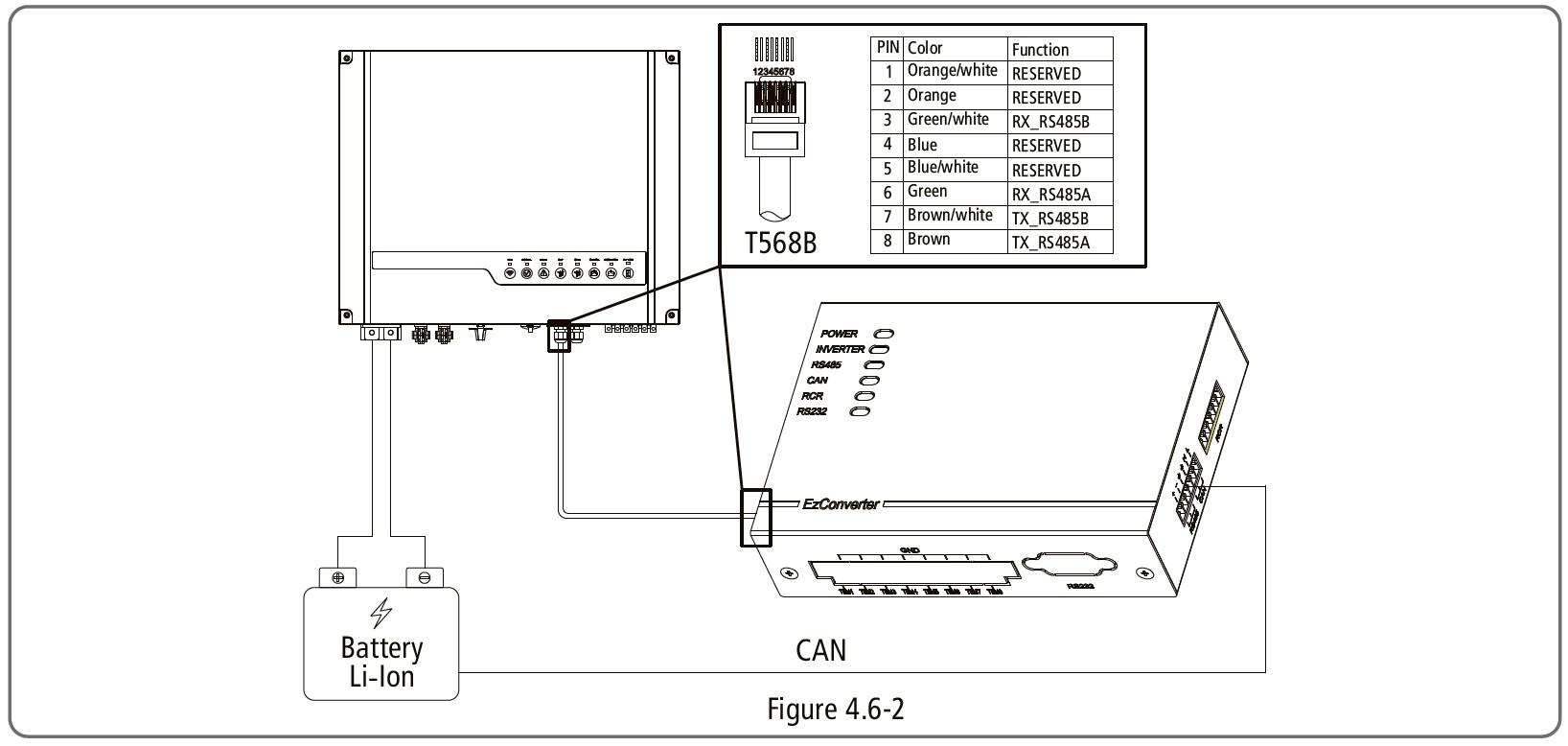
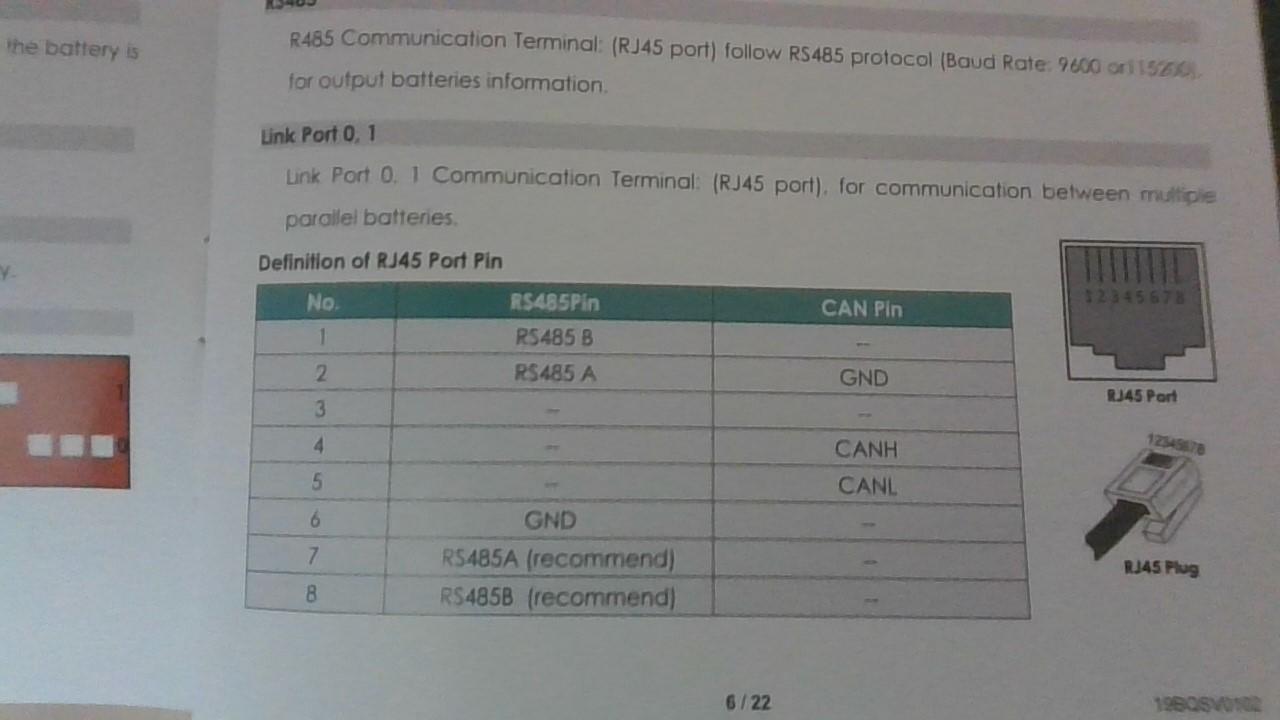
I think "useful resource" is an apt description as I'm no expert with this technology but did spend hours figuring it out. Maybe "sometimes useful" is more accurate. Ronald contacted via DM and here is my reply for the record: Yes, use the CAN port on the battery (looks like you have it on the RS port). Attached are two extracts, one from the Pylontech manual and one from the Goodwe manual. Some network cables have a cross over so have a look at the battery end to identify the colours (1 to 😎 and then connect the correct colours to the EZ Converter as in the picture. The dip switches should be 1 up and the rest down on the EZConverter and all down on the Pylontech. Let me know if I missed any questions.


-
-
Warm water will want to rise (thermal syphoning) so if the feeding geyser is higher than your main geyser (and you have a pumped system), this can be a problem. We solved this problem by installing a non return valve. Another solution if you have the space is to run the pipes downwards and then up to the feeder geyser. The idea is that colder water collects at the bottom of the pipes effectively stopping the thermal syphoning. This could be less maintenance over the long run as small particles can collect at the NRV's keeping them from closing properly.
-
Our Goodwe is about 6 years old and two years ago I replaced the lead acid batteries with two Pylontechs. Due to the age of my Goodwe, I had to buy an EzConverter as well to allow communication between the two but it works fine. The Pylontech does limit the charge current (to prolong its lifetime I presume) which the Goodwe picks up and deal with accordingly. I don't know the other batteries, but the Pylontech's work.
-
-
I only spot this thread now. I've started playing with arduino's about a year ago and have steadily expanded my home automation system. I'm also using OH, mostly because it's the first one I tried and I'm quite familiar with it by now (read: to lazy to learn HA). Over time I have replaced a lot of RF transceivers with Wemos D1 mini and MQTT - much more reliable. The first thing I built was a weather station which included a small 5V panel which measures irridiance. I'm still trying to figure how to translate that into maximum potential PV power from our solar arrays but need time to get my head around the different angles (sun vs weather station panel to sun vs PV solar panels - a LOT of trig). Recently someone on this forum figured out how to pull data from the Goodwe inverter so now I can really get into automation.
-
-
-
So my wemos is working and I'm getting the values and transmitting via MQTT. Thanks for all the help! I do need a bit of clarification on some of these readings: pgrid: On-grid Power (EzMeter) = 5 W (Is this the draw from the grid?) pload: On-grid Power = 143 W (And this the mains load?) total_power: Total Power = 427 W (I have no idea what this is)
-
I think I got it. I basically have to put the two address together and convert the resulting hex to decimal. I think that means bitshifting by 8 though.
-
I'm coding the wemos using arduino's IDE. For the SOC I use: BatterySOC = (int) incomingPacket[33]; If I understand bit-shifting correctly, I basically need to do this: n1 = (int) incomingPacket[7]; n2 = (int) incomingPacket[8]; PV1V = (n2*16 + n1) /10; //Divide by 10 for the single decimal But the math doesn't seem to work out. Using the example in your second post, 0x0B = B1011 and 0xA4 = B10100100 needs to give 298V. If I bitshift 0xA4 and add 0x0B I get 2635. This is the first time I come across bitshift and all help is appreciated!
-
So quick question. I find it fairly easy to get data that uses only one address, for example SOC from address 33. But how do I translate data across two addresses into a single value, for example [7,8] into PV1 voltage?
-
-
-
Some good news. It's taking a bit of time but I have my first data from the Goodwe coming into OH!
-
So just a brief update. I installed the openhab TCP/UDP binding and installed Packet Sender on my laptop to mimic the Goodwe. Something unusual is going on as PacketSender did not provide the IP address of the OH Raspberry Pi as "sender". So I'm parking that idea for now. As an alternative, I took a Wemos board I have and wrote some code to send the UDP packet to the Goodwe. The "0x00" initially gave some problems but I figured it out (I did say I'm a novice) and voila, the wemos is getting the data from the Goodwe! Next I'm going to add the MQTT code, decipher the incoming message and send it to OH via the (existing) MQTT broker. Finally I can see this working! The neat thing about this solution is it should work for any home automation system that uses a MQTT broker.