pvdw22
Members
-
Joined
-
Last visited
-
Same inverter different firmware. I personaly prefer Sunsynk after installing a few of both.
-
Hi there. This still for sale? Where are you?
-
Jip Tinuva, that is the problem. My personal inverter is the same as yours. The one in question is a clients inverter. There are 2x RS-485 ports but no Can Bus. Users devine seems to be the only option for the battery but I will have to be carefull with the settings.
-
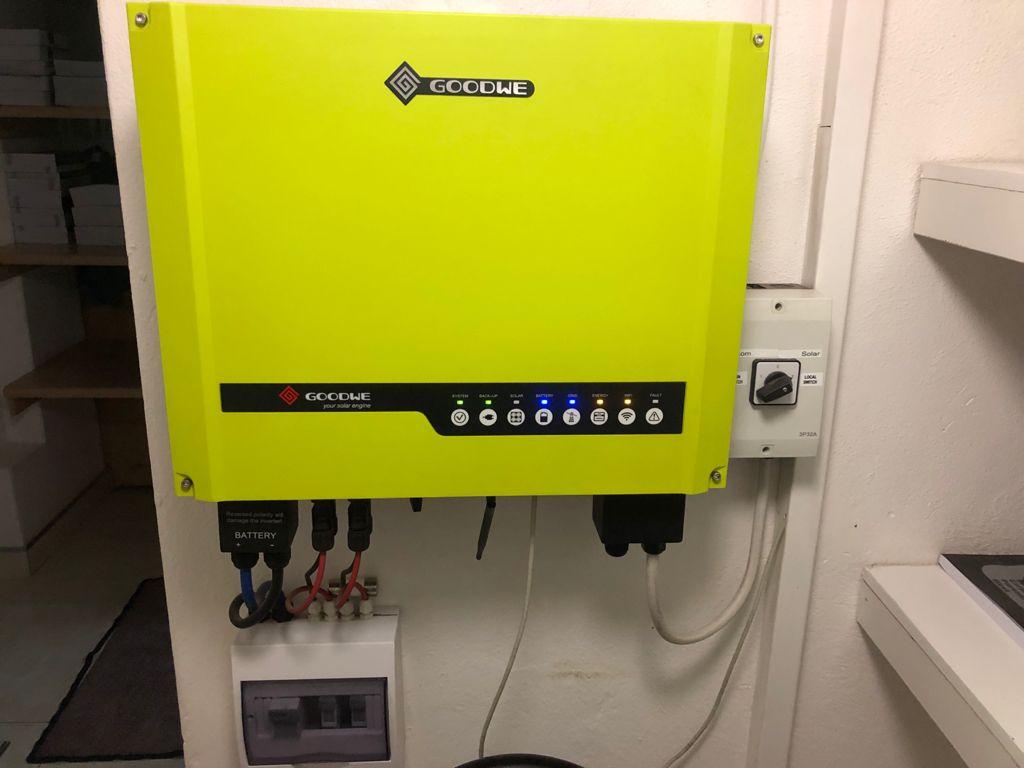
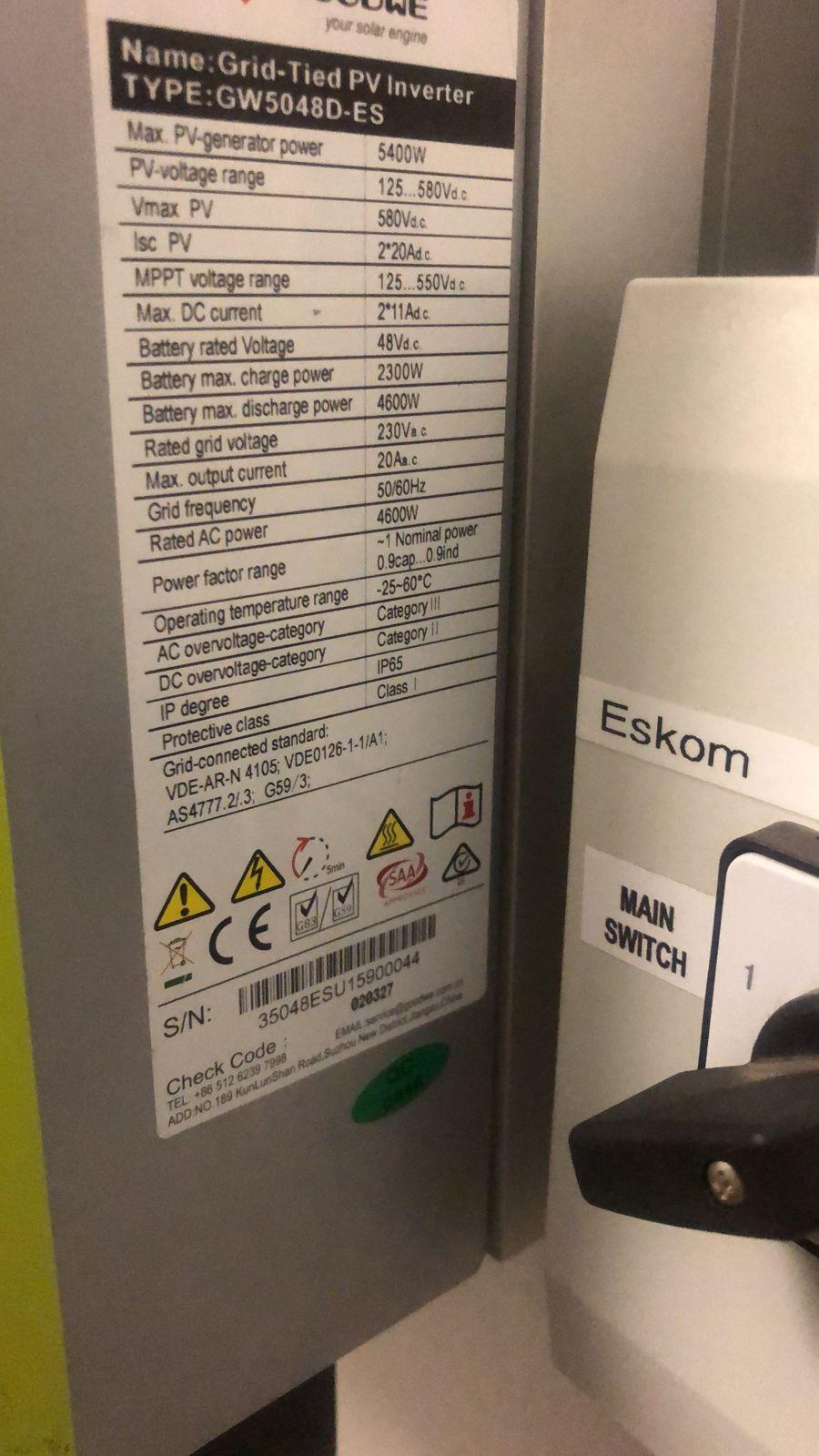
Hi all. I started with a job to upgrade batteries on a GOODWE installed in 2016 by someone else. It is a lightgreen unit I have never seen before. The unit has no CAN comms but there are 2x RS-485 ports only. The 1 RS-485 is used for the energy meter and the other one is ment to connect to a battery using a GOODWE EzConverter no matter what comms are used. I have 3 Q’s Goodwe do not have any stock of the converter here or in China. Will a general CAN to RS-485 do the job or do I need a dedicated GOODWE product? I see them all over the net. 2.If one can not mannage the CAN to RS-485 convertion can I try use the Pylons under ''users define"? If so, what settings will be good for the new Pylon 3000C models? 3.Lastly, I can not mannage to connect to the Inverter using PV Master so now I wonder if that unit may not have WiFi. If that is the case, how do one comunicate with it? Any help will be welcome. I will try to load a pick of the inverter. PeetI am in the northern parts of PretoriaI have a Goodwe myself with 5500W on the roof. It happens quite often that the generation is more than 5500W. Best so far 5650W. I am very happy with my Goodwe. My max daily generation is 34.5kW so far with 30kW+ a regular occurrence. I install Victron as well and for sure better than Goodwe but for now I will not spent money to change from Goodwe to Victron except if I want to go bigger than my current setup.When you series your 8 panels the VOC ads up so 44.4x8=355V. Now when you use 2 seperate mppt's the strings stay seperate as the mppt's function individually. So Jaco is correct, the volts is per mppt in this case. Even if you were using a single mppt the answer would have been the same. When you series connect panels/strings the Volts go up and the Amps stay the same. When you parallel connect panels/strings the Volts stay the same and the Amps go up. So even using 1 mppt with 2 strings of 8 panels the Volt would still be 355V and not 710V. In the case of the Goodwe the mppt would handle the Volts of 2 strings but not the Amps.Tariq you need to do the Volt maths using VOC. For that panel I think it is around 45-46VVisN I would prefer to do that and I do think that SANS will agree. My way of reasoning is that even when you trip the isolator/CB between your inverter and backup loads the lights on the inverter will stay on. This for me is not a correct indication of what is going on in the DB. I do my installs with 2 lights, 1 for mains and 1 for alternative power, and goes for both solar and generator installs. Here is the SANS regulation. a) supplies power only to certain circuits in a distribution board, a power-on indicator (visible or audible) shall be provided on each such distribution board as well as a notice indicating that the standby power main switch shall also be switched off in an emergency, b) only supplies a part of the electrical installation, the notice shall also be displayed on each distribution board in that part of the installation (see 6.6.1.1(d)).Defy is using R600a gas in the new fridge/freezers. The gas is more effiecient than R134a so they do more with less W's. That is only one 1/2 of the story. I saw on the Defy chest freezer the wall thickness is clearly thicker, even the lid/door is thicker. So by improving insulation with less heat ingress the already better R600a compressor has to run less to do the same work.Hi Dex. I have been using solar geysers fir 12 years now. The first thing you have to keep in mind with solar geysers is that the secret of there efficiency lies in capacity. You will need 1.5x solar capacity if compared with electrical geyser. In your case a 300L setup (like mine) in solar will do a great job. Regarding setup I prefer 2 smaller geysers in series rather than 1 big geyser. The pre feed configuration works very well. Making a call between tubes and flat panels I think is more a choice of looks than efficiency. Any one of these 2 when correctly sized will work perfectly. I use both and both perform good. Last suggestion if I may. If I have to start all over again I will most probably go for a gas geyser. The initial setup/install is cheaper but I find the advantage in the gas to be efficient even when we have a week of rain. The problem with rain now in SA is that is goes with load shedding. In this scenario your geyser is cold because of rain/cloudy weather and then when you want to use the backup element stage 2 or 4 surprise you with no grid. In those cases gas keeps on working for you.Perfect example of what to expect. I also do airconditioning. The moment a new client want me to fix an old aircon that is meant for the rubbish heap and he tells me "no man, I know it is old, just see what you can do " I do like Jaco and get out of there.I have the same problem when customers contact me to install generators at there homes. I have lost a lot of jobs because I tell them I will do the install but I refuse to COC as requested by there insurance company. I have also been looking fir VOO 1ph generators for sale. So far not a single supplier big and small understood or knew the answer to my question regarding VOV/centre tap configuration of generators.Nice topic. I speak to a lot of my friends asking them there basic needs. Almost all of them have the following as there first priority. Few lights, TV, WiFi, Alarm/security. That is the bare minimum for most of them. Very few of them even mentioned a fridge. For this application I guess a basic UPS like the ELLIES 24v 1400W unit would do good for a few hours to manage the average 2 hour load shedding we usually have. I started with the even smaller 12V 600W system. I started 10 years ago with a solar geyser(after my electrical geyser started leaking), then few years later a gas stove(after electrical plates burnt). The last year I have been putting a lot of effort into my solar system. The real newbie should know 1 thing I learned and that is to become independent or even just partially independent is a process and not an event. It takes time and homework with lots of planing. I have to say I loved each and every step of the process.