


wolfandy
Members
-
Joined
-
Last visited
Everything posted by wolfandy
-
Not sure what settings the Deye automatically chooses, but I would recommend checking against / adjusting to the settings recommended here Agreed. I am running my Pylons down to around 23% every night
-
This is the info that ICC displays

-
The biggest benefit is that the switching happens on accurate Pylon BMS data and not the Axpert's voltage guesstimate. An example: This morning my Axpert briefly switched to Utility when a 1500W load was switched on, even though my SOC was still above 30% and I have ICC set up to switch at 24%. The Axpert's 'Back to Grid' voltage is set to 47V (as a safety net in case something goes wrong with ICC - which it never has though). According to the ICC log the switch was not triggered by ICC, which means that it must have been triggered by the Axpert itself. I can see that the Pylon voltage took a brief dip when the load was switched on, but according to ICC (= Pylon BMS data) only down to around 49.2V - so in reality nowhere near to the 47V Axpert setpoint. The only way that I can explain the switch to Utility this morning is that the Axpert's own battery voltage measurement must have dropped below 47V to trigger the switch. In my view the Axpert's inaccurate voltage measurement does not allow you to take full advantage of the capacity of the Pylon (without at the same time running the risk of depleting it below 20% and impacting lifespan). To me, the (in sight of the total investment of my system) relatively low cost of ICC/Pi to accurately control my system was probably the best investment I ever made in my system I am using the custom firmware from @Coulomb and Weber for my Axperts, which addresses the premature float bug - but I do not know if that firmware also exists for your model. Maybe @Coulomb can advise or you can check in the AEVA forum yourself High temperatures negatively affect the lifespan of lithiums and if I remember correctly, you are not allowed to charge them if colder than 5 degrees celsius (mine have never even dropped below 20 degrees, so that is not something that I need to really worry about)My 2 cents: Looks like all the other scamsWhich Axpert model do you have? Most cannot talk directly to a Pylon BMS, so that cable would not help you much... If you have ICC and also the comms cable to connect the Pylon to your Pi (and everything is set up correctly), then there is no need for a direct connection between your inverter and the PylonIt is not 'relay' the Pylon BMS data to the Axpert but rather control the Axpert based on the Pylon BMS data. It switches the Axpert between Utility and SBU/SUB based on the Pylon BMS data (instead of the inverter doing itself based on it's own voltage readings). However, it does not have any influence on the charging side of things - this is still completely managed by the Axpert based on the set voltages. Have a look at https://iccsoftware.co.za/ for more details Yup, it seems that the 24V model can be paralleled same as the 48V onesJust be aware that the Pylontech US3000 (3.5kWh) is a 48V battery and your inverter runs on 24V. You would require the Pylontech UP2500 (2.84kWh), which is the only 24V model they offerIt's 25 and 39 If they are both in the same location, then agree that there is something wrongPlease post your full system specs and inverter settings. Then we can see if/how we can help If you load exceeds your inverter rating (e.g. 6kw load on a 5kW inverter), the Axpert will switch into bypass mode and fully run on utility. It will switch back to SBU/SUB once the load has dropped again in line with the rating This can be better handled by having the correct settings on the inverter. No need for any external switchesYou need 1 Pylon cable kit to connect a set of Pylons to the breaker/switch or DC combiner box. It is rated for 120A The cables that come with each Pylon are only for connection from one Pylon to another
 Am not sure why you would need the Pylon brackets. You can mount the Pylons directly into the 9U cabinet - no brackets needed for that Based on from what I have read here, that seems to be the better option (I did the same and can only speak of outstanding support from Manie)I have a different model Axpert, but from I have seen the difference is the following: SBL / UDC - PV priority will be for charging the batteries, grid will be used to power the loads. Only if PV is higher than max PV charge current will excess PV be used to power the loads SLB / UDC - PB priority will be for powering the loads. Any excess PV will be used to charge the batteries If you want to maximize your savings and are confident that you have sufficient excess PV to fully charge your batteries over the course of the day, you should run in SLB (which to my understanding is the same as SBU on my Axpert)And I would recommend changing the charging settings to Bulk 52.5V and Float 51.8V (see details here)A quick googling brings up many links to the specs, e.g. hereSure - no prob A good investment. Just a word of caution: It can lead you down an expensive path. I also started with 1x Pylon - and am now sitting with 4x... 😉Have a look at the add-on Advanced Power Managed (APM) from ICC if you want to automate that (using Sonoff Basics). I am using that to automatically switch on my pool pump when I have sufficient excess energy and to switch if off when PV drops. Below you can see that it automatically switched off my pool pump (load dropped) when I had a cloud cover around 12h45 and switched it on again around 13h05 when the clouds had moved on
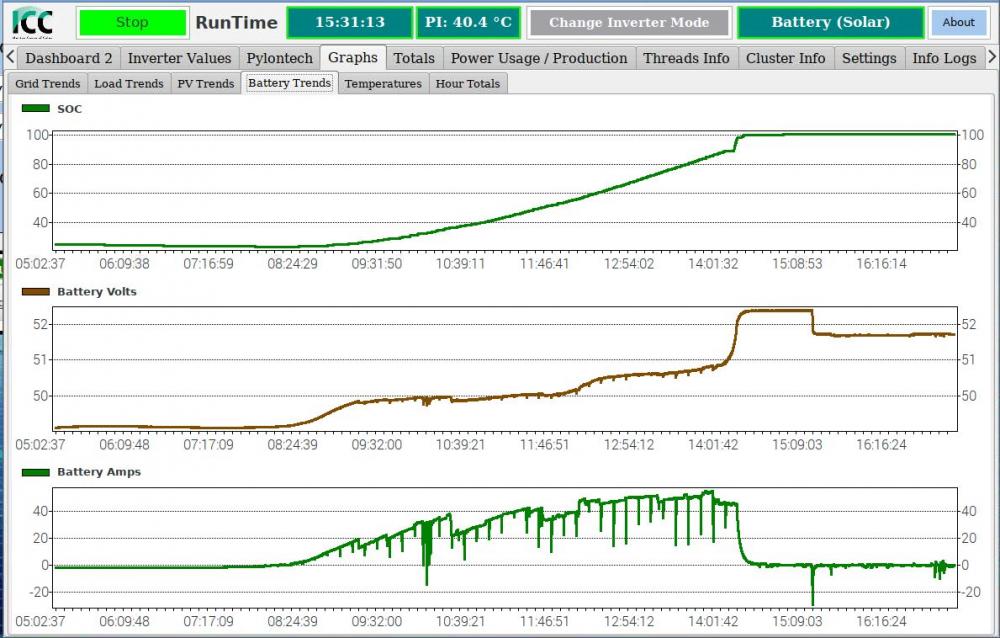
 Then I am also at a loss... Maybe @Coulomb will have an idea as to what might cause this behavior. One last question: When your PV ramped up again around 12h23 - did this happen by itself or did you switch the inverter to Utility in the meantime?I do not know enough about the MPPT side of the Axpert. Maybe @Coulomb can help with that?Thanks If you manually change to Utility, please be aware that the ICC settings from your Battery Settings page are still active in the background - which means that ICC will probably switch you back to SBU as your SOC is higher than your 'Back to Grid' SOC setpoint. If you want to manually override your mode setting, you need to first disable 'Use SOC for Control' and save (and then later re-enable them once you want ICC to take over again) Prior to 12h15 the behavior is normal. When you switched on a large load around 12h00, the inverter briefly drew on the batteries. This is due to the MPPT not being able to ramp as quickly as your load increased (which is normal). You then maxxed out your PV production for a short while, but as this was still not sufficient to drive the loads the inverter continued to draw from the batteries (but a lesser amount). Once your load dropped again, excess PV was used to recharge your batteries. Once they were full again, PV was throttled to the amount required to drive your loads. But I do not understand why your PV around 12h15 suddenly dropped to 0W and the inverter only ran on Battery. Did you have cloud cover at that point?And maybe also of Graphs/PV Trends?Can you please post a screenshot of your Graphs/Battery Trends tab (see mine below as example)?
 😬 Keep us posted hereThanks. A few questions/comments: For 'Charger Source Priority', did you press the 'Set' button after you've changed it to the current selection? And did ICC respond with 'OK' in the white box next to it (as it does for 'Output Source Priority')? You should set 'Max PV Charging Current' to 30A (submit any changes on this tab always with the 'Set' button next to the relevant field) You should set 'Max AC Charging Current' to 30A I would set 'Back to Grid Voltage' to 47V (so that the Axpert's own settings do not interfere with ICC) I would set 'Back to Discharge Voltage' to 54V or higher (so that the Axpert's own settings do not interfere with ICC) On the Battery tab, did you press the 'Save' Button at the bottom right after you have made changes? ICC does not act on any changes unless they have been savedLet us first confirm that all your settings are correct. Your PV does work when used to charge batteries and the inverter is in Utility mode - but drops when it goes into SBU. I would still guess it is a settings problem (maybe even conflicting settings between ICC and the inverter)


