Schnavel
Members
-
Joined
-
Last visited
Everything posted by Schnavel
-
Please let me know if the payment didn't go through and I will take it!
-
100% agreed, and I already have Home Assistant running, so it will tie in perfectly. The issue is I don't presently have the time to move the setup across to SA and HA, carrying over automations etc. I will get to it at some point...
-
With ICC / ICM no longer operational, is there anyone who still has access to the license key register? @Marius2001 I had a Pi fail on me and now I have purchased a new board, but the old license key is now no longer valid and I'm stuck. Otherwise, I'm going to have to move over to solar assistant, which I don't really want to do, as my setup is running smoothly.
-
It's not working - please can you post the file here
-
Hi @Jeremy H Any idea of number of cycles? Where are you based? How much are you looking for per battery?
-
Some great advice here! Going offgrid requires one to be mindful of your power usage, especially on days when you have poor sunshine
-
I see the link no longer loads and I have just had a SD file get corrupted with a recent power failure. Any chance you still have a copy or a working link?
-
Any idea on the number of cycles?
-
I didn't make any changes to the setup on the inverter, but I'm still keeping an eye on the fans to ensure that they are all spinning freely. In terms of the high temperatures, I ended up installing a vent fan in the roof above the inverter. In winter I don't have any problems as the ambient temperature is low. In the summer months, my garage gets rather warm. The vent fan helps to keep air flowing through the garage and helps to expel a lot of the hot air from the inverter. I noticed a roughly 10 degree difference in temperature with the extraction fan running.
-
Thanks @uDuWaR, but my inverter has 2x MPPT inputs. Looking at you original post, I managed to figure out the problem. The correct line is PvWattsTotal (the small v was causing an issue). I just edited my .yaml config and it is up and running.
-
Thanks for the great post guys - I have just installed HA and I'm in the process of setting up all of my sensors and dashboards. I'm still new when it comes to programming on the .yaml configuration, but for the life of me, I cannot seem to be able to get the values for the amount of PV produced. I'm using the following: - name: "Solar_PV_Watts" state_topic: "ICC-Master/Inverter/TotalPVWatts" unit_of_measurement: "W" state_class: "measurement" device_class: "power" This seems to fall in-line with what @uDuWaR so kindly posted. However, I have been unable to get it to work. When I review the entity, it just states that there is no information available. I have managed to get all of the other variables to work, but stuck on this one.
-
Just an update - system has been up and running now for a week. While we are still waiting for stock of solar panels, my in-laws are already saving money as they are no longer having to run the generator during loadshedding. It's considerably cheaper to charge the batteries via Eskom in comparison with the running costs of a generator.
-
As the system has only been running for a week, I also suspect it has something to do with the balancing. Initially, the batteries got very warm as they were balancing out, but now they remain cool and always seem to reach the same SoC when fully charged. I will bump up the bulk voltage by 0.1V to 52.6V and the float voltage to 52.5V for the interim to see if the batteries get fully charged and then equalise. Once they consistently reach fully charged, I will reduce the float voltage back down to 51.8V and then monitor the behaviour of the system.
-
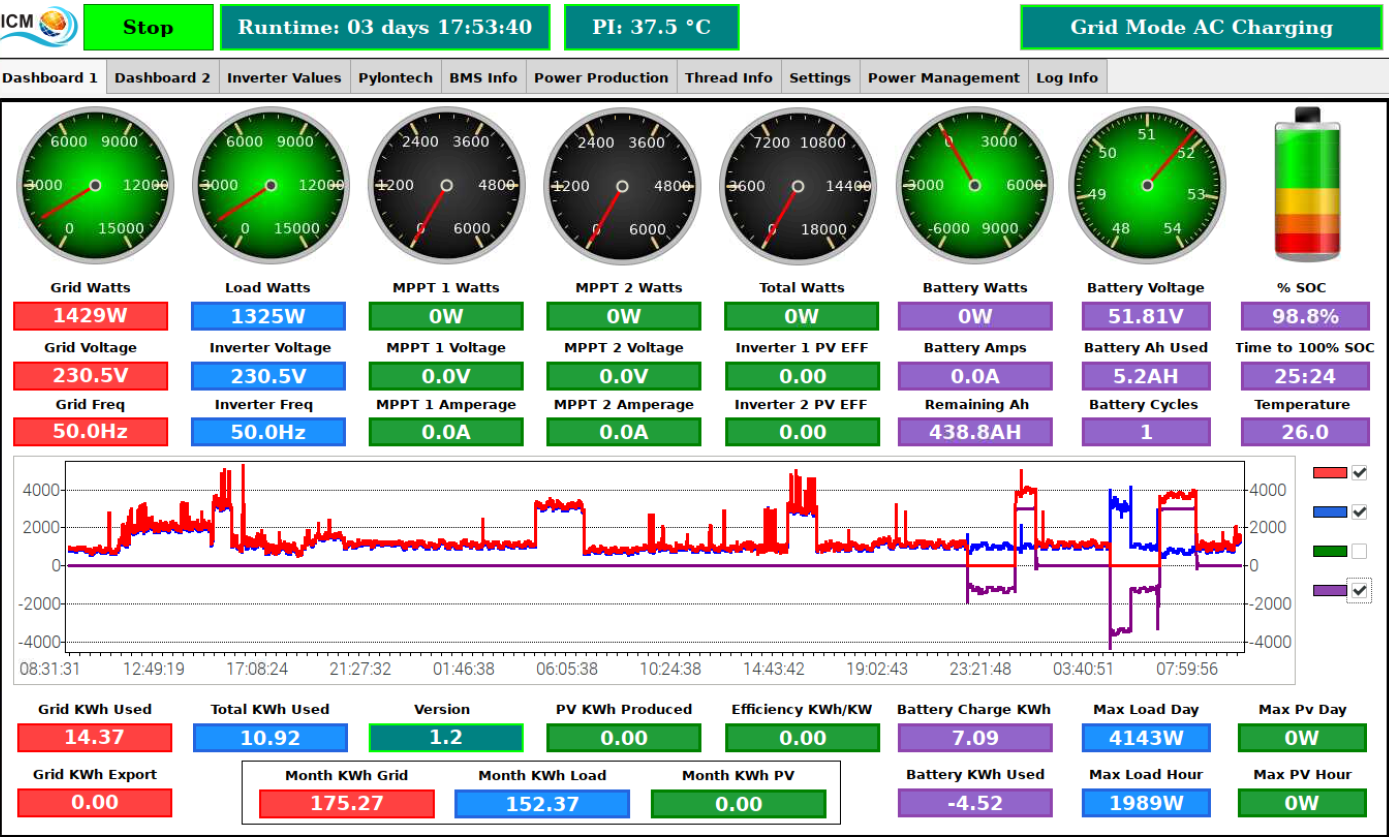
Slight hijack of this thread, but I need some assistance with these inverters. I have recently installed 3x Infini Solar V IV inverters at my in-laws house as they have a 3-phase setup. This is presently powered by Mains and a bank of 6x Pylontech US3000C batteries with ICM monitoring. The setup is working very well and although we haven't yet installed any solar panels (no stock available anywhere), they are saving money as they no longer have to run the generator during loadshedding. The question I have is regarding the charging the bulk and floating charge voltages. For both mine and my dad's installations, I have used @Coulomb settings of 52.5v and 51.8V for the bulk and floating voltages respectively. Both of our systems use the Axpert 8kW MAX units and with these settings, the 4x Pylontech batteries reach fully charged (also both monitored by ICM). However, with these new inverters and the 6x batteries, the batteries are never fully charged - they get to around 99% at 52.5V, but then the inverters back off the charging down to 51.8V. Should I increase both the bulk and float voltages slightly in order to push the final 5AH into the batteries? Here is a screen shot of the battery status from ICM (notice that there is no charging happening, as the voltage is sitting at the floating voltage of 51.8V):

-
PM Sent
-
Thanks @PurePower! I have network cable, plugs and the crimping equipment at home - will just make up a cable.
-
I have searched online but haven't been able to come across any information on this topic, hence my post. I installed 6 Pylontech US3000c batteries over the weekend, in 2 different battery cabinets (the cabinets are standing next to each other with 3 in each). I know that one "master" battery can control up to 15 "slave" batteries, but how does one go about connecting the batteries communication cables? The supplied cables are very short and intended to connect the one battery to the next when stacked vertically. What cable do I need to to connect across the 2 cabinets? Can I make up a cable, and if so, what is the pin arrangement? *Edit: Just to be clear, I need a long communication cable that can connect from the linkport 1 on the bottom left battery to linkport 0 on the top right battery.
-
Willing to split? I'm interested in the VE Bus to USB cable
-
If the sale falls through in the 150/45, please let me know - I will take it!
-
I'm looking for a Victron Blue 150/45 MPPT solar controller.
-
Unit has been sold
-
On hold, pending payment.
-
Hmmmm, not what I was hoping to hear! Will have to keep an eye on the unit and the fans. I blew it out over the weekend and while a fair amount of dust did come out, it wasn't excessive. I also gave the filters a good clean. It seems to have a helped a little, as the maximum temperature was around 4 degrees lower today - still high though...
-
I use ICC to monitor my setup, so it's easy to detect any changes over time. My fans are presently blowing in the standard direction - downwards. The air is sucked in from the top, through the filters and then out the bottom of the unit. This doesn't really make sense to me as I think it would be better to suck in cooler air at the bottom and exhaust the hot air out of the top of the unit.
-
Opened the bottom cover up to have a closer look. 2 of the 3 fans were running, but the one seemed to be jammed. After rotating it slightly, it started running again. I'm assuming that this means the fan is likely on it's last legs, especially considering the inverter didn't give any warning. @BritishRacingGreen, I see there is some discussion on the forum about changing the direction of the fans. Is it easy to do? What do you do for filters, as the air would then blow out the top where the filters are. Also, assuming that the fan is on the way out, any idea on replacement fans? Worth getting an upgrade such as Noctua?