


JayMardern
Members
-
Joined
Everything posted by JayMardern
-
Interesting read. Had their consumption been higher (eg if it were more than just two people) they could've also added more panels at minimal cost (panels are cheap at the moment!), keeping the rest of their equipment as-is. But it looks like they've sized it perfectly to their current needs. And of course once the loan is over and the system has paid for itself (5-6 years, likely even less as tariffs increase) it's pure profit thereafter.
-
Sure thing, here's today: You can grab this graph live any time, from the ESP app, under the top 'Eskom loadshedding' banner, then clicking 'Insights'.

-
If it's like the Sunsynk (same OEM) there needs to be a minimum of 5% difference between ON and OFF SoC for Aux/SmartLoad, so for example try dropping OFF to 90% and then ON can be 95% or higher.
-
You can still wire it to Aux for the benefit of being able to heat water in the event of an outage (and just leave the 'Aux On when Grid is Up' setting ticked.) Over and above this setting you specify a battery SoC range for Aux, and those Aux circuits will run so long as the battery is within this range - this also means that even if you lack the PV grunt to heat the geyser directly, you can still use your battery as a buffer in an outage. So for example if you set Aux to come on at 90% and turn off 70%, then when it hits 90% it'll switch on Aux, use your available PV + Battery to heat your water and when it drops down to 70% (because of insufficient PV), it'll switch off - and rinse repeat later in the day. We had an extended outage a while back where, on a rainy day, we were able to heat one of our two geysers like this despite the peak PV that day being insufficient for the geyser. (Other sunny days were fine in our case). As an aside, you also have to pay attention to peak power consumption: I don't see your geyser rating in your post but if it's an average 3kW element, that will contribute significantly to your 5kW grid-down load (since Aux contributes to your maximum essentials load when it's powered on). Finally, you can also dovetail the Time of Use settings with Aux if you don't want to leave Aux on whenever there's grid: so say you're expecting to be at 60% by 1PM, you can set Aux to come on at 60% (which is when your geyser will turn on) but also set your batteries to charge from grid at that same time if you're below 60%, so that if there isn't enough sun, the grid will charge your batteries from that time onwards to 60%, and when they hit the appropriate level, Aux will power on - regardless of where that battery charge came from. This means that on sunny days Aux can come on sooner (entirely from solar) but on rainy days you're covered as well. However I agree with @Scorp007 that it makes sense to start off simple (leave the geyser on non-essentials) and make these calls once you're up-and-running and have had an opportunity to evaluate performance (and plan your upgrades 😉 ). We only started using Aux when paralleling our second 5kW.
-
Absolutely. On the Sunsynk (same OEM) this was only recently fixed in firmware (and my older firmware used to do this same thing where if the first and last time wasn't 00:00, I'd get weird timer behavior similar to what OP is reporting - even with the inverter in AM/PM 12-hour mode.). So OP, definitely try swapping that 01:00 time to be 00:00 instead and see how you go.
-
Can you share your time of use settings (ie the table of times and SoC's)? (Is there a Power limit specified there by any chance?) In my setup, 'Power' limits max draw from the battery when the grid is up...
-
You're right! A non-PV-requiring use case might be a small inverter/UPS-type device (with it's own incompatible battery), say, powering a handful of critical PC and office equipment. If the power fails, the larger upstream inverter keeps the little one charged and operating at full battery; and when the the upstream inverter's battery runs out and cuts off its load port, then those critical devices can continue for a bit on the smaller inverter. This makes me wonder if it might be worth pulling out my own old (Must-clone) 12V inverter (complete with it's nasty lead-acids which I've kept floated since decommissioning) and powering just my Wifi and Fridge off it, downstream from the main inverter - a pair of 'super-essentials', so to speak. This way I cycle those lead-acid-batteries as infrequently as possible - only in the rare occasion that the main inverter runs out of battery. The disadvantage is that it adds extra DB wiring requirements, adds extra points of failure; and the considerations I mention in my previous post become pertinent: (that little thing was rated for >2kW charging of those 12V's parallel AGM's - pretty significant!).
-
It does indeed look like that's the case. I guess the only caveats would be: Inverters have self-consumption, so the presence of a daisy-chained inverter downstream will consume some standby power If that inverter happens to be connected to its own battery bank, one would have to pay attention to that inverter's configured charging power, since it could overload the upstream inverter's Load output if it charges at a high current. Interesting...
-
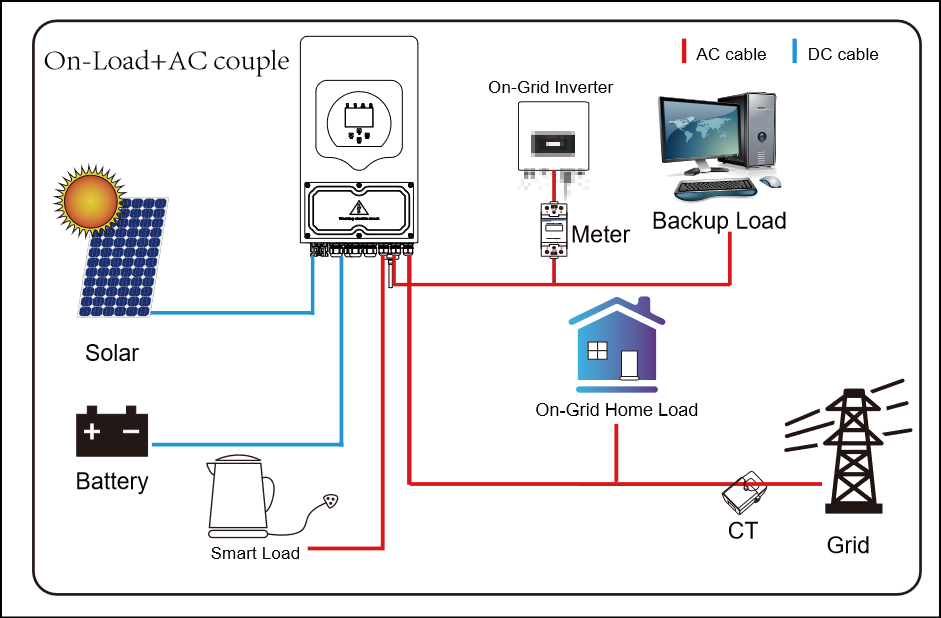
Hey there, Take a look at this diagram from the inverter manual (link: here), Page 39 - this is how mine is set up (I run a Sunsynk which is also manufactured by Deye): So the idea is, you run only your low-power circuits (Wifi, Lights, bedside plugs, etc) via the 'Backup/Load' port on the inverter (we often call these the 'essential' loads around here). These lower-power devices are subject to the limits of the inverter, but such devices are unlikely to exceed the limits. These loads stay up when the grid is down, powered by the inverter. And then your hot-water-heater/geysers/oven and other high-power loads stay on the non-essential circuits (called the the 'On-Grid-Home Load' in this diagram) - these don't go through the inverter at all and therefore they aren't subject to the limits of the inverter, so even if they consume a lot of power, this doesn't matter. They only run when the grid is up. Then when you add solar later, the inverter can zero-export to those high-power non-essential circuits whenever there's spare solar capacity that's not needed by the battery or backup/essential loads. A setup like this would negate the need for an ATS... do you think this would work for you? Finally, your inverter also has a 'Smart Load' Port which is like the Backup Port (and subject to the same limits) but the inverter can be set to only run that port when the grid is up and/or when the battery is above a certain percentage. This way you can choose to run certain higher-power loads (provided they don't exceed the inverter limit; 9.2kw [on-grid] or 6kw [grid-down] in your case). I run my stove on this Smart Load port, with a limit of 50%, so that when the battery is above 50% my stove can run, but this switches off when the battery dips below 50% to prevent the stove from wasting all my battery.
-
Your calculations are right, ~9200W passthrough @ 230V (when the grid is up this is what can run through the Load/Backup port), and that port will then do 6000W when the grid is down. Look into adding some panels before winter 🙂
-
Agree with @GreenFields here, Just to confirm: what's the model number of your inverter (you previously said it's a "Deye 4k" ? If so you may be limited off-grid to 4kW (rather than 6kW) when running off batteries - but we can check the spec sheet to be sure 👍 )
-
🤝🤝 That's a lot of off-time 😢. Once your system is up, run from full battery (leave timer disabled) and see how much battery you end with after a long outage. I'm nervous your 10kwh of battery may not leave you with that much spare over such long outages. See how you go. If you regularly end an outage on 40%, then you can target 60% to give yourself some headroom. Otherwise you may need to follow @GreenFields advice and just keep at full battery (with a charge limit to not strain your grid too much) Your inverter and batteries will play nicely with Solar so if you can get panels installed before winter, that will shield you to an extent from grid issues. Holding thumbs for your safety, dude.
-
If you're only looking to beat Load Shedding, a cheap inverter (with a lithium battery) to match your essential demand during load shedding will do the trick. I ran this for 9 years (albeit with a lead-acid battery which I'd absolutely not recommend for this purpose). Like this, we were only without lights twice in that time; works great. A system like this is a small capital outlay - but won't ever pay for itself. You'll replace the battery once every decade. Solar is for a different use-case: solar is for a system that provides immunity both from load shedding and grid unreliability in general; and also pays for itself (and generates profit thereafter); provided the system is appropriately spec'ed for the use-case. This is a large outlay, but will pay for itself. You'll also replace components on occasion (batteries for example, once a decade). The other thing to keep in mind is that, even if your solar system still requires you to utilize some grid, your electricity bill savings on a solar system are two fold: Units generated directly from the solar system (as opposed to being billed from the grid) The reduction in your average per-unit cost from the grid, because it'll put you in a lower usage step. (eg. the cost of your first 500 units are cheaper than units 500-1000 in a given month). This makes a bigger difference than many realize!
-
As a South African who's dealt with load shedding, I feel your pain. At least we understand why we have power problems (lack of maintenance, lack of added supply to meet growing demand). In your case I have no idea why this needed to happen (Land grab? In modern times? What the heck! My neighbour has a nice house should I walk into there and take it?). It's insane. Anyway I digress, what's the difference between the dark and light yellow here? Is it 4 hours or 7 hours? In either case, you'd pick a SOC that can withstand that duration (both daytime and night) so that when the power goes, you've got a few hours. So if you find that an outage consumes 40% of your battery, you'd set your minimum SOC during the day at 40% (plus maybe 10-20% in case it lasts a bit longer). So say, daytime SOC would be 60% for each slot, and then nighttime would be 100%. Then if there're two outages, the inverter will charge back to 60% when the power comes back and stop there in the day, and at night it would continue to 100%
-
Yeah then you can use the Timer to target 100% at night whilst maintaining a lower SOC % during the daytime hour slots. For during the day, you'd have to pick a percentage that's high enough to withstand a typical 8-hour grid-blackout, though.
-
Saddened to hear of your blackouts. Export to CT is mainly for solar - it will use the Grid input port also as an output, to power non-essential devices with spare solar capacity. This also won't help you when the grid is down, though since that port goes down with the grid. So you need to connect your devices to the regular Load/Backup port which will keep them running using your battery when your grid goes down, and it will pass-through when your grid is up. Please post any other questions here and we'll help you out.
-
A huge source of frustration isn't just that pricing went up, it's also that it was mostly communicated quite poorly, and publishing the details so close to when they come into effect can make it challenging to budget appropriately for said changes. Also their simplified infographic doesn't come close to telling the whole story.
-
The AM-5 warranty (also a LiFePO4/LFP) only requires a 100% charge every 7 days (and I'd imagine that's being conservative). My own bank hasn't been to 100% since the weekend... From the warranty conditions: I asked about this during a firmware update of mine (AM-5's) and they said SOH is calculated as the 'Stored Capacity' divided by 'Designed Capacity'. So if the BMS detects a full charge is storing 97Ah and the battery has a specified capacity of 100Ah, then the SOH would be 97%. This might differ from one battery/BMS to the next though.
-
Feed-in rates are listed here: https://joburg.org.za/documents_/Documents/Approved-Tariffs-for-2024-25-Financial-Year.pdf Section 6: "EMBEDDED GENERATION TARIFF", snippet below, this confirms what @Bobster. indicates:

-
These seem to be approved/finalized now: From: https://joburg.org.za/documents_/Pages/Approved-Tariffs-For-202425.aspx Direct link: https://joburg.org.za/documents_/Documents/Consolidated Tariffs 20242025.pdf They seem to be slowly eroding the benefit of Prepaid; at least in the solar space. 😐

-
The warranty document for the battery lists numerous exclusions but SOC isn't one of them, so they'd have a hard time using that as grounds for rejecting a claim. I chatted to my installer and he's mentioned good warranty service from them (and very few questions asked) on the now-150 Hubble's he's installed in the field (3-day turn around time on both his claims, which were both hardware failures) so I'm not that worried (and I'd go through him if I ever needed to claim). That said it's always best to be safe, so I've attached the latest version of this warranty document here, on the public record, in case we ever need to use it in future - and I'll absolutely point them to this post if they ever hassle me. 😉 The tool they used when upgrading the parameters on my batteries (after a firmware upgrade) was a green-themed piece of software called "BMS Tools V3.31 [ZWN]" that seems to be from "VKING" if memory serves. They selected a 'VKPH' BMS Board type when administering mine. I previously thought the AM-5 used Pace BMS's, though I'm not so sure after seeing this. During an extended outage I took my (then only-one) battery down to zero on one occasion. You get a slow-flashing Alarm light at under 15% SOC but it keeps going until it hits zero. In parallel, with the latest firmware, if one of the batteries hits zero (again tested during an extended outage), the SOC lights all switch off on that unit and the Run light continues to flash to indicate Standby mode, and the Master then reports the remaining-batteries' Maximum Discharge value to the inverter whilst keeping Maximum Charge at the combined value. So in my case, my typical two-battery '200A Maximum Discharge' dropped to 100A when the one battery hit zero (since we were now running on just the remaining battery), but the 'Maximum Charge' stayed at 200A (since both batteries were still available to charge). And it continued until the second battery also nearly hit zero, before the inverter shut off at the 2% Shutdown value I'd specified. Best of all when the sun came up, they charged as normal without requiring any restarts; including the one we'd zero'ed. So low-SOC scenarios seem to be catered for in the BMS firmware; and knowing I can run them that low in an emergency gives me a bit of peace of mind. Hubble Energy AM-5 Warranty V2.pdf
-
Those are good specs. Recommended Continuous Charge is listed at 50A per battery; more than double what you're getting right now (you're currently at approx 20A charge current per battery based on your testing). As a sanity check to be safe, what's the "Charge Current Limit" reading you see on the "LI BMS" Screen when your batteries are at low SOC? Is it around 300A? We'd never want to go that high (because thats not for continuous charging and there's also no way to guarantee perfectly equal distribution of that current between the three batteries), but its still good to check this value to ensure comms is solid. I'm assuming the "Battery" --> "Batt Type" --> "Charge Amps" settting is set to just 60-ish? This is the global battery charge limit (for any source: grid or solar). I can't see any reason not to push this up a little - you'd still be well within manufacturer specifications. In contrast, the right-hand Amp setting on the "Bat Charge" tab (the text-box above the "Grid Charge" checkbox) can be used to limit charging from the grid.
-
Could very well be; however there are two different Battery Charge Amp settings - so it's still possible to have still set it to charge at full speed from Solar, whilst limiting Grid Charging current.
-
Exactly. If Master is at 100% and Slave is at 90%, the Master reports 95% to the inverter (i.e., the average) and the slave will continue to charge (albeit at a slower rate than when both batteries are actively bulk charging); until both are at 100% (at which point the average is now 100% - which is what gets reported to the inverter as the battery bank's SOC.)
-
Different battery models have different recommended C values for charge/discharge - can you share the model numbers of your BSL's?


