


JayMardern
Members
-
Joined
Everything posted by JayMardern
-
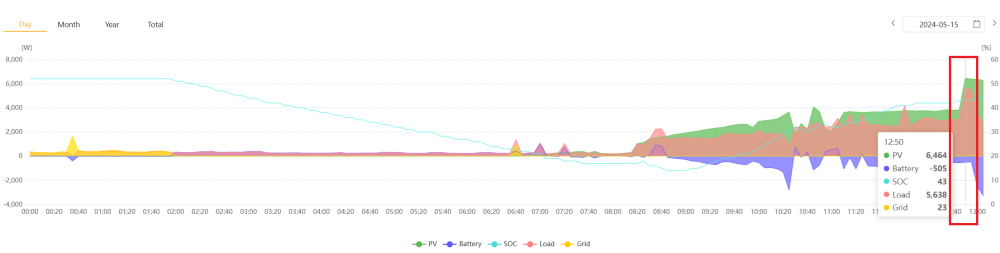
Can confirm, @Steve87 and @Carl Anthony are spot-on, adding a second gateway (to the same plant) combines the values. This is a really nice improvement over dealing with separate values all the time. Thanks guys! In a rare example of decent Sunsynk documentation, full instructions can be found here but the process (as mentioned by @Steve87) is simply to add additional Gateways onto a single Plant which will automatically combine their data. I've highlighted the moment the addition started reflecting on my side, we can see everything (including load and PV production) got doubled as expected: @Shvncrvn, try it out and let us know if you run into any problems.
-
Did not know this; means I'm not set up correctly either!! Is this something that applies to Deye inverters also? Will give it a shot...
-
Similar experience my side; a sunny late-autumn day drops daily yields by around 20% compared to a similar summer day. An example from mid-December compared to last week (before Joburg clouds ruined all the fun): Both graphs are for our original 5kW Sunsynk inverter with 10 x 455w JA Panels; north-facing. The drop in Grid usage ('Import' dropping from 22.7kWh to just 1.7kWh) is thanks to a second inverter that we paralleled since then (with another 10 identical panels and a second battery); as a result combined production last week was around 40 kWh per day, on average, between the two inverters. (The second inverter experiences a touch of late-afternoon shading on it's panels so it's production is a tad lower - 7th May, above, was 19kWh for that inverter). A third battery would put us entirely off-grid on days like this. Summer should peak at around 55 - 60kWh between the two inverters. But have to agree with @TaliaB: now is absolutely the time to upgrade, I talk about what we did in this thread, and the results speak for themselves - go for it!

-
This is normal... I 'ball-park' my solar production/stats/etc by just doubling the figures of the master (since my arrays all face the same direction and hence both inverters perform similarly). A combined view would be nice upgrade, though.
-
The maximum battery kW output under discharge will change with voltage (and voltage drops as the battery depletes or is put under load), so your calculation (using the lowest usable voltage) is a safe bet for the worst-case scenario (ie, low SOC). In practice that lower voltage will only apply as SOC gets low, so the rest of the time you'll probably be close to 10kW at nominal voltage (51.2*200 = 10.24kW). And some of the time you'll have PV to bolster you (so the battery won't take the full load) But avoid red-lining your system/batteries if you can since you don't want to trip: on my 10kW system I target an absolute maximum load of 8.5kW and have never tripped. Yet, that is.. 😃
-
Since you're using Li-BMS mode, the Capacity you specify in Ah doesn't actually get used. If you swap to AGM%, then the inverter will use the value to calculate SOC (in my experience it's pretty accurate as well). Instead in your case, the battery BMS will handle it for you. However something else doesn't look right: if each battery has a 'Recommended Discharge Current' of 50A, then three batteries should be higher than the 50A limit we see on-screen. Perhaps check that the comms between batteries (and also the dip switches that give each battery the correct role: i.e., master vs slave) are correct according to the manual?
-
BMS reporting is very hit-or-miss. The factory-supplied firmware of my Hubble AM5's (2 in parallel) used to report the lowest battery SOC when charging, and the highest SOC when discharging. That was beyond useless and caused unwanted charging every time the inverter trickle-charged the battery to maintain a given SOC whilst on-grid (since suddenly it'd drop to the lower SOC from the higher one!) After a firmware update the behavior is much improved; I've tested and the master battery now reports SOC as an average for the two batteries’ reported SOC. Far more useful. I've also tested a run-down to 0% (I typically cycle to 15% daily) and it all worked as expected, with the Maximum Discharge Current reported by the BMS to the inverter dropping to single-battery levels when the first battery depleted (which occurred about 5 minutes before the second one hit 0Ah). To the point of the OP: I also notice discrepancies of SOC between the two batteries, up to around 10%; so to an extent it's normal. Just check that the wiring connecting the batteries is uniform (same gauge and same length) since otherwise the wiring path to one battery may provide more resistance than the next which can affect charge/discharge rates to that battery.
-
Yeah he mentions he is. You'll still see a % though when clicking through the info screen, even in V mode (at least on the SS's you do). My experience with AGM % mode is totally different to yours though: with last month's firmware update, the discrepancy between battery-BMS-reported SOC and inverter-displayed % is consistently under 5%: And this is with two inverters running in parallel and drawing/charging from the battery bank slightly differently (I test by temporarily activating Lithium mode to compare on the BMS screen, at various levels of SOC). However: this does include a charge to 100% (which re-calibrates the measurement) at least every 2nd or 3rd day though. If I didn't have BMS comms this would do the trick for me, though comms is always first prize of course. V mode doesn't have enough decimal points to be useful for precise night-time targets in my case, I need at least two decimals rather than one (lithium has a rather flat discharge curve!).
-
Yeah - 100% then let it dip low (down to 15%) and hopefully you're sorted after a full cycle.
-
650W panels are on the menu now. Lower cost-per-Watt for hardware, cheaper/simpler installation, and significantly less roofspace required. Significant win.
-
Usual suspects would be check that comms between inverter and battery is good (LiBMS screen should reflect values for current/temp/etc as they change, in close-to-realtime); and if that's not the issue the battery BMS may simply be mis-reporting it's SOC. See what happens after you've taken it back to 100% when it starts charging again today. That might re-calibrate the BMS thereafter. Failing that, a power cycle of the whole system may help, and I've had luck temporarily running my own battery in AGM Voltage mode (using the specifications from the manufacturer) to allow it to get to 100%, then let it drop close to cut-off voltage, which in many cases (including my own) will re-calibrate the BMS to have it corrected when going back to Lithium/BMS. As a side-note, in voltage mode after hitting full capacity (ie when the battery stops accepting any more current at the charging voltage) the inverter will use that as that as the 100% mark, and 'estimate' (with frighteningly good accuracy) SOC thereafter, which can be used to replace voltage mode - by swapping over the 'AGM%' battery mode instead. No comms in this mode, it's just based on Power In/Power Out from the battery bank - the inverter is 'guessing' the real percentage using the capacity captured on the Battery screen and good old fashioned coulomb counting. My testing indicates this is within 4% of the value reported by the BMS.
-
Disconnecting comms isn't a safety hazard so long as you're not physically bypassing the BMS entirely; you're simply running in voltage mode instead of LiBMS mode which isn't uncommon. In that case, the BMS will still disconnect the battery (even without comms) where necessary. This is good. Many do (including my own batteries which I believe run PACE BMSes). If the BMS triggers a fault, the alarm light illuminates, the beeper sounds (unless it's a low-DC-voltage alarm - which remains silent). And with comms in place that gets taken a step further: the inverter gets the exact notification from the BMS, displays it on-screen, and then (depending on the inverter and setup) can push the alarm to a smartphone.
-
Can also confirm after some additional testing: This update fixes the 'System1' time-of-use settings being ignored (for the first/last entry) when not starting/ending at midnight. 'Solar Power (W)' Aux Load setting is still ignored in my parallel setup; likely due to each inverter being supplied by different MPPTs/arrays. Using SOC instead works as expected.
-
This (and the bloating mentioned in the original post) reminds me of the colloquial term used in the repair industry for bulging/bloated mobile-device lithium cells: "Hand grenade." If little cells are grenades, I can imagine what they call big ones. I definitely agree with you in strongly advocating keeping the BMS in the loop for both safety and longevity purposes. Whilst LFP is supposed to be more inert than other lithium-based battery chemistries, risking it isn't worth it unless experienced, able to carefully monitor, and willing to take some (potentially major) safety risks. Even after I've personally dealt with my own BMS mis-managing top-balancing (and reporting SOC somewhat inaccurately as a result - exactly as described earlier in this thread), I'd rather occasionally deal with that than a house fire.
-
Upgraded 2 x 5kw Sunsynks (in parallel), model 5k-SG01LP1 from firmware version: M 3.3.8.2 / S 1.5.1.5 / C E.4.2.6 To version: M 3.3.8.6 / S 1.5.1.5 / C E.4.3.8 Requested via FreshDesk on Monday, was actioned that Thursday during early-afternoon SA-time. Ticket changed from New to Open (with an agent assigned) when they started; got a notification on completion from FreshDesk. Top-left on-screen “On” indicator changed to an “A” followed by a “B”, both followed by numbers as the update progressed; system rebooted twice during the update. Process took about 30 minutes. Changes noticed: Aux Load/Generator screen now has checkboxes for “AC Couple Load Side” and “AC Couple Grid Side” “Force Off” button added in Battery —> Battery Charge menu (by Generator settings) System Mode —> System 2 offers a “Fast Export Mode” above Zero Export Advance —> “Multi-Inverter” menu offers a “Grid Tie Meter 2” checkbox Advance —> Other menu offers new checkboxes for “Low Power Mode < Low Batt”, “Low Noise Mode” and “MPPT Multi-Point Scanning” Advance now has a whole “Wind Turbine” settings screen for allocating voltages to currents, with a selector for which DC input(s) are connected to turbines
-
It’s for loads that are being powered via the Aux/Generator port.
-
Agreed. Disappointingly un-enticing. Yeah. They have your meter on file and you have to submit the current reading, along with a photo that has both the reading and the meter number visible - great to avoid estimates. But based on the proposed figures, prepaid is the true way: at least for now.
-
This is also somewhat disappointing, in the midst of an energy crisis I'd have hoped for a bit better for feed-in rates:

-
Like before though, the fixed fees are still much better on Prepaid - most notably the Capacity Charge (I believe this appears as 'Network Charge' on post-paid invoices). The gap is closing somewhat (Prepaid now gets a Service Charge under some circumstances), but as @Bobster. says, Prepaid will still often will be cheaper overall thanks to the large fixed fee difference. Blue highlight below: As a post-paid user that submits my own readings (via the surprisingly decent www.e-joburg.org.za portal), it would be nice to get a bit of a reduction on this fee since we're saving employee labor by reading our own meters...

-
Inverters like these use the Grid input to double also as an Output - to export/zero-export. They phase-match to grid, and then apply a slightly higher voltage than grid, which causes current to flow in the opposite direction. Nice article on this, link here. So the same wiring used to connect the inverter to mains gets used to feedback excess. Exactly
-
It won't bypass the whole inverter, but it does swap the essentials/UPS output to directly connect to Grid such that essentials are no longer running through the inverter. The inverter will continue to receive power from Grid when it's changed over, which is why the AC IN breaker is also important - a full bypass is: Inverter Change-over to Grid, Inverter AC-OUT to Off, Inverter AC-IN to Off (we should now be isolated from Grid), And then of course PV OFF if you want to fully power down the inverter In the case of a bi-directional inverter with either export-to-grid or zero-export-to-CT enabled, with the change-over flicked to Grid, the inverter actually continues to back-feed excess energy via that Grid input - with the UPS loads moving from the UPS (essentials) icon to the House (non-essentials: zero-export-to-CT) icon in my case. So even when changed-over, my inverter continues to invert unless I disconnect AC IN as well.
-
This really is a neat (and not-so-common) feature - sticking to Pylontech makes even more sense than it did already if OP is looking at higher-capacity batteries since he's no longer limited to purchasing the same capacity of Pylons. From the UP5000 manual:

-
Let me ask: you're saying that Solar Power (W) is an 'And' condition? Meaning that (with 'On Grid Always On' un-ticked) if Solar Power (W) is above zero, the SOC Batt Percentage condition has to be met AND there has to be the specified amount of Solar Power (W) available)? And for this Solar Power (W), is this amount being drawn from solar at the time? Or is this including spare availability (eg if batteries are full and house load is 900W - thus the system is only pulling 0.9kW - but the array could be generating 4kW if demanded, if you set the Solar Power (W) value to 2kW - will it power on? Or does it have to be currently-in-use PV that gets measured?) These are questions we asked a while back on this forum (without clear answers) so having someone around who's got this working is helpful, here! As an aide: I've been thoroughly enjoying watching my geysers heat, stove cook and pool pump when the grid is down thanks to this little Aux port...
-
They're lots of issues with mixing battery types on BMS-managed 'smart' battery systems: your safest bet is adding more of the same model when paralleling additional units instead. This is especially true since your current Pylons are likely communicating with each other via their 'Link' Ports; which is unlikely to be work as expected when mixing models/brands that aren't specifically made to communicate with each other. Likewise paralleling batteries of different capacities is a minefield because they all discharge evenly (more-or-less), so when you hit 50% SOC on your larger-capacity batteries, you'll suddenly have 4 totally flat batteries (because these are are half the capacity) in your bank, which would likely turn themselves off and bring your system to a sudden DC-disconnect power-down (even though there's left-over capacity in the other batteries). As a final potential issue, the Shotos are 50A recommended-discharge batteries whilst the Pylons are 25A so their maximum recommended current-draws differ. My vote: get more of the same (especially since you've already tried-and-tested your current array with [presumably] good results!).
-
I actually did before I pulled the trigger but there wasn't mention of any limitations like this: Technically the comms between the inverters could share combined PV for making a call on activating the port so I'd imagine it would be possible using firmware; though perhaps it adds complexity/test-cases that make it not worth-it. When I get a moment I'll send them a query on this field in particular and see; just for the sake of curiosity (since my use-case doesn't need it - we cook on Aux at night!)


