kuba.cz
Members
-
Joined
-
Last visited
-
-
-
-
-
-
-
This is RS485, not RS232, also the pinout and the protocol is different. It won't work.
-
I would check for earth leaks on the PV panels. Or generally any leaks between the panels if they are not earthed. It's only one of many possibilities, but easy to verify.
-
-
This looks similar to Anern. Both Anerns that I have are not user-updateable. They don't have a bootloader so they can't be updated through the serial port. It could be possible to replace the DSP on the control board with a new (unlocked) one and flash the firmware using JTAG, but unfortunately I don't have any firmware for this particular model.
-
-
They are on the main board, on pin 15 of the 50-pin IDC connector. But I don't think that any Axpert firmware can work with this board. The ADC and GPIO connections are completely different. And most likely the chip does not have a bootloader anyways, so it can't be updated through the serial port. The only reasonable option in this case is to get the firmware somehow (from the manufacturer?) and flash it into a new unlocked chip using JTAG.
-
It's a link. Just click it.
-
-
Error 99 means no bootloader. The firmware checks for a magic number at a specific address in the bootloader. The address may differ among various models. Some models do have a flag for grid-feed in the EEPROM settings. Use Communication Tool to verify/change it: QFLAG command to check whether the flag is there. Search for a lowercase "d" letter in its output. If it appears after "E", the flag is enabled. If it appears after "D", it's disabled. PEd to enable solar feed to grid. PDd to disable solar feed to grid.
-
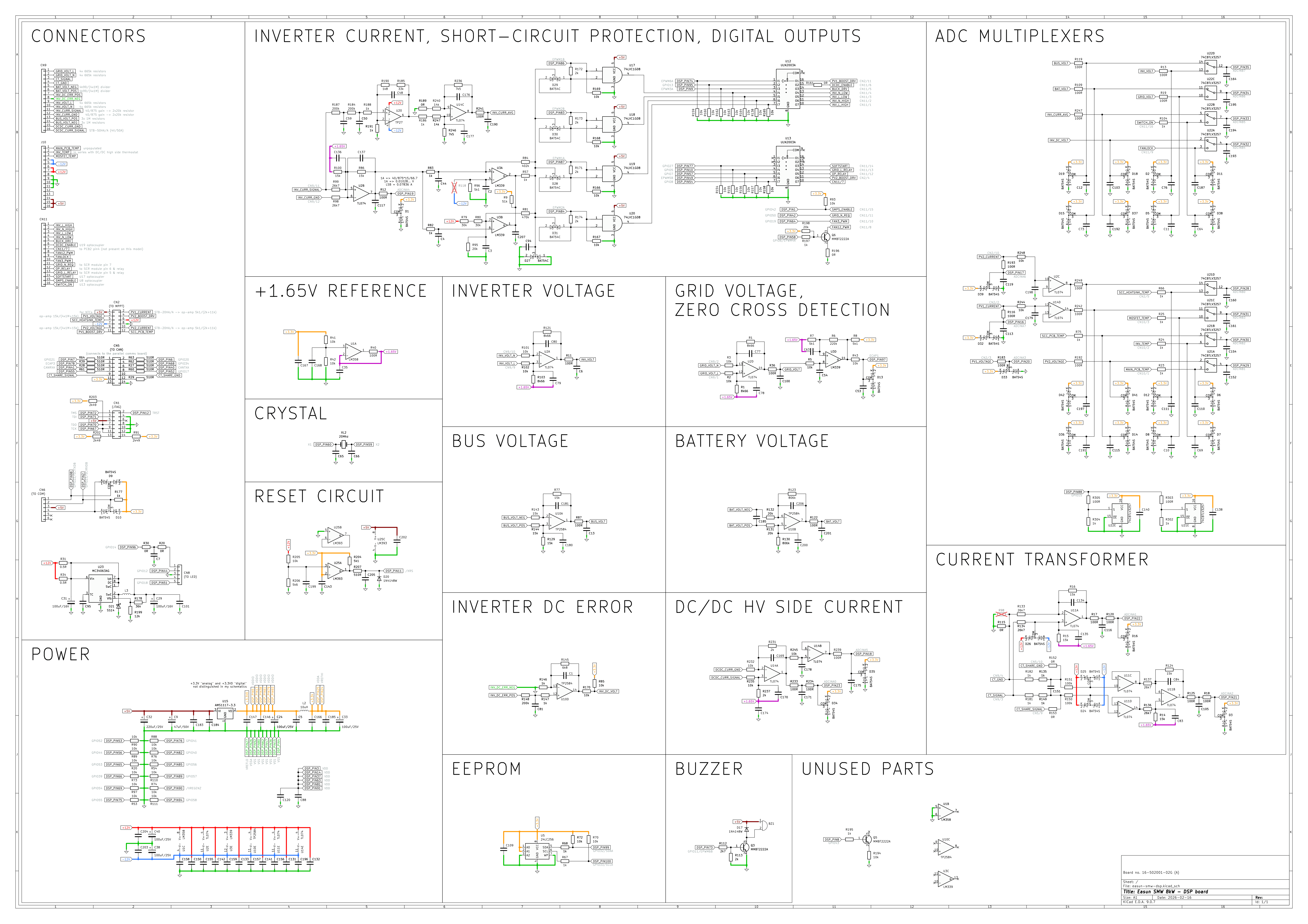
Some more schematics here. These are from Easun SMW 8kW which is, I believe, identical to Axpert Max 8kW. In this case the control board did have part references printed so most of those in the schematic should be correct. It's a multilayer board but only power planes are on the inside layers so it's not that hard to trace. The main difference, compared to Anern, is that this board uses multiplexers for 8 of the ADC's inputs, increasing total number of available analog inputs to 24. I also made a schematic of the SCR board and some fragments of the main board. I'm not going to make schematics of any power supplies as these are already pretty obvious. Just note that the topology in this case is different from Anern's. There's no intermediate SPS_IN (150V+) branch. The main power supply and bus softstart are located on the main board and powered directly by the battery voltage through a diode. The grid/AC power supply and solar power supply are on a separate board, both of these output around 63-66V and also provide power to the main power supply through diodes. Unlike Anern's, this topology does not need a relay in the softstart circuit. I made a note of some critical parts (MOSFET type, shunt resistor value and how they deal with voltage spikes): main SPS: JCS86N25WT, 0.15R, RC snubber 2x47R (parallel), 2.2nF softstart: SIF13N50C, 0.62R, RC snubber 2x22R (parallel), 220pF grid SPS: SVF9N90F, 0.47R, RCD clamp 15k/5W, 10nF solar SPS: SVF9N90F, 0.47R, RCD clamp 15k/5W, 10nF Original KiCad files and PDF schematics are available on my GitHub: https://github.com/solar-pwr/axpert/ There will be errors as usual, so every feedback is appreciated.


-
-
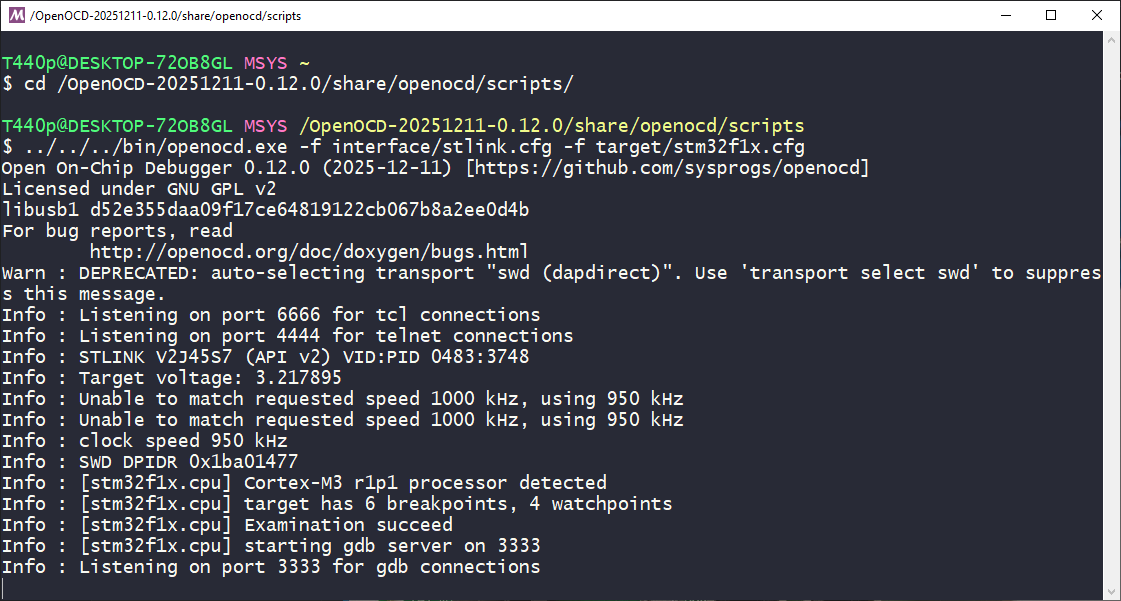
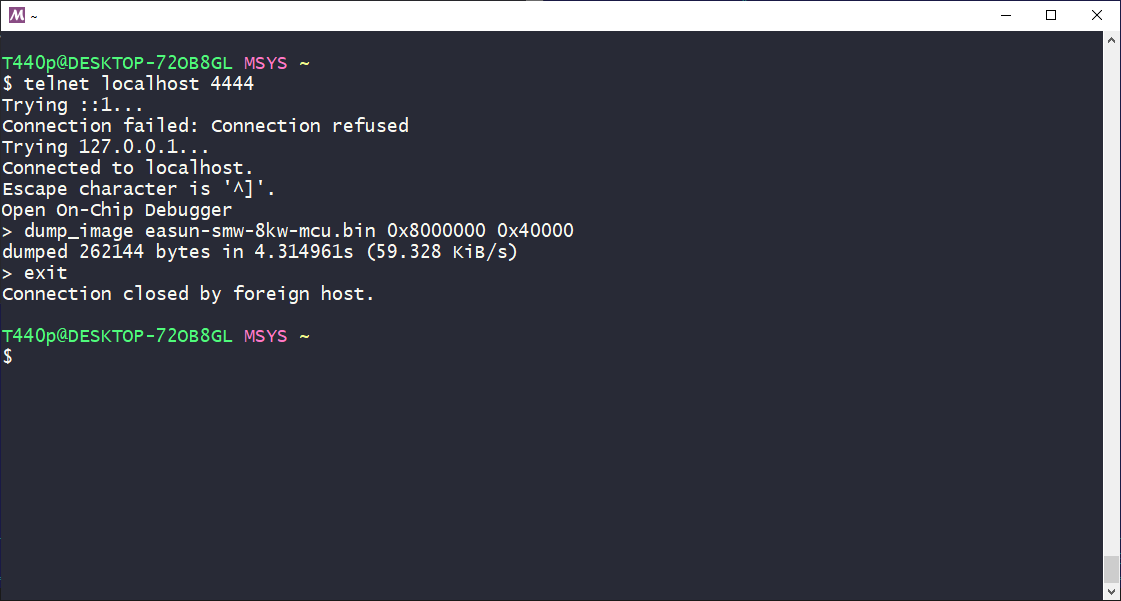
Hi, you can use ST-Link (or any other SWD probe) to reflash the chip with the right firmware. Check this thread for SWD pinout: https://powerforum.co.za/topic/14829-easun-axpert-max-8kw-firmware/page/5/#findComment-140679 No external power is needed, the SWD probe will provide +3.3V for the device. First of all, make a full backup of the flash memory. You'll need it to extract the bootloader which is not included in the upgrade file. I like to use OpenOCD for this but you can choose any other tool except STM32CubeProgrammer, which won't probably work with a GigaDevice chip. After successfully connecting, run the backup using telnet: The file will be stored in the directory where OpenOCD is running, /OpenOCD-20251211-0.12.0/share/openocd/scripts/ in my case. Size of the flash memory (0x40000) may differ in your case, check the datasheet of your chip. 0x8000000 is where the flash starts. It's the same for all STM32's and clones. Once you have the backup, post it here and I'll merge the bootloader with the proper firmware you need so you can flash it into the chip.


-
-
Most part references around SG3525 seem to be the same as in this schematic: https://forums.aeva.asn.au/viewtopic.php?p=88434#p88434 Got one on my desk too 😀

-
-
-
@Coulomb All schematics are here https://powerforum.co.za/topic/32491-anern-102kw-schematics/ in my first post. Part 2 was added later. I've just uploaded original KiCad files to my GitHub as well: https://github.com/solar-pwr/anern . BTW, yesterday, while working on an Easun SMH, I realized that this Anern is a rare case which can only measure charging current on the DC/DC converter's Hall sensor. The output of the op-amp is not shifted to +1.65V so discharging current will always be read as zero on the ADC. Easun SMH does have a voltage divider between the output of the op-amp and +3.3V (taken from a voltage follower, not directly from the power rail). I think it will be similar in all MAX models.
-
I think the only explanation is that battery 2 disconnects because of cell overvoltage. Otherwise it's not possible to see different voltage on batteries connected in parallel. Differences in internal resistance of cells might be the reason, causing balancer to operate the wrong way during charging.
-
I'm not sure what was the reason to remove the snubber, but the power supply seems to run fine without it as long as the output current stays within normal range. But when there's a short circuit (and that can be on the COM port also), the voltage spikes can be high enough to cause arcing on the transistor drain or transformer pins. If UC3845 failed, don't forget to check R253. The power supply may run even if this resistor is open-circuit, but UC3845 will stay at 50% duty cycle, just switching on and off according to the voltage feedback. In this mode, the spikes on the primary will be extremely high. Currently I'm running two inverters with RC snubber added between source and drain of the MOSFET without any issues (that's not an RCD clamp as show in the schematic). I used 100pF/3kV MLCC capacitor and 33R/5W resistor as already mentioned.
-
I only have firmware for two different 10.2kW models (single MPPT and dual MPPT).
-
It's in the schematic, 0R5, like 0.5 Ohms. 5W rating is just a guess, it's probably less, maybe 3W. You can also use two 1 Ohm resistors in parallel. If it's burnt, you need to check other components as well. Especially Q71, U10, R253, R250, R249, D49. You may also want to add an RC snubber or RCD clamp to prevent the same failure happening again (see my earlier post - the one with board photos).
-
These are two unrelated problems. The update via COM port fails probably because of a weak/slow optocoupler or some other hardware problem which corrupts the data. When uploading the firmware update via JTAG you get F99 which means "missing bootloader". That's expected. The firmware checks for a signature at the end of sector A where the bootloader resides. And it's not there because the firmware update does not contain the bootloader. When flashing via COM port, sector A is never erased or overwriten but the JTAG utility by default erases all sectors. I've merged the patched firmware with part of your original file. This one should work if uploaded by JTAG. Do not use this with the original update utility. dsp_374.04_patched_05_wboot.hex