superdiy
Members
-
Joined
-
Last visited
Everything posted by superdiy
-
It has the required certification, someone posted the link a few days ago. If you are going to use it offline, they (CoCT) can go.....
-
Yes, correct Yes
-
ditto
-
Looking at the details, something is clearly wrong, or hopefully reported wrong - it is in battery mode, yet no current is flowing from the battery. No current is flowing from PV either and no current is flowing into the batteries (charging current), but yet you have a load of more than 300W! Maybe you should re-calculate your system requirements again, because I think it is totally incorrect as is. Currently you have 2 panels with combined power of maximum 500W when the sun hits them at 90° on a clear summer day under ideal conditions. You have a load of at least 300W - 24 hours a per day - keep in mind that you have to look at the apparent power when the source is DC (PV or Batt), because that would be what would be drawn from DC (losses ignored). Lets ignore losses and assume everything is running 100% effective, you then have 500W - 300W => 200W left to charge a 400Ah battery bank. To charge a 400Ah battery bank you would need about 40A for more than 10 hours to charge the bank up to 100% - actually you need more time, but lets ignore that for the moment. With 200W @ 12V you can achieve a maximum charge current of 200W / 12V => 16 Amps - if your inverter charges the batteries at 16 Amps you'll need at least 400Ah / 16A => 25 hours at full sun to charge the batteries. Normally you work on 5 hours sunshine per day, so you would actually need 25/5 => 5 days or 5 x the amount of panels you currently have - so 8 more panels - and that is if you run the batteries down to 100% DoD overnight on a daily basis, which you also do not want to do. You actually want to run the batteries down to between 30% and maximum 50% DoD, so that means that you have to at least double the 10 panels to 20.
-
-
Yes, they are very overpriced lately. Years ago when I bought my first one, the gsm commanders and the extras were much more affordable, the Arduinos were not very popular yet and the Pi's were not even on the drawing boards. The advantage of the gsm commander is that any novice can set it up and get it working within a few minutes - no electronics or programming skills required.
-
I frequently see this with 3KWp and cloud edge effect.

-
Just remember the following when you do the calibration: Use a calibrated multimeter / oscilloscope to measure the voltage do the voltage measurement on the battery connection terminals on the inverter, not at the battery bank only calibrate the voltage when no current is running to or from the batteries, because if you do the calibration while the batteries are charging or discharging you might have a voltage drop inside the inverter and then the calibration will not be accurate.
-
Hi ivan, welcome to the forum. The earth leakage connection issue has been discussed many times before and no conclusion has been reached. I'm not sure what causes your ELR to trip, but the best way to connect the inverter is before the main ELR and then to bond the Neutral & Earth on the inverter output and to add a second ELR to the inverter output and then feed the load from the second ELR.
-
Sounds to me like a driver issue. Remove the "unknown device" and hit refresh and see if it is picked up again and if asked for a driver.
-
Excellent products and great support. Been using one for the past 5 years for home automation / control / alarm system and configured 5 more units for clients for various remote control applications. Pity they are soooo expensive lately.
-
Infini can be used without a battery bank.
-
Just don't use a size 3 phillips.
-
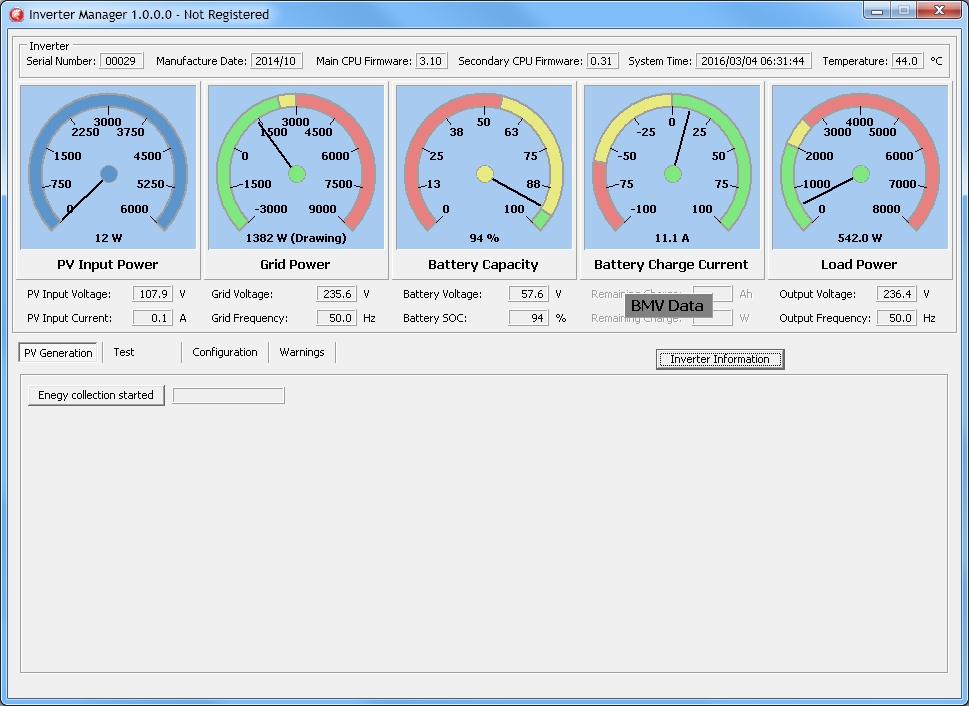
Mike, here it is. Download the zip, unzip to any folder or the desktop and run the application. Please post / send me the screenshot of the Device Information screen. (PS Windows only ) Still early days, but more to come. Maximum values on the dials are for the 3KW infini - I need the screenshot to get your Model Type to customize features per inverter model. http://www.spectrumsound.co.za/invertman/InvertMan_0.0.0.1.zip

-
I'm not sure about the 5KW model, but as I've understood, it is also a true hybrid. The 3KW and 10KW models are true hybrids which simply means that they can combine input sources to drive loads. As per your example if the load requires 1000W and only 900W PV is available, 100W will be drawn from the grid. As you've mentioned, the Axpert cannot combine sources and will go into bypass mode and draw the 1000W from the grid only. You can set the inverter to feed back from battery power as well. If feedback is enabled and surplus PV is available, the surplus will be fed into the grid. load = 1000W, PV = 900W - nothing will be fed into the grid, because the load requires more than what is available from PV unless feedback from battery is enabled.
-
Batteries do not like heat, because the reactions inside occur at a higher rate. High temperatures effectively reduces the battery life. You also have to adjust the voltages according to temperatures - refer to your batteries' data sheet - usually you have to reduce the voltage per °C above 25°C. From the Trojan T105-RE datasheet: CHARGING TEMPERATURE COMPENSATION To the Voltage Reading -- Subtract 0.005 volt per cell (VPC) for every 1°C above 25°C or add 0.005 volt per cell for every 1°C below 25°C. EXPECTED LIFE VS. TEMPERATURE Chemical reactions internal to the battery are driven by voltage and temperature. The higher the battery temperature, the faster chemical reactions will occur. While higher temperatures can provide improved discharge performance the increased rate of chemical reactions will result in a corresponding loss of battery life. As a rule of thumb, for every 10°C increase in temperature the reaction rate doubles. Thus, a month of operation at 35°C is equivalent in battery life to two months at 25°C. Heat is an enemy of all lead acid batteries, FLA, AGM and gel alike and even small increases in temperature will have a major influence on battery life.
-
Yes, that is it.
-
Feel free to ask before you buy anything.
-
Which sentence?
-
I LOVE that heatsink, but how many watts does that thing dissipate? More than your daily PV generation?
-
No, this sentence does not make sense at all, rather ditch it. The BMV's internal relay has a potential free contact already - no use in trying to connect another relay with potential free contacts to it.
-
OK, so they've confirmed that you can use your relay with 230V coil. You don't get anything like a potential free relay. The relay contacts are potential free meaning that they are electrically isolated from the BMV (in this case) and you can compare it to a stock standard light switch on your wall, where, in this case, the BMV is the "person" switching the switch on and off. Hope that makes sense.
-
Yes, it will be able to work like that - the SSR is just an "electronic relay" - the control side is similar to the coil on a mechanical relay. BUT, the SSR linked above will not work, you need to get one with a "switch side" capable of switching 230 / 250V AC.
-
That is an option - just not the one in the link, it won't work. It can only switch DC and only up to 60V - Viper wants to control the geyser element - 230VAC. You need a lower voltage to control the SSR as well - not 55V odd volt, but I guess Viper can tap that somewhere in the bank, either at 12V or 24V.
-