WindGat
Members
-
Joined
-
Last visited
Everything posted by WindGat
-
Item: 7.2kw Axpert offgrid inverter with 2 x 4kw mppts Price: R 8 500-00 Payment Method Accepted: Instant EFT Condition: Working Location: Cape Town rural Reason: Upgraded Shipping to be arranged by buyer
-
Hi Frans Navitas se deure het toe gemaak Jammer, ek het ook al probeer om Dricus in die hande te kry If anyone can help me with the pinouts to make up a battery communication cable between Navitas Battery and Axpert Inverter, it would be much appreciated!
-
https://leoch.com/uploads/ueditor/file/20221216/6380680816436179649903741.pdf

-
To all the "Navitas"-Custumers; This might help: Seplos 48v 150A 8S-16S BMS - Navitas.pdf

-
Hey Guys! Special Thanks to Andre Kruger for posting this topic, Coulomb for generously sharing his expert advice and Plaashaas, for encouraging me to try again! Initially, I bought the first of three machines and ran it in Single Phase Mode (P3) A couple of months later, I bought two more machines (P1 & P2), that's when the trouble started! After much troubleshooting, we figured out that the latest arrivals had a different firmware version than the first machine. Segen supplied the necessary firmware and we updated the firmware on all three machines (P1, P2 & P3) to 71.93, the same that Andre had installed. Everything seemed OK and the system was working in three phase mode, but occasionally we would still experience a glitch. Usually a reboot would sort it out. Later we added a SMH (Solar Management Hub - Centurion Solar). We then realized that the SMH would duplicate the stats from P1 to P2 I an attempt to figure out why this would be, we realised that P3 was running a different firmware version on the MCU. We contacted Segen once again and this time requested no only the latest firmware for the Main Board, but also for the Display (Segen tells me this is the "MCU") After updating both the Main (72.02) and MCU (2.83) firmware an all three machines, everything seemed OK after each upgrade, but a short while later, I noticed P1's display went dead, although everything else seemed to be working fine! I then consulted this forum and went back to P1 to once more re-install the latest MCU firmware version (2.83) I experience everything as Andre explained and followed Plaashaas's advice to "Reflash Again", now all the displays are working again! Coulomb, In total I have re-flashed displays 4 times today. I never took specific care to timing, so that doesn't appear to be an issue, but what I can say is that the first attempt today was on P1. At some point during the process after connecting to my laptop, the connection seemed to be not responding and I might have pushed buttons on the inverter and confused the update software. With my last attempt, I made sure not to push anything on the inverter until the process is finished. With my first three attempts, I switched of the utility supply and solar supply so only the fully charged batteries can power the machines. On my fourth attempt, I forgot to do so, therefore I can deduct that it doesn't matter how the displays are powered up! Nevertheless, I still have to figure out why the SMH is duplicating P1 to P2

-
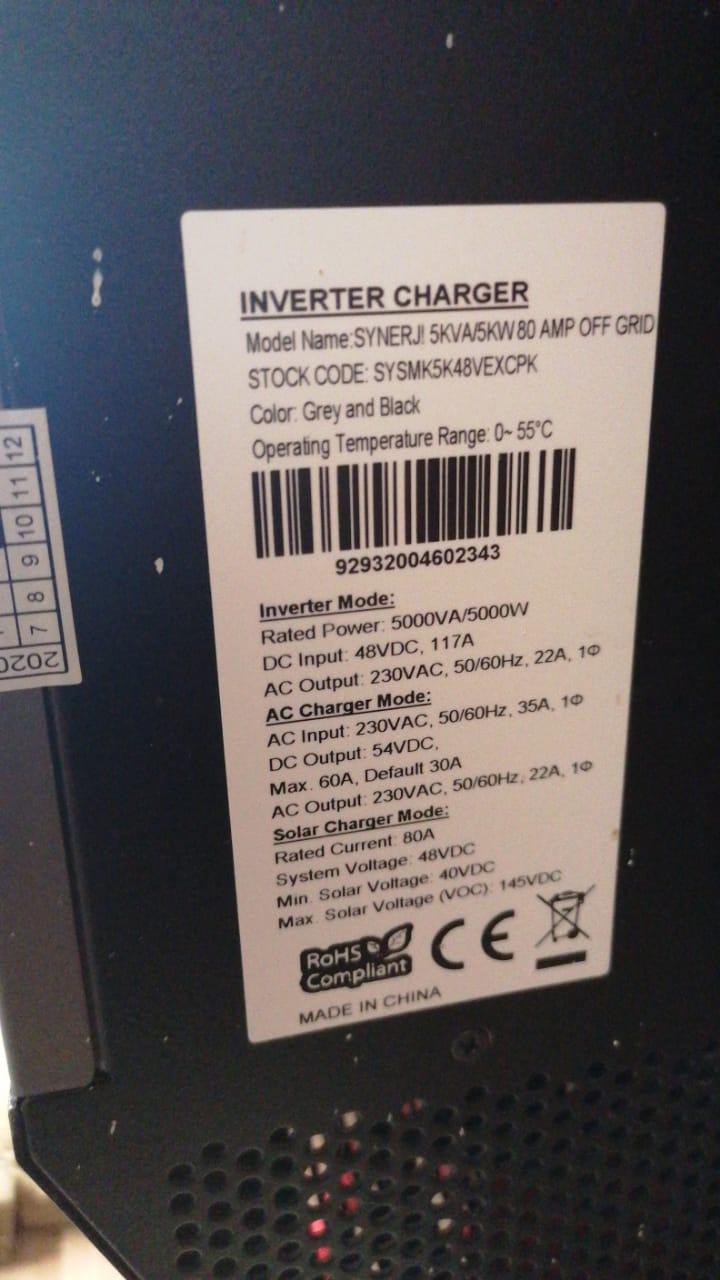
I have a 5Kw Synerj! Inverter Will an upgrade to Coulomb's Patched Firmware 74.40e help me get less error 04 messages?


-
I am also on 71.93 for Main CPU (U1) I have three Units running in Three Phase Mode, I did not get all three machines at the same time, therefor I had to flash all the machines with the current version (71.93), but it seems like the Secondary CPU (U2) did not change on the oldest of the three machines. The oldest of the three machines show firmware version 02.00 for U2, whilst the newer two machines both show 02.40 Is it possible to only flash the Secondary CPU's firmware?
-
So Chris, If I have three Kodak Kings running in Three-Phase Mode, Would it be better to Face One String East, One String West and the Last North, Or Simply face all of them North?
-
"Warning code 61: Battery management system communication loss. This fault is only available when the battery type in settings menu 05 is set to anything other than “AGM”, “Flooded” or “User-defined”. Unless you are using a BMS connection for a compatible lithium battery and have correctly configured the connection, make sure to use “AGM”, “Flooded” or “User-defined” in settings menu 05. After battery communication cable is connected and a communication signal is not detected for 3 minutes, buzzer will beep. After 10 minutes, inverter will stop charging and discharging the battery." Page 47 of attached file: "Kodak King - Phocos - Any-Grid PSW-H Manual 2020-02-26" Kodak King - Phocos - Any-Grid PSW-H Manual 2020-02-26.pdf
-
Am I correct if I understand that under certain circumstances I will get a "warning" message which is actually perfectly normal and not something to worry about? For example: 70! is actually an indication that the inverter has resumed charging the battery on the battery's request
-
System Background I have three Kodak Kings running in 3-Phase Mode on 3 x Pylontech US3000 Batteries and using EKSDOM (aka ESKOM) as backup. Each inverter is connected to 6 x 325W PV Panels. I started of my SOLAR-Journey by installing an 3kw EAST-Hybrid Inverter and running it in Grid-Tie Mode. By the time I could afford a battery, the inverter's screen went bust. It was not economically viable to repair, so I bought my first 5Kw Kodak King. In the meantime I jumped through the loops to submit a claim to my insurer, who paid out. Adding some bonus cash to my insurer's pay-out, I bought two more 5kw Kodak Kings and two more Pylontech US3000 batteries giving me the total of 3 x Kings, 3 x US3000's and 18 x 325W PV Panels. During my journey, I ran into a couple of issues ranging from fault codes not listed in the manual to learning that the Axpert Kings are not good at managing lithium batteries etc etc etc I ended up purchasing a Raspberry Pi and the SMH (aka ICC) Software. I strongly doubt whether it is possible to get my system to work any better than what it currently is (Too little batteries and too little PV Panels). The SMH definitely allows me to better mange the system's overall performance, but there is still some issues I need to resolve. Nobody I know has ever been brave enough to run Three Kodaks in 3-Phase mode, however, between myself, Segen and my supplier, we managed to get the system running. The first issue I had, was the fact that the machines were running different firmware versions. Segen supplied me with the latest version available at that time and I installed it on the three machines. From what I understand, the program I had to run, flashed all the necessary controllers in the machines. The next issue I had, was the phase rotation: Eskom's phase rotation was wrong! This is a simple fix that I could rectify on my side. Under the setting where I can choose in which mode the inverters must run (Single, Parallel or 3-Phase), I have selected P1 for the inverter on Phase 1, P2 for the inverter on Phase 2 and P3 for the inverter on Phase 3. The issue that I am still trying to figure out I use my PC over WiFi to access the SMH-Machine using "AnyDesk". On the SMH-Machine, I select "Dashboard" and then open the "Inverter" tab. This gives me a spreadsheet listing the three inverters in three columns like follow: what bothers me, is the fact that for two of the inverters, SMH shows the same Serial Number. Occasionally the inverters have showed error messages on P1's screen which I suspect relates to this. It seems that the inverter/s only worry about this when a very specific condition arise (which I can't figure out). The result of this on a day-to-day basis, is that the SMH is giving a wrong calculation of my load. Has anyone got any idea how I can get the SMH to read the correct Serial Numbers for Each of the machines?

-
Hey Guys I got a 3kW Axpert with blown components. I was about to order parts on Aliexpress (The WWW doesn't show me the exact part number in RSA) and wait a lifetime when I stumbled on your thread. Would it be possible to swop out the GP4063D for a GP4066D instead?

-
Hi Steve I am running such a setup and have noted that the SMH under the "Inverter TAB" shows the same inverter serial number for P1 and P2 Have you ever used a Three Phase Kodak/Axpert Setup with Centurion Solar's SMH?
-
Also check out this link: https://github.com/scottwday/InverterOfThings Anyone had any success with the ESP8266?
-
Grease and Seals deteriorate with age, hence bearing failure! For this reason you'll be lucky to find a car manufacturer that will guarantee your car for more than 5 years. Nevertheless, a little maintenance can make your car last just about FOREVER, same is true for turbines. I have been donated two turbines that were "faulty". I did some basic testing on both and found no trouble on the wiring of either unit. The one unit had a seized neck bearing, bit the slip-ring was still perfect. I removed the bearing and sourced a suitable (better quality) replacement from my local bearing wholesaler. From what I could gather, both machines were "China-Specials" I sold one unit at a very reasonable price and donated the other to a friend of mine where the machine is serving him just fine! The cost of bearings for Repair/Service was less than R 300-00 per machine!
-
Yes, you can use it in Grid-Tied mode, when the utility fails, it will run of the battery in "Off-Grid" mode
-
JaquesVDM, dis nou 'n Windgat projek! How do you connect the ESP8266 with the inverter? I have read somewhere that the inverter's voltages on the RS232 pins might be too high for the ESP8266