system32
Members
-
Joined
-
Last visited
Everything posted by system32
-
@hannesvn In terms of 1800W vs 2400W PV, there are many settings on the Deyer that affect the PV draw. The inverter will only draw as much as it needs from PV + Grid + Battery. When my battery full ~11;30am, PV drops to match Load for the rest of the day.
-
Nice, I'm also considering using excess PV to mine - not sure where to start/howto mine. Will need to do some homework. Agree solaman has issues. Try Solar-Assitant.
-
You might find my post on this subject useful: https://powerforum.co.za/topic/8896-sunsynk-8kw-no-output-on-load/#comment-112092
-
Just checked

-
Try Solar-Assistant - it has options to change some of the settings remotely on the SunSynk. According to the video at: https://www.sunsynk.org/remote-monitoring the new app + new dongle will allow remote control.
-
See https://powerforum.co.za/topic/10982-syn-synk-logger/ https://powerforum.co.za/topic/8383-querying-wifi-solarman-dongle/ AFAIK, 1.For SolarMan the firmware is pushed by SunSync.org 2.The SolarMan is readonly (no can set values) 3.SolarMan changed the encryption so you can't access the SolarMan dongle directly anymore.
-
Approximately 2279mm x 1134mm × 35mm is pretty much the industrial size used in ZA. If you have the space, then it's not a problem. Does required 2 people to handle and correct mounting on the correct clamping zones to prevent flex and damage.
-
I bought the USB/RS485 cable from Solar-Assistant.io Should be easy enough to make one.
-
AFAIK, you can oversized PV as long as you don't exceed the MPPT Volts ~425V Solar Input Max power input – 6500W Max V DC input – 370V (100V~500V) Max current input – 11A + 11A MPPTs – 2 MPPT Range – 125~425V So about 7 or 8 of 48V panels per string per MPPT and you have 2.
-
@Muerte My 2cents worth: There are 2 loggers. 1. The SolarMan logger (the older one) Ive only used the SolarMan version. It only connects via WiFi IMHO, SolarMan is slow to refresh / lags, not very informative/useful and does not allow changing any inverter settings remotely - perhaps I'm missing something. I'm using Solar-Assistant to provide additional functionality and information. -- 2. The new SunSynk.org logger https://www.sunsynk.org/remote-monitoring AFAIK, not yet released in ZA - can someone on the forum advise? This connects via WiFi, but according to the documentation also has a network port. The new SunSynk logger looks quite good, and allows you to remotely change inverter settings, etc. Watch logger the video in the link above. AFAIK, you will need a logger to request firmware updates. I suspect you could do an offline firmware upgrade from a laptop and a serial cable. Perhaps someone else can advise.


-
There is no proof that CoJ/CityPower is paying attention to South Australia and any renewable options. If they were, CoJ would have noticed the "Hornsdale Power Reserve" (Tesla Big Battery) to capture the cheap rooftop solar electricity. CoJ would have also noticed the South Australia "Tesla Virtual Power Plant" where 50,000 homes with batteries and central control work together. CoJ would have consulted and put out discussion papers / proposals. CoJ would have regulations to encourage PV + Battery. No I don't think CoJ has done any attention paying to roof top solar. CoJ too busy letting piggies eat at fraud & corruption table fed by high electricity tariffs and high rates. Here's my proof of the above assertion: https://www.enca.com/news/city-power-concerned-reports-corruption-nepotism https://mg.co.za/news/2020-06-11-allegations-of-corruption-at-city-power/ https://www.politicsweb.co.za/politics/investigate-jobs-for-pals-scandal-at-city-power-in https://ewn.co.za/2021/09/03/city-power-ceo-mongezi-ntsokolo-suspended-over-corruption-claims etc
-
From what others have said, you have to be a "net user". This is the killer for me. With batteries you can drop your CoJ electricity consumption to near zero. If we can't make money from the excess, what's the incentive?
-
We been making noises about CoJ/Citypower's lack of interest on renewable for a few years now on this forum. Some of these posts go back to 2018. What I would like to see from CoJ/CityPower: One-stop web portal with: Rules & Regulations Submitting Applications Streamlined transparent, responsive processes to submit & track applications And Dropping the "net user" rule Encouraging/incentivising home battery storage to discourage using the grid as a battery With the above - it would be a "win-win-win" situation Plant owners will make a 2nd income CoJ/CityPower would have access to cheap green electricity that they could sell to other residents Help ZA reduction CO2 emissions and meet targets After my batteries full, I have ~20kWh solar per day that I'm able to use. If it was viable, I would have add an additional 32x400W PV panels my system to feed the grid and make a business of it, but alas CoJ is not interested.
-
According to the Deye manual - Section 5.10 - The Deye is the same as the SunSynk and has a "Signal Island Mode" setting https://www.deyeinverter.com/deyeinverter/2021/02/06/502012021【b】储能单相说明书sun-3.6-5k-sg03lp1-eu-ver2.0-deye.pdf As explained above, Signal Island Mode will activate a relay when grid power is lost. The relay [Automatic-Transfer Switch (ATS)] is used to bond Neutral/Earth. See Neutral Earth Bond information from SunSynk: https://www.sunsynk.org/post/automatic-neutral-earth-bond

-
I've only been on Solar for 4 weeks, the main issue is that excess "solar production" is "discarded" so it's quite difficult to measure. There are only a few situations "solar production" can be measured: You grid-tied and feeding into the grid every single kWh Your own consumption exceeds the kWp of the solar PV Both of these are unlikely in CoJ since (1) is discouraged by CityPower and (2) most people oversize the PV. In my case the graphs on a sunny summer day look like this, after midday, the battery is full, the geyser is hot and there is nothing in my house to use the excess solar, so "solar production" drops. In summer my battery is full by 11:30-12:30, I expect in winter to be full by 13:30-14:30 Still the same "total solar production", just over a longer period. Would be interested to see "solar production" data from someone that feeds the grid.

-
See https://powerforum.co.za/topic/2345-joburg-regulations-for-solar/ @pilotfish posted the regulations. Would be interested to hear of anyone who's followed thru and any tips. Seems somewhat complicated and AFAIK, you can only claim as much as you consume - "net-zero". If CoJ/Citypower were interested, they would have streamlined, online, quick, single portal where all the information is available and applications can be processed and without some of the "net-zero" clauses - and even some incentives to do so. Seems CoJ only play lip service to renewables and are not interested.
-
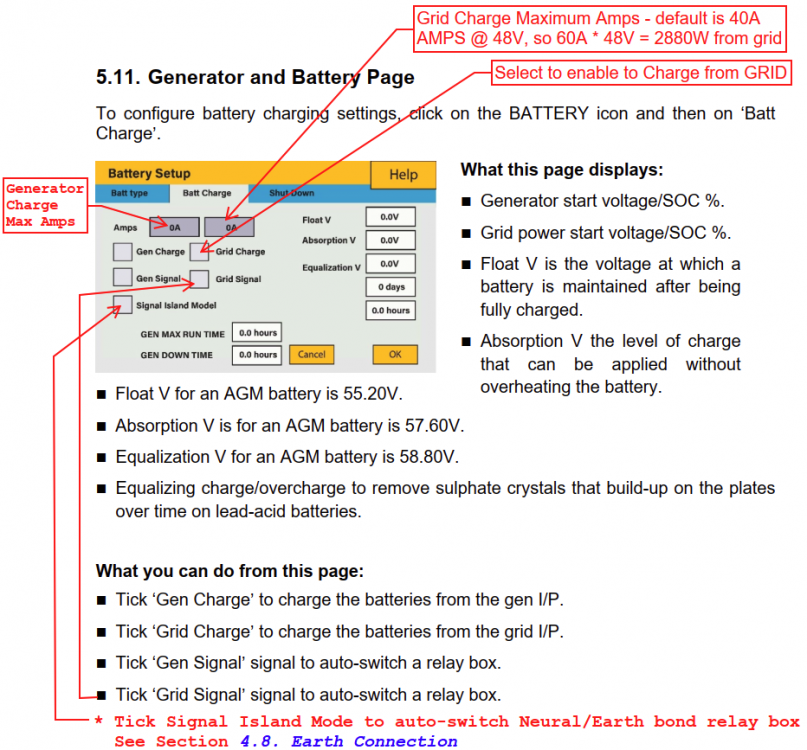
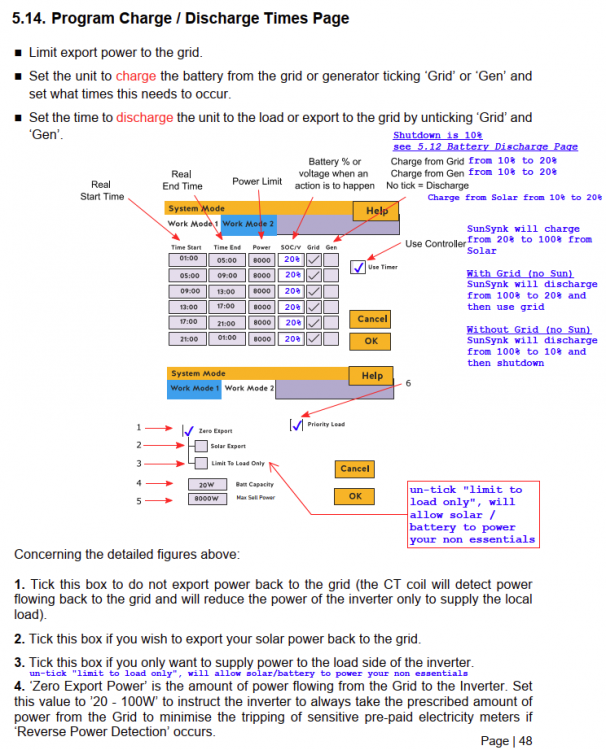
Here are my notes on the SunSynk 8k on the v7 Dec 2021 manual: https://www.sunsynk.org/manuals These notes are for a SynSynk 8k PV Lithium battery Zero Export (self consumption) no generator all loads on "Critical" If you have no PV or no Lithium or are exporting, then these notes are not for you. My use case is as follows: During day, use solar to run house and charge the lithium battery At night, use battery until 20% then use grid At night, if no grid (load shedding), use further 10% of battery then shutdown. At night, if grid returns, charge battery to 20% First set the Lithium Battery up as per manual section 5.13 Setting Up a Lithium Battery Note that the charge / discharge Amps in image below is at 48V. The charge / discharge Amps in the image needs to be below the "C" rating of your battery bank. This needs to be below the "C" rating of your battery bank. If you have 4 batteries in parallel, the charge/discharge current (Amps) increases by 4. I have 6.4kWp of PV and 4x100Ah 1C batteries. I use 150A at 48V = 7200W (150A/4=37.5A) which is less than each AM2 battery Amp and "C" rating. Initially I had an 85A charge setting, and this limited the PV to battery charge to about 4000W. After changing to 150A (48V) the batteries charge at ~6kW from the PV or ~1.5kW into each battery (at PV peak period). It is highly recommended to connect the BMS to the inverter via a suitable CANbus or RS485 Modbus cable. This allows the BMS to accurately control the charge from the inverter. Confirm the communications is working via LI-BMS, you should see something like the left panel above. If you get the screen on the right (just numbers), then the communications is not working. Try updating the Inverter / battery firmware. Support for new batteries is being added to the SunSynk firmware continuously. The Dec 2021 Installer Manual has 43 different Lithium batteries listed. -- Second set the Charge Amps and Tick Grid Charge as per manual section "5.11 Generator and Battery Page" I use 60A setting which at 48V is 2880W I have a relay that bonds neutral/earth connected to earth spikes when there is no grid. See https://www.sunsynk.org/post/automatic-neutral-earth-bond -- Third set the Shutdown % as per section "5.12 Battery Discharge Page" I use shutdown 10% for a lithium battery - remember 10% is only if there is no grid and no solar (load shedding at night) Normally the inverter will discharge the battery to the SOC/V (20%) setting in System Work Mode 1 below, then switch to grid. The inverter will restart when 15% SoC reached (charged from 10%) -- Fourth is System Mode - these settings are confusing as they have different rolls see Section "5.14 Program Charge / Discharge Times" Charge / Discharge Times are designed for "Time-of-Use" functionality and grid export. The idea behind of TOU is to load shift from peak to off-peak and export/use battery during peak and charge during off peak. I don't use TOU or export, but these settings are required to ensure the inverter works as I want. Since I don't do TOU, I've used the same settings for all the periods - 20% SoC & Grid Charge ticked. I could only get the inverter to work as I expected when I ticked "Use Timer" - else it seem to work like a UPS. I set my SOC/V to 20% and ticked "Grid" [Charge] as per image above. Grid Charge is only dune under specific circumstances from 10% (Shutdown) to 20% (SOC/V) and is not normally used. See "Grid Returns" below for effect of Grid Charge tick. Note: I don't have anything on the Grid Side or Aux (Gen) Load - I do have a CT coil on the Grid side. How it works with the above settings Day Operation The inverter will use Solar to power the Loads and excess to charge the battery to 100% Once the battery reaches 100% about 11:30am, the excess is not used as I have zero export ticked. Night Operation (or no sun) & grid available Battery above 20%, the inverter will use the battery to power the load (note I don't have anything on the Grid side or Aux side) Battery at 20%, the inverter will use the grid to power the load. The battery will drain from 100% to 20% and stop and switch to grid. The battery will remain at 20% waiting for Solar. There will always be a 10% reserve in the event of no grid (see "No Grid" below). No Grid (Load Shedding) at night The inverter will use the battery from 100% to 20% then to 10% to power the load. Battery at 10%, the inverter will shutdown. Grid Returns (after Load Shedding) at night IF you have "Grid" charge ticked AND Battery < 20% THEN The inverter will use grid to charge to 20% and stop charging the battery at 20%. END IF Once Solar returns, Solar will to charge the battery. Note: Battery will hardly ever go below 20%. You need to be at 20% first when load shedding happens. EDIT1: One last tip - if LI-BMS is not working, ensure your inverter firmware is current as new battery support is being added all the time: Nov 2021 Installer Manual had 28 Lithium batteries listed Dec 2021 Installer Manual has 43 Lithium batteries listed I found the below video on the Deye to be of some help in explaining TOU Use pause/slow motion to see the animations. https://youtu.be/79IUkH3tPQ8 EDIT2: Clarity on Amp and "C" for battery bank. EDIT3: Clarity on the "Grid Tick" in Work Mode 1


-
According to the Hubble website and sales pamphlet: https://www.hubblelithium.co.za/uploads/1/3/5/0/135079623/hubble_lithium_am-4_pamphlet_v1.5.pdf Specification: 25.5V 2.6kWh, on page 2, it states 100Ah at 25.5V = 2,550W which is close to the marking 2.6kWh. Ah * Volts = Watt hours, from the calculations you should have 1.7x the energy (Wh) available with the AM4. In order to confirm what's going on, you need to access the AM4's Battery Management System (BMS) data. You will need a serial cable, and software that can decode the data. I use Solar-Assistant to read the Hubble AM2 BMS - not sure about if it will work with AM4 The BMS provides very useful data like Rated Capacity Ah, SoC, Charge Cycles, etc. See https://solar-assistant.io/help/dashboard/battery Below is BMS data from my 4xAM2 extracted from Solar-Assistant to Excel: >The installer said that it is not necessary to connect the communication cable as voltages can be set on the inverter. As others have suggested, for Lithium batteries, it's recommended to have the BMS connected to the inverter (CANBus/RS485/etc) so that the BMS can inform the inverter as to it's State of Charge (SoC) which is more accurate than Volts. Check if there is a firmware update for the Growatt. Newer firmware may have support for Hubble. The BMS also performs other functions like Cell Balancing every few days when the SoC is 100%. Without data you will struggle to identify what's going on. Suggestions: 1) Update firmware for better integration and bug fixes (can you tell I'm a computer technician? 🙂) 2) Log BMS and Inverter data - keep history 3) Use data guide your plant settings 4) Use data to prove/disprove the problem


-
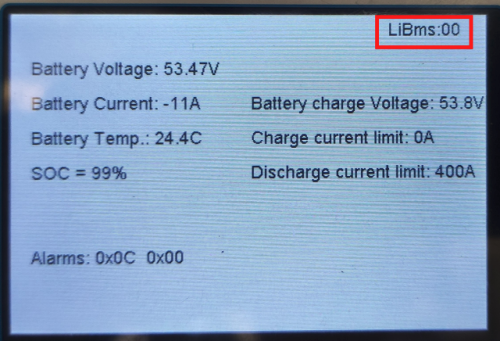
Not sure why it's "0 0" in the manual and "0" in the setting. Mine seems to be fixed on "0" and can't be changed. LiBms does show "00" Used the rain & load shedding to confirm some of the settings in the manual: Regardless of work mode - you need to enable "Grid Charge" if you ever want to change from Grid. The 40A above is at 48V (kind of obvious as it's on the Battery Panel) 40A * 48V = 1.92kW I had rain/overcast most of the day with two load shedding. I have 4xAM2 batteries ~20kWh capacity and my whole load is on the critical side. Still need to move some of the big appliances to the Grid side. I normally have my Work Mode 1 set to 20% with Grid un-ticked and Shutdown at 10%. This means that only excess Solar is used to change the batteries to 100%. If I run out of battery (below 20%) then Grid is used, and the next day, Solar fills the batteries. For load shedding and because of the rain, I decided to bump the SOC to 30% and enable Grid. The "Use Timer" setting seem to be a prerequisite for things to work. I had Eskom for the morning, but little Solar due to rain. Before load shedding, because of the rain, the battery drained to 30% then used the Grid and the SOC stayed at 30% During load shedding, the battery drained from 30% further to 22% When Grid came back on, Eskom was used to charge the battery SOC to 30%. Without the Grid Tick, the battery stayed at 22% and only charges from PV. Now that rain + load shedding is over, I'll revert to 20% / No Grid Tick. If it was just load shedding I would have been fine. The manual is OK, but could do with some expanded definitions / clarity on some of the settings.


-
You have 16 x 540W=8640W so you could produce in excess of 8000W. Setting charge to 155A will limit charge to 155A * 53.47V = 8287W My question was: Is it OK to push 8287W into an 8kW inverter? I just checked the specs and the inverter is rated higher than this for PV and DC.
-
What's the kWp of your panels, as that may be the limit. 155A * 53.47V (charge) = 8,287W. Is that OK for an 8kW inverter?
-
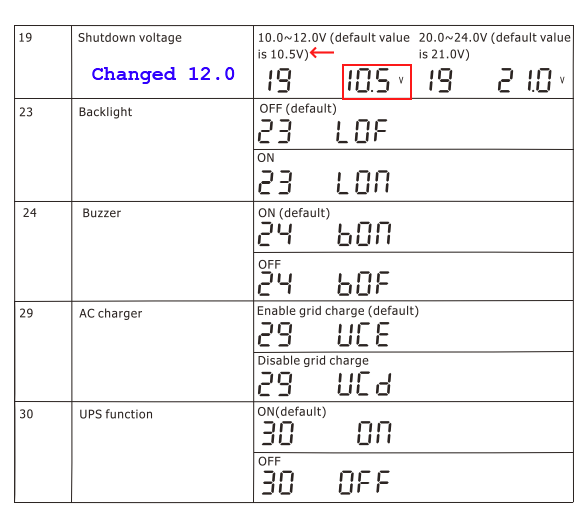
TIP: On any inverter with Lead batteries remember to set the "Shutdown Voltage" to prevent damaging the battery. Not sure what the value is for a 24V, but for a 12V it's usually around 11.6V to 12V depending if the measurement is under load or not. The default on many cheap inverters is 10.5V - yes I'm looking at you Mercer. You will need to lower the value for Lithium which can be discharged to ~20% SoC/80% DoD without damage. Lithium battery will outlive the inverter.

-
Sound like you have a SunSynk - same as me - also my first time. I like the last idea of setting the SOC to 50%, so when you hit 50%, the inverter will use grid. When load-shedding starts you will have go from 50% to 10% shutdown. The load shedding is ~2 hours, so 40% (50-10) should be enough - you then have until the next load shedding cycle to charge from PV, Thanks in advance to any more experienced/knowledgeable users who can guide us.

-
Yes, a bit sad it's not real-time. Solar-Assistant is providing energy (kWh) every minute and power (W), Volts (V), etc are near real time - every second. I think the slow update is a problem with Home-Assistant. There's probably a setting in Home Assistant to make it more real time. I tend to use Grafana mostly to display my data.
-
The FIRST rule of Solar is "make sure you replace all inefficient appliances with efficient appliances" Have a 60W incandescent globe -> replace with 7W LED Have 50W GUD10 halogen down light -> replace with 5W LED Have a 15 year old fridge -> replace with 2021 AAA+ model (uses 40W) etc. In order to implement this rule it's useful to have some measuring meters - The "Kill-A-Watt" does a good job. The reason to replace these inefficient appliances is that you end up saving 3x on the Solar system. Less panels Less inverter Less battery You can install the 24,000 BTU AirCon on the Grid side, ensure the CT coil is after the AirCon by the metro meter and during the day, excess Solar will power the AC. Enjoy - looks exciting,