Sc00bs
Members
-
Joined
-
Last visited
Everything posted by Sc00bs
-
What battery do you have? My advice is to connect using PBMS tools to the rs232 port and check you can actually connect. Your batteries may be using a different BMS. If you can connect you will be able to check, what protocols the CANBUS and RS485 ports are configured for. I used the https://github.com/syssi/esphome-pace-bms project to speak to my batteries over RS485 but your RS485 protocol needs to be set to PACE_MODBUS protocol . There are other integrations available for other protocols but you will need to look for them. I made a video on setting it up https://www.youtube.com/watch?v=HlKNxRJbX3Y Good luck
-
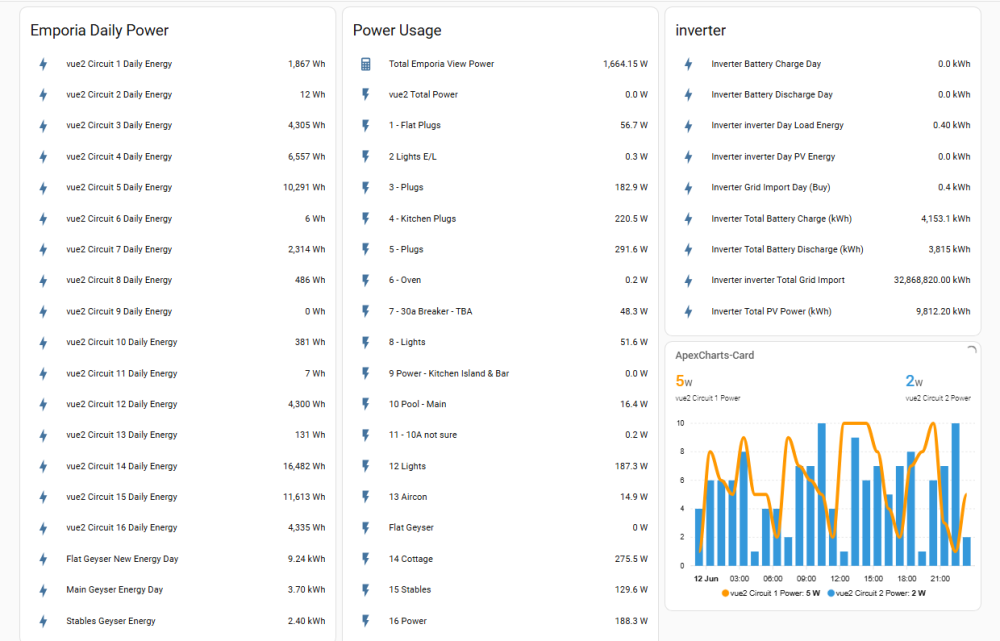
I have an Emporia Vue II which I reflashed with ESPhome, relatively easy to do if you are comfortable with that type of thing and works very well. Pulls my household usage data into Home Assistant and is super handy to know where my power is being used. I purchased mine through Amazon.co.za but looks likes Geewizz has as well so I would compare prices.
-
https://github.com/mchiriciuc/mppha maybe?
-
What error are you getting? Maybe try the latest ESPhome code from the Github page. https://github.com/slipx06/Sunsynk-Home-Assistant-Dash
-
Still around, what's up?
-
All still works
-
Axpert's usually aren't grid tied, they are off grid inverters with an option to connect to the grid, they don't sync to grid frequency.
-
Easier probably to just get a grid tie inverter connected to the Aux port, the Sunsynk will control production on the grid-tie and you can get as many extra MPPT's as you want. There is a max size you can connect to the AUX port, half the inverter size if I remember correctly.
-
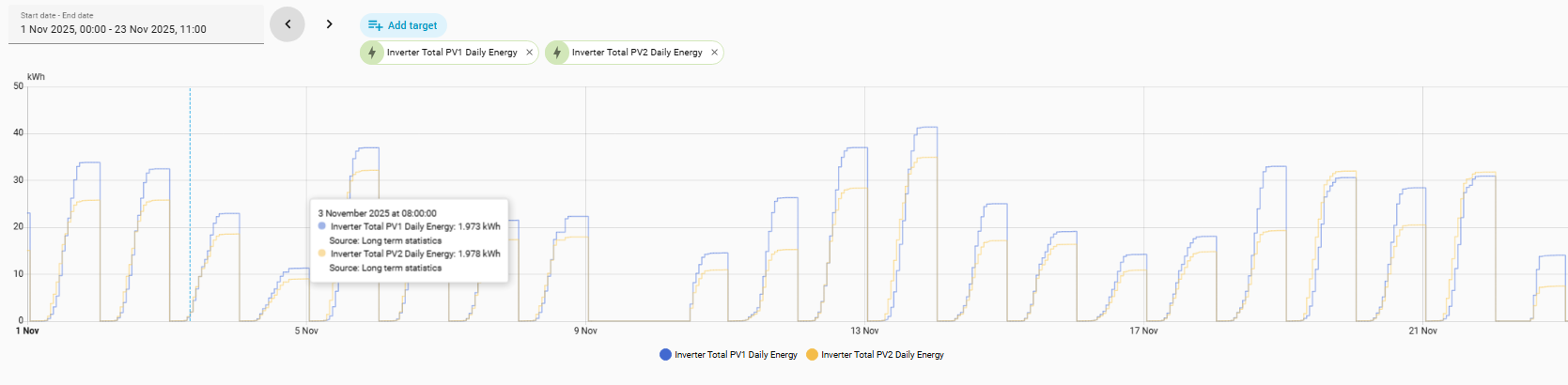
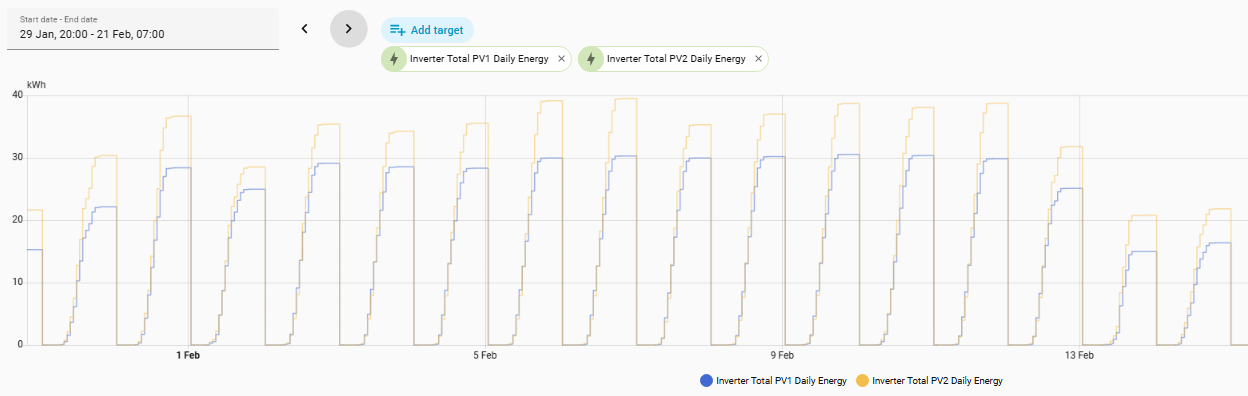
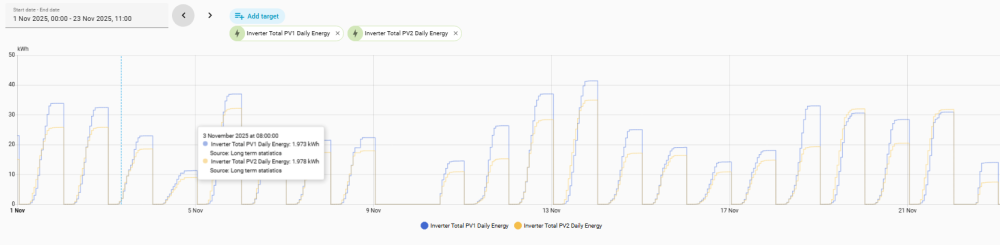
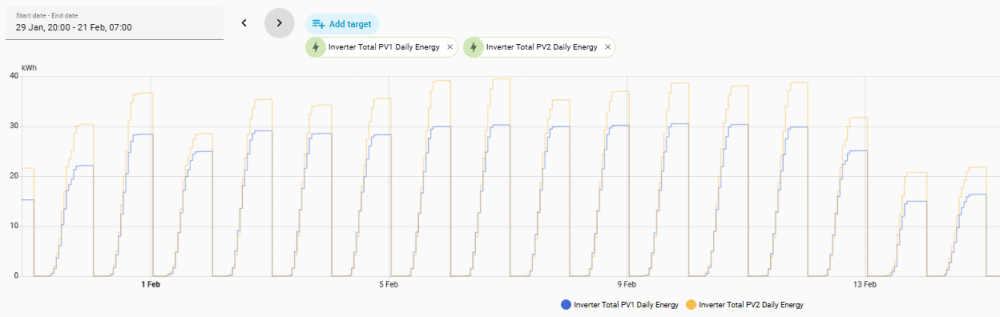
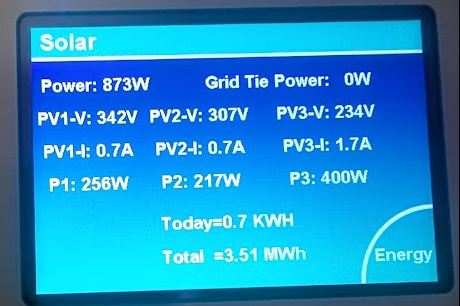
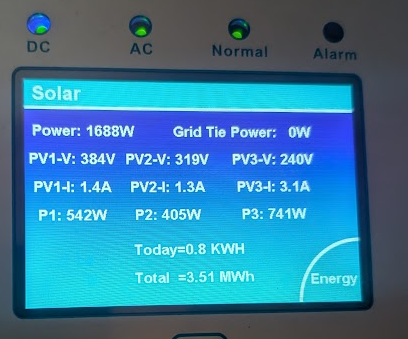
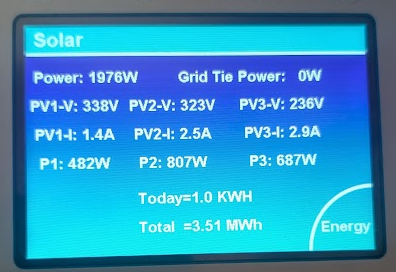
Hi Guys I would like your opinions on possible issues with one of my PV Panel Strings. I am not sure iof I may have missed anything out and maybe there is an easier solution. I have a 16KW DEYE with three Strings on in it. JA Solar 455W Mono panels, Open Circuit Voltage: 49.85V, Short Circuit Current: 11.41A On West facing PV1 I have a 2P8S string of JA Solar 455 Watt mono panels On East facing PV2 is a 2P6S string of JA Solar 455 Watt mono panels I noticed that the PV1 string's production has gone down since end of Dec. These are the numbers from November, PV1 Blue, PV2 Yellow These are the numbers in Jan As you can see, PV1 is no longer out producing PV2 This morning was overcast and I decided it was a good opportunity to disconnect each of the parallel strings to see if one of the parallel strings was faulty/disconnected. This is with the bottom 8S string disconnected. This is with the top 8S string disconnected This is with both strings connected again 2P8S. There seems to be a voltage drop issue with the top string of panels in the 2P8S configuration which to me would seem to indicate a faulty panel. I am going to check for hot spots/faulty diodes with my FLIR camera and check the connectors as well for any heat when the sun comes out again. Any other suggestions anyone?
-
Hi Guys Looking for someone with a 16KW DEYE single phase inverter to do me a favor please and check the DC Temperature on their inverter and let me know what it says. My one is saying -51c and I want to know if this is standard across all inverters or if it is an issue with my one.

-
Hi @-cK- Managed to sniff the CANBUS coms between the inverter and the master battery BMS and it is very limited with the information it provides the inverter. No individual cell voltages, deltas etc. You can get all the data sent over the the CANBUS from the Inverter so no need to capture that as well. Not sure what your other options might be if any.
-
Thanks for the suggestions, I decided to take through to Solar Deity and will see what they say before I try any out of warranty solutions :-) Will let you guys know what they say.
-
@-cK- I am also working on getting the data from the batteries using the CANBUS that goes to the batteries along with help from Ohan @ZS1SCI I should hopefully have a video showing how to snoop the connection for the data in the next few weeks.
-
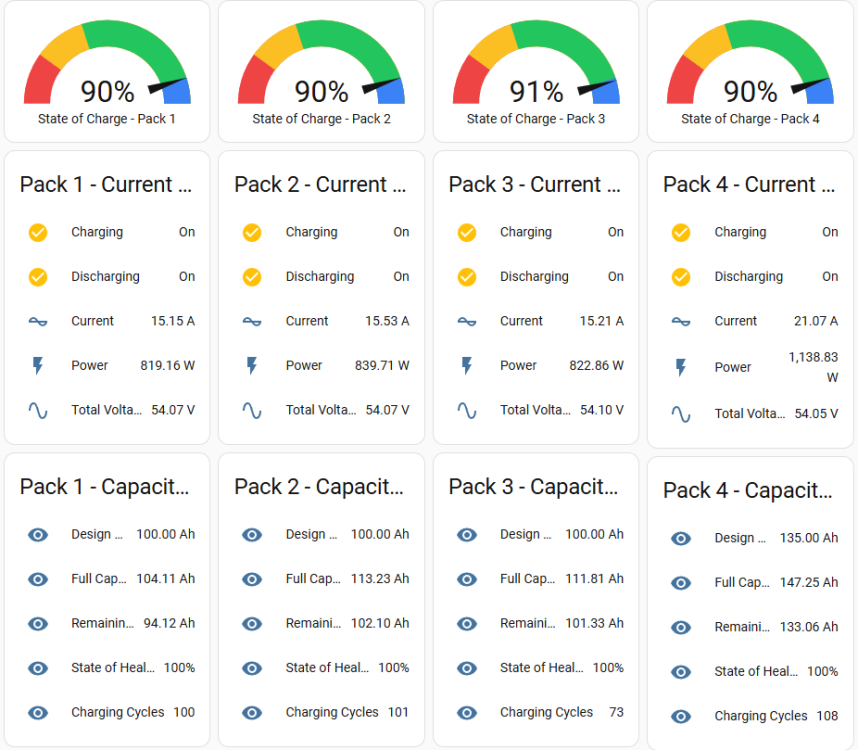
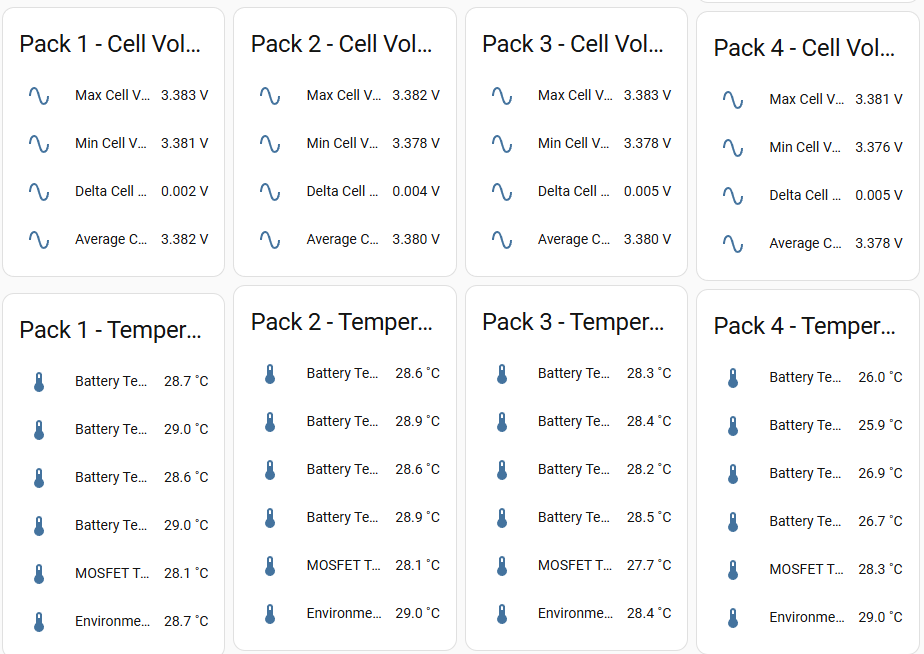
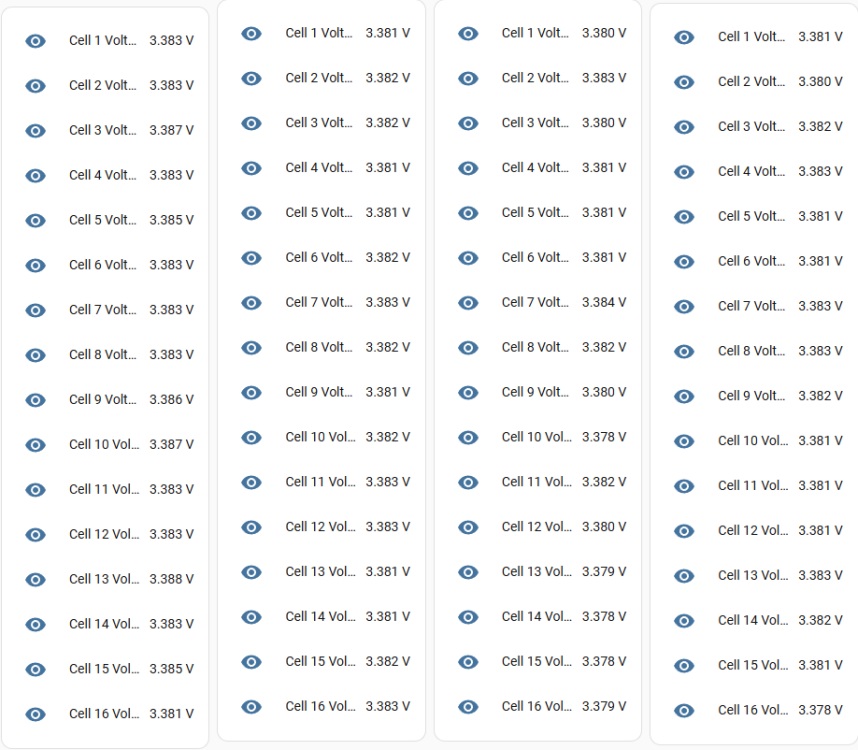
I made a video recently using the RS485 port on my BSL Batteries to read the data from the batteries which have PACE BMS's. As far as I know the Hubble's also use PACE BMS's so the communications should be the same. https://youtu.be/HlKNxRJbX3Y
-
Thanks @Scorp007 Hmmm, I don't have a PP3 power supply. I have a 24V power supply, wondering if that might restart the BMS
-
If I measure the voltage over the terminals I get 0V and have tried resetting the BMS by pushing the SW button for 3 seconds but always flashes red. Is there another way to restart the BMS if I connect to it directly using my laptop perhaps?
-
Hi Everyone, One of my neighbors has Victron MultiPlus II GX and a Pylontech UP5000 and asked if I could have a look at it and see if I can figure out what the problem is with the battery. I have managed to connect to the Inverter using VRM. They have not been used for some time (2 years) and when I turned the inverter and battery on, the UP5000 is totally flat and flashing red. It comes up with a low voltage alarm when I connect to it from my laptop. I have tried recharging it using the Victron but cannot get it to wake the battery BMS up (I am not a Victron guru so could be doing it wrong). Does anyone have any suggestions/experience on how else I can try wake the UP5000 up? It has been suggested I use a low amperage 48V charger and try wake up the BMS with that. Thanks
-
Ahhh, single phase, sry. You have 3 MPPT's and can parallel those panels as the max ISC is 44A (max A it will produce per string is 26A), so if you have the space on your roof you could have a truck load more panels. I have North, East & West strings on my 16kw and it works like a treat.
-
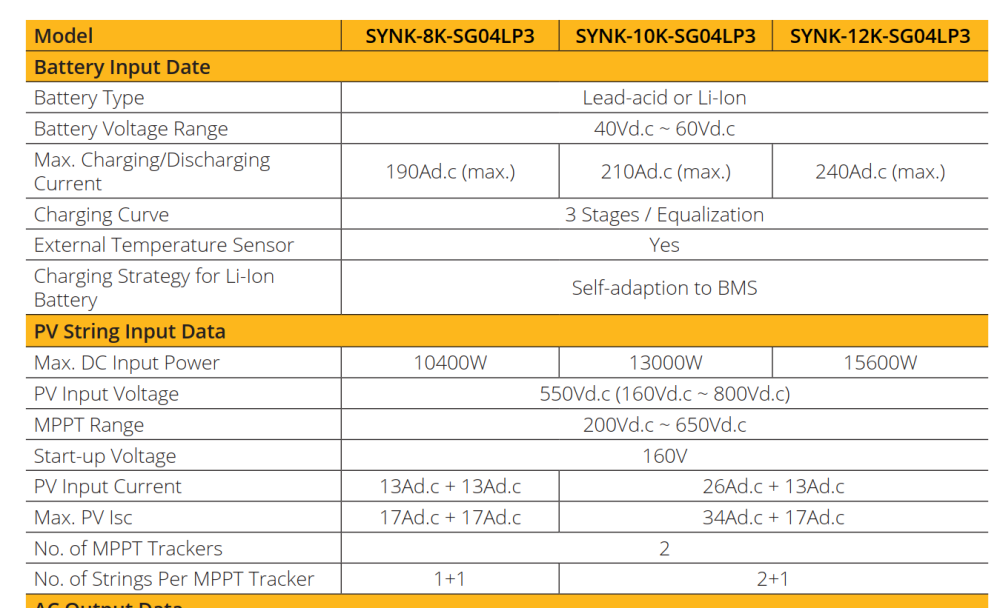
Which model 12KW have you got? I suggest you double check, the MPPT range on the 12Kw SG02 has the same limits as the 8kw inverters @ 500V, the SG04 however goes up to 800V max with optimum @ 550V. I would suggest having a look at the badge on your inverter to check if you have an SG04. If so I would get your panels changed back to S10 configuration, you could even add an extra panel onto each string :-)
-
There is an option to add a Grid-Tie onto the Aux port on the 5Kw if you want an extra mppt for more panels. Advantage is that the 5kw will restrict production when the extra power is not needed. Unfortunately can't use the AXpert though as it is not a grid tied (as far as I know) and won't sync to the frequency the 5kw is running at.
-
FYI - There is a ESPHome integration for home assistant that will allow you to pull the data from your batteries into Home Assistant as well Connecting it up to the DEYE is a piece of cake now adays :-) GitHubGitHub - syssi/esphome-jk-bms: ESPHome component to monit...ESPHome component to monitor and control a Jikong Battery Management System (JK-BMS) via UART-TTL or BLE - syssi/esphome-jk-bms
-
Agreed, that doesn't sound great, not worth the risk, you don't want to give them any reason to void his warranty.
-
Have you tried connecting using the PBMS Tools?
-
Have you ever looked at Home Assistant for you inverter data @Scorp007 ? Haven't looked at Solar Assistant recently so don't know if it has changed at all but I would say the integrations and automations you can do with all the other smart devices/switches/Solar Forecasting/Load Shedding integrations etc is a major advantage.
-
Let us know what they say please, interested to know. Do you know which model PACE BMS the Hubble uses?