


MdF
Members
-
Joined
-
Last visited
Everything posted by MdF
-
Ok, so yes you are correct, there is no Home Assistant BASIC. But for those of us who do not have the knowledge to install and operate Home Assistant, Node Red, MQTT with Pi programming etc., some BASIC options do exist. My inverter started to run a tad hot during these hot summer days when solar PV is at its max to charge the batteries. Yes, the Deye 5kw unit does have a fan but that only clicks in at 65 degrees C. So, I decided to install a small desk-sized USB fan using a small digital timer plug to turn the fan on at 8am and off again at 4pm. And it works like a dream. The fan does have an impact and I am not seeing those 65 degree C spikes on the inverter of previous weeks. So, all in all, the cost for this cooling automation system was the following: Fan (Goldair) – R149 from Pick-n-Pay. Timer plug (Major Tech) – R490 from Takealot. Total Investment – R639 I say that’s Not Too Shabby Nige 🤣 PS, for those of you looking closely at the system, yes, the battery cables on the 2nd battery are not housed in the tubular plastic thingy, the installer did not have any with him at the time of the 2nd battery install. Will be getting that tidied up in the new year 😉 MdF

-
Yes, the Sunsynk has a slightly better user interface but I have found the Deye to be absolutely fine, even maybe a bit more intuitive. But using something like Solar Assistant on any of these makes, makes it all pretty universal when it comes to monitoring and remote system management. MdF
-
Hi Mako, those settings look good. Give it a try for the next couple of days and see how it works out for you. Yes, re there being no grid, the battery will proceed to set SoC and then shutdown.
-
Yes, the power field is the capacity of your inverter. This refers to the maximum amount of power the inverter will output during each of those time session. I have kept mine below 5000w just to be safe the system doesn't overload. Batteries were setup by the installer and he recommended not below 40% SoC. To be honest, we have not gone below 45% when running on batteries at night. MdF
-
Mako, you need to set the work mode time to look something like this (ignore Power as I'm on a 5kw Deye system). Basically the system is running on battery from 8pm in the evening to 8am in the morning. As soon as the sun comes up PV starts charging the battery and powering essentials. Untick Grid Charge and tick Use Timer. MdF

-
Morning All, Apologies for the late reply. I bought the Omni-85 from Poynting Tech (https://poynting.tech/) plus a 5m single cable HDF-195 with SMA(m)-SMA(f) connectors. Total package cost with delivery was R700. Hope this helps. MdF

-
I found in the beginning when using the SolarMan app that my dongle would also disconnect for quite long stretches at a time. I put it down to wifi signal strength and so improved that by adding on an external antenna to the dongle. Got a specific antenna and extension cable from Poynting Antennas and it did show improvement of retaining signal. However, I changed pretty quickly after that to Solar Assistant and have not had any problems again. MdF
-
Thanks Beats, that sounds like a good plan.
-
I am planning on doing a mored detailed inspection this week once the rain has let up. The installation was done in July this year so still very new. MdF
-
Gerrie, this looks very cool (pardon the pun) 😅 Please can you share some of the inverter screenshots where you setup the Aux power control settings? Thanks in advance. MdF
-
Thanks Erastus and evryone, I will certainly provide feedback if and when I am able to figure out what has been going on. MdF
-
Absolutely no errors on the inverter at all. All was working as it should. Checked all the displays for any other system errors and nothing showed up. Checked all the fuses and trip switches and all were in the correct on position. No sudden temperature change at all. It was a clear sunny morning with no cloud cover at all and so the ambient temperature increased like on a normal sunny day in Joburg. As posted above previously, "Another possible explanation could be deformation due to thermal expansion?" seems like the most probable cause 🤔
-
Everything is secure and tied down correctly. Gunshots heard just after peak production of PV to recharge batteries. Not sure if this is relevant? MdF
-
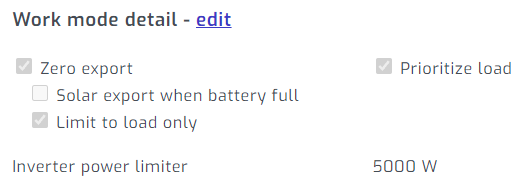
My settings for my Deye (aka Sunsynk) inverter does have the Prioritise Load box ticked and system pulls from solar and battery when available. Your CT coil is most likely in the wrong place 🤔
-
Now that sounds like a very reasonable explanation 😮
-
My thoughts about arcing too but the system is working perfectly fine. Have contacted the installer and reported this to him as well. Will feedback here what he says. But dang, it is so interesting indeed. Defo not miscreants taking pot shots. MdF
-
Now that I have your attention, yes, the title of this thread is correct 🙄 Was working in the house just now and heard a loud bang from outside. It did indeed sound like a gunshot. It was not the seeds falling from the next door palm tree onto a corrugated tin roof. I had a look at the solar array on the roof and there was no sign of visible damage, smoke or anything else. So I went back inside and looked at the inverter and installation setup. Nothing was untoward, no error messages or anything. All working perfectly fine. Solar power was being supplied to the system at the usual rate that it does for this time of day. Five minutes later another loud bang. This time I climbed up on to the roof to have a closer look at the solar array. Was mindful not to touch anything. Every single panel looked fine. There were no cracks or deformities or broken glass or anything. All wires looked edzachery how they should and there was no visible sign of burning or melting. Since then, which was about an hour ago, no further gunshots. So to the experts out there, some kind assistance please as to what on earth happened 🤔 MdF
-
I'll be honest, I am not a fundi when it comes to all the extra stuff that people are doing with Node Red, Home Assistant etc, so I will just get myself a small digital timer switch and plug that into a socket to which the fan will be connected. I will then just run the fan on the timer from 8am to 11am daily. Sorry yes, I am not sure if the fan will do any cooling to the batteries but its primary use is to cool the inverter down. I was also thinking about reducing charging amps to reduce battery temperature but if its operating below 30 degrees C during summer then I will leave the settings as is. MdF
-
Battery temps have only gotten up to 29.4 degrees but will also keep an eye on that. These hot summer days are making the garage a tad warm. I have bought a small usb fan from Goldair for R150 and run that off the Pi from 8am to 11am to keep the inverter cool. Its a manual process at the moment but just want to see the effectiveness of the fan. Yes, I am using Solar Assistant on the Pi and have been upgraded to the latest software which allows the Power Management function to work. MdF

-
Thanks for the tips. Makes for interesting reading. Always on a learning curve with this solar journey so most welcome. MdF
-
Morning All, Just some feedback on Work Mode timer settings that I have tweaked a bit this past week. Now getting the battery pack down to 45% SoC overnight. MdF

-
70.7 degrees seems rather high 🤔. Are the fans not kicking in to cool the unit down?
-
That is interesting. However, I have just done a check on my inverter and I have the following readings: DC-T = 54.3 and AC-T = 44.4 At the same time, the Solar Assistant inverter temperature reading is 54.3. So it appears that SA is reading the DC-T value. MdF
-
Hi Schalk, The Wi-Fi dongle that my Deye 5kw came with gave me endless connectivity problems to my home network. Plus data was struggling to get uploaded to the server and was delayed in displaying in the Solarman app. I could therefore not make informed decisions about how to manage my system remotely without having to go to the inverter and make changes on the LCD screen. I did a search here on the forum and one of the first suggestions to come up was Solar Assistant. Did my research and was happy to see that it provides near real-time data viewing (2sec delay). I ordered online and the system was delivered within 24hrs. Installation was pretty simple and support for the software has been great. The data that I have access to now on SA has ensured that I can manage my system better from a remote point of view. I am able to use the app to make changes remotely when loadshedding kicks in or when skies are overcast like today. But just remember, its horses for courses so please do have a look on the forum for software that other users are using. I am not so clued up on MQTT and Node Red as those computer skills are currently above my pay grade level of understanding. But there are some seriously cool software management systems being used here (both individually built and commercially available). Hope this helps. MdF
-
It really is horses for courses as to what software monitoring programme you would like but I will recommend Solar Assistant. Its easy to install, delivered within 24 hours and gives fantastic data outputs for monitoring your system. Visit https://solar-assistant.io/ MdF



