


jumper
Members
-
Joined
-
Last visited
Everything posted by jumper
-
A quick look online suggests a charge voltage of 54V for this battery, but you are sitting at 51V currently. I think you need to increase your bulk voltage to something like 52.5V and see if that helps. My battery would sometimes sit for ages and the passive balanceer would just charge and burn off the higher cells and never really charge the lower cells until I pushed the voltage up a bit. If you have comms between the battery and inverter then it 'should' be setting the correct voltage for you though. Got the battery info here: https://www.fullcirclesolar.co.za/wp-content/uploads/2021/09/FCS-48NPFC100_-5U-_Side_Handles.pdf
-
I notice your "Min Cell Voltage" doesn't display the actual lowest cell voltage. Could it be that the BMS doesn't think balancing is necessary? What BMS is this?
-
You need to use RS485 to USB, with 2 wires on pin 1 & 2 (or 7&8):
-
Change your Baud rate to: 19200
-
This is most likely due to the instability of the grid voltage when load shedding ends. You could look at getting a switch to delay switching the grid on after it returns. Have a look here:
-
You can download the battery monitor software which is used to update the firmware here: https://drive.google.com/drive/folders/10pxgNLHovcDZRVGrCZsSkfecBrRw-AdW You will need a RS485toUSB converter to access the battery with the software and PC, there is a topic about setting up those comms here: I don't have any firmware files though, I've not needed to update, but be careful what files you use as there are newer versions of the seplos bms with different hardware and the firmware is not compatible across different versions and can possibly brick the bms.
-
Well spotted there by @gimme_power, you might only need to change this in SA to RS485 and it should work if it is plugged in to the RS485 port on the inverter and the cable pinouts are correct. I think there might be a setting on the inverter for RS485 instead of CAN battery comms too.
-
Ah, if you have SA, then it is likely communicating correctly with the inverter. If you can find the battery screen on the inverter and see if it also reports 200Ah, then you can be sure. My next area to look at would be the wiring, but it looks like you have the pos from one battery and the neg from another which is correct, the next issue might be the length of the cables if they are different. The only other suggestion I would have, if you are up for it, would be to switch the batteries around and make battery 2 the master and battery 1 the slave, by changing the cables (power cables too) and dip switches and run it like that for a while to see if it evens the batteries out.
-
This will be happening because it is set to lithium mode and can't communicate with the BMS, it is doing what it is supposed to. It might be necessary to try different protocol settings in order to find one that will work, but it might also be necessary to change the protocol on the BMS itself for it to work. There is another user on here who has his shoto and sunsynk talking, (via CAN though), but his protocol on the BMS is set to something different from the default: This setting is only available via the seplos BMS software connected via RS485 to USB on a PC, where it can be changed like in the image below, for CAN and RS485: This is all theoretical at this point as I've not seen someone with this exact setup working, but it might be possible to find a combination that works. I know solar assistant works via RS485 with shoto and sunsynk, so it could be possible with the right combination, but be aware that it might also mean updating the BMS firmware for newer protocols, I'm not sure, these are just the places where I would look. I would try getting 1 battery communicating with the inverter first and then try connecting the slave once that is working, then you will know it is down to the dip settings on the slave and then that's the last problem to sort out.


-
The Deye should have a battery screen where you can see the total capacity of the batteries, it should read 200Ah if it is seeing both. The other way would be to set up a RS485 to USB cable to the master battery and see if you can read it with Pbmstools, @Beat has a specific version he got from Averge, so maybe you can ask them for the correct software for your battery.
-
Wow, recommended charge voltage of 163.9V?!?! There's definitely something strange going on there. Hopefully someone with solar assistant can help you out.
-
What is the C rating of your battery? It could be that you are trying to pull too much current from the battery with a 5kVA inverter. You will need at least 2 batteries if they are rated at 0.5C or the BMS will shut down the battery due to high discharge current. With lead acid batteries you may not notice this as they will deliver whatever you ask, to the point of damaging themselves.
-
It looks like your dip settings are upside down... on the master battery, set dip 1 UP and 3,4,5 DOWN and on the slave set the dip 2 UP and 1,3,4 DOWN. Turn both batteries off, change the dips, then switch on the master first and then the slave if it doesn't turn on automatically. That should sort out the addressing so they can talk to each other.
-
You should only need a cable with pins 1 & 2 connected, straight through, you don't need a ground. From the pinouts it looks like a normal cable would almost work, but pin8 (GND-RS485B) is probably causing problems. You could get an old LAN cable and cut and insulate all the unnecessary wires on pins 3-8 and test with that.
-
Your charge voltage seems fine, but your float is too high and shouldn't ever be higher than the charge voltage, set that to 52.6V. You should probably also change the "AC Charge End Battery Voltage" to 53.6V. As @Kilowatt Power says, you can't get an accurate SOC from the voltage, so if you are getting that 81% from the inverter without comms then it is probably incorrect. The only way to truly know if your battery is charging to 100% is with comms to the inverter or a PC.
-
Hi Merlinda, just for a little background; during loadshedding, the Neutral (N) and Earth (E) coming out of the inverter need to be bonded together for safety, but after loadshedding this bond needs to be automatically broken as Eskom provides a bonded N&E. Most inverters have an internal mechanism to do this automatically, but the Sunsynk inverters usually don't so they need an external device to do the E/N bonding and unbonding and this should have been installed by your installer originally. Some installers will just permanently bond the N&E, but that is 'illegal' and dangerous. If you could provide some images of your installation, there are quite a few professional installers on here like @Leshen, @Steve87 & @TaliaB who could help to identify if the necessary equipment has been installed correctly.
-
Which model Hubble battery do you have? Do you have a communication cable between the battery and inverter? Is the inverter set up to use the battery comms or is it set in a user mode with the charge voltages set manually? What are your charge voltages and currents set to? It could be that 52.5V is too low to fully charge the battery.
-
That could be it if you can change it there and SA can update the inverter, I can't tell if it is just being read from the inverter or can be changed, I don't have SA. If you can't change it there then you will have to change it on the inverter on the screen like I showed above or similar.
-
I'm not familiar with the Deye specifically, is there a setting for the BMS to use CAN comms? If so, try changing that to whatever you have the rpi plugged into (RS485?). Edit: something like this maybe:
-
You can leave it in and see if the inverter can still talk to the battery, but I would think it would communicate via the rpi anyway. I would plug the RPI into B1 RS485A and then go from B1 RS485B to B2 RS485A, like below. Yes, you'll need to turn the batteries off, change the dips and switch them back on. It'll be best to turn the master on first.

-
This should work as @Raiden2912has posted above, you just need to remove the CAN cable between the inverter and the battery and let the RPI do everything over RS485. There seems to be an issue with the seplos BMS where, if the dip switches are set up for CAN, then the RS485 network doesn't work because it has different dip switch settings. So basically you are setting the batteries dips to work on the RS485 network not CAN (you can't use both at the same time apparently).
-
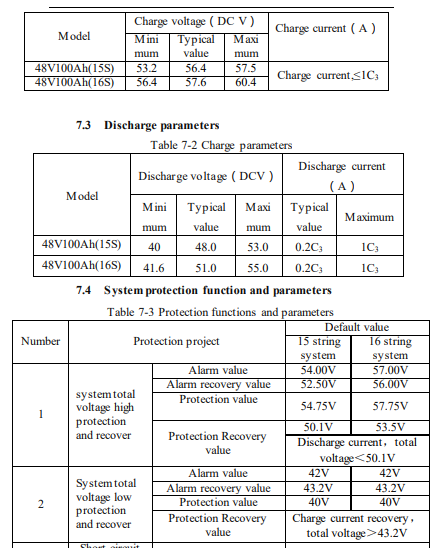
I think your charge voltages are set too high for a 15S (48V) battery. I have a 16S (51.2V) battery and I only charge up to 56.4V to reach 100%, I think your battery might be going in to overvoltage protection when it is charging. Take a look at this table from the shoto manual, I know it has 56.4V as the typical value for a 15S battery, but I use the minimum value and it charges fine. You can also see in the bottom table that the BMS will go into overvoltage protection at 54.75V which is below your bulk charge voltage. Your float and cutoff values should be ok, but I'm not sure what a "Back to discharge" setting of 0V might be doing, you should set that to something like 52-53V.
-
75A should be totally fine. The manufacturer recommends up to 0.5C (50A) per battery, so at 75A you are still half of that with 3 batteries. The batteries are capable of doing 1C each.
-
You also have a typo here, it should be: <protocolVersion>2.0</protocolVersion> Edit: I also see you are using the file for 11S battery, is this correct?
-
Try changing the numbering format in windows date and time settings in the control panel, like this: Decimal symbol must be "." Digits after decimal must be "2" Digit grouping symbol must be "," Save those settings, restart the software and try reload the original xml file


