jumper
Members
-
Joined
-
Last visited
Everything posted by jumper
-
According to the manual "SBL&UDC" should be doing what you want... I see there is a note in the manual at setting 16 that says "In case of battery keep discharging to cause battery damaged, inverter will charge battery at 1~2A in line mode". From that I guess it means it will always charge with 1-2A if there is grid available to prevent battery damage. Is it using more than that? If so you could try changing "Max AC charging current" to 2A (I think that's the lowest it goes). I have a King, but I don't have a grid connection so I don't know exactly how this behaves.
-
We have discovered on another topic (thanks to @jgdt) that with CAN comms to the inverter the battery requests a charge voltage of 57.8V which triggers the overvoltage protection at the top of charge, causing the battery to go into standby. It could be that this is preventing the cells from balancing. After some time it could be that this causes the capacity change you are seeing. I would suggest trying to remove the can comms and set the inverter to charge to 56V for about 60mins and float at 54V and see if it reaches 100%. If it doesn't reach 100% then you may need to increase the charge time to give it a chance to balance properly. The lower voltage will prevent the overvoltage protection from kicking in before the cells are balanced.
-
Thanks @Leondavibe that helps already. Seeing as they are pouches like the pylontech then the orientation doesn't matter as much as cells mounted vertically. Much appreciated 👍
-
Hi, yes this will be the best way to get the battery to charge fully. I would suggest setting the timed absorb to 14.1V for 30min and see how well that charges and increase the time if necessary to get to 100%. Keep an eye on the cell voltages and see that it is balancing nicely. Once you have the time worked out you can set it to repeat daily. Your float setting should be fine at 13.7V even if the battery is at 13.6V, it is still above the settling voltage of 13.5V. The timed absorb stage should take care of charging to 100% and then it should just sit around at float voltage after that.
-
Yeah, that is cell balancing and it only triggers if the cell is over 3.5V (param 8 ) and there is a difference of 50mV (param 62) between the highest and lowest cell and will stop when the difference reaches 30mV (param 63) or 100% SOC is reached.
-
At least you know what is being reported now and it is accurately measuring the cells. I agree with @zivvaanything up to 40deg will be fine. Shoto does class these batteries in their "High Temperature" range and the temp warnings only start at 50deg, protection at 65deg, so I wouldn't worry about it.
-
Thanks for testing that, it's very helpful to know. So either sunsynk is calling the wrong variable or the bms is sending the wrong variable value when being asked for the charge voltage or maybe seplos is ok with those short spikes in voltage although they are not necessary to fully charge to 100% SOC. Generally I would say yes, but the sunsynk runs so much off SOC he will lose a lot of that functionality. There is another "Charging overvoltage protection" which is set to 63V, so either it is set that high because it never gets hit due to the total overvoltage protection being triggered first or shoto reckons their batteries can handle 57.8V. I suspect all systems running CAN comms are doing this as I've seen it on another inverter setup. @jgdtI would suggest also contacting the supplier of the battery to see if they will tell you officially that it's ok to be charging to the overvoltage protection. I will bet they are completely unaware of the situation.
-
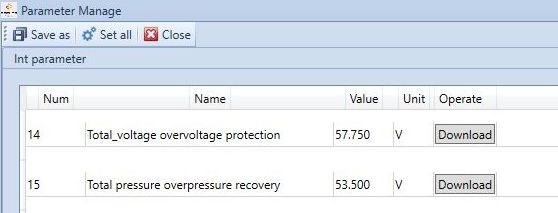
Bummer, that would have been so easy =D I've had a look at the BMS settings and I can't see anything related to charge voltages, amps or settings for the inverter, but I think I know what might be going on... I don't think it's the BMS telling the inverter what to do, I think the inverter requests certain parameters from the BMS for charging and I think it is querying the wrong parameter. The only parameter close to 57.8V is parameter 14 "Total_voltage overvoltage protection" which is set to 57.75V. I think they are pulling this value and using it for the charge voltage instead of something like parameter 11 "Total pressure and high pressure recovery" which is set to 56V (charge voltage I use). If this is the case then I think it is Sunsynk that needs to update their firmware to query the correct parameter, not Shoto or Seplos. Edit: on second thought it might be the implementation of the pylontech protocol on the BMS that gives the incorrect value when given the command for the charge voltage... I don't know for sure.
-
This is what concerns me with automatic battery comms, there are strange things going on. I have seen high voltage requests like this before (I think it was on a luxpower) and I have been waiting for voltronic to add shoto support so I could test it myself, but I'm still waiting. One would expect that the manufacturer would know best how to charge their batteries, but I don't like to see the battery shutting off charging with red errors, hitting overvoltage protection. Yeah the BMS will be telling it these settings, but I don't think I've seen any settings related to this in the BMS parameters, I'll have another look.
-
You shouldn't physically break anything with invalid DIP settings, they are just there to set up the unique addresses on the network for communication. If the settings are invalid then the batteries might not see each other or conflict with each other, but you can just revert back without issues. First try what I wrote after that with deselecting Pack1 and see if that works without changing any DIPs.
-
@Scorp007is right, you will at least need to have the exact same firmware on both units, but be aware that there are clones that look exactly like the original voltronic machines. I had a 5kW TSP inverter and I'm 99% sure it was a clone. I would stick to the same brand.
-
Hang on before you try what I've written above... I think it might be even simpler. Just click on Pack1 on the rhs to deselect it and it will probably display the info for Pack0.
-
That is excellent news, so the adapter works finally! That's a very good question, I have not seen anyone with this working yet, I've not tried as my inverter doesn't support CAN and I only have 1 battery so DIP addressing wouldn't be an issue. I think you are correct that the software is seeing the slave as pack1 because DIP 1 is on. There are files on the seplos google drive for DIP settings for CAN and RS485 and comparing them it looks like DIP 5-8 on the master are used to set the CAN address (or number of batteries) and DIP1-4 are used to set up the RS485 addresses. The RS485 doc shows that with multiple batteries DIP1 needs to be set on the master and DIP2 on the slave which is why it is seeing your slave as the master in the software because it has DIP1 on from the CAN setting and it can't see your master because it has no (or incorrect) DIP setting for RS485 because DIP1-4 are all down. I assume that it sees DIP1 as master then it looks for the next address for the slave which should be DIP2 up. So after scratching my head for a while I think the best would be to try the following DIP settings to satisfy the CAN addressing requirement and also the RS485 addressing requirements to get them to work at the same time: Master: DIP1 on (set as master for RS485) and DIP5 on (set as master of 2 batteries for CAN) Slave: DIP2 on (set as slave for RS485) [no need for CAN setting, it will speak RS485 to the master] This is something I noticed before on someone else's setup. It seems that with comms the BMS requests a charge voltage of +57V and the BMS is set to protect at 57.75V. I really don't know why it is set so high because I easily charge my battery at 56V. Yeah the bms controls the current request nicely, but unfortunately it requests a high voltage, so it's possible it might hit that just for a short time at the top of charge and also by then the amps will be low anyway, so maybe not much damage, but I don't like seeing a red error message. You can pull up the history which should give you some decent info to be able to see what was going on and what voltages were reached. It will clear after it reaches 53.5V again.
-
Yeah everyone has their own way of doing things depending on their situation. I am completely off-grid and can't rely on any input except for the sun so I like to keep my battery charged as the weather here in the mountains can also be very unpredictable. I could maybe go 2 days without charging, but by then I would be freaking out 😱
-
Those 2 extra panels could change things quite a bit now. If they are managing to charge the batteries nicely then maybe the extra panels can be added to the West in future and get rid of that 3pm grid usage if you even need them anymore.
-
I have the Shoto SDA10-48100 5.12kWh (16S) which looks identical to the SDC10, just that it is rack mounted instead of stacked. I'm pretty sure they will use the same seplos BMS. P.S. I just checked the manual you uploaded and it is almost exactly the same. Pinouts etc. are identical. The only difference I see is that the SDC10 is 80% DOD whereas the SDA-10 is 90% DOD. P.P.S Looking closer I see that the SDC10 is also rack mountable, the housing is identical to the SDA-10 and I also see it advertised as 90% DOD... seems like the same battery to me.
-
I agree 40% is not too low, but they are only getting back to 65% before being discharged again and on multiple cloudy days things could be worse. I just like to keep batteries charged as much as possible (not necessarily as fast as possible) before using them again. Those are some quality (and costly) batteries, I would take very good care of them.
-
Technically there is a fuse in the inverter (200A I think) and usually a way to turn off the battery via a button or switch, but these are expensive to replace and clunky to operate in an emergency (trust me I know), so it is best to have an external fused DC breaker. I can't comment on the compliance aspect, but for safety it is definitely better.
-
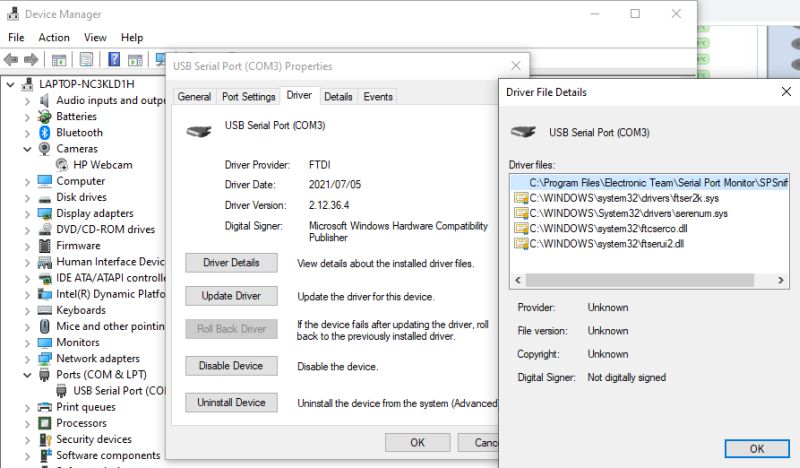
Here are the drivers that work for mine, installed via windows: Remove any other driver files as they might cause confilcts.
-
I've never seen those drivers, but I see in the remark that the driver is for the seplos adapter so probably won't work for yours. I think I did the driver install via the device manager in windows and searched for the ftdi driver there, it was months ago and I tried so many different things that I can't recall exactly. I do remember that it was necessary to remove the old drivers from the windows folder before installing the new ones as they were still lying there after the uninstall.
-
Unfortunately I can't, I have heatshrink over it to strengthen the join to the wires. If it says CH340 on it then it must be CH340. I read that the CH340 chips don't work so well which is why I had given up on mine but saw someone else get it working on another battery so I gave it another try. If you see data with the CH340 driver and not the FTDI then I guess it is CH340. 2.1.8 was the only version around when I bought my battery and it works so I've not tried anything else. I think 2.1.9 is the latest. The CH340 chips and drivers are older than the FTDI so it should work with 2.1.8 if it is going to. Sorry I can't help any further as I don't have experience of a working CH340 adapter, so I can't say for sure if it will work or not.
-
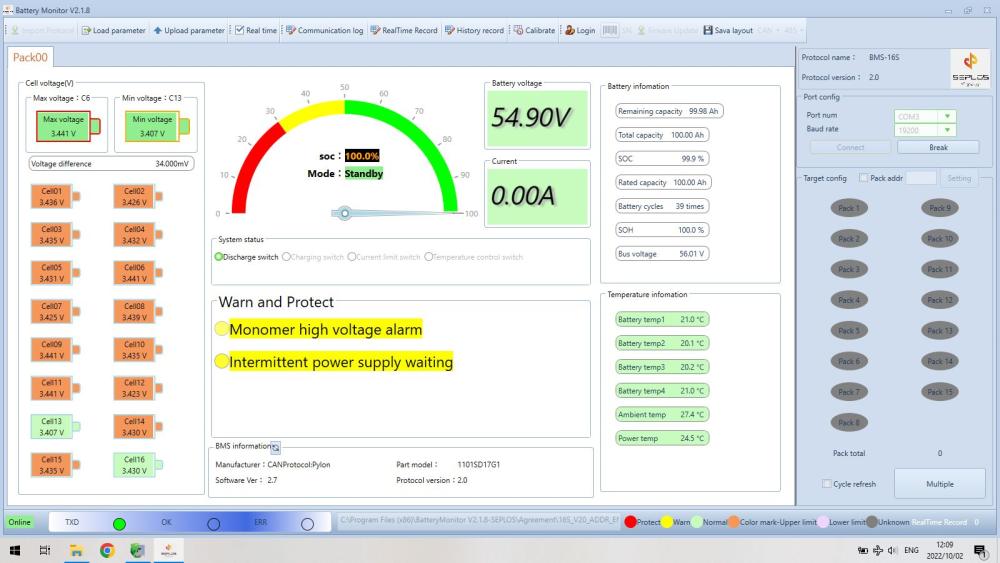
Makes sense, I would also think the higher the amps used to charge; the hotter they will get. I don't have an image from that same day when they reached 100%, but I have one from another day where they just reached 100% and finished balancing and there is still 6-7 deg difference between ambient and the cells. Your image also has 5 deg difference, so people don't need to worry that the cells are getting as hot as the ambient temp in the room, even when charging.
-
Those are the sensors from 4 of the actual cells, I don't remember exactly which 4 though.
-
That's what I would do to maximize the possible input from the panels. You could do without the battery being used in the middle of the day. Charging the batteries as soon as possible is best in my opinion as lithium doesn't like to sit around with low charge.
-
FYI from my observation, the actual cell temps are usually 5-7 degrees cooler than the ambient temp, as reported by the BMS. Even on a nice toasty day with 35C ambient, the cells are sitting below 29C: