jumper
Members
-
Joined
-
Last visited
Everything posted by jumper
-
Hi @leifhain, you can change your settings by clicking on the bell icon on the top right of the web page and clicking on 'Notification Settings'. You'll also need to either quote or ping @Coulombor he might not find your message as he is a very busy man 😀 I wish I could help out with your batteries, but I don't know the pylontechs very well. It does seem strange to have all the dip settings the same on all batteries, usually they are different as this decides their address on the comms network and they all need to be unique to avoid confusion between them.
-
I would suggest trying to get some sort of ventilation using a fan of sorts. It is difficult to cool a room when it is hot outside, but if you can pull in air from a shaded area outside it would help, but just general active movement of air into the room should make a difference.
-
How far apart are the inverters installed? If there isn't sufficient breathing room between them they will get hot. Also how big is the room?
-
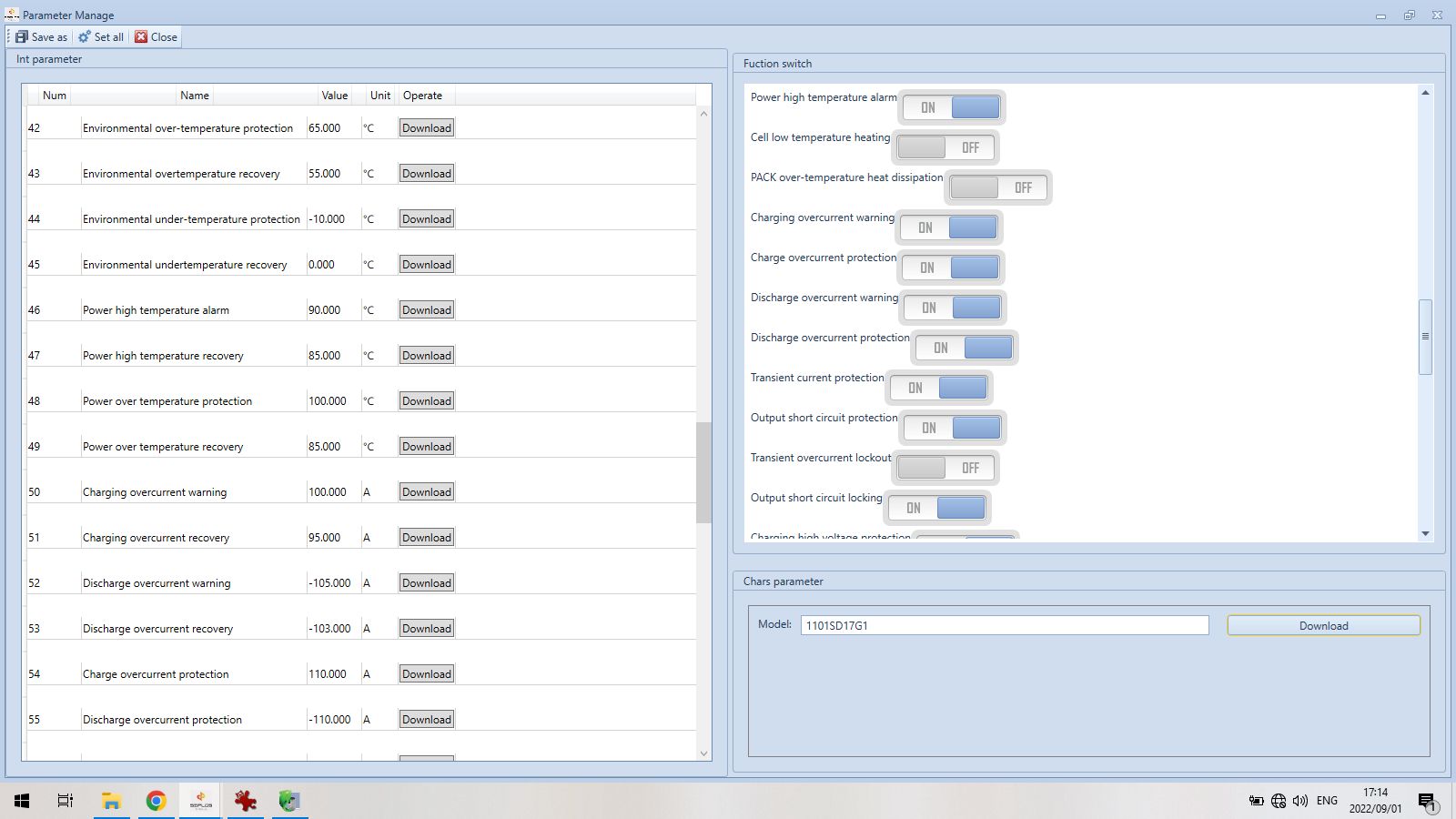
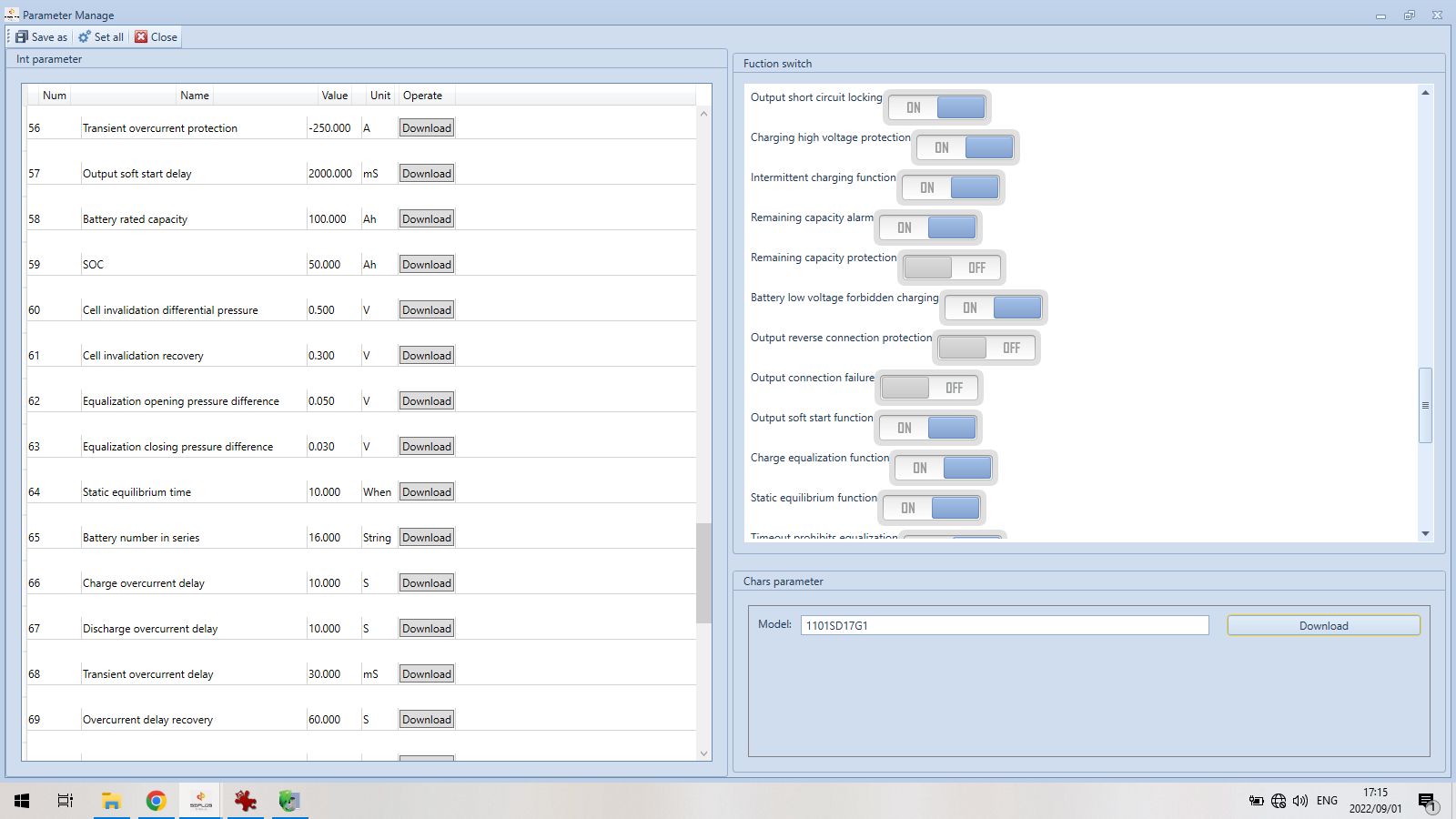
I'm just going to put some screenshots of all the default BMS settings here for reference and for anyone interested who doesn't have comms set up...




-
There are 2 options wrt the 100% SOC, there is the function switch called 'Intermittent Charging Function' on the RHS of the parameters window which will turn off the function completely and it will hover around 100% SOC. The second option is to increase the percentage at which it will start charging again which is parameter 80 'Interval Charge Capacity' on the LHS of the window, which is at 96% by default. Parameter 81 is 'Cycle Cumulative Capacity' which is used to count the cycles and is set to 20%. I set mine to 90% as this battery is sold as 5000 cycles @ 90% DOD, so that makes sense to me. Just be aware that I have no idea how changing any of these settings will affect your warranty, but I doubt it can be argued that changing the percentage at which the cycles are counted affects the battery performance at all.
-
Ah yes, I found this very confusing at first, but then figured out why it looks like it's only charged to 98%... this is because it has already reached 100% SOC and the BMS won't allow charging again until it reaches 96%. That is what the "Intermittent Power Supply Waiting" message tells you, it is basically "Battery Waiting (to be discharged)". If you pull the history data you might be able to catch where it was at 100% SOC, but you need to be quick as it only gives the last 500 rows and when the battery reaches 100% the data is filled every few seconds with status changes. I did turn this off for a day or so to see what happens, but I didn't like the idea of the battery sitting at 100% all day. The "Monomer High Voltage Alarm" basically means "Single-Cell High Voltage Alarm" and is triggered when any cell goes over 3.5V, but the passive equalization also only activates at 3.5V, so these warnings are 'normal'. They will go away as the battery settles after charging. My guess is pack1 reached 100% a little earlier and the cells have already settled. It makes sense that the slightly older battery has had time to equalize better. As for the capacity change, I have not seen this yet, but technically yes the BMS is supposed to learn with time and update the SOH and capacity as it goes, usually it goes down though. On the cycles, the BMS has a setting that counts as cycle at 20% cumulative discharge which is incorrect, so you will probably see the cycles counting a lot quicker than you expect. That can be changed in the parameters.
-
Charging at 56V and floating at 54V works very well. I have raised my float voltage to 54.5V to make sure it reaches 100% in bad weather as I don't have a lot of PV and no grid backup. Some cells need to reach 3.5V for the balancing to activate. You can try reducing them a little and see if your system still gets the battery to 100%.
-
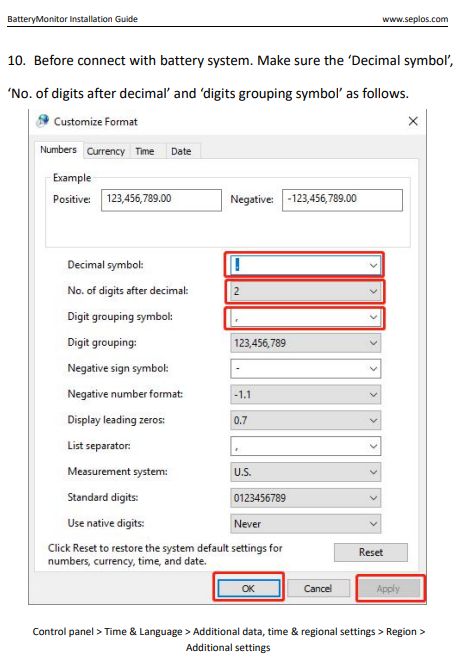
Just checking if you did this step as it is not in both installation manuals:
-
Also check the older setup guide in the google folder, it has extra steps to change the windows language settings and install the .net framework.
-
Yep, that's the expected behavior when it is counting every 20% discharge as a cycle, the remainder is carried over until it eventually adds up to another 20% and you get 2 cycles on 1 day. I bet if you discharge your battery to 60% DOD in one go it will count 3 cycles. BTW if you still have that 1 lagging cell when charging it might be a good idea to discharge your battery below 50% before recharge... I had the same issue with 1 cell always being the lowest and after doing a discharge to about 45% SOC it changed to a different cell. I also only use about 25% per night, but it seems it's good to give the battery a little exercise once in a while.
-
All I have to go by is the testing and observation I have done with my own battery and the data downloaded from the BMS. The seplos only counts discharge, no charge and the data intervals can range anywhere from 2sec to 30mins depending on what the battery is doing. I've added a download of some data in case anyone is interested to see what is recorded. The seplos BMS existed before lithium batteries and was used in LA battery banks so it makes sense that the discharge value is set to 20% by default, but this does not suit lithium batteries, I think manufacturers like Shoto, LBSA and others have simply overlooked changing this value... or they are being dishonest with their advertising... I will lean towards overlooking the default value out of kindness 😉 When I first got my battery I was only using 20-25% per day and it was counting a cycle every day which to me makes no sense when the battery is advertised as 90% DOD. If I had to discharge to 90% DOD it would have counted 4 cycles. Check @Antonio de Sa's battery sometimes count 2 cycles a day when he probably never even gets to 50% DOD. I found the 20% parameter and changed it to 90% and now the battery counts a cycle every time 90% discharge has accumulated as expected. The BMS calculates correctly, I think it is 'user error' on the part of the battery manufacturers using the seplos bms in their batteries. I totally agree that we are the test subjects and will most likely struggle when applying for a warranty claim which is why I decided to fiddle with the settings myself to know what is really going on without having to trust what someone else tells me. Hisotry data 20221203_1717_100%SOC.xls
-
That is good to know, comms are clearly working properly as seen in your screenshots. Also good to know they told you it would be fine to parallel them so they can't use that as an excuse. As @I84RiSmentions it may be a problem when the battery is charging and a cell(s) is hitting the overvoltage alarm. The cells look perfectly balanced when discharging, but usually they are most unbalanced when reaching the top of charge. Might be a good idea to also take some screenshots of what is happening when the batteries are charging, there might be a major imbalance there causing somehow causing the SOC calc to be incorrect causing the big drop when discharging.
-
@I84RiSis correct, you need to download PBMSTools from the Tech Support page of their website and you will need to use the RS232-USB cable that should apparently have been in the battery box. This should allow you to connect a PC to the batteries to see what is going on. You may have an issue with unbalanced cells. I see they don't supply the parallel battery cables with the battery, have you added them yourself? These are necessary when paralleling batteries for them to stay balanced among themselves. Edit: I do see this note on their website: "It is not recommended to parallel an older battery with a new battery. The internal resistances of the batteries and the firmware may differ."
-
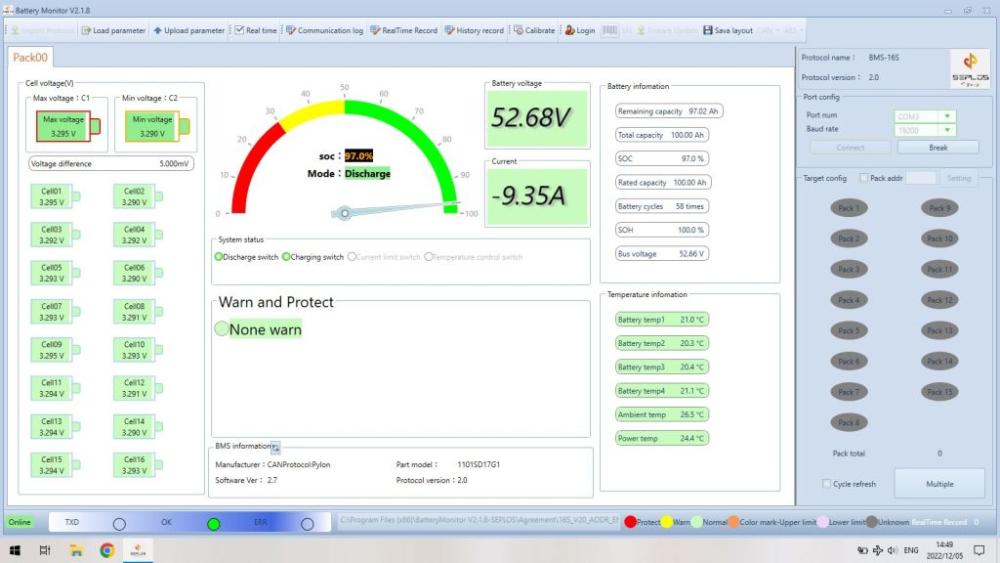
All you need is a R30 RS485-USB converter and a network cable and you can access the BMS with the seplos software that looks like this: For a cycle the Shoto uses 'cumulative discharge', so every time the battery is in discharge status the amount of Ah used is added up and a cycle is triggered once this value reaches a percentage value which is set in the BMS settings. This should be triggered every time the value reaches 90% (Shoto is a 90% DOD battery), but due to the default setting in the seplos BMS it is actually triggering a cycle count at 20%, so your battery is probably counting this incorrectly anyway, so no use bothering unless you are willing to change BMS settings which may void your warranty.
-
Password is admin, admin. It is in the installation guide with the software which I suggest reading as there are a couple of things you need to set up, it isn't just install software and go. https://drive.google.com/drive/folders/1pAZ_i8w6QFbBYsoweEd93eP94szeZjKW I see there is a newer guide in the folder that was added in October, I used the older one as it was all that was available at the time and it contains details the newer guide doesn't. The newer guide also refers to a newer version of the software which isn't there... I use V2.1.8
-
Sorry to hear it isn't working for you yet. I spent the better part of 2 months fiddling to get mine to work and it was a driver conflict the whole time... this stuff can be frustrating. I never had any luck with PBMSTools and once I got the seplos software working I never bothered with it as I'm not 100% sure it works over RS485. Just wondering if you installed the .NET framework and changed the windows language settings as in the seplos guide? Maybe that is causing the error you are seeing. If you have done that and it still doesn't work then maybe it isn't a seplos BMS. The only other thing I could suggest is maybe trying to download some com port sniffer to make sure your adapter and wiring is correct. You should be able to see something being sent from the master battery at least.
-
Sorry that didn't work. From the BattParallelNum values you have there it looks like there is an addressing problem which is exactly what the dip settings are for. Have you also been resetting the batteries when changing dip settings? The only suggestion I would have is to pull the comms cables between batteries and change the dip settings and then turn each battery off, reconnect the cables and then turn on the master battery first (turn the other batteries on one by one if they don't start automatically). If you did that then unfortunately I cant help any further... the manual is all I have to go by as far as paralleling is concerned.
-
Welcome @Essop, I can't help much with the Sunsynk specifics, I'll leave that to folks who are a bit more clued up, but I'm sure I've read someone on here has successfully extended their CT coil cabling... As for the location of the installation, I think the balcony would be best as far as sound is concerned, as long as it doesn't get too much direct sun, otherwise the kitchen would also work, I think the fire escape is probably a no no. @Steve87has done some very clever installations where space has been an issue, you can have a look in the Members Installation Showcase, but here are some examples: Kitchen: Stairway: I have seen many installations in living areas, so I don't think that is an issue anymore with lithium batteries, it's just the inverter noise that is usually most disturbing.
-
200A is fine for 4 batteries FYI the BMS has what it calls an 'intermittent charging function' so when the batteries are above 90%ish they will go into a state of charging and then standby and then charge again and then standby again and it repeats itself until it gets to 100% SOC. This causes my inverter to ramp the charging right down and it looks like it's doing nothing. Just checking if you have been resetting the batteries each time you make any dip switch settings because if you don't it can cause issues? I'd say let it run now that you've done a fresh restart of everything and see how it goes. I have set up RS485 comms with a PC using seplos BMS software if you need any info, it's really easy.
-
From the details I can find on your battery it can be charged at 50A, but it is recommended to charge at 25A. You need to check your settings to make sure the max charge amps is set to 25A and grid charge is also set to 25A... you can increase this for bouts of heavy loadshedding, but I would mostly leave it at 25A to save the battery or load shedding will kill it quickly. Max discharge is 100A, so that is approx 2400W at 24V. The battery is 4S2P, so with 2 in series you should be able to safely charge the battery to 28V bulk/absorb and float at 27V... write down what your current settings are and compare them before you change anything. End of discharge voltage is 11,2V, so for 2 in series you can set the cutoff to 22.5V. If your current setting is higher then you will get longer runtime just from this alone. https://www.batteryguru.com.au/product/bvllfpsp12-200/
-
I'm only running 1 battery, so I can't tell you what 'normal' is, but they are supposed to all work together equally if the comms are set up correctly. Is there a difference between last night and today? Do you have solar charging at the same time, maybe that makes a difference? If they are working unevenly it could be due to wiring, do both your power cables go from one battery to the inverter or one from the first and one from the last?
-
No problem. Not 100% sure as I don't have SA, but is it possible to run the cable from the pi to the inverter instead of from the master battery to the inverter? I'm not sure if SA can pass the bms data on to the inverter.
-
Looks like you have a mix-up between CAN and RS485 dip switch settings... the dip switches for the last 3 batteries in the CAN setup is the same as the first 3 batteries in the RS485 setup, so your inverter is likely seeing batteries 2,3,4 as 1,2,3 and battery 1 is ignored. You should use the setup as per the RS485 doc attached for the seplos BMS as these batteries use this to communicate with each other. The CAN is only from the battery to the inverter. So, Bat1=dip 1, Bat2=dip2, Bat3=dip1&2, Bat4=dip3 RS485 DIP ADDRESS SETUP.pdf CAN DIP ADDRESS SETUP.pdf
-
If you go for a Voltronic/Axpert type inverter you won't have to worry about that, it is built in to the inverter and the relay switches automatically.
-
Hi Fillistyn, did you make a typo for the solar panel spec, should it be 180W? What are the other specs? Voc, Vmp? It seems like you want to add 1 panel, but that is possibly not enough voltage for the SCC to initialize. You should have a voltage range for the solar charge controller on the side of the inverter, you need to be above the minimum for the inverter to 'see' the panel. You possibly need more panels in series if they are low voltage.