


slipx
Members
-
Joined
-
Last visited
Everything posted by slipx
-
Thank goodness for the gas geyser 😀
-
Saw this today 10/12/2023 2:00:00 AM - Dear Sunsynk Connect Users, We are preparing to conduct essential maintenance in Region 2, which is scheduled to commence on Friday 13th October at 01:00 GMT. The primary objective of this maintenance is to migrate data from MongoDB Business Edition to MongoDB Enterprise Edition. Purpose: Our transition from MongoDB Business to MongoDB Enterprise is motivated by our need to facilitate rapid scalability. MongoDB Business edition imposes constraints on storage and services, and we aspire to have the flexibility to expand as per our requirements. MongoDB Enterprise offers us the capability to incorporate multiple shards, allowing us to scale up as needed. Steps Involved: 1. We will transition the application to the enterprise edition, ensuring that all new work data becomes accessible within minutes. 2. Subsequently, we will migrate data from the past 7 days to the enterprise edition. Please be advised that this process may take approximately 2 days to populate in your account. Region 1 to Region 2 Migration Update: Our migration of data from Region 1 to Region 2 is currently planned for the 25th of October. The slight delay in this migration is attributed to our reliance on our service provider for the release of the MongoDB Enterprise edition. Prior to the migration, we will provide you with a further update. Thank you for your understanding and cooperation during this essential maintenance period. Sincerely, Joel Egan | Chief Information Officer
-
I've created a version based on my 8K and kellerza 3P definitions. I have not tested this so please be careful with writing to registers. https://github.com/slipx06/Sunsynk-Home-Assistant-Dash/blob/main/ESPHome-3P-12K-Sunsynk.yaml
-
v2.9.0 🚀 Exciting New Features doc: add support for CZ language. Thanks @Legnava89. Closes #84 feat: Battery shutdown (`shutdown_soc:`) accepts either a numeric value or sensor e,g, `sensor.sunsynk_battery_capacity_shutdown` Closes #85
-
Hi. I haven't really looked at the 12kW three phase inverters. That config was copied from another repo just for reference and has not been tested. If I have some time I'll create a proper version.
-
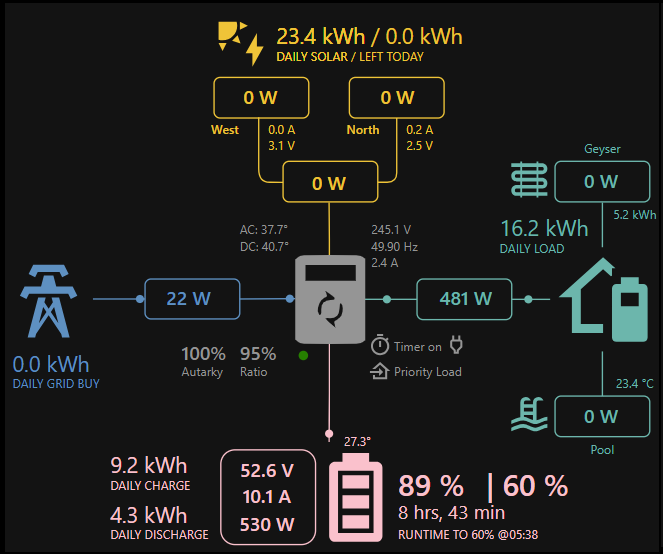
v2.8.0 🚀 Exciting New Features feat: you can now display extra sensor data for your additional essential loads e.g. daily energy or temperature etc. The following optional entities can be used: essential_load1_extra and essential_load2_extra. This data is not displayed on the full card if show_aux: true due to insufficient space. Full Changelog: Comparing v2.7.2...v2.8.0
-
v2.7.0 🚀 Exciting New Features feat: adds optional auto scaling of power values for each of the card sections i.e. battery, solar, grid , load and inverter. When auto_scale: true power values greater than 999W will be displayed as kW i.e. 4,32kW. The number of decimal places is set to 2 by default but can be adjusted globally using the card decimal_places: attribute Full Changelog: Comparing v2.6.1...v2.7.0
-
@Yuri I've released 2.6.1. Battery power and current are now displayed as reported by the sensor. If you prefer the absolute values you can use the `show_absolute: true` battery setting
-
Hi. They only show absolute values on the card. The animated dot shows the state of charge or discharge. On second thought maybe I should make that an option....
-
I think i tried this a while back and got no data back. Need to relook at it
-
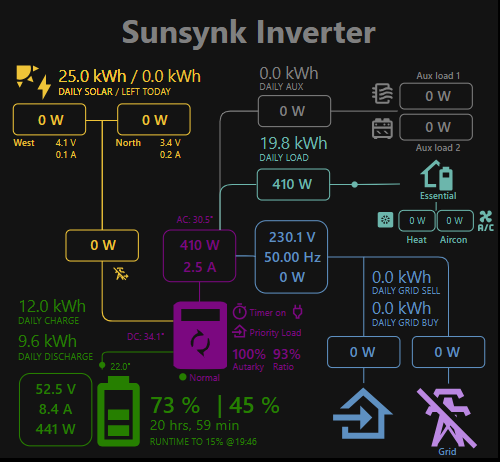
2.6.0 lets you add an optional card title and set the font colour and size title: Sunsynk Inverter title_colour: Grey title_size: 32px
-
Thanks. I would recommend you add the phases together for now using template sensors. The current card size limits how much data can be displayed (specifically in the full mode). Adding individual phases would require a larger canvas and redesign.
-
Hi. The registers for the 3 phase are different so it wont work without some modification. There is an example to get you started on the github but I have not tested this https://github.com/slipx06/Sunsynk-Home-Assistant-Dash/blob/main/DEY12k-modbus.yaml
-
Hi All 2.5.1 has been released. The card can now be configured to hide all battery information if you don't have any energy storage. I've also fixed the display of additional essential loads when show_solar and/or show_battery attributes are set to false. The can be configured for both the lite and full version of the card. Some pics below.
-
Hi. I'm running ESPHome with the config below. substitutions: device_name: sunsynk-fan-controller friendly_name: "sunsynk fan-controller" device_description: "Fan with speed control" temperature_threshold_low: "22" # At what temperature, in celcius, should the fan turn on to its minimum speed temperature_threshold_high: "45" # At what temperature, in celcius, should the fan turn on to its maximum speed minimum_fan_speed: "25" # What is the minimum fan speed, as a percentage esphome: name: '${device_name}' comment: '${device_description}' platform: ESP8266 board: d1_mini # Enable logging logger: # Enable Home Assistant API api: encryption: key: "" wifi: ssid: !secret wifi_ssid password: !secret wifi_password # Enable fallback hotspot (captive portal) in case wifi connection fails ap: ssid: '${device_name}' password: !secret fallback_password fast_connect: true power_save_mode: none captive_portal: ota: safe_mode: true reboot_timeout: 10min num_attempts: 5 # PWM output for the fan speed control output: - platform: esp8266_pwm pin: D0 frequency: 22000 Hz id: pwm_output sensor: - platform: homeassistant name: "ACTemp" entity_id: sensor.sunsynk_radiator_temperature id: temperature_sensor on_value: then: - script.execute: set_fan_state # The actual fan entity presented to Home Assistant fan: - platform: speed output: pwm_output name: "${device_description}" id: "the_fan" # on_turn_on: # - switch.turn_on: fan_relay # on_turn_off: # - switch.turn_off: fan_relay script: - id: set_fan_state then: - if: condition: lambda: |- return id(temperature_sensor).state < id(${temperature_threshold_low}); then: - fan.turn_off: the_fan else: - fan.turn_on: id: the_fan speed: !lambda |- if (id(temperature_sensor).state >= id(${temperature_threshold_high})) { // Over upper threshold, fan speed at maximum ESP_LOGD("Fan speed calc", "Temperature is above or equal to upper threshold so setting to max"); return 100; } else { float calc_speed = ((100-id(${minimum_fan_speed})) / (id(${temperature_threshold_high})-id(${temperature_threshold_low})))*(id(temperature_sensor).state-id(${temperature_threshold_low}))+id(${minimum_fan_speed}); ESP_LOGD("Fan speed calc", "calculated speed = %f", calc_speed); return calc_speed; }
-
Here you go type: custom:apexcharts-card view_layout: grid-area: solar header: show: true standard_format: true show_states: true colorize_states: true apex_config: chart: height: 350px tooltip: enabled: true shared: true followCursor: true graph_span: 8d now: show: true label: Now span: start: day offset: '-1day' all_series_config: type: area opacity: 0.3 stroke_width: 1 series: - entity: sensor.sunsynk_battery_soc name: Battery float_precision: 0 type: line color: '#f06292' opacity: 0.6 yaxis_id: capacity extend_to: now show: legend_value: true in_header: false group_by: func: last duration: 5m - entity: sensor.sunsynk_solar_power name: Solar Power float_precision: 3 color: '#ff9800' yaxis_id: kWh unit: kW transform: return x/1000; extend_to: now show: legend_value: true in_header: false group_by: func: avg duration: 5m - entity: sensor.solcast_pv_forecast_forecast_today name: Solar Forecast (D1) extend_to: false color: grey opacity: 0.3 stroke_width: 0 yaxis_id: kWh show: legend_value: false in_header: false data_generator: | return entity.attributes.detailedForecast.map((entry) => { return [new Date(entry.period_start), entry.pv_estimate]; }); - entity: sensor.solcast_pv_forecast_forecast_tomorrow name: Solar Forecast (D2) float_precision: 3 extend_to: false color: grey opacity: 0.3 stroke_width: 0 yaxis_id: kWh show: legend_value: false in_header: false data_generator: | return entity.attributes.detailedForecast.map((entry) => { return [new Date(entry.period_start), entry.pv_estimate]; }); - entity: sensor.solcast_pv_forecast_forecast_day_3 name: Solar Forecast (D3) float_precision: 3 extend_to: false color: grey opacity: 0.3 stroke_width: 0 yaxis_id: kWh show: legend_value: false in_header: false data_generator: | return entity.attributes.detailedForecast.map((entry) => { return [new Date(entry.period_start), entry.pv_estimate]; }); - entity: sensor.solcast_pv_forecast_forecast_day_4 name: Solar Forecast (D4) float_precision: 3 extend_to: false color: grey opacity: 0.3 stroke_width: 0 yaxis_id: kWh show: legend_value: false in_header: false data_generator: | return entity.attributes.detailedForecast.map((entry) => { return [new Date(entry.period_start), entry.pv_estimate]; }); - entity: sensor.solcast_pv_forecast_forecast_day_5 name: Solar Forecast (D5) float_precision: 3 extend_to: false color: grey opacity: 0.3 stroke_width: 0 yaxis_id: kWh show: legend_value: false in_header: false data_generator: | return entity.attributes.detailedForecast.map((entry) => { return [new Date(entry.period_start), entry.pv_estimate]; }); - entity: sensor.solcast_pv_forecast_forecast_day_6 name: Solar Forecast (D6) float_precision: 3 extend_to: false color: grey opacity: 0.3 stroke_width: 0 yaxis_id: kWh show: legend_value: false in_header: false data_generator: | return entity.attributes.detailedForecast.map((entry) => { return [new Date(entry.period_start), entry.pv_estimate]; }); - entity: sensor.solcast_pv_forecast_forecast_day_7 name: Solar Forecast (D7) float_precision: 3 extend_to: false color: grey opacity: 0.3 stroke_width: 0 yaxis_id: kWh show: legend_value: false in_header: false data_generator: | return entity.attributes.detailedForecast.map((entry) => { return [new Date(entry.period_start), entry.pv_estimate]; }); - entity: sensor.solcast_pv_forecast_forecast_today yaxis_id: header_only name: Solar Forecast (D1) color: grey show: legend_value: true in_header: true in_chart: false - entity: sensor.solcast_pv_forecast_forecast_remaining_today yaxis_id: header_only name: Forecast (D1 Remaining) color: grey show: legend_value: true in_header: true in_chart: false - entity: sensor.solcast_pv_forecast_forecast_tomorrow yaxis_id: header_only name: Forecast (D2) color: grey show: legend_value: true in_header: true in_chart: false - entity: sensor.solcast_pv_forecast_forecast_day_3 yaxis_id: header_only name: Solar Forecast (D3) color: grey show: legend_value: true in_header: true in_chart: false - entity: sensor.solcast_pv_forecast_forecast_day_4 yaxis_id: header_only name: Solar Forecast (D4) color: grey show: legend_value: true in_header: true in_chart: false - entity: sensor.solcast_pv_forecast_forecast_day_5 yaxis_id: header_only name: Solar Forecast (D5) color: grey show: legend_value: true in_header: true in_chart: false - entity: sensor.solcast_pv_forecast_forecast_day_6 yaxis_id: header_only name: Solar Forecast (D6) color: grey show: legend_value: true in_header: true in_chart: false - entity: sensor.solcast_pv_forecast_forecast_day_7 yaxis_id: header_only name: Solar Forecast (D7) color: grey show: legend_value: true in_header: true in_chart: false - entity: sensor.solcast_pv_forecast_api_last_polled yaxis_id: header_only name: Forecast (Last Update) color: grey unit: ' min.' transform: return ((Date.now()) - (new Date(x).getTime())) / 60 / 60 / 24 show: legend_value: true in_header: true in_chart: false yaxis: - id: capacity show: true opposite: true decimals: 0 max: 100 min: 0 apex_config: tickAmount: 5 - id: kWh show: true min: 0 apex_config: tickAmount: 5 - id: header_only show: false
-
Try adding: state_class: total_increasing to your template sensor i.e. # sensor.sunsynk_total_pv_energy sunsynk_total_pv_energy: friendly_name: Sunsynk Total PV Energy value_template: "{{ states('sensor.master_master_total_pv_energy') | float + states('sensor.sunsynk1_slave_total_pv_energy') | float }}" unit_of_measurement: "kWh" device_class: energy_storage state_class: total_increasing
-
That looks correct. Check these entities in your graph, specifically the data generator part as this renders the grey solar forecast for D1, D2 and D3 - entity: sensor.solcast_forecast_today name: Solar Forecast (D1) extend_to: false color: grey opacity: 0.3 stroke_width: 0 yaxis_id: kWh show: legend_value: false in_header: false data_generator: | return entity.attributes.detailedForecast.map((entry) => { return [new Date(entry.period_start), entry.pv_estimate*2]; }); - entity: sensor.solcast_forecast_tomorrow name: Solar Forecast (D2) float_precision: 3 extend_to: false color: grey opacity: 0.3 stroke_width: 0 yaxis_id: kWh show: legend_value: false in_header: false data_generator: | return entity.attributes.detailedForecast.map((entry) => { return [new Date(entry.period_start), entry.pv_estimate*2]; }); - entity: sensor.solcast_forecast_d3 name: Solar Forecast (D3) float_precision: 3 extend_to: false color: grey opacity: 0.3 stroke_width: 0 yaxis_id: kWh show: legend_value: false in_header: false data_generator: | return entity.attributes.detailedForecast.map((entry) => { return [new Date(entry.period_start), entry.pv_estimate*2]; });
-
Can you see the sensor under the statistics tab in developer tools?

-
That plotly graph will start populating once there is sufficient long term statistics collected. Give it some time.
-
Have you looked to see what your solcast sensor is reporting for tomorrow: sensor.solcast_forecast_tomorrow
-
Try use 7 (Brown/White) to A 8 (Brown) to B@cc120689 try convert it to an integer return parseInt(hass.states["sensor.sunsynk_inverter_2112086414_pv1_power"].state)Two methods you can look at 1. You can create a new utility meter in HA that measures W/h for your load. Then you can create an automation that resets the meter value to 0 i.e PV = 0 for last 10 minutes, sun is below horizon etc and then resets it again when PV output starts again. 2. You can create a template sensor that copies the value of the utility meter into a variable when the first condition is met and then copies the value into a second variable when the second condition is met. Subtract the two. Some ideas below https://community.home-assistant.io/t/custom-period-with-utility-meter-and-service-reset-by-automation/421195/7


