Bloubul7
Members
-
Joined
-
Last visited
Everything posted by Bloubul7
-
Installed my Sunsynk inverter today and the first (and only) thing I miss is the realtime information and integration with my Home Assistant. Looking at the inverter it would appear like it is has modbus communication available on the RS485 port. I have ordered a USB to RS485 receiver to see if I can decode the the communication. Once decoded I want to create a stand alone ESP8266 which will receive and translate the Modbus and communicate it in realtime via MQTT.
-
Hi, thanks no problem
-
Awesome, I went the same route. Mine is still on my desk for final testing, bought a spare set of TH16's this morning. Just want to check if the mechanical cut off still works, should be easy to verify with some boiling water from a kettle. If you are going to use the jack, ensure to enlarge the plastic hole slightly on the enclosure slighty.
-
The plastic on screen is still the original protective cover. Can be removed


-
Jy sal twee parralel kaarte benodig.
-
If you are using an Axpert, Goodwe or Victron then you could go the automation route. By setting up a Home Assistant server you could integrate the data from your inverter. By using the solar production and Battery SoC data you could set a smart Thermostat to heat the geyser to 55 irrespective of the battery SoC and Solar load, then once it reaches the set temperature you create a second automation to further heat the Geyser to a higher temperature but only if the Battery SoC is 100% and the available solar exceeds the element's load
-
Until you get your panels installed you can either run the inverter in ECO mode or bypass. This would reduce the power usage of the inverter. The King is a double conversion unit meaning that it takes AC then converts it to DC and then back to AC. Thus while using the inverter without panels you would electricity usage would go up due to some inefficiencies in the conversion process.
-
Good Morning, Yes it is still available. Forgot to mention in my initial post, I'm based in Centurion
-
Doing the same, Geyser elements reduced to 1.5kw. They are tied into my home automation system, will heat up to 55 during the mornings. Once the batteries are full and sufficient solar time is left they would continue to heat up to store energy.
-
If you are getting error 61 that means that that the inverter is not communicating with the battery. Ensure that the cable pin out is correct. Also ensure that the dip switches are set to 1000. If the battery icon is flashing it indicates that the inverter is communicating with BMS. The settings above would appear like the standard settings from the Pylontech to the Axpert
-
That is normal. It takes a couple of seconds for the MQTT to readjust to take the full load.
-
Good day, I'm putting my Axpert King 5kw inverter up for sale. The unit was manufactured in October 2018 and have been installed in December 2018. It is currently running the latest firmware and will be sold with the Raspberry PI, ICC software and Pylontech cable (worth R3,500). Asking price: R9,500 Reason for selling: The original plan was to eventually run 2x Axpert Kings in parralel but have decided to rather go the Sunsynk route for the additional capacity.
-
Based on your photo it looks like a genuine version. The problem with the premature float is a firmware related issue. You can use to the patched firmware from Coulomb and Webber to fix the premature float issue as well as to add some additional patches
-
That to me would appear like incorrect settings on the battery settings. It would look like the inverter is trying to charge the pylontechs, but because they have reached 100% state of charge the BMS is refusing the charge current. Please show a screenshot of your settings and battery graphs at the time when the PV drops occurs
-
Correct, was refering to the testing the DS18B20 and Mechanical cut out as well. Would like to get the readings from the DS18B20 and see if the mechanical switch still cuts out at 90 degrees. For testing the original sensor, I'm looking at getting a MAX31865 to convert the signal to digital. Want to see if I can get the Sonoff & Geyserwise to work in parralel with the Sonoff being the primary driver and the Geyserwise as a backup safety net.
-
I have not tested it as yet, need to go and buy a spare Sonoff TH16 to run the tests with. Will keep you posted
-
The original 2 wire temperature sensor. Will play around with it to see if I can get it to communicate with sonoff TH16

-
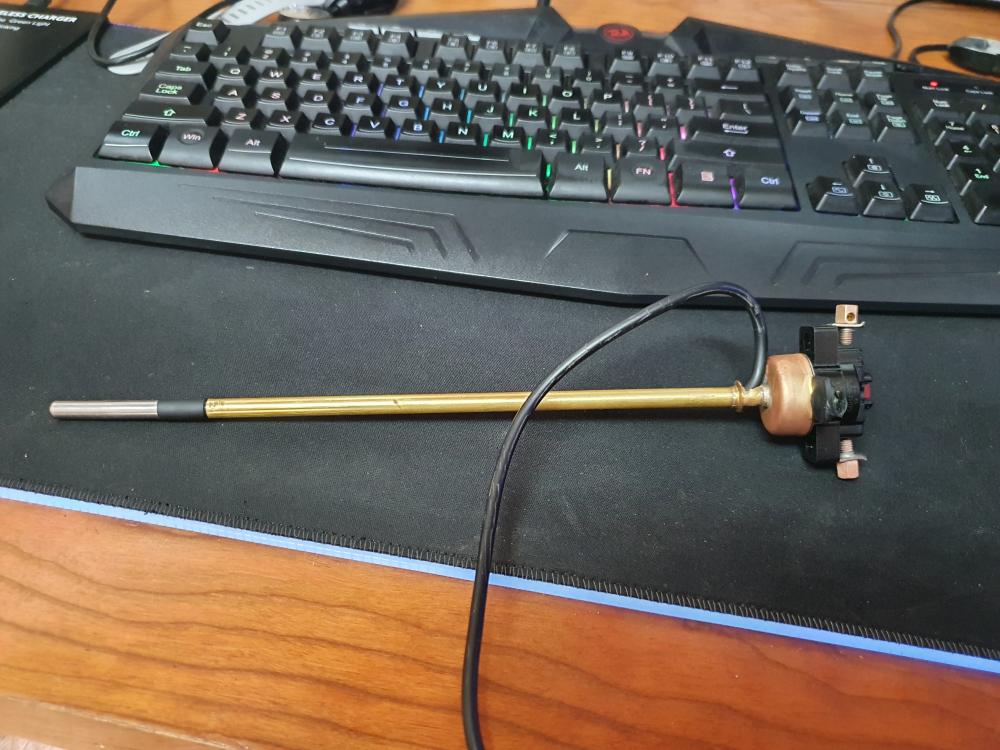
This is my hacked thermostat. Removed the Geyserwise temperature sensor and replaced it with a DS18B20. The original mechanical thermostat has a cut off at 90 C
-
Hi, The key problem is that the cable delivered with the unit doesn't work. You will have to create your own cable in order for the communication to work. I will look for the pinouts now
-
Try deleting the paired device. Do not pair the inverter, open the watchpower and select it within the app
-
The panels will only deliver up to the connected load at the given point in time. The solar production will vary based on the following: Battery SoC (state of charge) Current load Inverter mode You should roughly be getting 80% of rated power at peak.
-
Just try again, other users had the same issue. Reloading 02.49 resolved the issue
-
If the display remains dead after the update has been completed then re-run the update. The display should power up once the update has been succesfully completed
-
Axpert King 5kva Solar - 12x 335w panels 3x Pylontech batteries Averaging a monthly savings of R1,280. This is based on R2.69 per unit (when using in excess of 600kWh). Managed to reduce my monthly Eskom dependence from 1,100 kWh to around 550kWh.


-
You could also use solpi https://github.com/njfaria/SolPipLog