


wolfandy
Members
-
Joined
-
Last visited
Everything posted by wolfandy
-
You should be able to put even 8 of those panels on one MPPT - but not more than 14 in total
-
Don't know the UP5000 from Pylon - but if it is same as US3000, then you can find recommended voltage settings here
-
The see post by @Achmat here about the Pylon BMS forcing grid charge when his SOC got down to 8%. I'd say that a BMS that overrides inverter settings to prevent damage to the cells is definitely value
-
https://iccsoftware.co.za/ Yesterday the cables were still listed in their online shop - but this morning they have disappeared. Maybe drop them an email at [email protected] and ask about the cable
-
Ok - thnx. My guess would be that the self-preservation mechanism of the Pylon kicked in (I take it this was on a US3000B, correct?)
-
Interesting. Do you remember around what SOC it was?
-
No prob. Have dropped you a PM One other things that I noticed once I had the Pylon BMS directly communicate with my Sunsynk (vs previously ICC) is that the Pylon BMS dynamically adjusts the requested charging current based on SOC. Had not seen that before
-
My latest US3000B did not play well together with my older 3 ones. Turns out it was on a newer firmware than the older ones. Updating all to the latest v2.8 solved that problem @Achmat Are you not also from the Somerset West area? If yes, you're welcome to borrow my USB-console cable for the US3000B's to look into your batteries. Can also give you the software if you need
-
Am running 4x US3000B in my setup with Sunsynks. As the B and C can be run together, I do not see any reason why the C would not work with the Sunsynk
-
Thanks Leshen 🙂
-
According to @Leshen, with the latest firmware update the 5kW Sunsynk can take up 13A per MPPT. Not sure what impact that has on total kW that the MPPTs can combined handle None. Each is a separate MPPT. It simply means that one MPPT will be producing slightly more than the other one
-
I've previously purchased the USB cable for the US3000B from ICC and it worked like a charm on my Windows laptop to update my US3000B's I have also seen cables for both US3000B and US3000C available from the Solar Assistant website
-
Is this an Axpert inverter? If yes, then the MPPT will derate above above 115V (if I remember correctly, but you should be able to find that in a post somewhere here on the forum) In that case, 2 panels in series (2S) in a string and 6 strings in parallel (6P) will be the best as per @Calvin above
-
@Tariq I also just paid just over R19k per 5kW Sunsynk incl. wifi logger and free shipping
-
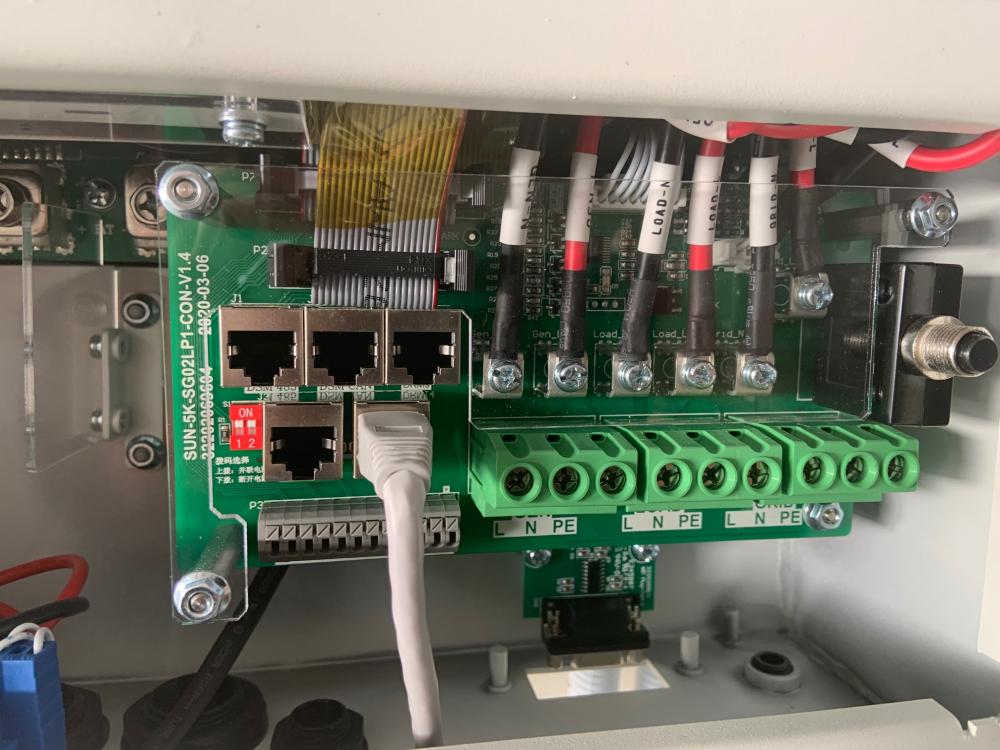
Ok - on closer inspection it seems that the wires are correctly connected. The internal wires match the labels on the board for the internal connection. Just weird that on the older board version they are swapped compared to the external connectors...
-
Thnx - but which labels? On the connectors or on the internal wires? 😉
-
Have to admit that I had not even picked that up - that the labels on the older version do not line up with the labels on the connector. Maybe mistake in assembly? This is the inverter that was making a really loud high-pitched noise when only connected to batteries, so I never even connected load or grid. It's already packaged for return to merchant
-
Just switched my 2 new Sunsynks on - and also had a very loud high noise coming from one of them ☹️ So loud, that I can even hear it from the next room... Will await the firmware upgrade tomorrow and then see if anything changes
-
Yup - my Victron 250V/100A was getting hot to the point that I mounted a fan underneath to blow air against the heatsink...
-
Awesome - thanks. Will do So the update gets pushed onto the inverter remotely? Does the logger need to be connected? Or how do they receive the udpate?
-
Thanks Leshen How do I update the firmware? Can you please help?
-
I just noticed that the 2 Sunsynks that I received are physically different to each other. The 1st board is V1.4 and the 2nd V1.5 Both inverters were ordered together and will be paralleled. Do I need to be worried about the different revisions - other than obviously having to expect different firmware versions once starting them up?

-
Fully agree - and have already asked my installed to adjust the order Thanks for the detailed insights - really helpful !!
-
😝 I know that problem - but I have already been down that road. I started off with 1x Axpert, 1x Pylon US3000, and a few panels. Gradually expanded the system to 2x Axpert, 4x Pylon, Victron MPPT, and 12x panels. Now upgrading to 2x 5kW Sunsynk and adding 8 more panels (total 8.5kW PV then). Don't really think that I will need more than that (even though there will still be an idle MPPT string on one of the Sunsynks 😉)
-
Thanks for the info, Leshen 👍 That means that latest firmware actually increased the specs of the inverter beyond what is printed on the label?


