


wolfandy
Members
-
Joined
-
Last visited
Everything posted by wolfandy
-
Item: Victron VE.Direct to USB cable Age: approx. 2 years Price: R250 Payment Method Accepted: Cash, EFT upfront Warranty: None Packaging: Will package safely for shipping Condition: Good Location: Somerset West Reason: Have sold my Victron MPPT Shipping: At buyers cost and risk Collection: Sure Link: Victron VE.Direct to USB interface or Victron VE.Direct USB Cable Interface

-
Have a similar issue with white noise coming from all my speakers around the house Had the same problem also with the Axperts, which I had in my system before - so do not think it is a Sunsynk/Deye-specific problem I only get the noise if any of my aircons around the house (connected to critical load circuit) are running. If they are off, the noise is not there. But if even 1 aircon is on, the noise is on all speakers (e.g. aircon in bedroom on and noise also on speakers in living room - circuits on separate electrical breakers on my DB board) And I think it only occurs when grid is connected - when we have loadshedding I think the noise is not there (might be wrong though) Do you mean when when you are running on solar or battery? Have you tested if they noise always occurs? Or only if you have certain other loads on your inverter?
-
@NoordSolar I am using Sensibo for several aircons around the house and use the timer-function to switch units on/off based on when usually in the day I have spare PV. So not an actuals but rather patterns. But I can switch the units on/off via the app if I need to adjust
-
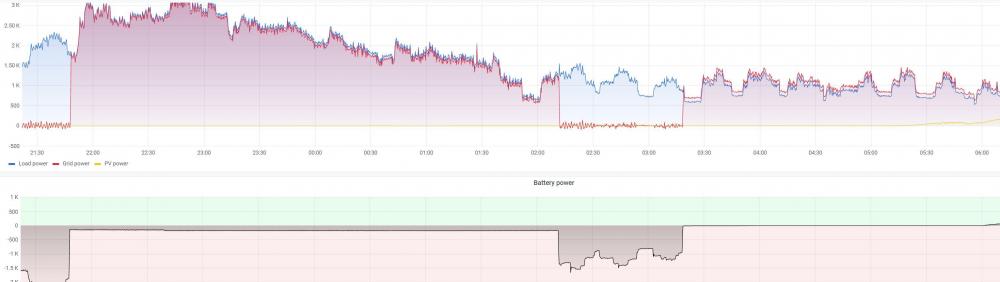
Thanks. Happy to see that I am not the only one experiencing this Thanks. Agree to the trickle feed. But that should not be necessary when the inverter is running on fully on grid, or? And in your case, is the 45W taken from grid? ------------------------------------------------------------- To make things even weirder, I just noticed this in my charts: So in the first window that the inverter was running on grid, it pulled the +/- 180W from the batteries. Then it reached my next setpoint and ran on batteries again for a while before again switching back to grid (next setpoint). But the 2nd time running on grid, it pulled between 0W and 5W from the batteries. Any thoughts on this inconsistent behavior?
-
Thanks - but I have to admit that I still do not understand the high draw from the batteries. I could understand the difference between the reported 2x45W and the 115W through conversion factors, inaccuracies, etc. But even from the 115W to the 180W is still a sizeable gap. Does that mean that the Sunsunk still draws from battery for load usage even though it is running on grid?
-
Hi all I know that the question regarding the self-consumption of the Sunsynk has been posted here a number of times - and I myself have reported it at 45W. This is what my SolarAssistant is reporting for each inverter: However, the other night I noticed something different (and quite confusing to me). I had depleted my batteries to my changeover point and the inverters had switched over to running on grid. I was expecting a draw from my batteries of around 90W for my 2x inverters - however, my consumption was around 180W: Does anyone have a similar experience? And/or an explanation? 180W for self-consumption seems high to me


-
My 5kW Sunsynks have each 45W self-consumption
-
Around 40W or 45W
-
+1 I ran with an external Victron MPPT for a while (and actually no PV connected to the Axperts anymore). Worked like a charm
-
I had the same problem with that unit. I called the CoCT and logged a fault with them. They installed a new wireless meter in the main box in the street. So now I only have a small wireless device lying around to check my balance and load new units. Has been working fully stable ever since
-
You need to play around with your Zero Export Power setting to see what gives you the best result. I think 0W is not a realistic number. I have set mine to 20W and this works quite well for me. My grid consumption also bounces around a bit during the day - but in total is around 0.2kW-0.3kW per day (otherwise at the moment do not use any grid at all)
-
No prob. One of the US3000 needs to be the master. And probably worthwhile making sure that all are running on newer firmware
-
How long did it take to charge your Pylons? Remember that the Sunsynk also draws self-consumption (45W on my 5kVA) - which will also be included in your consumed units
-
I also originally wanted to go the 8kVA route - but then decided on 2x 5kVA instead. Yes, a bit more expensive - but also 2x as many MPPTs and hence bigger flexibility. And my parallel setup runs stable as a rock
-
Thanks @Leshen 🙂 Do you know what the changes in the latest version are? Is it worth upgrading?
-
When I first started with my Axpert /Pylontech system a couple of years ago, I also wanted Victron as my 'dream' system. I then added a Victron MPPT 250/100 and moved all my panels off the Axperts - which was definitely a nice and noticeable upgrade. But the more I eyed a full Victron system, the higher the cost went... So I eventually moved to Sunsynk (2x 5kW) and am very happy with my system. It works like a charm - especially the feed to the non-essential side with excess PV. You could start off with 1x 5kW and then later add more inverters as you need and your funds allow. 1x Sunsynk will give you 2 MPPTs, and if you another inverter later, you will get further MPPTs and additional flexibility. Same with the batteries. Start with a smaller pack, maybe 2x Pylons or Hubbles, and then later expand. Something like 1x Sunsynk 5kW, 2x Pylon 3.5kW, and 9x JA 490W will be around R90k. Then add a whole bunch of installation materials (cables, breakers/fuses, combiner boxes, panel mounting hardware) and installation labor (and maybe monitoring software) - and you will quickly hit your budget. As much as I adore Victron (and have made good experience with their MPPT) - something similar with Victron equipment will cost you significantly more. And I do not see (or know) what more benefits a Victron system would give me over my current setup.
-
Hi all Does anyone know what the latest Sunsynk 5kW firmware version is? I can't find that info anywhere on the Sunsynk website. Am hoping that one of our Sunsynk experts (maybe @Leshen 😉) might be able to help. Am currently running COMM: e419 - MCU: 3162 Thanks in advance
-
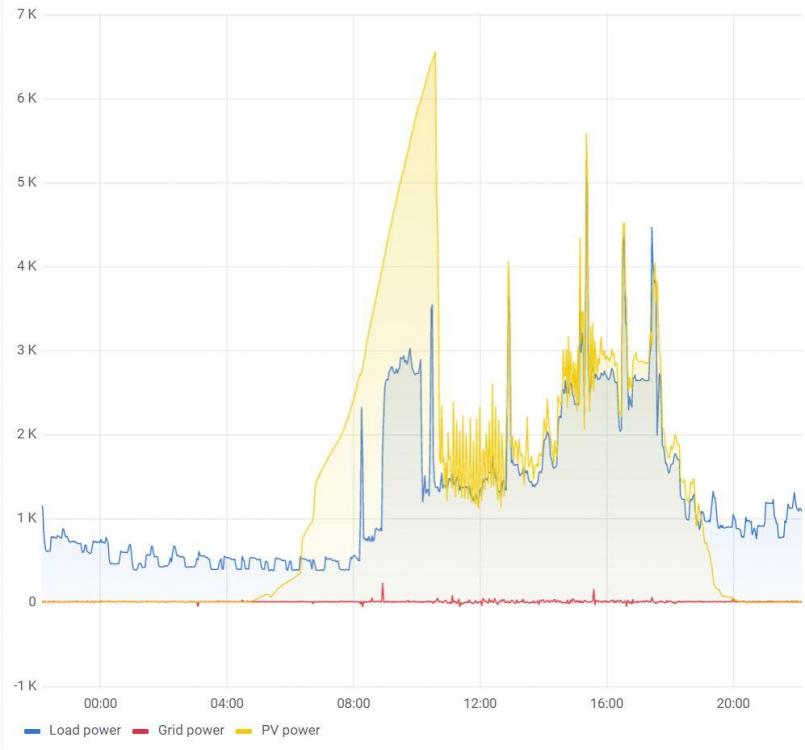
It's been a while, but a brief update for anyone interested I've ended up with the following setup: MPPT 1 (Morning sun): 6x 380W panels MPPT 2 (Evening sun): 6x 380W panels MPPT 3 (Main sun direction): 9x 490W panels Turns out that for this time of the year this is absolute overkill 😜 I've got 14kW of Pylons, deplete them on most nights to around 35% SOC (unless the kids are home and are playing PS5 in the eve...) - and by 10h30 in the morning they are fully charged again already. This is my chart from today: I would say that the addition of the string facing the morning sun (yellow below) has made the biggest difference - production starts a whole lot earlier and ramps up significantly quicker My main string (blue) never even reaches peak production... Evening string not included above. Will probably add another Pylon in the near future to cater for A/C during the night as well as kid's PS5. And won't hurt for winter days, when production days are shorter. But overall really happy with the system 🙂 Total grid usage for Oct was 11kWh

-
🤣 Only if the Intel is under full load But yes, my 2x Sunsynks do make up a significant portion of my power consumption during late night / early morning hours. But then again, it is also negligible compared to my kid's consumption in the eve when they are playing PS5...
-
If you mean self-consumption, it's around 45W
-
As much as I like and agree with what you wrote, I think we just need to be honest and admit that for certain parts of the year you will not be able to generate sufficient PV and will still need to draw from the grid - and hence not achieve the targeted savings. With the weather that we have been having in the Cape for the last 2 days, my 9kW of panels generated 5.9kWh yesterday and 2.8kWh the day before... So definitely agree with pre-paying your electricity, just I would be a bit more conservative on the rate calculation 😉
-
I can't comment on the history, but I take it you are aware of the split of the company into 2 parts at one point - which caused this problem for us end customers... I was running the ICC (not Centurion) variant and it was running (mostly) stable for me. If you can get the upgrade to the ICC version for R250, then I would definitely give that a try first. I understand your pain regarding their customer service (even though I already received prompt service when I had a problem) - but is that really worth throwing R20k at it? Alternatively consider Solar Assistant. I am running that now as it was the only software that supports Sunsynk that I could find. Am happy with it, even though at the moment it is only data display and no active management of settings for Sunsynk. I know that it also has similar features as you are looking for for Axperts - but have no experience with it. If you already have a Pi and the Pylon comms cable, then all you are looking at is the R800 software license
-
In the online shop, you can put the software only version into your basket and proceed to payment. I did not venture further than that
-
You know that ICC split into 2 'branches' a while back, right? Which one did you reach out to? One of them (Centurion Solar - they've renamed their product SMH now) I cannot comment on because I never dealt with them. The other one (still called ICC) you can buy the software from separately here: https://iccsoftware.co.za/about/shop/
-
Cheapest option would be to keep your current setup and add a control software like ICC or Solar Assistant and the Pylon comms cable to your system. I ran my system (2x Apert and a couple of Pylons) like that for 2 years and could do everything you are looking for (my pool pump would switch on if SOC was above certain value and if I had more than X watts of spare PV) If you're willing to spend the cash, then the Sunsynk will be the better long-term solution. I recently did the upgrade (also because I wanted to add more panels) and am happy with it. However, out of the box the Sunsynk currently also only provides time-delayed metrics for remote viewing. Supposedly an upgrade for this is in the works, but I had to get Solar Assistant to remotely access real-time data. And remotely changing parameters currently is not supported on the Sunsynk (which you can do on the Axpert with either of the control software mentioned above) My 2 cents: If your current inverter size and PV amount is sufficient for you, I would probably go the ICC / Solar Assistant route to add the features you are looking for. Investment for that will be around R3k (depending if you go ICC or Solar Assistant. You can save a couple of R if you buy the Raspberry Pi separately elsewhere and just get the software and comms cable from them). If you are planning to further add to your system in the near future, then the upgrade to Sunsynk will be the better option - but obviously also much more expensive


