


wolfandy
Members
-
Joined
-
Last visited
Everything posted by wolfandy
-
Cool - and thanks for the info. I also upgraded to 2.99995 earlier today and will keep an eye out for any problems
-
Ok - so if the problem is not occurring while ICC is not connected, then we can rule out that any of the Axpert settings are causing the behavior 2 things to note: You need to enable the switch to the left of 'Use Time for Control' for your selections below to become active Any changes to ICC settings (other than inverter settings that have a button 'Set') only become active after you have pressed the 'Save' button in the bottom left. So even if you make changes on the 'Battery' tab, ICC will only act on the changed settings after you have saved them My guess it is due to you still having a setting in ICC on which it changes back automatically (or you happened to cross a voltage setting that triggered the Axpert itself). I have lowered my 'Back to Grid Voltage' and raised my 'Back to Discharge Voltage' outside of my normal boundaries to ensure that the Axpert itself does not trigger any mode changes and hence does not interfere with ICC. In ICC itself you need to remember that even if you manually change the mode via the 'Change Inverter Mode' button, it does not override any active settings for automatic change that ICC has. An example: I have 'Use SOC for Control' active and my 'To Solar/SBU' is set to 25% My actual SOC is 45% at that moment I change my inverter mode manually via the 'Change Inverter Mode' button to Utility My inverter will change to Utility ICC will pick up that the SOC is higher than my Solar/SBU setpoint (25%) and automatically switch back to SBU. There is typically a slight time delay between my manual change and ICC automatically switching again This means that if you want to manually change modes, you first need to disable any automatic mode change settings in ICC that might be in contradiction to the manual change that you want to make
-
I have to admit that I have no idea. I get a separate tab for the Victron MPPT (see below) and the PV Watts are reported on Dashboard 2 (but not voltage or amps) Maybe reach out to Manie and ask him for details?

-
Thanks. I'm not the technical expert here, but I believe this strongly supports the assumption of a faulty MPPT. I could not come up with any other explanation for both strings working on inverter #1 but not on inverter #2 Maybe @Coulomb has another idea for something I might have missed? In the meantime, I would recommend reading this thread that helped me answer a few questions about adding an external MPPT to my system. I have completely moved my PV off my Axperts onto an external MPPT, but I understand it is also possible to run both the Axpert internal and an external together at the same time. So it should not be a problem for your to leave one set of panels directly on your inverter #1 and move the other set to an external MPPT. You just need to be a bit careful with the max PV charging amps settings on both to ensure that your Pylons do not receive more power than they like if both are running on full power I am running a Victron MPPT and am really happy with it (and ICC is also able to integrate the Victron MPPT data into the dashboard)
-
Ok - thanks. And it was the same inverter #1 that also produced PV before you did the swap? So that you have eliminated the PV strings as a problem?
-
My guess would be that either the Axpert's voltage settings or the ICC battery settings are conflicting with the changes that you want to make - and then the system automatically changes back according to its programmed settings Do you want to post screenshots of your ICC Inverter and Battery settings tabs here? Then we can see if we might be able to identify what causes this?
-
Does this mean that each inverter has 2 strings of 6 panels connected? I do not have any experience in running PV in a parallel setup (am using a separate MPPT in my parallel setup), but according to the Axpert manual 'Each inverter should connect to PV modules separately' This does sound strange. Judging by your screenshot, it seems that the MPPT in your 2nd inverter has voltage on the input but is not drawing any amps. Yet if you have 12 panels connected to each inverter, then the MPPT in inverter 1 would by itself not been able to produce the 5500W you have seen before Have you tried swapping the PV connections around between the 2 inverters to see if the problem is related to the MPPT or maybe one of the strings?
-
I've figured out that the SRK12 will also hold 4x US3000 (4x 3U)

-
A few questions, Gunners: I assume that the parallel setup of the 2x Axperts is correctly done (current sharing and comms cable) - correct? How are your panels connected? Split between both inverters? What max Wattage have you seen reported for MPPT 1 on ICC? And was that limited by load or actual production? Have you checked what each inverter is reporting on its built-in display for PV? I am not 100% sure how ICC reports MPPT values in a parallel setup. I do not know if ICC not already combines the values of both MPPTs and reports this combined value as MPPT 1 (but this would actually be my guess). I do not know if MPPT 2 is only reserved for inverters with dual MPPTs (again this would be my guess). Maybe confirm with ICC support how exactly MPPT reporting in a dual setup is being reported So before you declare that MPPT as not working and spend money, I would first recommend a thorough fault-finding
-
Cool - that will make changing settings on your inverter a lot easier as well allow you better / more accurate control of your system Am I correct to assume that both the inverter as well as your Pylon are being recognized correctly? And that you have VNC up and running so that you can make changes remotely? You can now have ICC switch your inverter between PV/Battery and Utility based on SOC or a specific time of day rather than on the voltage guesstimate of the inverter. To do that you need to first change the following settings on the Settings/Inverter tab to make sure that the inverter does not change based on voltage settings: Change the 'Back to Discharge Voltage' as high as possible (mine is set to 58V) Lower the 'Back to Grid Voltage' to a value that is lower than your Pylon at the lowest SOC that you want to discharge it to (I discharge mine down to just over 20% and have my voltage set to 47V) On the Settings/Battery tab you can then set when you want ICC to change the inverter between PV/Battery and Utility: First you need to make sure that 'Use Pylontech Battery Values' is switched on (you need to click the 'Stop' button in the top left to be able to change that setting; afterwards press 'Start' again for ICC to reconnect to your inverter) If you enable 'Use SOC for Control' you can set the SOC values (based on the reading from the Pylon BMS) to change to Grid and back to SBU Alternatively you can enable 'Use Time for Control' to choose between Utility/Solar-Utility-Battery/Solar-Battery-Utility for each hour of the day You now need to figure out which works best in your circumstances/environment. It will probably involve some playing around with the settings and testing to see what works for you. What I like about ICC very much is that it easily and quickly allows me to make changes. I live in an area where we have virtually no unscheduled outages and have a set of settings that works best for me in normal day-to-day use (e.g. running my batteries down to just over 20% every night and only charging from Solar). If loadshedding is announced for my area for late night or early morning hours, I simply raise the 'Back to Grid' SOC value to ensure that I change back to Grid earlier in the eve/night and still have sufficient capacity left in my batteries to get me through loadshedding. Only if I am looking at 2x loadshedding in short sequence (and no PV) or during extended periods of time of low PV do I change the inverter to also charge from Utility
-
Some Axperts (and if Bypass function is enabled) will switch over to Utility if overload occurs while in Battery mode (but the inverter itself will not shut down)
-
Have you read this thread ?
-
You will find many people running Axperts (or same unit under different brand, etc Mecer) Do some of them have problems? Yes, sure. Do all of them have problem? No Are there better units available? Sure. Are these more expensive? The ones I am aware of, yes Would I recommend an Axpert if money is not an obstacle? No. Would I recommend an Axpert if funds are limited? Yes I personally have been running an Axpert since 2015 without any major problem
-
Cool - and yes, that is the cable to connect your Pylon to the Pi. Then you are all set Yes, I would say (at least) 1 more Pylon. 2 Pylons in total will cover your night-time loads for 2h of loadshedding. During (most of) the day your PV will be sufficient to carry your 2kW load. You will, however, run into problems in 2 scenarios with 2 total Pylons and your 2kW load for 2h of loadshedding: If you have a cloud cover and your PV drops close to 0W. The late afternoon / early evening hours where PV drops to 0W but you are still running your 2kW of day-time loads (I do not know when in the day your change from 2kW to 1.3kW loads occurs) 2 Pylons will be ok to carry your 2kW loads for longer periods without complaining (2x 25A = 50A = 2500W) - however, they will not have the capacity to run your 2kW loads for 2h of loadshedding by itself (2kW for 2h = 4kWh vs usable Pylon capacity of 2x 1.9kWh = 3.8kWh - and you still need to account for conversion losses) And even with 2 Pylons please keep in mind that they will still be the limiting factor on how much power your inverter can provide while purely running on battery. Even though your inverter is capable of delivering 5kW, with 2 Pylons you should not draw more than 2.5kW - otherwise your Pylons will complain Thanks. I wanted to check how much your Max PV Array Power is (4500W in your case but other/older models only support 4000W) as I thought your 15x 330W (4950W) of panels was quite a lot. You have oversized your PV array by 10%, which to my understanding is still within 'limits'. But maybe @Coulomb can provide better assistance if this is still ok or if he would deem this as potentially harmful If you need assistance with fine-tuning your system once you have ICC up and running, give another shout here and we will see what we can do
-
Welcome @OneillZA Let's see if we can help you a bit Could you please post a picture of the label from the side of the inverter? I have to admit that I am not as versed as other resident members here in the differences between the various models - so that label will help me understand better which model exactly you have Great stuff. I am a big fan of ICC as it makes managing your system a whole lot easier Have you also ordered the Pylontech cable to connect the Pylon to the Pi? Can you please help me understand what you mean by this? Your Pylon has a built-in BMS Once ICC has arrived, we can set it up that way based on your actual Pylon SOC and also time-based if desired. In the meantime we can set it up to something that is close to that (based on voltages). Let me try to explain: Based on your screenshot, at the moment your system ('Output Source Priority') is set to SBU - which means Solar -> Battery -> Utility. This means that your system will run on PV during the day. Any PV amount above your load will be used to charge your batteries. If PV drops below your load (clouds or towards the end of the day), the system will draw the shortfall from your Pylon. Once your PV is down to 0, it will draw your full load from the Pylons. Once your Pylon voltage drops to your 'Back to Grid voltage for SBU priority' setpoint (47.0V as per your screenshot), it will switch over to Utility. It will run on Utility until your Pylon has been recharged back to the 'Back to Discharge Voltage' setpoint (54.0V as per your screenshot - way too high - see below). Then it will run on PV/Battery again until your Pylon voltage drops to your 'Back to Grid voltage for SBU priority' setpoint - and so on... This I believe is not how you want to run your system. You have 2 options: Change your 'Output Source Priority' to SOL - which means that it will run on PV until PV drops down to 0 (shortfall supplied by battery until then) and switch to Utility at that point Increase your 'Back to Grid voltage for SBU priority' setpoint to a higher value to have the system change earlier to Utility (e.g. increase from 47V to 50V) A few further settings that you should change immediately: Your charging parameters are way too high for the Pylon. Recommended settings here are Bulk 52.5V and Float 51.8V Your 'Back to Discharge Voltage' is also set too high - which means that at the moment your system will only switch back from you to PV once your Pylon is fully recharged. This obviously needs to be somewhere in between your Float voltages above and your 'Back to Grid voltage for SBU priority'. Remember that your inverter will keep constantly drawing just over 40W from your Pylon even if it running on Utility - which means that your Pylon in the morning will be at a lower SOC than it was in the evening even if you have been running on Utility the whole night I would also recommend changing the following other settings: 'Output Mode' is currently set to Parallel. If I am not mistaken, this should be set to Single as you are running only a single Axpert and can cause sometimes problems I would set 'Max charging current' and 'Max AC charging current' both to the same value. Recommended value for your Pylon is 25A. As I don't think that the Axpert supports 5A steps, I would recommend 20A for both settings Your 'Charger Source Priority' is currently set to Solar First, which means the Axpert will use whatever PV is available to charge the battery. If no PV is available, it will charge from Utility. If with the settings made above you are not significantly drawing down on your Pylon in the eve, then I would change this to Solar Only. Then your Pylon will only be charged by excess PV that you have and not by Utility. You need to decide for yourself how often and long your loadshedding is and if you believe that you will get by with only charging your batteries during the day (e.g. you would have problems if you have loadshedding from 18h00-20h00 and then again from 06h00-08h00 as your batteries will not have recharged in the meantime due to lack of PV). Maybe in the meantime leave the setting like this. With ICC it is easy to change this setting whenever required (that's what I do) That is quite a high load. For that load I would say that your single Pylon is not enough. You need to keep 2 things in mind: Your Pylon does not like to be discharged by more than 25A for an extended period of time. This equals roughly 1250W - which means that your nigh time load of 1300W is already borderline. Turning on the kettle or vacuum cleaner while only running on Battery your Pylon will not appreciate Your Pylon has 1.9kWh of usable capacity at 80% DOD. That means that it will not be sufficient to power your 1300W night time load for the loadshedding period of 2h (=2.6kWh). For your 2000W load it would only be sufficient for about 1h - but as per above you should not power your 2000W purely from the Pylon
-
87A is still well within the comfort zone for 3x Pylon US3000. Each is fine for 37A, so 3x 37A = 111A
-
My local shop could not help me when I was looking to make another cable. But then again, I also live in South Africa 😉 No, ICC runs on a Raspberry Pi, which is then connected via USB cable to the Axpert and runs 24/7. You can access the Pi from any computer/phone via VNC. If you get the Pylon cable, ICC can then read the data from the Pylon BMS and control the Axpert's switching between PV/Battery and Utility based on actual BMS data rather than the Axpert's 'guesstimate' based on voltage reading. It hence not only provides you with insight into the performance of your system but allows you to operate your system with a higher precision I have never seen the ICC software or the Pylon cable in any physical shop (the Raspberry Pi itself obviously yes). I bought my own Pi and then ordered ICC and the Pylon cable through their website. The software was delivered electronically within a matter of hours and the cable arrived a couple of days later via courier
-
I have never seen individual cables (or connectors) for sale anywhere - but I might be wrong. I have only found the cable part of the full parallel kit, e.g. here (please confirm that this is indeed the right cable for you as I have a different Axpert model to yours) I can highly recommend ICC (https://iccsoftware.co.za/)
-
Yes, I also use ICC. Since one of the latest versions, it also supports the integration of Victron MPPT. So I have connected the MPPT with a VE.Direct to USB cable to my Pi and ICC is reading the data from the MPPT and shows the combined Axpert/MPPT data on the dashboard But would you not still recommend the Multi rather? On the one hand agreed. But your 5kW already allows you to power more than just your essential loads. I had most of my house (incl. 2 inverter aircons, microwave, and pool pump) connected when I was running only a 4kW Axpert. I only had to watch out for the occasional 'overload' scenario of e.g. 1 aircon running, my domestic vacuum cleaning, and me then switching on my bean-to-cup coffee machine... (my pool pump switches automatically on/off based on the amount of excess PV available) I have added a 2nd Axpert in parallel in the meantime and now even moved my dishwasher and oven onto the inverter. I now only have heat pump, washing machine, and tumble dryer running directly off Eskom
-
If you are happy with the inverter side of your system, why not add a standalone Victron MPPT if you don't want to connect the PV to your Axpert? It's also what I did. It gives you the benefit of the better MPPT technology from Victron without having to fork out all the cash to also replace the inverter side
-
Yeah - I also saw that. But that might be an older version of the same doc - which made me think whether the usable capacity figure might have also changed in the meantime I play around with my settings if we get into loadshedding times. Fortunately I am supplied by COCT and they are very reliable with their loadshedding forecasts. So if I am only scheduled for day-time loadshedding, I run my batteries down close to 20% - but if we have night-time ahead of us, I'll adjust that number to make sure that I still have sufficient reserves for that 'special' time of the day Thanks 👍 I had read a previous report but not the latest update. They also seem to be using 20% DOD for their test
-
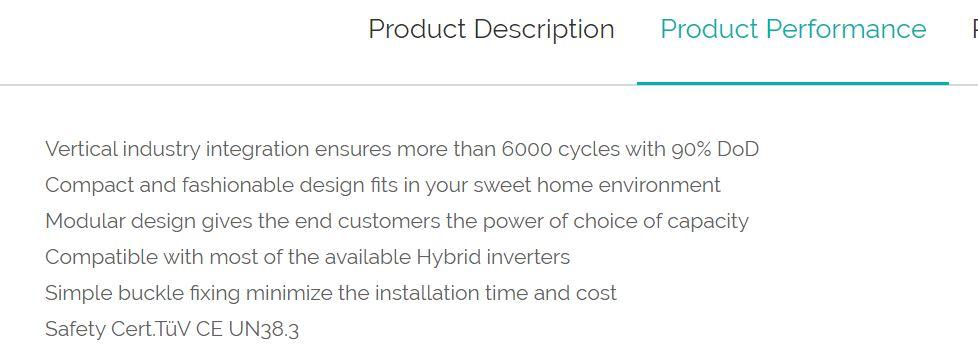
Thanks @starmage and @plonkster This is also what I thought. But then both the Pylon website as well as the manual mention several times 'more than 6000 cycles with 90% DoD' - e.g. and and This made me question my assumption of not going below 20% DOD to achieve more than 6000 cycles. Any thoughts?


-
Cool - thanks for the info. Learned something new again today 😀
-
You do not need to restart ICC or reboot your Pi after you have made changes. Just click on the 'Set' button next to the value that you have changed (purple boxes) to have those changes send to your Axpert. Just for safety I would also recommend pressing the 'Save' button in the bottom right (red box) to save the values to ICC There are very few options in ICC (e.g. selecting to use the Pylon BMS values on the 'Settings - Battery' tab) that are only accessible when ICC is not 'active'. For this you can press the 'Stop/Start' button in the top left (orange box) I only restart ICC or reboot my Pi if I have installed an ICC update, updated the Pi OS, or had some type of problem


-
Hi all I always remembered 80% usable capacity for the Pylon US3000 specs (2.8kWh) and their 6000 cycle life claim (this figure is also still listed on some online-shops). However, just having looked at the both the Pylon website as well as the manual of my latest Pylon (I unfortunately cannot find the manuals of my older ones...), both of them state 90% usable capacity (3.2kWh). Is my memory completely off or has the usable capacity changed at one point?


