


wolfandy
Members
-
Joined
-
Last visited
Everything posted by wolfandy
-
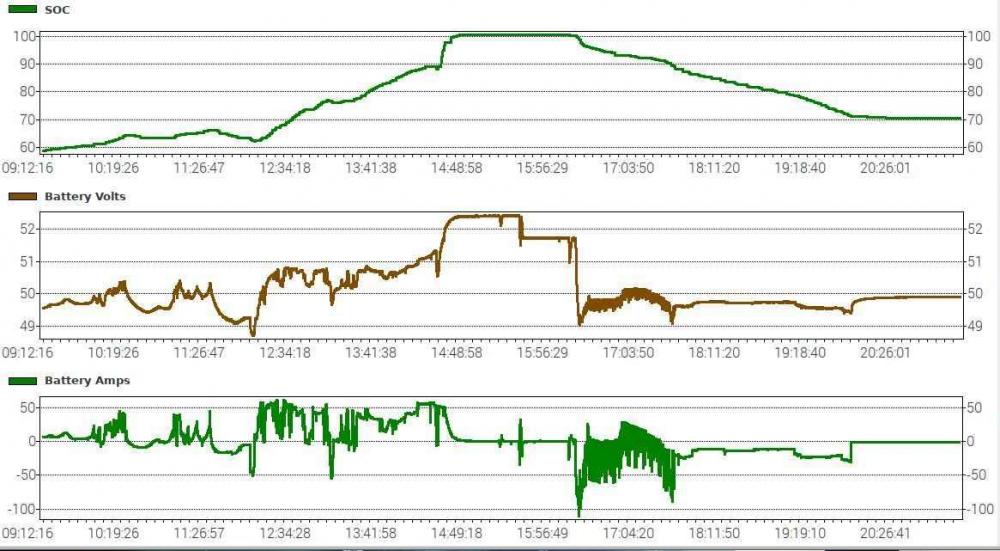
I always had 46V in mind - but just looking again at the manual I realized it is actually 45V is actually specified as lowest discharge voltage point I am not an expert on this, but to my understanding the SOC and voltage correlation is not linear. But I do not know even closely enough about lithium batteries and simply rely on the SOC that the BMS provides. Maybe just a screenshot of my Pylons from today as example: Are you sure about that? I always thought that the BMS only counts in full cycles - but also have to admit that I've never paid that close attention. But I will keep on my cycle counter when I use my batteries down to 20% tonight and recharge them tomorrow
-
ICC is not calculating the Pylon cycle number - it is a number that it reads directly from the Pylon BMS. I do not know what triggers the Pylon BMS to register 1 cycle (SOC, voltage, ...). Maybe anyone else here does? You can see the last 12 hours of battery SOC, voltage, and current in/out-flow under the tab 'Graphs' and 'Battery trends'. There you can check down to what SOC and voltage your battery drops during loadshedding As a first thing I believe that you should never use the Pylon down to its cut-off voltage and have it shut down completely I think it comes down to what you mean by 'drained' and 'used'. An example: If during a normal day I am running in SBU mode, my batteries have already been fully re-charged, and then I get a bit of cloud cover that my PV production drops below my load for a while - then my batteries will start being discharged. If the cloud cover hangs around for a bit longer, my batteries might even get discharged back down to 90%. Then the sun comes back out, my PV ramps up, and eventually fills the batteries back to 100%. To my understanding this will not be registered as a cycle by the Pylon BMS. But if I use my batteries during the night and (instead of using them down to just over 20% like I normally do), I set ICC to switch back to Utility already at 40% to keep a bit of reserves for unannounced loadshedding - then the Pylon registers this as a cycle I personally would not be too worried about that. Remember that even a 1 cycle per day, the 6000 cycles lifetime than Pylontech claims equates to more than 16 years. In the grander scheme of things, I don't think that 2 cycles will make a difference 😉
-
Very nice 😬 Yes. 3 strings of 4 panels in series. But I would recommend confirming with the Victron MPPT calculator tool that that configuration also works for your panel specs and temperature environment I have to admit that I have no idea. My installer wired everything up for me 😝
-
Recommended settings here in the forum (and what is also working well for me) are 52.5V for Bulk/Absorption and 51.8V for Float
-
Thanks - and I know that challenge 😁 Just one advice: A Pylon does not like to be charged or discharged at more than 37A (approx. 1800W) over longer periods of time. I noticed in your first picture a brief spike higher than that. Short spikes like that are not a problem (the Pylon can handle spikes up to 100A). Just be mindful that your loads do not exceed 1800W during loadshedding (which it has not on the graphs that you have shared) - even though your 2x Axperts are able provide up to 8000W combined in theory
-
@Cassie: One other question: How many Pylons do you have and which model (US2000 or US3000)?
-
I have not found anything in ICC that changes charge stages as described in your firmware. I can more conveniently adjust the Axpert program settings (Bulk/Float voltage, max charging amps, etc), but that is it regarding charging This is the first time that I hear about not charging it higher than 80%. Maybe the resident experts here know something that I don't I believe the Pylon is built to be discharged down to 20%. I typically do not discharge it exactly down to that level, but around 23% or so to keep a bit 'spare' in case something unexpected happens This info is from the Pylon BMS. To my understanding, a cycle represents a deeper discharge. Only running it down to 70% or so and then recharging it I believe will not register as a cycle. I do not know what the exact SOC (or cell voltage) is at which point the BMS registers a discharge as a cycle But if you are only using your system as UPS at the moment, then it sounds about right I believe we can also help you with that here 🙂 In ICC, you need to select the bigger tab 'Settings' and then the smaller tab 'Axpert parallel setup'. This is where you can set the different options and values of the various Axpert programs. At the bottom you can set your desired Bulk and Float charging voltages. Just click on 'Set' after you have changed an option/value to send the command to the Axpert. It will respond with an 'Ok' in the white box next to the relevant 'Set' button if the Axpert setting has been changed (or 'Error' if something went wrong - usually just try again or check if another setting might be in conflict with what you are trying to change, e.g. trying to set the Battery Cut-Off Voltage higher than the Back-to-Grid Voltage) If you want, post a picture of your settings here and we can check for you As @francois said, your grid briefly went down (red line down to 0) and ran on batteries (purple line below 0 means you are drawing power from your batters - see you other pics when you were in loadshedding). When the power came back, your inverters started charging your batteries (purple line above 0) until they were full again
-
This is deemed quite high for the Pylons Recommended settings here in the forum (and what is also working well for me) are 52.5V for Bulk/Absorption and 51.8V for Float See plonkster's post or the full thread for details Not to my knowledge. ICC can read the actual SOC from the Pylon BMS, allowing you to use accurate data rather than the voltage guesstimate of the Axpert for switching between Solar/Battery and Utility. But to my understanding it does not impact the Axpert charging behavior 48V and 61% SOC sounds a bit strange to me. I am currently sitting at 49.3V and 47% SOC. But it sounds like your Pylon is still relatively new and has not gone through many cycles - correct? Then this might still be part of the Pylon settling down. Or what do other think?
-
I use one of these Samson equipment racks - the Pylons fit perfectly. You probably need at least the SRK16 for 4x US3000
-
@Coulomb will be the expert to answer this. But to my understanding it has adjusted charging/voltage settings optimized for lithium batteries (such as your Pylons)
-
Sorry to hear - but I know the problem. After we came online again after our scheduled loadshedding tonight, the power was literally on only for the split of a second - and went off again... To be fair to COCT though, power was back 1.5h later (and this was the first unscheduled outage in my area that I can remember) That can definitely be ensured. But if you load profile in the last picture you posted is representative of your average day, then you have more than enough PV that you will not require any Eskom for 6h or so during the day - and charge your batteries if required. And if loadshedding takes place during that time, you don't even notice 😉 But we can sort out the fine-tuning once we have the basics in place the way you want them
-
No prob. Not sure exactly what my day will look like, but I will check in here every now and then You do not have a Victron BMV installed in your system and connected to the Pi, correct? There should not be any risk to disconnecting the Axpert from the Pi and changing setting 01 to UTI. Then the inverter will run permanently on Eskom unless there is no grid available Setting 16 on the Axpert determines what sourced is used for battery charging. I would set that to SNU for now, which means that the batteries will be charged by both utility and PV (we can look at optimizing that later). That way your batteries will always immediately be recharged after loadshedding If you don't have the Axpert manual on hand, you can download it here All relevant settings made in ICC are saved on the Axpert itself, so there is no risk in disconnecting it. Other than providing better insight into the performance of your system, the main advance of ICC is that it offers more options for setpoints for switching between Utility and PV/Battery - which is something that you do not want to do at the moment So if you are still feeling 'adventurous' late in the evening (and you have power back), you can even still make these changes tonight 😉 I will also drop you a PM now
-
I cannot answer this unfortunately. Especially not without being able to see what the settings in ICC are Do you have a monitor or TV with an HDMI port that you can connect the Pi to (and have the Micro HDMI to HDMI cable that came with the Pi)? And a USB keyboard and mouse? First prize would be to do this while it is also connected to the inverter - then we could make the changes directly live. Second prize would be to disconnect the Pi from the inverter, connect it to the monitor/TV, set up VNC to access it remotely, and then reconnect to the inverter. How good are your computer skills? Have you ever heard of RealVNC? Another quick fix would be to completely remove ICC from the equation for the time being and directly change the programming on the Axpert itself. You would lose detailed insight into what is happening with your system, but I am concerned that without knowing the settings that have been programmed in ICC, ICC might override whatever changes we program directly on the inverter
-
Cool - thanks for the additional info and screenshots, @Clivevan That helps to better understand what is happening Let me try to see what we can do - and apologies if I am jumping around a bit ICC on the Pi is a great tool to help you better understand and manage your system. It shows you current and historical performance data on your system as well as allows you to make changes to the settings of your Axpert more conveniently than on the Axpert itself This is definitely not the way that your system is currently set up. If you look at the last picture that you posted, you can see that since about 09h00 this morning you have not been running on utility - as the red line (gridwatts) has been at 0. You have been running on PV (green line - pvwatts) since then. As for most of the time, your PV production (green line) was higher than your load (blue line - loadwatts), the excess PV energy was used to charge your batteries. You can tell as your purple line (batterywatts) is greater than 0. This means that energy was transferred to your batteries (charging). As your gridwatts at that time were 0, it means that the batteries were charged from PV (basically the difference between your PV production and your load then gets used to charge your batteries). When your PV production dropped below your load (e.g. clouds blocking the sun for a few mins), you can see that your battery line went negative. This means that your inverter used energy from the batteries to bridge the shortfall of PV to provide the loads. When running on PV, this behavior is normal and to my understanding not really detrimental to the batteries. After 15h00 you can see that your PV production was consistently less than your load - and hence the system has been running on battery since then. The screenshots that you have posted are actually not of ICC itself but of Emoncms. ICC in your case is set up to upload the data to Emoncms for easier access through the web. Do you have direct access to your Raspberry PI? Has a VNC access to the Pi been set up (for you)? I do not really know my way around Emoncms but believe it is just for data representation. To make changes to your Axperts settings you need to access ICC on your Pi directly Gotta run real quick and sort out a few things with the kids. Will continue in a bit...
-
You only have a single Axpert installed - correct? I just noticed from your pictures that your inverter is in 'Master' mode ('HS' on the display), which means that it is set to parallel use with multiple inverters. I would recommend switching it to 'Single' mode to avoid potential misbehaving. Happy to post details on how to do this if you require
-
Does this mean that you are also running ICC? If yes, can you please post screenshots from your inverter settings tab? That would make everything a whole lot easier The flicker usually occurs when the system switches between solar/battery and utility to power the loads (not related to battery charging) and especially noticeable with LED lights Did this only occur once or several times? If the latter, then your system bounced around between solar/battery and utility to power the loads, which in my view is not the ideal case. With proper setting this can be easily avoided If you only want to use your system as backup, then as mentioned by @introverter your setting 01 should be on UTI to always run on utility. PV and batteries will only be used if no utility is available (loadshedding) This means minimized use of your batteries - but also minimized use of your PV Can you please help us understand your loadshedding / interruption situation? Are we talking about 'normal' Eskom loadshedding of 2.5h? If yes, then I believe there are ways to better utilize your available PV and not always charge your batteries from utility As mentioned by the others, it makes no difference to the batteries if their charge comes from utility or PV. So I would recommend to maximize charging from PV as far as possible (which can be fine-tuned based on you loadshedding situation) to at least generate some savings from the panels Yup - that would also be my guess. Usually my Axperts do not run their fans while running on utility but do ramp up when running on PV or battery
-
You can find the details on the improvements in Coulomb's link In my view the updated firmware provides significant benefits, so to me it was worth taking the 'risk' Since you are running Pylons, you should use the LFP 'flavor' (as did I). And you would need to flash both inverters to be able to parallel them
-
If the Pylon is not being either bulk charged or discharged it goes into standby mode and the SOC LEDs will be off. Only the green RUN LED will flash intermittently. Detailed LED status from Pylon manual here (am somehow struggling to upload pictures) Have you disconnected the Pylons and measured the voltage across each battery's terminal individually? Do you still get 0V? I had a similar problem a while back. In my case, it turned out that my installer had not properly tightened the connection at the top of the fuse between the Pylons and the inverter - and this caused the disconnect. After frantically chasing around with a multimeter for a while, all it took to fix was a few turns with the screwdriver to tighten the connection
-
It's a bit of reading, but you can find quite a bit of background info in this thread
-
I would say bricking your inverter is not something that you need to be too worried about. I have successfully updated my 2 Axperts (also made in 2015 and running 52.30) to 73.00e. Follow the instructions here but use the newer firmware from Coulomb's link The update on my 2nd unit failed on the first attempt, but following the info from this thread the update completed successfully on the second attempt
-
Hi @Coulomb am I correct to assume that this one should be flash-able to your firmware 73.00e?
-
I think thereabouts was also my last one that I commissioned a few weeks ago
-
Normally the Axpert/Mecer require power connected to the battery input to start up. If I remember correctly, you are actually supposed to switch off both AC IN as well as loads before powering on the inverter. If you do not have batteries available at the moment, then you might be stuck. I do not know if the inverter will power on when PV is available but no batteries. Maybe @Coulomb has any magic tricks up his sleeve for this case?
-
Does the Raspberry also come with the ICC software and license? If yes, then you can use ICC to monitor your Axpert and either access the Raspberry Pi and ICC through VNC or have ICC post the data to Emoncms
-
This is the Axpert's own power consumption, which it always draws from batteries (even when running in utility mode) I have an older Axpert and mine draws just over 40W


