Tsa
Members
-
Joined
-
Last visited
Everything posted by Tsa
-
Hi all What is the best option these days for integrating Deye 8kw(new Gen) with home assistant? Does this thread still apply? It seems like there is only 1 option available for local purchase now on Smart Home Integrations? Just plug and play? No more self loading of FW? Any other suggestions/options available? Even if DIY? Thanks
-
Bump R11k
-
Bump, open to offers
-
Thanks, Did speak to GC Solar and Solarway as per Growatt support, but they only work on the items if it was bought from them. Will contact Growatt SA directly.
-
Bump 1 left
-
Hi Guys Have a SPF5000TL which is not registering any PV input. Has been running for about 3years without issues and now just dropped PV. Have restarted and reset without any luck, so suspect MPPT issue. Have 130v at the breaker coming in from PV panels. Any suggestions on inverter repair in CPT? Ideal would be someone to disconnect, remove, repair and re-install. Thanks!
-
Bump
-
-
2 left
-
Bump
-
-
Brilliant stuff. Thanks for the complete reply and also the "lessons learnt" which helps the rest of us again.
-
Wow, ok so its normal for it to initially error on 04/20 when setting this up? Would be great if Growatt actually also knew this and confirmed as normal. Thanks for this. Have you had any disconnects/comms issues after running this for some time? How long have you been running it like this?
-
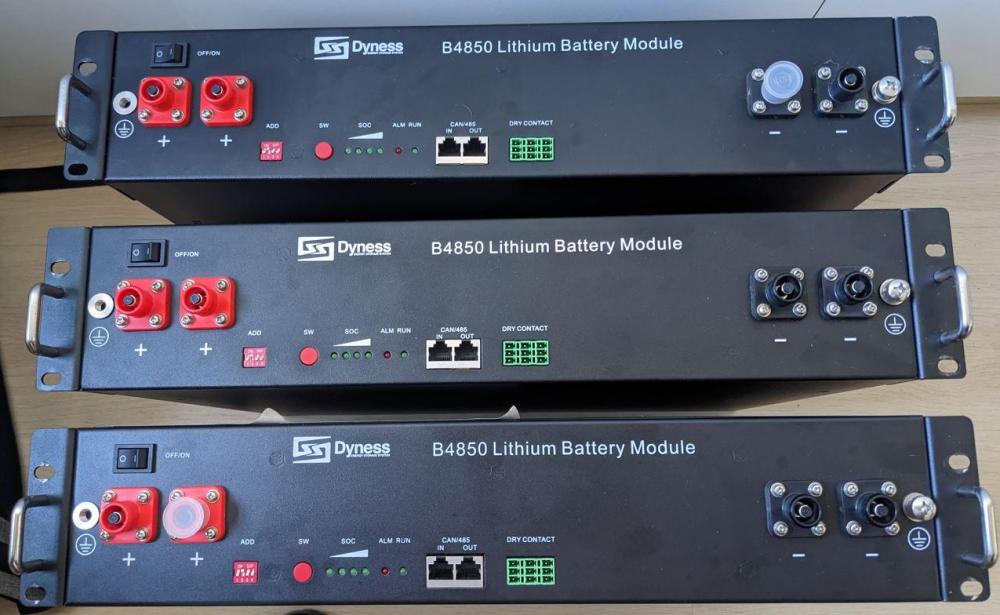
BumpItem: Dyness B4850 lithium batteries Age: +-3years Price: R12000 each or R35 000 for all 3 Payment Method Accepted: Instant EFT Warranty: Remainder of Dyness warranty, bought through DC Rebel. Firmware upgrade done in 2020 by Aspergo. Packaging: None, includes parallel cables (power + data) Condition: Good. Less than 800 cycles. Pack has not worked hard. Can supply export of values from battery. Location: Durbanville, Cape town Reason: Need to upgrade to bigger system and Dyness B4850 are currently out of stock so cannot add to my system . Shipping: Collect Collection: Yes
 Anyone been able to connect the SDC10-Box5 to a Growatt SPF5000TL-HVM? Which ports and Li Protocol (36) to use?Thanks @Brian_SA: Was hoping there is some other software just to be able to get a snapshot of current cycles and SOH. Will try a few options that have been mentioned on the forum. DIP will be 0100 and will use Pin1 and Pin3 to the USB/RS485 converter as per below from the battery manual. If anyone has software suggestions, please shout.
 Thanks @AndySu, I was wrong. The B4850 does not have a COM/console port, so RS485 is the only option. I now have a RS485 USB cable and using the PIN1 and PIN3 as per the photo below. Now the next question is which DIP switch optoin on the battery? I am guessing 0110 for RS485? Also what software to use for RS485 comms?
 OK, so I have the cable for RS485, but seems like the Dyness Software only works on CAN and RS232. Anyone successfully connected via RS485 to the B4850/B3 batteries and what software did you use?How did you check/update the firmware?@AJ22 did you get this resolved?Howdy, anyone running this combination in Li mode and all working fine or only possible in USE mode? Any DIP and cable config would be appreciated. TIAHi @Robert DT, did you ever get this resolved?That is exactly what I want to do. Just need confirmation on the correct cable, pinouts and software for Dyness B4850(2.4kWh) battery.