


Tsa
Members
-
Joined
-
Last visited
Everything posted by Tsa
-
OK 100. What issues are you having?
-
OK WOW WOW WOW...so you saying with me running this Growatt SPF5000TL and it running on batteries/solar and I touch a live wire, EL wont trip? Easy method to confirm this? Would this be a valid test when running on batteries? How about when running on grid via inverter (changeover switch still on Inverter)? @HarrycHow were you testing if it trips or not?
-
OK cool. That is the latest major versions. There have been BMS specific firmware sent out depending on what batteries you run, etc. This was to fix specific comms issues. BUT saying that I am still to hear of someone running Dyness batteries in Li mode(05) profile L01 and not occasionally getting warning 04 & 20 and the inverter restting/house power tripping.
-
Whats up? Did you get the relevant firmware from Growatt?
-
Any suggestions on how to go about this? Think it is a great idea, just need to sort out the logistics.
-
Thats exactly what it does. See previous page for discussion on this.
-
Anyone have an explanation of how to wire such a setup? Using a Basic Sonoff switch. I take it the relay/contactor replaces the CB?
-
To all the guys that are having issues and/or need firmware updates. PLEASE make contact with Growatt themselves so they are aware of the issues and also start getting an idea of numbers. Use the Support option on the ShineWifi app, or email them. PM me if you need email address, but I think it is important that they become aware of everyone having issues.
-
I would then have hoped that the BMS just lowers the charging current or something instead of throwing all the load to the batteries, but maybe not the way things should work.
-
I have a SPF5000TL HVM-P model and suspect this is what everyone else is also running when they talk of the SPF5000's
-
Could be that the startup of the tumble dryer took it over its threshold seeing that it has an element and heats up quick. This would cause the inverter to restart. Did you ever have any other resets/trips since?
-
Could be that the startup of the tumble dryer took it over its threshold seeing that it has an element and heats up quick. This would cause the inverter to restart. Did you ever have any other resets/trips since?
-
According to Growatt this is a automatic safety feature to keep the batteries from being overcharged and remaining on 100%. So as soon as the batteries get to 100% it will start this cycle of switching all the load to the batteries and discharging to about 95%. Still trying to figure out if this is an inverter feature or if this is the battery BMS telling it to do so. I would think that the BMS would just lower charge to the batteries instead of this total switchover which is a pain sometimes.
-
When queried Growatt indicated that these can be ignored as they are not used.
-
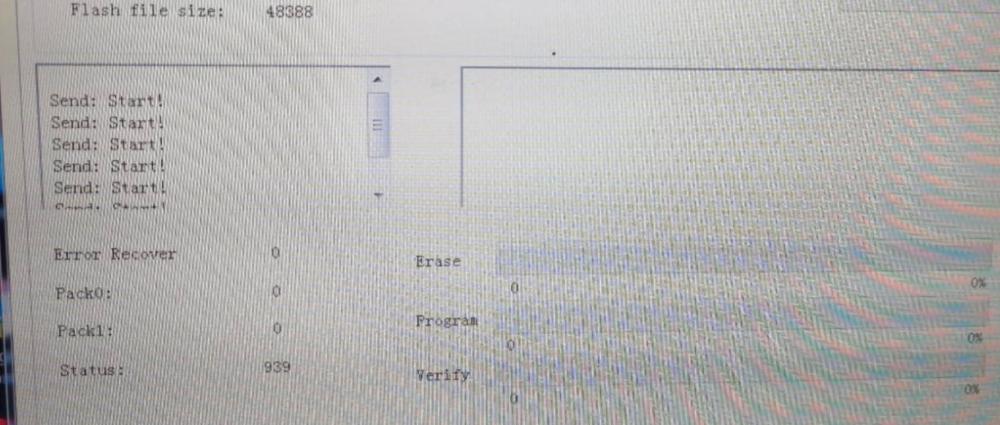
Anyone ever have their FW update only display "Send Start!" continuously when doing FW upgrade on a Growatt inverter via ISP tool? Getting this on multiple computers with a mix of Win7 and Win10. Inverter registers on COM port as soon as you plug it in.
-
I actually read up a bit more and used Templates within HA.Here is an example. Basically creates a new sensor entity with the states based on the filter/if statement. I can then setup my dashboard using these new states. ############ TEMPLATES ############### - platform: template sensors: powersource: friendly_name: "PowerSource" value_template: > {% if states('sensor.xxx_import_from_grid') != "0" %} ESKOM {% else %} BATTERIES {% endif %} gridstatus: friendly_name: "EskomStatus" value_template: > {% if states('sensor.xxx_ac_input_voltage') == "0" %} DOWN/LOADSHEDDING {% else %} UP {% endif %}
-
Good to hear it has been sorted. What exactly did you change?
-
Hi Guys Need some assistance in making the dashboard in HA a but more user friendly for the rest of the household. Basically I want to use the value from a sensor ( sensor.xxx_import_from_grid) which is the Watts imported from grid to update the display on a card on the Dashboard. So if sensor.xxx_import_from_grid > 0 then button should read "ESKOM" or be a specific color or whatever, else indicate "BATTERIES" (meaning import from grid is 0W). Just an easy way for the household to see if we are on Eskom or Batteries. TIA
-
Thanks. Just to confirm, you are also running this with Dyness batteries and on Li mode profile L01?
-
Oh no that's not good news. Can you maybe confirm what the fw bin file name is? Thanks. Also have you been able to pin point when the data stops collecting? From my initial tests, in my case it seemed to be once the batteries were charged to 99/100% and PV then gets disconnected and all load moves to the batteries to auto discharge till around 95%. In that cycle mine would usually stop collecting and then start again around 93/94% battery SOC.
-
No idea. Feedback from @willietes was that all the problems are sorted in his initial tests, but he has since disappeared
-
Hmm I like where this is going. Was also looking for an easy way to indicate to the wife/house when we are on batteries and when we are on grid. Maybe as mentioned above a light to be on when we are on batteries. In my case everything in the house is powered by the inverter , excluding oven and geyser.
-
Thanks, any ideas on brands which would support the Geyserwise control? Then also I guess one would replace the current element in the geyser with the heat pump one? or is there an option of running both? Also, totally different question, but do you guys have any suggestions on doing a switch on the geyser between using PV OR using grid? Basically in winter I would have it running on grid and in summer flip it to use the PV/batteries setup to run the geyser where it is mostly a topup in summer. This option vs moving the wiring inside the DB from inverter to grid and vice versa every time.
-
Have also looked at heat pumps before. My current setup in terms of geyser is retrofit (circulation pump) with FPC on roof. Geyserwise installed. Grid tops up geyser temp as needed at pre-scheduled times of the day (geyserwise settings). Topping up being a lot more in winter in CPT and as such geyser connected to non-essential. Also have solar PV install (2.1kw) + batteries and inveter. In summer there was actually enough solar from panels and batteries at 100% to be able to run the geyser off the solar and then top up the max 5degrees needed to 55degrees most days, but winter is a no go. So the options I have been looking at: 1) 2kw geyser element. BUT will still have the issue with limited solar production in winter. 2) Heat pump to replace the current geyser element. But how will this fit into my current setup with Geyserwise/FPC and Solar PV setup? The idea is to sometime up Solar PV to 3.2kw which would get us closer to supplying everything in winter as well.
-
I have seen Dyness 2.4kwh @ around R14500.

