


Tsa
Members
-
Joined
-
Last visited
Everything posted by Tsa
-
This is what I am leaning towards, but not 100% sure if it will work on the B4850 and which pinout and software(non solar assistant) to use with it. https://solar-assistant.io/shop/products/rs485_usb_self_crimp Can then also use it on other batteries if I change in future. Just needing a once of snapshot of the various states, not constant monitoring, so not worried about the multiple device reading issue.
-
Thanks for the info on this @Brian_SA. What cabling and pinouts are you using to connect the battery to PC? Which software are you using? Are you able to query cycles and SOH?
-
Has anyone successfully connected to a Dyness B4850 battery via CAN/RS485 to view cycles/SOH from the BMS? I see many posts about this, but missing which hardware and pinouts are needed to achieve this. I have the Dyness Monitor SW, just need to cheapest option for hardware and relevant pinouts. TIA
-
Would also like to know if you got this to work. I am specifically looking for stats on cycles and SOH. Question being what pins to connect to the USB RS232 connector. Thanks
-
Looking for one of these batteries to add to my current stack. Preferably in CPT area. New or 2nd hand. Please DM me. TIA
-
Hi All Anyone aware of specs/regulations that are available relating to wiring/solar/batter/etc for installations in caravans/off road trailers/etc? Have seen some shoddy stuff on a newly built offroad caravan which I would like to confirm. 1,5mm wire for mains into 25A AC 220v breaker, and the same 1,5mm wire to 2 other 16A breakers for the plugs. That would make sense as 16A max on plugs, but the 1,5mm on the 25A breaker can't be right? Wire will be long gone before the trip? Also no fuse on batter positive? All earth connections bundled together and taped and one earth wire atteched to body with pop rivet. Probably at best 2,5mm wire from 140/160w solar panel on roof of caravan to mppt. This is just a few items I saw and sure there are many more, but surely there must be some regulation guiding these kind of installs? Thanks
-
What was the process to update this and on which model inverter? Mine indicates an update available and goes through its steps, but remains on 3.0.0.0
-
@Tracsec: Have been having this specific issue of random trips when in Li mode, since day 1 of my install. In the meantime I have updated all Inverter FW, battery boards have been replaced as well as FW updated. When setting to Li mode and L01 it works fine, but minutes hours or days later it would randomly trip supply and restart the inverter. When set to Li mode and L01 everything is updated to % values and I can change and save these, so the comm is established and system runs perfectly. Untill the next restart.... Every now and then I get some hope and do yet another Inverter FW update as it is released and then run the system in Li mode with that worry in the back of my head. Only to be disappointed again and reset all and move back to USE mode.
-
Hi Dyness, is there any way to check current firmware version on the batteries (B4850) to be able to see if a FW update is needed? Other than carting them all to Rectron?
-
Have also hade the random trips from day one when running in Li mode. This now with latest firmware on the inverter, still get the same. NOTE: This is with SPF5000TL-HVM inverter and Dyness B4850s. So it seems to be a general issue and not something with my install then?
-
I had the same. 04-20 immediately. Swopped the cable sides around as suggested above... AND restarted the inverter. It then powered up fine without issues and working as expected. UNTIL many hours later I randomly got a 04/20 and it tripped the power to the house for a few seconds. Have had this since day 1 on these inverters and Li mode (L01). Note L01 as I am running Dyness batteries.
-
I am actually gettting this much more now after the FW upgrades I did. All looks fine, but no data. However now unplugging and replugging the usb wifi dongle resolves the issue, didnt have any effect before. OR it just randomly starts working on its own again.
-
What was the last on this?
-
Thanks. Yip, that was the 1st one I applied in my list. Received this last year sometime from Mahone as well before he left when we were troubleshooting the comms issues.
-
Yip, L02 vir Pylon, but was instructed from day one L01 is for Dyness. By Growatt and Dyness. Would be bad if they changed this in the meantime Still waiting on a reply from Nhlanhla for any indication on what else to try/check.
-
Nope, It got me again! Decided to quickly have another go at this. Made up a new comms cable with the correct pinouts. Powered inverter and batteries down, installed cable. Started up. Immediately on startup gave Error 04/20 in Li mode. Powered down everything again and then swapped the ends of the cable around (battery side now on inverter and vice versa). Setup Li mode and L01 for Dyness and restarted. Hey! no errors and inverter starting as expected and all good. Completed the settings config and restarted one last time. All good. Reading battery %, etc. Except, again no data from datalogger, no flashing lights after the green on reinserting the usb datalogger. Tried multiple times. Also tried a reset (reset key for 6 seconds and reconfig to wifi). Nothing. And HEY my batteries are at 95% and enough Solar to carry load, but Solar still disconnecting. So they possibly fixed it for Pylon(L02) but no Dyness (L01) 😒


-
Morning all Did the updates in the following order from 500.09. STM32F030CC_SK036.01m.bin F030_SK022_07_ 20200714.bin F2809_GW500.12_20210927A.bin Restarted and reset inverter. Setup Li Profile 01 for Dyness and no data. Plugging unplugging wifi usb dongle, no success. Reset inverter again, no success. Left it for 2+hours, nothing. Then went to USE mode, still no data. Reset inverter again, nothing. Tried Li mode again, now gettting Error 04 and 20 flashing. WTH, didnt do it the previous time and also +- a year ago it was also running in Li mode for some time. Using orange comms cable plugged into BMS as it has always been. Eventually put it back to USE mode and kept it there. Around 9pm (9 hours after starting the upgrade process) it started sending data again, magically on its own! Now would still love to run it in Li mode, but just not in the mood to struggle with this thing anymore. Also noted that when in Li mode the 1st time, post update, batt % was at 90% and cycling solar on and off!! WHY!???? Another question, what is the best sequence for cycling batteries on and off when you have say 3 Lithiums connected 1 being master the rest slave? @Dyness @Dyness Engineer Weizhong @Dyness Engineer Zhang
-
Excellent news! Any further feedback on this so far? Also still seeing the issue where data is lost for some time or has this also been resolved? Any other updates like BMS/Comms Board updates applied? Other than this main FW update? (500.12)
-
Good to hear, wondering if anyone has experienced the same with an update on the SPF5000 yet?
-
Thanks again Vassen. Yes Main breaker is 60A. Also there is a EL/RCD, but doesn't look like the Oven and Geyser are on it. These 2 are fed directly from main. The rest of the circuits are through the EL/RCD and the EL is fed with the output from the inverter.
-
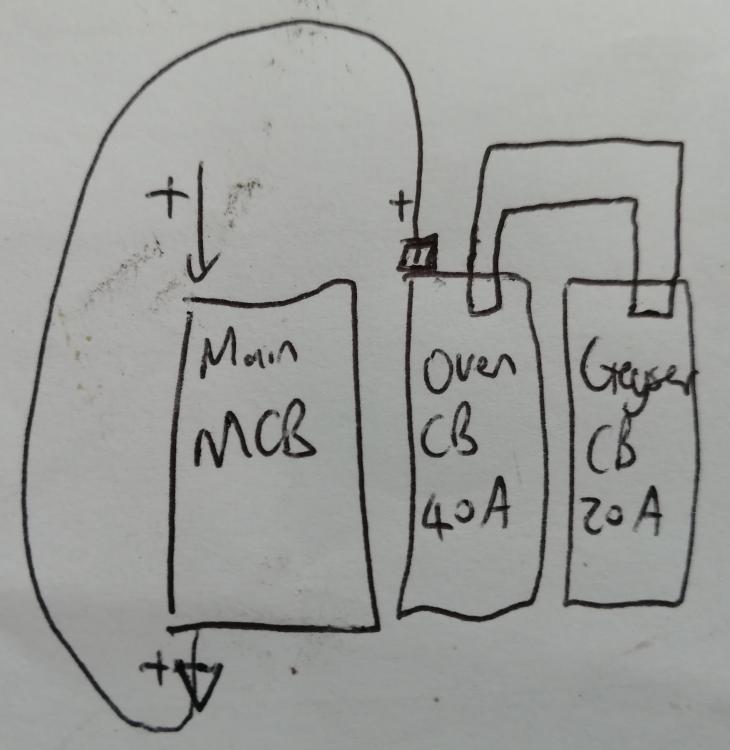
Here is a basic layout. Main supply comes in from the MCB(60a) goes to the input of the oven CB and with a busbar splits to the geyser CB. So the question basically is if the feed from MCB to oven CB needs to be 16mm2(7-8mm wire) or if the 10mm2 (5-6mm wire) is sufficient.
-
OK, another random question. Your feed out of your main circuit breaker feeding your downstream CBs like Oven and Geyser etc, does this need to be 16mm2(OD +- 7-8mm) feeding into the oven CB if the highest downstream CB is 40A(also being the oven CB, eventhough it wont even reach 20A for the oven element)? In my case I have the MainCB feeding the Oven CB and also busbar split feed to the Geyser (20A) CB next to it. Fitting 16mm and a busbar into the CB input is near impossible! 10mm2 (OD +- 5-6mm) should be more than sufficient in this case?
-
No worries, please ignore. I see it's called a busbar as well. Did some further searching
-
@Richard Mackay and @GerhardK83 what is the correct name for the solid copper link if one needs to search for it online and as with the wiring, do these also have different ratings? Thanks
-
@Mahen : Interesting on the time thing. I would again suggest logging this with Growatt so that they can become aware and maybe someone with some savvy hears this and decides to sort it out. I actually had the same the other day, everything looked fine on the dongle, correct blue flashing sequence and same story, no data. After the 5th unplug and replug it started working and continued working. The previous ones would give 1 or 2 datapoints and then stop again. Could you maybe share how you connected to the ad-hoc wifi to check these times?

