system32
Members
-
Joined
-
Last visited
Everything posted by system32
-
I'm using a Hiking DDS238-2 WiFi which is rated for 65A/220V. Unfortunately the DDS238-2 ships with Tuya firmware. There is clumsy cloud based Tuya integration to HA. If you know Python, you can access the DDS238-2 with TinyTuya https://github.com/jasonacox/tinytuya If your whole house is connected through the inverter, you may be able to get the readings from the inverter. Other options: Shelly EM with CT-Coil (WiFi) Eastron meter (RS485) Victron/Carlo Gavazzi ET112 Meter
-
If you have a GeyserWise TSE1 (check that you have the correct module) you can upgrade to Tuya - you buy & replace the circuit board in the keypad. You don't need both the Sonoff (Astute) and GeyserWise Tuya. From what I can see on my device: Features: Remote access via Tuya/SmartLife App Temperature view Temperature set set for 4 time zones Remote power control (turn on/off element) View Element Run Time - I guess you can calculate kWh from hours * element rating Remote set of Normal/Holiday mode. The TSE1 has 4 timer + temperature zones, the time cannot be configured via the app - set on keypad only. The temperature for the zone can be set via app. Missing: Set & view timers/time zones via App - this can only be done on the keypad. No Volts, No Amps, No kW, No kWh. Home Assistant integration is via Tuya cloud (not the easiest)
-
GeyserWise Tuya can do timers and remote access via Tuya
-
80A single phase. Checked the circuit breaker by the CoJ feed it is 80A. The circuit breaker in the DB board is 63A. The circuit breakers into/out of the SunSynk are 50A. Last I checked Landis+Gyr prepaid power limit level i014 it reported ~18.4kW is ~80A (can't confirm right now as it's load shedding)
-
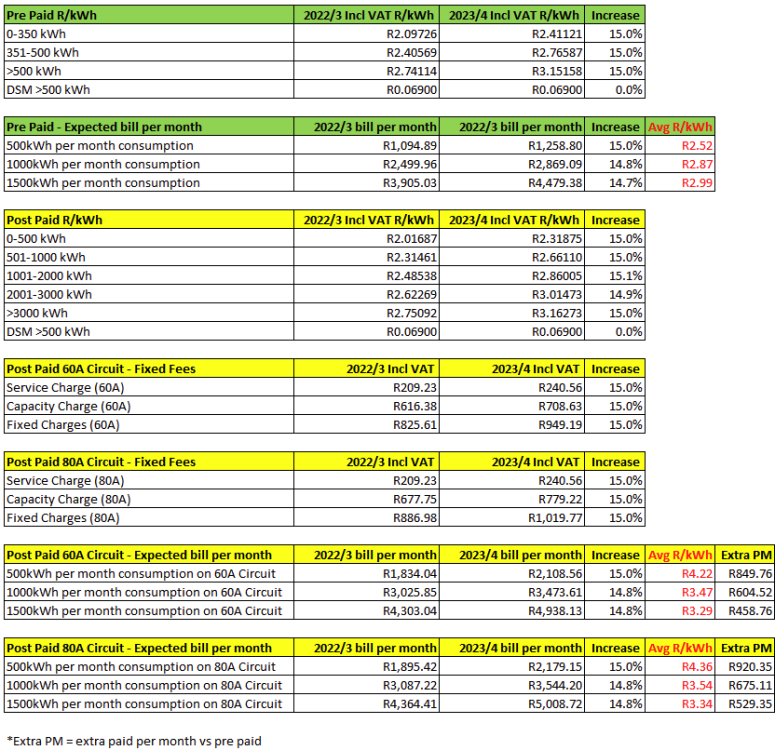
I use my home which is 80A. I think my home is typical of CoJ suburbs. For 60A you pay R949.19 fixed fees per month. The R240.56 per month Service Charge is for reading your meter. I've updated the XLS with the 60A and 80A fixed fees to make it clearer. TIPS: I recommend CoJ ratepayers switch to pre-paid as it's cheaper, better control and no bill shock and simple to top up with banking app Switch to pre-paid before getting Solar as you may encounter difficulties switching afterwards. On pre-paid always purchase a few kWh per month to prevent being disconnected due to no usage.
-
I tend to use both JSON and SQL. I store the IoT data from tasmota and sunsynk into a postgresql database with a JSONB format: -- DDL for a tasmota IoT sensor for the geyser table CREATE TABLE IF NOT EXISTS tele_geyser_sensor( id integer PRIMARY KEY GENERATED ALWAYS AS IDENTITY NOT NULL tm timestamptz DEFAULT current_timestamp NOT NULL, payload JSONB NOT NULL); -- store the tasmota json payload here CREATE INDEX tele_geyser_sensor_tm_idx ON tele_geyser_sensor(tm); Then create a view to access the JSON as a table: -- PostgreSQL 14 and later allow accessing JSON elements using the [] operator -- you can also use the SQL '->' and '->>' operators CREATE VIEW tele_geyser_sensor_v AS SELECT tm, tm::date AS dt, payload['ENERGY']['Power']::numeric AS power, -- same as ((payload -> 'ENERGY'::text) ->> 'Power'::text)::numeric AS power payload['ENERGY']['Current']::numeric AS current, payload['ENERGY']['Voltage']::numeric AS voltage, payload['ENERGY']['Today']::numeric AS today, payload['ENERGY']['Yesterday']::numeric AS yesterday, payload['ENERGY']['Total']::numeric AS total FROM tele_geyser_sensor;
-
The sunsynk dongle sends inverter IoT data to the cloud (probably using mqtt portocol) which is then persisted into a cloud database. The synsynk app and sunsynk web displays the cloud data. see https://sunsynk.net Nothing to do with EEPOM. Programming these cloud apps is easy. I wouldn't use json for the rate, just an SQL table. The issue is sloppy programmers only use a single Rands/kWh rate for all calculations. create table city_power_tariff( year_month date not null primary key, tariff numeric not null ); -- my average CoJ rate per month insert into city_power_tariff(year_month,tariff) values ('2021-07-01',2.33), ('2021-08-01',2.33), ('2021-09-01',2.33), ('2021-10-01',2.33), ('2021-11-01',2.33), ('2021-12-01',2.33), ('2022-01-01',2.33), ('2022-02-01',2.33), ('2022-03-01',2.33), ('2022-04-01',2.33), ('2022-05-01',2.33), ('2022-06-01',2.33), ('2022-07-01',2.50), ('2022-08-01',2.50), ('2022-09-01',2.50), ('2022-10-01',2.50), ('2022-12-01',2.50), ('2023-01-01',2.50), ('2023-02-01',2.50), ('2023-03-01',2.50), ('2023-04-01',2.50), ('2023-05-01',2.50), ('2023-06-01',2.50), ('2023-07-01',2.85) ; SELECT TO_CHAR(dt, 'Dy DD Mon') as "Period", pv_energy as "Solar in", load_energy as "Load out", grid_energy_in as "Grid in", self_energy as "Self_kWh", load_energy*tariff as "R Load", grid_energy_in*tariff as "R Grid", self_energy*tariff as "R Saved" FROM solar_assistant_day LEFT OUTER JOIN city_power_tariff ON date_trunc('month',solar_assistant_day.dt) = city_power_tariff.year_month WHERE $__timeFilter(dt) ORDER by dt desc
-
CoJ have published their tariff increases for 2023/4 See https://www.joburg.org.za/Documents/2023 Notices/2023-24 FINAL TARIFFS.pdf Summary: I've assumed the DSM has stayed the same as I can't find a reference to it in the PDF. Let me know of any errors.

-
Your chart is from SunSynk / SolarMan App - they only update every few minutes. I suspect the graph is just an instantaneous sample of -126W grid and not the average. On SolarAssistant which is much more real-time you can see these grid feeds for a second before the inverter reverts to a 20W draw.
-
Initially I only got disconnect notifications. There was a change about 2 months back on the SunSynk.net Server Side and now I get both disconnect & re-connect pop-up from the SynSynk Android App. On sunsynk.net it only shows "restored" notifications in the notifications archive. Seems half like SunSynk App is a "work-in-progress". You can email Joel at SunSynk with any app suggestions & enhancement requests.
-
AFAIK, the SD card image you download is generic. EDIT: According to SA website "NB: The SD card image is linked to your account. Do not share it with other users." SA runs in a evaluation mode until you register via the http://solar-assistant.lan/configuration page. In terms of the WiFi / LAN, try plugging it into the LAN, check on your DHCP server/router/nmap to find the IP address. SA should register itself using the DNS name "solar-assistant". Open a browser to "http://solar-assistant/" or "http://IP-from-dhcp-server/" and go to the configuration tab and configure your SSID and WiFi password. Once done, click the shutdown button on the configuration tab, unplug and relocate the Raspberry PI to near your inverter. Check that you have WiFi signal by your inverter - On Android use WiFiMan or WiFiAnalyzer to check. There is also a Bluetooth config option, but I've not tried that.
-
SA works great for me. You not forced to buy their "rip off priced data cables", you can use any cables, even make your own: see https://www.robotics.org.za/communication-wireless-Industrial/RS485-devices In terms of grid power, battery usage, seems you did not read the warnings: I use the SA mqtt interface to send real time data to Home Assistant and also save readings to a PostgreSQL database. I have a Juntek couloumb meter on the batteries and DDS238-2 on the load and DDS238-2 grid which also send data via mqtt to PostgreSQL. SA readings and charts correspond closely with all three meters. This image shows "Load Power" from SA and 28House from a DDS238-2 meter. As you can see the lines are very close. SA data is accessed via mqtt and averaged per minute. Here is another example on the SoC reported via SA vs the Juntek and battery BMS What inverter do you have? Are you using "Emulated BMS"?


-
2022/2023 CoJ Postpaid fixed fees: CoJ Service Charge (meter reading) is R209.23 per month CoJ Capacity Charge (meter reading) is R616.37 per month Total: R209.23+R616.37=R825.60 per month. Also: If you compare the statutory measure to calculate property rates - what is known as the cent-in-rand (c/R) - between the big three metros, Cape Town emerges as a clear value-for-money winner. Commercial property rates in Cape Town (0.014742c/R) are 35% lower than in Johannesburg (0.022689c/R), and 54.6% lower than eThekwini (0.032473c/R). When it comes to residential property rates, Cape Town (0.006273c/R) is 31% lower than Johannesburg (0.009076c/R) and 51% lower than eThekwini (0.012890c/R).
-
Do I have to register this tiny UPS + PV system for my router? Please advise.

-
My 2c worth: >account side of things The post paid "Service Fee" is for meter reading which require someone to read your meter monthly. On pre-paid there is no meter reader hence no "Service Fee" >fixed up front fee per month for all pre-paid meters This is referred to as a "Network Fee" In order add a fixed fee to pre-paid, they need to align the pre-paid and post-paid rates, both the bands and R/kWh. a) CoJ Pre-paid has 3 bands and post-paid has 5 bands - needs to be made the same b) CoJ Pre-paid units (R/kWh) are more expensive than post-paid - needs to be made the same c) "Service Fee" is not applicable to pre-paid as there is no meter reading. d) Implementation of fixed fee. Since with pre-paid you don't have an account CoJ would have to add the fixed fee of R616,37 on the first purchase of the month. The R616.37 can't be added to the rates bill as the electricity bill is often separate from the rates bill for tenants. You would need to by R616.37 before getting your first kWh of electricity. e) Only 4% of Alex [and other township] residents paying for electricity - City Power https://ewn.co.za/2020/09/09/only-4-of-alex-residents-paying-for-power-city-power CoJ need to fix this township non-payment issue. CoJ wanted to just introduce a pre-paid fixed fee without fixing (a) (b) (c) (d) and (e) making it unfair. If they fix (a) (b) (c) (d) and (e) then I'll OK with paying a pre-paid fixed fee - otherwise it's just a tax on middle class and they will lose votes and increase non-payment.
-
Only if you grid feeding. If you not grid feeding, then you have a UPS with PV. There is no requirement to register a UPS. I have this below UPS which came with a small PV and I use for my router. Do I need to register this with CityPower?

-
Unethical and unfair to disconnect you because you don't buy for a few months. Then to demand R12,000 to reconnect is completely outrageous. I'm also on CoJ pre-paid. Fortunately I'd heard of this disconnect issue, so I decided to purchase a small amount every month. No issues so far with CoJ.
-
I think the 4.5h midnight slot is so that Eskom / CT can re-charge the pumped hydro for use during the day - Steenbras, Palmiet, Ingula, Drakensberg,
-
Try: https://powerforum-store.co.za/
-
My silent clean inverter is some distance away in the garage so even if there is any EMF, distance + walls will reduce that to near zero. My neighbor has a diesel generator and the noise and PM2.4 is more of a concern to me. The anger 🤬 and high blood pressure at load shedding has gone to zero since getting my solar pv system.
-
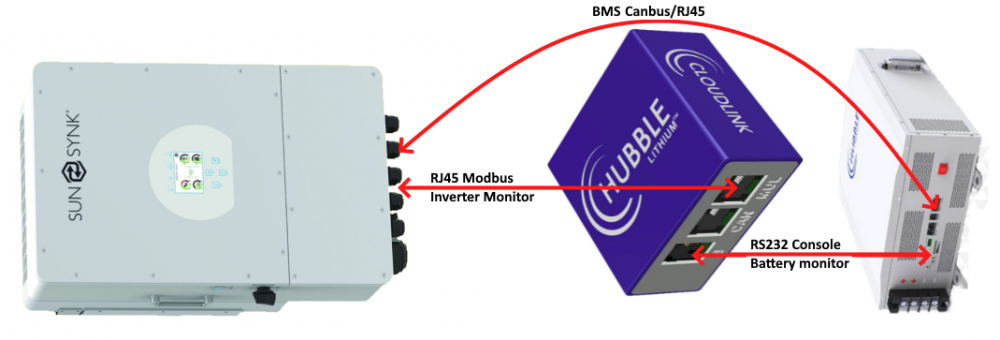
Just out of interest, how is your system connected before and now: Option 1. Direct: No RIOT, LiBMS gets battery SoC/SoH/Temp/Charge Rate/etc directly from battery BMS --------------------------- Option 2. Monitoring Only - LiBMS gets battery SoC/SoH/Temp/Charge Rate/etc directly from battery BMS RIOT can monitor Inverter and Battery--------------------------- Option 3. Emulation Mode - LiBMS gets battery SoC/SoH/Temp/Charge Rate/etc indirectly from RIOT. RIOT can monitor Inverter and Battery RIOT "emulates" the battery BMS.


-
The CHNT DDSU666 and EASTRON are digital meters (similar to the Victron Energy Meter ET112) that communicates via RS485 modbus protocol to the inverter. Not sure if the Victron Energy Meter ET112 is compatible - it costs about R1,500.
-
You can use an RS485 CHNT / EASTRON Meter (or similar) - it can do longer distances. See documentation https://www.sunsynk.org/post/eastron-meters-do-you-need-one https://youtu.be/ifR80jE5pdI
-
Backup is a good feature. SA uses Debian 10 and Debian 12 is about to be released. The ability to backup / restore could be used to upgrade a newer OS.
-
I think polling every 5 sec when down is too aggressive for a public service. I take a sample once every 60 minutes and use the previous value if I get an error.